


GlobalDev AI Image Metadata
Generate, review, bulk-process and automate complete WordPress Media Library image metadata through GlobalDev AI Hub.

Use with caution
GlobalDev AI Image Metadata works, but test it on a staging site before relying on it in 2026. Was last updated 2 months ago, and scores 55/100 on our health check.
- Small user base (<10 active installs)
- Very few reviews so far
How does it stack up?
Side-by-side on installs, updates, ratings & support



Daily downloads
Download spikes usually follow a new release — each site that auto-updates counts as a download.
Rankings
Where GlobalDev AI Image Metadata stands todayWordPress.org search rankings
Live position in the plugin search, top 100| Keyword | Position |
|---|---|
| accessibility | >100 |
| AI | >100 |
| Alt Text | >100 |
| image metadata | >100 |
| media library | >100 |
About GlobalDev AI Image Metadata
From the official readme · v1.0.4Description
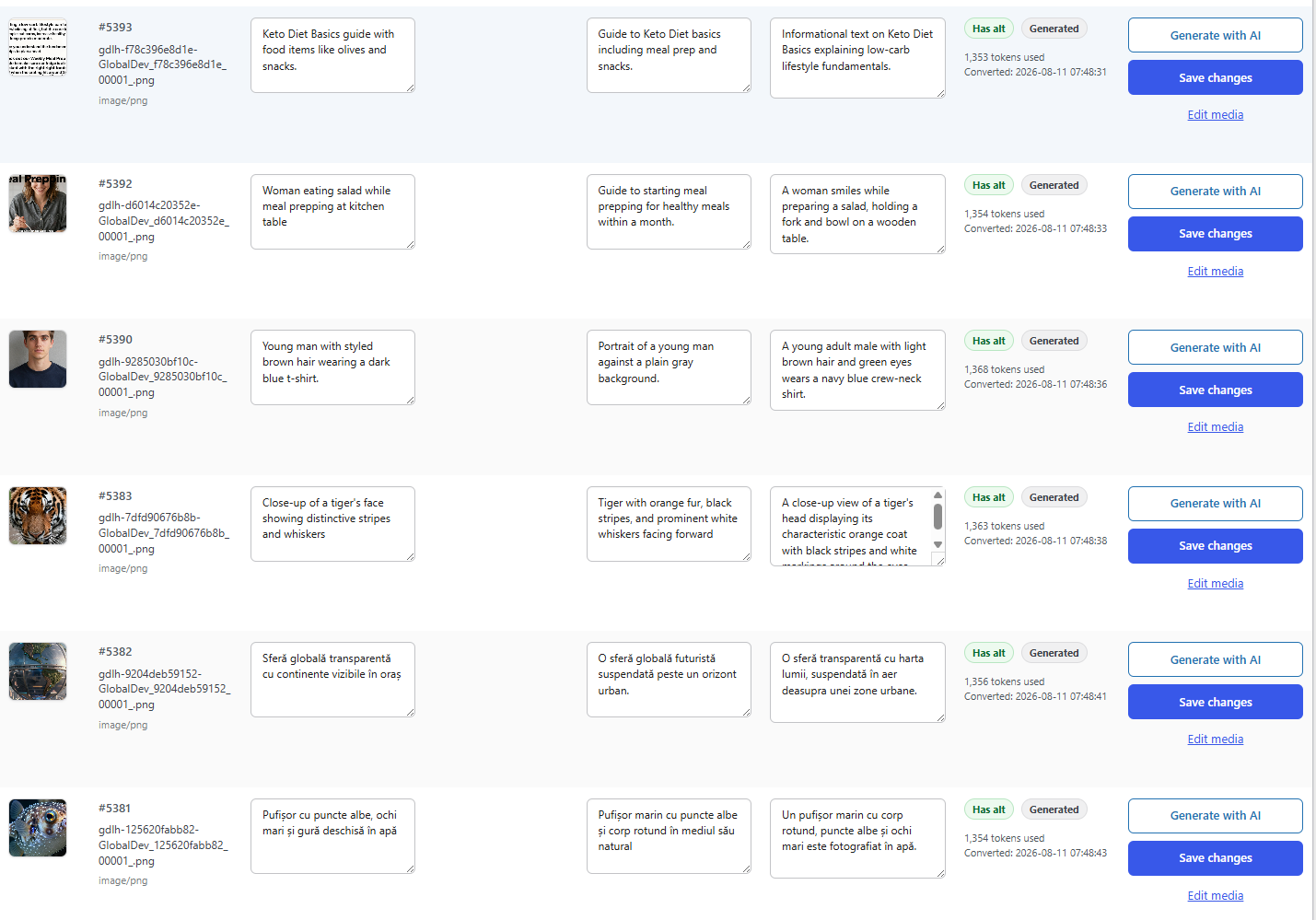
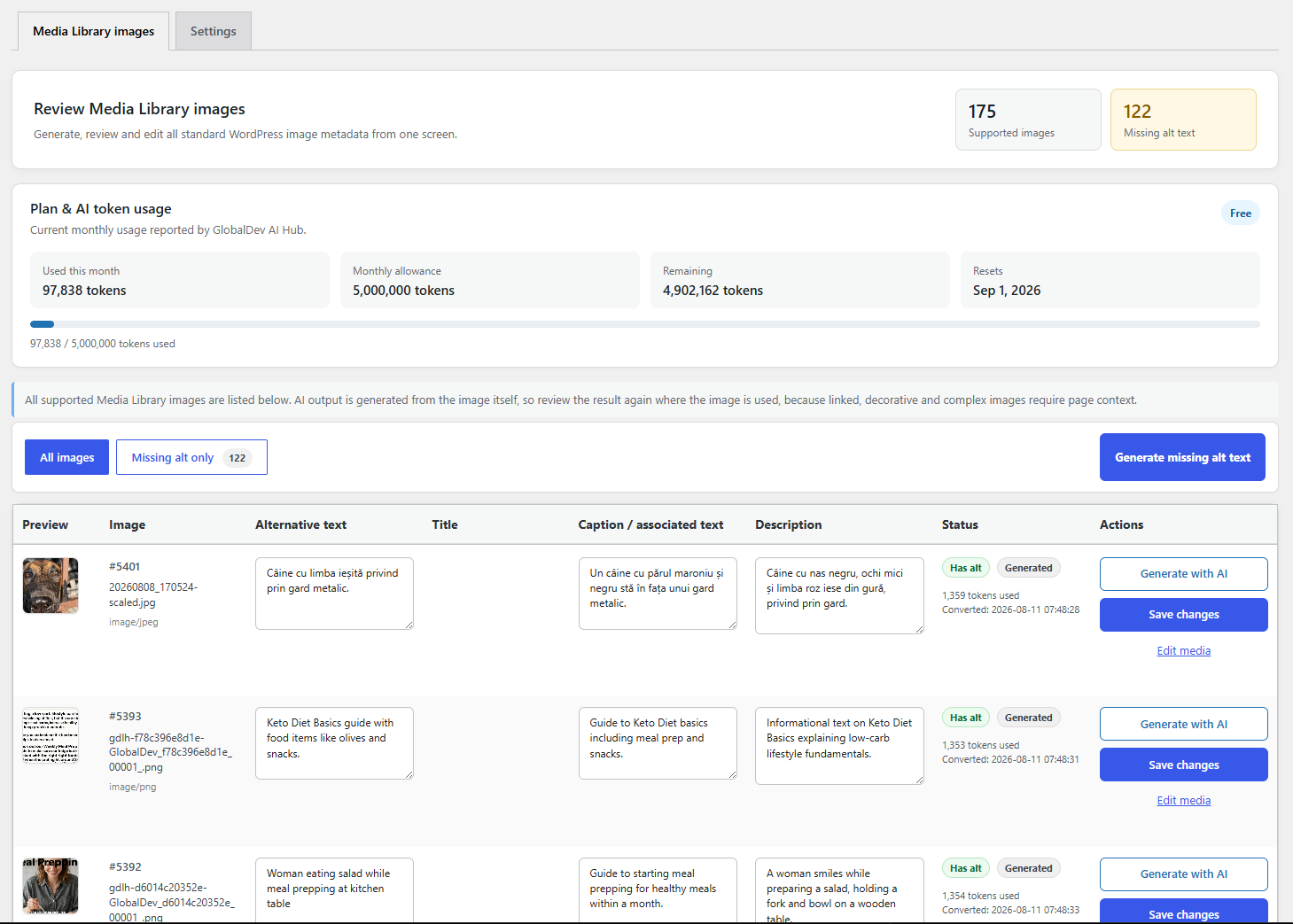
GlobalDev AI Image Metadata is a Media Library metadata workflow, not an alt-text-only generator. It helps administrators generate, review and manage Alternative Text, attachment Titles, Captions and Descriptions for JPEG, PNG and WebP images. Metadata can be generated per image, processed in bulk for missing alt text, or queued automatically after upload.
Features include:
- Generate Alternative Text, Title, Caption, and Description from an image.
- Use the WordPress site language automatically, or enter a custom language name or locale.
- Generate metadata manually from one Media Library screen.
- Generate and save missing alternative text in bulk with live AJAX progress.
- Display per-image and cumulative token usage returned by the service.
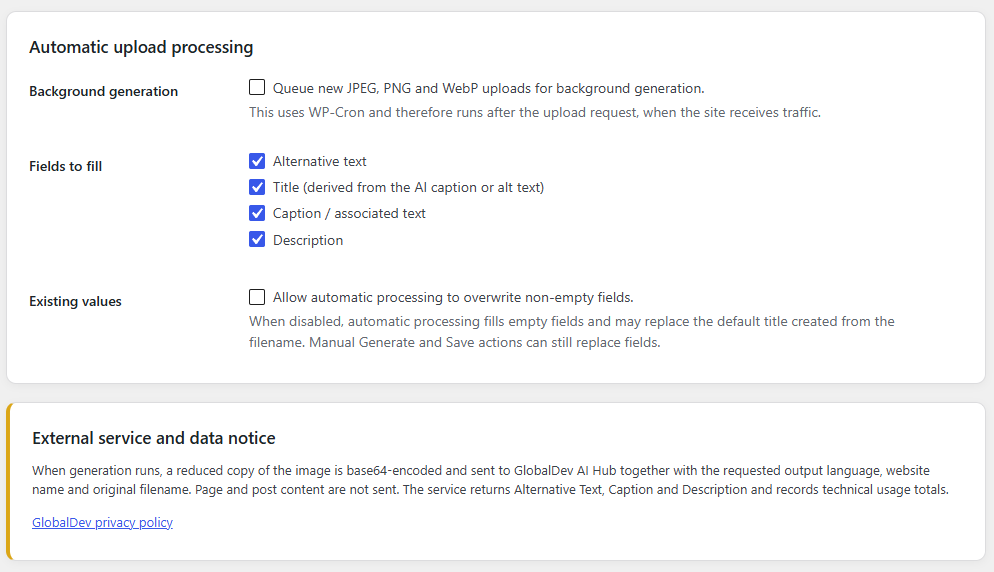
- Optionally queue supported new uploads for background processing with WP-Cron. Automatic processing is disabled by default.
- Review and edit generated values before saving.
- Preserve existing values unless overwrite is enabled for automatic processing.
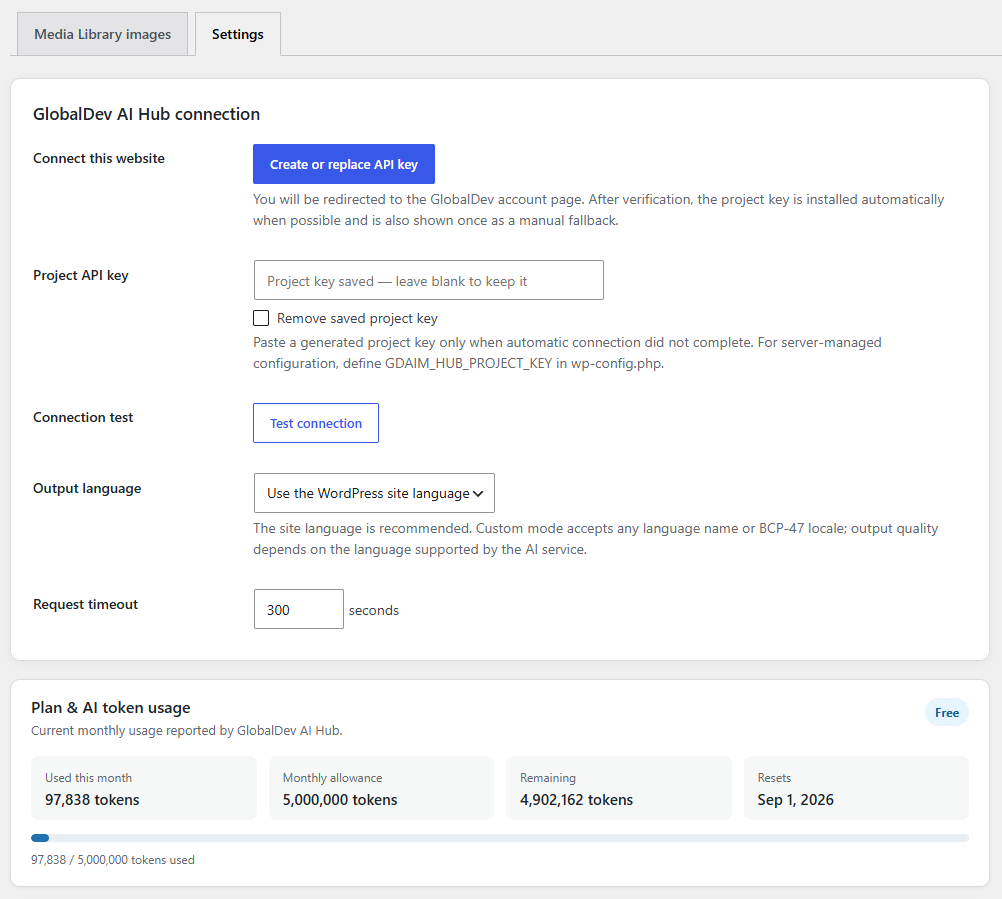
- Connect with a revocable project API key created in GlobalDev AI Hub.
The service accepts arbitrary language names and locale codes. Output quality varies by language and by the visible content of each image. Generated accessibility text should always be reviewed in the context where the image is used. Decorative images may need an empty alt attribute instead of generated text.
GlobalDev AI Hub is an external service and may apply project-based usage allowances, quotas, or paid usage plans. Commercial limits and billing are enforced by the Hub service rather than by code bundled in this plugin. The plugin remains fully available under its GPL-compatible license and reports service usage information returned by the Hub.
External service
This plugin connects to GlobalDev AI Hub, an external service operated by GlobalDev IT SRL.
Default API endpoint:
https://globaldev.app/wp-json/gdlh/v1
The service is used only after a site administrator enters a project API key and either requests generation or enables automatic processing.
For each generation request, the plugin sends:
- A reduced copy of the selected image, encoded as base64.
- The requested output language or locale.
- The WordPress website name.
- The original image filename as limited context.
- The project API key in an HTTP request header.
The plugin does not send page or post content. The Hub returns generated media fields and technical usage information. The Hub may store technical request records including the project, endpoint, status, latency, byte counts, token counts, request identifier, and a one-way hash of the client IP. It does not store the base64 image or raw media prompt in its traffic table.
Service website: https://globaldev.app/
Privacy policy: https://globaldev.app/privacy-policy/
Support: https://globaldev.app/contact-us/
By configuring the project key and using generation, the site administrator authorizes this external data transfer.
Privacy
When generation runs, a reduced image copy and limited metadata are sent to GlobalDev AI Hub. Review the External service section above and the linked privacy policy before enabling automatic generation.
Installation
- Upload the plugin folder to
/wp-content/plugins/or install the ZIP from Plugins → Add New. - Activate GlobalDev AI Image Metadata.
- Open Media → AI Image Metadata → Settings.
- Click Get API key. You are redirected to the GlobalDev project-creator page, where the installed connector is verified.
- Sign in, create or regenerate the website project key, and return to the website. The key is installed automatically when the connector callback is reachable; otherwise copy and paste the one-time key.
- Use Test connection.
- Choose the WordPress site language or enter a custom language or locale.
- Open Media → AI Image Metadata to generate, review, save, or start bulk generation.
For server-side key configuration, add this to wp-config.php:
define( 'GDAIM_HUB_PROJECT_KEY', 'gdlh_live_your_project_key' );
Frequently asked questions
Does the plugin expose the AI model name?
No. The client plugin shows only the conversion result, request status, and usage totals. Provider and model configuration remain inside GlobalDev AI Hub.
Does it support every language?
The plugin does not impose a fixed language list. It can request the WordPress site language or any custom language/locale. Results depend on the language capabilities of the external service, so quality cannot be guaranteed equally for every language.
How does bulk generation work?
The plugin creates an administrator-scoped bulk job and processes one missing-alt image per AJAX request. The screen updates live with processed, generated, failed, and cumulative token counts. You can stop the job without losing completed items.
Are the token totals exact?
The Hub uses provider-reported token counts when available and an explicitly marked estimate when the provider omits them. Image tokenization is model-specific, so base64 size alone is not an exact model-token measurement.
Does bulk generation overwrite existing alt text?
No. The bulk action targets supported images whose alternative text is absent or empty and skips images that already have alternative text.
Is the plugin free? Does the external service have usage limits?
The WordPress plugin itself is free software. GlobalDev AI Hub is a separate external service and may provide included usage, project quotas, or paid usage plans. Any commercial limit is enforced by the Hub service, not by disabling code included in this plugin.
Which image formats are supported?
JPEG, PNG, and WebP.
Changelog
Hardens AJAX request validation, resolves WordPress.org code-quality findings, and sends smaller analysis copies to the AI service.
1.0.4
- Added direct nonce verification to every AJAX action before request data is read.
- Added translation-context comments required by WordPress coding standards.
- Corrected the WordPress.org
Tested up toheader format and removed redundant manual text-domain loading. - Documented the intentional admin-only alt-text metadata queries for code-quality tooling.
- Reduced large analysis copies to a maximum of 768 pixels at JPEG quality 80 to lower transfer size and vision-processing overhead.
1.0.3
- Added an automatic Plan & AI token usage card showing monthly used, allowance, remaining tokens and reset date.
- Quota information now refreshes after AI generation and bulk processing and remains visible for unlimited plans.
1.0.2
- Moved installation-token authorization into the REST API permission callbacks for connector verification and setup.
- Added client handling for Hub-enforced project usage quotas and quota-exceeded responses.
- Clarified the plugin’s complete Media Library metadata workflow and external-service usage model.
1.0.1
- Removed the configurable Hub API URL from the administration interface.
- Added a secure Get free API key redirect to the GlobalDev project-creator page.
- Added connector verification and server-to-server project-key delivery with token rotation.
1.0.0
- Prepared the plugin for WordPress.org submission.
- Added site-language output and unrestricted custom language/locale input.
- Removed provider and model details from the client interface and responses.
- Added a Hub connection test.
- Added live sequential AJAX bulk alt-text generation with stop control and per-image status.
- Added per-image and cumulative token usage display and storage.
- Reduced analysis images to a maximum of 768 pixels and 2 MB for reliable requests.
- Disabled automatic upload processing by default and added suggested WordPress privacy-policy text.
- Updated the external-service and privacy disclosure.
Screenshots
For developers
Is this your plugin? Show off the numbers.
Add a live badge to your site, docs or GitHub README. It updates on its own — no account needed.
Best GlobalDev AI Image Metadata alternatives
All accessibility plugins →





FAQ
GlobalDev AI Image Metadata: quick answers
Straight answers, pulled from live WordPress.org data.
Live data from WordPress.org · checked Oct 9, 2026
Is GlobalDev AI Image Metadata free?
Yes. GlobalDev AI Image Metadata is free to download and use from the official WordPress.org plugin directory.
Is GlobalDev AI Image Metadata safe to use in 2026?
GlobalDev AI Image Metadata works, but test it on a staging site before relying on it in 2026. Was last updated 2 months ago, and scores 55/100 on our health check.
How many websites use GlobalDev AI Image Metadata?
GlobalDev AI Image Metadata is active on <10 WordPress websites and has been downloaded 159 times since it launched in August 2026. It was downloaded 67 times in the last 30 days.
Does GlobalDev AI Image Metadata work with WordPress 7.1?
GlobalDev AI Image Metadata is officially tested up to WordPress 7.0.7, while the latest release is 7.1.3. It may still work, but try it on a staging site first.
What PHP version does GlobalDev AI Image Metadata need?
GlobalDev AI Image Metadata requires PHP 7.4 or higher. Most hosts run PHP 8.x today, so it works on any modern WordPress hosting.
When was GlobalDev AI Image Metadata last updated?
The latest version, 1.0.4, was released on August 11, 2026 (2 months ago).
Who makes GlobalDev AI Image Metadata?
GlobalDev AI Image Metadata is developed and maintained by Globaldev.
What are the best alternatives to GlobalDev AI Image Metadata?
The most popular alternatives to GlobalDev AI Image Metadata are Web Accessibility (formally… (500K+ installs), Auto Image Attributes From… (100K+ installs) and Accessibility by UserWay (80K+ installs).
Powered by PageForge
Want thousands of pages that rank like these? Build them in an afternoon.
This directory runs on the same engine as PageForge. Turn any spreadsheet, CSV or API into thousands of fast, SEO-ready WordPress pages — with schema, internal links and AI-written copy baked in.
- CSV, Google Sheets & API data sources
- AI content, schema & internal links per page
- Works with Elementor, Gutenberg, Yoast & Rank Math
- Free on WordPress.org — no credit card


