


Fuldash
Every WooCommerce order becomes a QuickBooks invoice and a shipping label – automatically.

Use with caution
Fuldash works, but test it on a staging site before relying on it in 2026. Was last updated 2 months ago, and scores 55/100 on our health check.
- Small user base (<10 active installs)
- Very few reviews so far
How does it stack up?
Side-by-side on installs, updates, ratings & support



Daily downloads
Download spikes usually follow a new release — each site that auto-updates counts as a download.
Rankings
Where Fuldash stands todayWordPress.org search rankings
Live position in the plugin search, top 100| Keyword | Position |
|---|---|
| automation | >100 |
| fulfillment | >100 |
| orders | >100 |
| quickbooks | #31 |
| woocommerce | >100 |
About Fuldash
From the official readme · v1.1.0Description
Every order placed in your WooCommerce store becomes a QuickBooks Online invoice and a
shipping label, with no manual work on your end. Connect your store once, and from then
on Fuldash creates the invoice, records the payment, picks a carrier, box, and rate,
prints the label, and marks the order Completed back in WooCommerce when it’s done.
Visit Fuldash | Pricing & free trial | Terms of Service | Privacy Policy
What happens on every order, automatically:
- Creates a QuickBooks Online invoice and records the payment
- Picks a carrier, box, and rate, then generates the shipping label
- Marks the order Completed back in WooCommerce once fulfillment finishes
Product, payment, and expense mapping are configured once from your Fuldash dashboard,
where all order tracking and fulfillment status live – this plugin’s only job is getting
order data there and marking orders complete once fulfillment finishes.
Requirements
Fuldash is a paid platform with a 30-day free trial on every plan, no credit card
required. To use this plugin you’ll need:
- A Fuldash account – see plans and pricing
- A QuickBooks Online account to connect
- A ShipEngine account with your carriers connected, for rate shopping and label generation
How it works:
- A customer places an order in your WooCommerce store.
- When the order is created, the plugin forwards the order to your Fuldash platform.
- Fuldash creates a QuickBooks invoice, records the payment, and generates a shipping
label – choosing carrier, box, and rate automatically – all in the background. - Once fulfillment finishes, Fuldash marks the order Completed in your store
automatically – no manual updates needed.
Setup takes under two minutes:
- Install and activate this plugin.
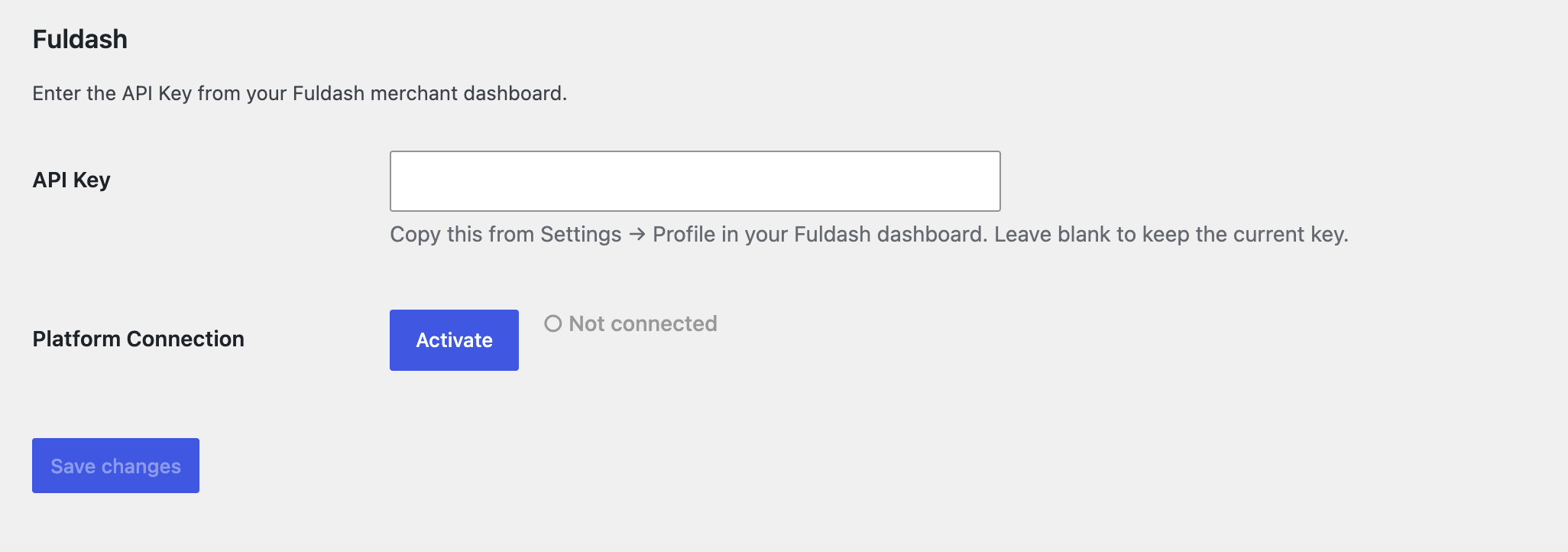
- Go to WooCommerce → Settings → Fuldash.
- Paste your API Key from your Fuldash merchant dashboard (Settings → Profile).
- Click Save changes, then click Activate to connect your store to the platform.
Channel control:
Use the Activate / Deactivate button on the settings page to connect or disconnect your
store from Fuldash at any time. Deactivating stops order forwarding without removing
your credentials – you can reactivate instantly when ready.
External Services
This plugin sends data to the Fuldash platform, an external
third-party service.
What is sent and when:
- Channel activation / deactivation – when you click Activate or Deactivate, a
request is sent to the Fuldash platform to record your store’s connection status. - Order data – when an order is created and the channel is active, the order’s
line items, addresses, payment method, and totals are sent to the Fuldash platform
for fulfillment processing.
What Fuldash can request from your store:
Fuldash’s fulfillment platform also requests information from your store, used to help
you configure product, payment, and expense mappings in your Fuldash dashboard, and to
keep your order statuses in sync:
- Product catalog – product names and SKUs, so you can map them to your accounting
items in the Fuldash dashboard. - Payment gateways – the ID, title, and enabled status of your configured WooCommerce
payment gateways, so you can map them to accounting payment methods. - Recent order fee data – certain fields on your 25 most recent orders, used to
detect payment-processor fees (e.g. Stripe or PayPal fees) for expense tracking.
No customer personal data is included in this scan. - Order completion – once fulfillment finishes, Fuldash marks the corresponding
order Completed in your store.
Service information:
- Service URL: https://fuldash.com
- Terms of Service: https://fuldash.com/terms
- Privacy Policy: https://fuldash.com/privacy
Installation
- Upload the
fuldashfolder to/wp-content/plugins/. - Activate the plugin via the Plugins menu in WordPress Admin.
- Go to WooCommerce → Settings → Fuldash and enter your credentials.
- Click Activate to connect your store to the Fuldash platform.
Frequently asked questions
Where do I find my API Key?
Log in to your Fuldash merchant dashboard and open Settings → Profile. Your API Key is displayed there with a one-click copy button.
What order data is forwarded?
The plugin sends your complete order details, including line items, billing and shipping addresses, payment method, and order totals.
What happens if my API Key is invalid or the platform is unreachable?
Clicking Activate with a key that doesn’t match your Fuldash dashboard shows “API key not recognized” – enter the correct key in Settings and save before trying again. If the platform can’t be reached, it shows “Server unreachable – try again later”; your key is unaffected, so just click Activate again once the platform is back.
What happens if an order fails to forward?
The order is still created normally in WooCommerce. The failure is logged to WooCommerce → Status → Logs (source: fuldash), and the order’s forwarding status is visible in your Fuldash dashboard.
Can I temporarily stop forwarding orders without losing my credentials?
Yes. Click Deactivate on the settings page. Your API Key remains saved. Click Activate at any time to resume forwarding.
Does this plugin store any data?
The plugin stores your API Key, connection status, and a forwarding status on each order. No order data is stored by the plugin itself – it is forwarded to Fuldash and not retained locally. Uninstalling the plugin removes the saved API Key and connection status from your store.
Does my order get marked as completed automatically?
Yes. Once Fuldash finishes creating the QuickBooks invoice and generating the shipping label, it calls back to your store to mark the order Completed – you don’t need to update order status by hand.
Changelog
Order and product data now include weight and dimensions for shipping.
1.1.0
- Order line items and your product catalog now include weight and dimension data,
used for shipping label generation on the Fuldash platform. - API keys are now validated when you click Activate instead of when you save them.
- Removed the per-order forwarding status column from the WooCommerce orders list –
fulfillment status is tracked in your Fuldash dashboard.
1.0.0
- Initial release.
Screenshots
For developers
Is this your plugin? Show off the numbers.
Add a live badge to your site, docs or GitHub README. It updates on its own — no account needed.
Best Fuldash alternatives
All automation plugins →





FAQ
Fuldash: quick answers
Straight answers, pulled from live WordPress.org data.
Live data from WordPress.org · checked Oct 11, 2026
Is Fuldash free?
Yes. Fuldash is free to download and use from the official WordPress.org plugin directory.
Is Fuldash safe to use in 2026?
Fuldash works, but test it on a staging site before relying on it in 2026. Was last updated 2 months ago, and scores 55/100 on our health check.
How many websites use Fuldash?
Fuldash is active on <10 WordPress websites and has been downloaded 212 times since it launched in August 2026. It was downloaded 65 times in the last 30 days.
Does Fuldash work with WordPress 7.1?
Fuldash is officially tested up to WordPress 7.0.7, while the latest release is 7.1.3. It may still work, but try it on a staging site first.
What PHP version does Fuldash need?
Fuldash requires PHP 7.4 or higher. Most hosts run PHP 8.x today, so it works on any modern WordPress hosting.
When was Fuldash last updated?
The latest version, 1.1.0, was released on August 16, 2026 (2 months ago).
Who makes Fuldash?
Fuldash is developed and maintained by fuldash.
What are the best alternatives to Fuldash?
The most popular alternatives to Fuldash are OttoKit: All-in-One Automat… (90K+ installs), Zapier for WordPress (50K+ installs) and Uncanny Automator (40K+ installs).
Powered by PageForge
Want thousands of pages that rank like these? Build them in an afternoon.
This directory runs on the same engine as PageForge. Turn any spreadsheet, CSV or API into thousands of fast, SEO-ready WordPress pages — with schema, internal links and AI-written copy baked in.
- CSV, Google Sheets & API data sources
- AI content, schema & internal links per page
- Works with Elementor, Gutenberg, Yoast & Rank Math
- Free on WordPress.org — no credit card


