


Enable Drag and Drop on Adding Plugin Upload
Adds drag and drop multi-file plugin uploads to the Plugins list, installer, and upload result pages in wp-admin.

Solid choice
Enable Drag and Drop on Adding… is a solid plugin choice in 2026, with a few things worth checking first. It runs on 20+ sites, is rated 5/5 and was last updated 2 days ago, and scores 74/100 on our health check.
- Actively developed — last update 2 days ago
- Tested with the latest WordPress (7.1)
- Small user base (20+ active installs)
- Very few reviews so far
How does it stack up?
Side-by-side on installs, updates, ratings & support



Daily downloads
Download spikes usually follow a new release — each site that auto-updates counts as a download.
Rankings
Where Enable Drag and Drop on Add… stands todayWordPress.org search rankings
Live position in the plugin search, top 100| Keyword | Position |
|---|---|
| drag-and-drop | #53 |
| install | >100 |
| plug-in | #15 |
| upload | >100 |
| WordPress | >100 |
Version adoption
Share of active sites per release.
Rating breakdown
★★★★★★★★★★ 5 from 1 reviews
About Enable Drag and Drop on Adding Plugin U…
From the official readme · v1.5.3Description
A WordPress plugin that adds drag and drop capabilities to plug-in uploads across the admin: the plug-in installer (/wp-admin/plugin-install.php), the Plugins page (/wp-admin/plugins.php), and the install/update result pages (/wp-admin/update.php), so you can keep uploading plug-ins without leaving the page.
Features:
- Drag and drop ZIP files directly onto the upload form
- Drag and drop one or more plugin ZIPs directly onto the Plugins list (
plugins.php) — no need to open the upload form first - Upload multiple plug-in ZIP files at once – they are installed one at a time with a per-file status list
- Upload queue: added files append to the list, each on its own line with a remove button
- “Upload Plugin” button on the Plugins page, next to “Add Plugin”, that reveals the upload form
- Upload form shown again after each install or update, so you can upload another plug-in right away
- One-click “Activate Uploaded Plugins Now” button after installation completes
- In-place replacement of already-installed plug-ins via a red “click to replace existing [current version] with new [uploaded version]” link
- Click-to-browse functionality on the drop zone
- Automatic file validation (ZIP files only)
- Visual feedback, success/error messages, and smooth animations
How It Works:
The plug-in:
* Loads on the plug-in install page (plugin-install.php), the Plugins page (plugins.php), and the upload result pages (update.php)
* Adds a visual drop zone in place of the standard upload form
* On the Plugins list page, also accepts drops anywhere on the list (shows an overlay while dragging)
* Handles drag and drop events and validates dropped files (must be ZIP files)
* Queues the selected files and installs them one at a time using WordPress’s own upload handler
* Shows a per-file result list with options to replace already-installed plug-ins and activate the new ones
* Provides visual feedback during drag operations
Browser Support:
Works in all modern browsers that support the HTML5 Drag and Drop API:
* Chrome
* Firefox
* Safari
* Edge
Installation
- Upload the plug-in folder to
/wp-content/plugins/ - Activate the plug-in through the ‘Plug-ins’ menu in WordPress
- Navigate to Plug-ins > Add New > Upload Plug-in
- Drag and drop a plug-in ZIP file onto the form
Frequently asked questions
What browsers are supported?
This plug-in works in all modern browsers that support the HTML5 Drag and Drop API, including Chrome, Firefox, Safari, and Edge.
What file types can I drag and drop?
Only ZIP files are supported. The plug-in automatically validates that dropped files are ZIP archives.
Where does this plug-in work?
The drag and drop functionality appears on the plug-in upload page (/wp-admin/plugin-install.php), on the Plugins page (/wp-admin/plugins.php) — drop ZIP files onto the plugin list itself, or use the “Upload Plugin” button next to “Add Plugin” — and on the install/update result pages (/wp-admin/update.php) so you can upload another plug-in right away.
Can I upload more than one plug-in at a time?
Yes. Drop or select several ZIP files and they are added to an upload queue, each on its own line with a remove button. Clicking “Install Now” installs them one at a time and shows the result for each file.
What happens if a plug-in is already installed?
The result list shows a red “click to replace existing [current version] with new [uploaded version]” link for that plug-in. Clicking it replaces the installed version with the uploaded one, without leaving the page.
Can I activate the uploaded plug-ins right away?
Yes. After the uploads finish, an “Activate Uploaded Plugins Now” button appears; clicking it activates all plug-ins that were just installed. Plug-ins that were already active stay active.
Changelog
1.5.3
- All Plugins lists this account’s WordPress.org plugins and shows the installed 53mp loader version.
1.4.3
- The uploaded-plugins badge is requested once per plugin and shown once.
1.4.2
- The overwrite link reads “click to replace existing [current] with new [uploaded]” and is shown in red.
1.4.1
- Readme Tested up to uses WordPress 7.1.
1.4
- Admin screen stays under 53mp Tools. The shared hub is now All Plugins.
1.3
- Admin class namespaced under abda53\enabledraganddroponpluginupload.
Screenshots
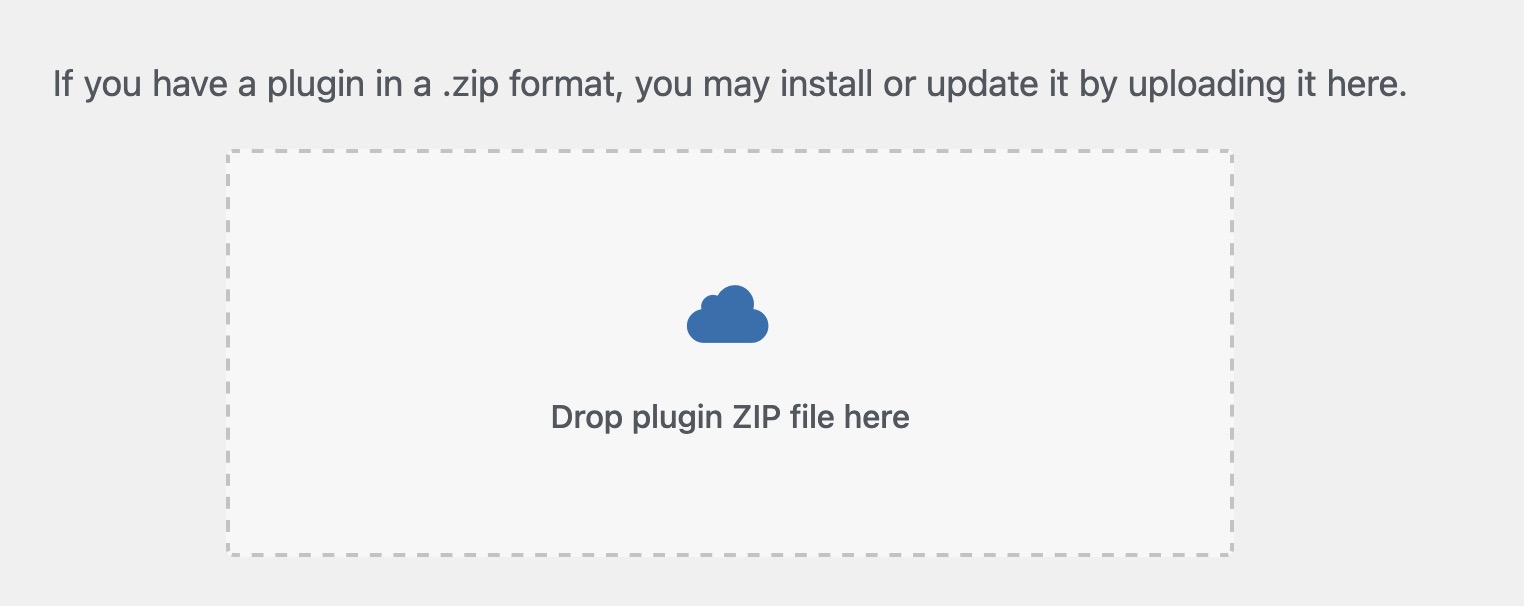
For developers
Is this your plugin? Show off the numbers.
Add a live badge to your site, docs or GitHub README. It updates on its own — no account needed.
Best Enable Drag and Drop on Addin… alternatives
All drag-and-drop plugins →





FAQ
Enable Drag and Drop on Adding Plug…: quick answers
Straight answers, pulled from live WordPress.org data.
Live data from WordPress.org · checked Oct 3, 2026
Is Enable Drag and Drop on Adding… free?
Yes. Enable Drag and Drop on Adding… is free to download and use from the official WordPress.org plugin directory.
Is Enable Drag and Drop on Adding… safe to use in 2026?
Enable Drag and Drop on Adding… is a solid plugin choice in 2026, with a few things worth checking first. It runs on 20+ sites, is rated 5/5 and was last updated 2 days ago, and scores 74/100 on our health check.
How many websites use Enable Drag and Drop on Adding…?
Enable Drag and Drop on Adding… is active on 20+ WordPress websites and has been downloaded 1,096 times since it launched in January 2026. It was downloaded 392 times in the last 30 days.
Does Enable Drag and Drop on Adding… work with WordPress 7.1?
Yes. The developer has tested Enable Drag and Drop on Adding… up to WordPress 7.1.2, the latest release. It requires WordPress 3.0 or newer.
What PHP version does Enable Drag and Drop on Adding… need?
Enable Drag and Drop on Adding… requires PHP 5.3 or higher. Most hosts run PHP 8.x today, so it works on any modern WordPress hosting.
When was Enable Drag and Drop on Adding… last updated?
The latest version, 1.5.3, was released on October 1, 2026 (2 days ago).
Who makes Enable Drag and Drop on Adding…?
Enable Drag and Drop on Adding… is developed and maintained by a 53 minute production.
What are the best alternatives to Enable Drag and Drop on Adding…?
The most popular alternatives to Enable Drag and Drop on Adding… are Elementor Website Builder (10M+ installs), Kirki (500K+ installs) and Page Builder by SiteOrigin (400K+ installs).
Powered by PageForge
Want thousands of pages that rank like these? Build them in an afternoon.
This directory runs on the same engine as PageForge. Turn any spreadsheet, CSV or API into thousands of fast, SEO-ready WordPress pages — with schema, internal links and AI-written copy baked in.
- CSV, Google Sheets & API data sources
- AI content, schema & internal links per page
- Works with Elementor, Gutenberg, Yoast & Rank Math
- Free on WordPress.org — no credit card


