


Digital Asset Manager
Helps you to store and manage all of your digital assets in one place.

Use with caution
Digital Asset Manager works, but test it on a staging site before relying on it in 2026. It runs on 10+ sites and was last updated 2 months ago, and scores 57/100 on our health check.
- Small user base (10+ active installs)
- Very few reviews so far
How does it stack up?
Side-by-side on installs, updates, ratings & support



Daily downloads
Download spikes usually follow a new release — each site that auto-updates counts as a download.
Rankings
Where Digital Asset Manager stands todayWordPress.org search rankings
Live position in the plugin search, top 100| Keyword | Position |
|---|---|
| backup | >100 |
| editor | >100 |
| file manager | >100 |
| files | >100 |
| wp file manager | >100 |
Version adoption
Share of active sites per release.
About Digital Asset Manager
From the official readme · v1.3.0Description
The Digital Asset Manager plugin for WordPress allows you to store, manage, and share all of your digital assets efficiently. This includes themes, plugins, and other files purchased from various marketplaces, with added support for custom taxonomies and templates for enhanced functionality.
Live Demo
Features:
- Store and manage all of your digital assets in one place
- View detailed information about each asset, such as name, version, date purchased, and source
- Easily update your assets to the latest versions
- Share assets on social media or via email
- Archive and restore assets
- Predefined templates for single and archive pages with user override support
- Advanced search functionality, including filters for custom taxonomies
- Pagination and dropdown category filters for better navigation
Benefits:
- Save time and hassle by managing all your digital assets in one place
- Keep your assets organized, up-to-date, and easily accessible
- Share assets effortlessly with clients or team members
- Protect your investment in digital assets by keeping track of them
- Centralize your client and asset information for better productivity
Use Cases
- WordPress agencies can use the plugin to store and manage the themes and plugins purchased for their clients.
- Freelancers can use it to store and organize the digital assets for their projects.
- In-house teams can manage company-wide digital resources.
Usage
Once the plugin is activated, you can access it from the Assets menu in WordPress.
- Add new assets using the
Add Assetmenu, where you can upload files and enter detailed information. - View or edit assets by clicking on their titles.
- Use predefined single and archive templates for custom display of your assets.
- Override templates in your child theme for further customization.
Archive and Single Page Templates
The plugin includes archive and single page templates for the dam-asset post type and associated custom taxonomies (asset-type and asset-tag). These templates can be overridden in your child theme.
Default templates included:
1. single-dam-asset.php
2. archive-dam-asset.php
3. taxonomy-asset-type.php
4. taxonomy-asset-tag.php
Refer to the plugin’s template header comments for override instructions.
Conclusion
The Digital Asset Manager plugin is a versatile tool for WordPress users looking to organize and manage their digital assets. With robust features, user-friendly templates, and seamless integration, it’s ideal for agencies, freelancers, and in-house teams.
Additional Tips
- Customize asset library templates by overriding them in your child theme.
- Use the included search functionality to quickly find and filter assets.
- Enhance navigation with built-in pagination and category filters.
- Share assets via social media with prebuilt sharing links.
Installation
This section describes how to install the plugin and get it working.
From within WordPress
- Visit
Plugins > Add New - Search for
Digital Asset Manager - Activate
Digital Asset Managerfor WordPress from yourPluginsmenu. - Configure plugin settings under
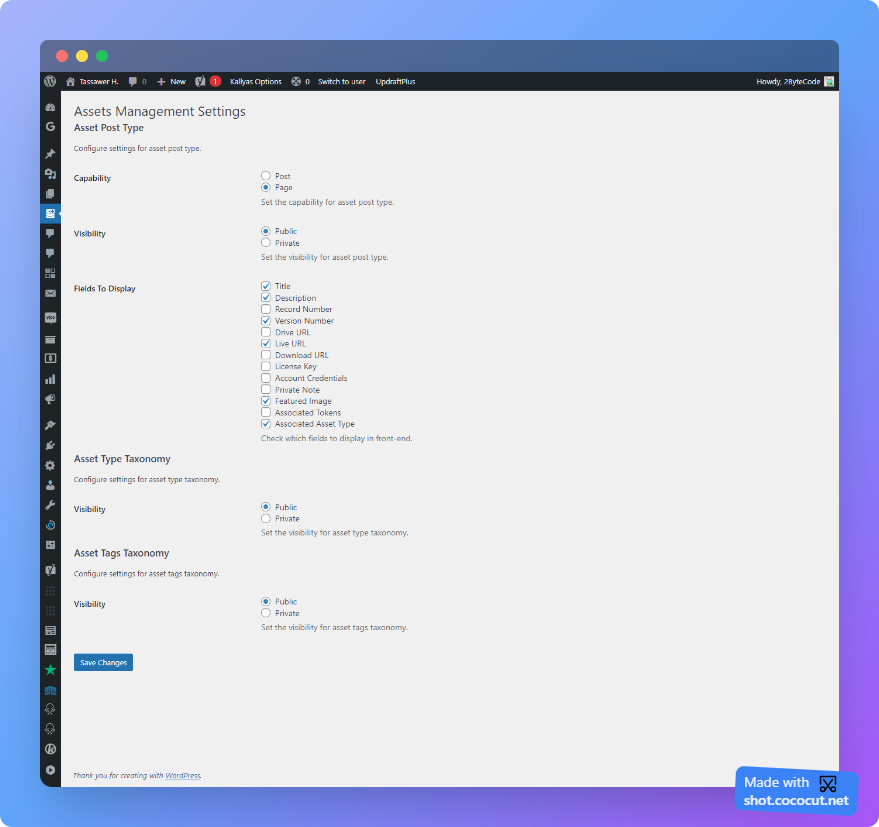
Assets -> Settings. - Visit the new
Assetsmenu and clickAdd Newto start adding your digital assets.
Manually
- Download the plugin.
- Unzip the file.
- Upload the
digital-asset-manager/folder to the/wp-content/plugins/directory using cPanel or SFTP/FTP. - Activate the plugin through the
Pluginsmenu in WordPress. - Configure plugin settings under
Assets -> Settings. - Visit the new
Assetsmenu and clickAdd Newto start adding your digital assets.
Frequently asked questions
What do the visibility settings do?
Visibility settings allow you to toggle the public or private visibility of asset post types and taxonomies. This is useful for managing internal-only assets.
Can I override the provided templates?
Yes, templates for single and archive pages, as well as taxonomy and search functionality, can be overridden in your child theme.
Does the plugin support custom taxonomies?
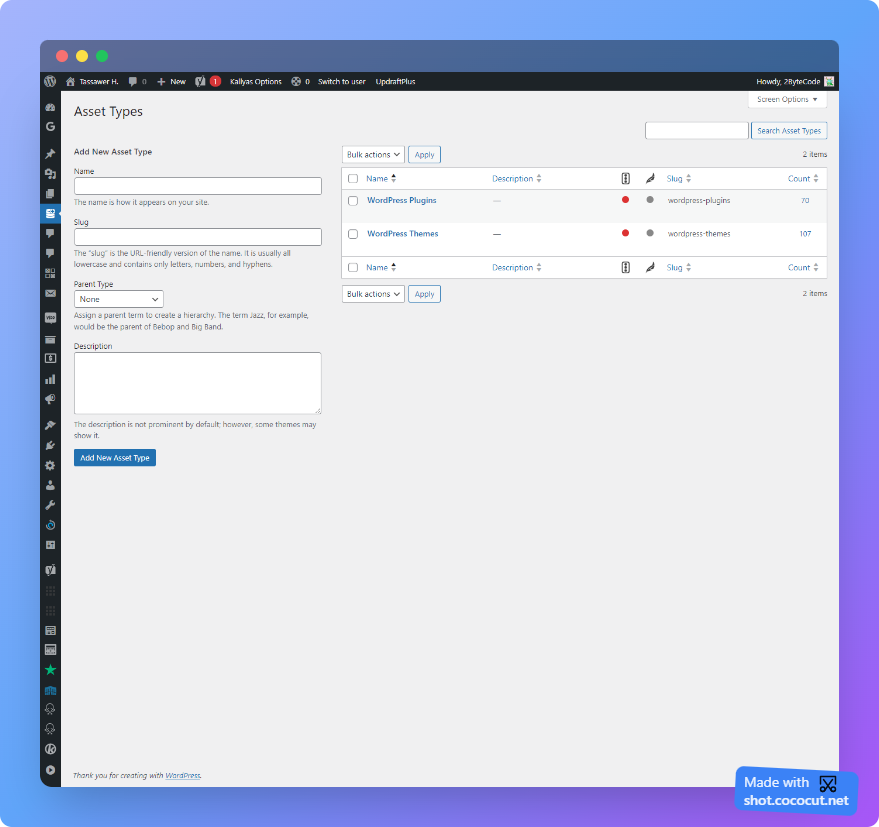
Yes, the plugin includes two custom taxonomies (asset-type and asset-tag) for categorizing and tagging your assets.
Changelog
Added a new "Woo Tokens" taxonomy for storing connection/auth data per token. Tested up to WordPress 7.0.2.
1.3.0
- Added a new “Woo Tokens” taxonomy with a Token Data field to store connection/auth data (as term meta) alongside each Woo Token.
- Tested up to WordPress 7.0.2.
1.2.0
- Tested with WordPress latest version.
- Added social sharing buttons.
- Improved search functionality with taxonomy filters.
- Enhanced Bootstrap 5-based responsive layout.
- Introduced dropdown category filtering using
wp_dropdown_categories. - Added support for preselected dropdown options.
1.1.0
- Imporve the admin interface.
- Included the single and archive templates.
- Implemented the Asset tags.
1.0.0
- First release.
Screenshots




For developers
Is this your plugin? Show off the numbers.
Add a live badge to your site, docs or GitHub README. It updates on its own — no account needed.
Best Digital Asset Manager alternatives
All backup plugins →





FAQ
Digital Asset Manager: quick answers
Straight answers, pulled from live WordPress.org data.
Live data from WordPress.org · checked Oct 9, 2026
Is Digital Asset Manager free?
Yes. Digital Asset Manager is free to download and use from the official WordPress.org plugin directory.
Is Digital Asset Manager safe to use in 2026?
Digital Asset Manager works, but test it on a staging site before relying on it in 2026. It runs on 10+ sites and was last updated 2 months ago, and scores 57/100 on our health check.
How many websites use Digital Asset Manager?
Digital Asset Manager is active on 10+ WordPress websites and has been downloaded 2,442 times since it launched in April 2022. It was downloaded 83 times in the last 30 days.
Does Digital Asset Manager work with WordPress 7.1?
Digital Asset Manager is officially tested up to WordPress 7.0.7, while the latest release is 7.1.3. It may still work, but try it on a staging site first.
What PHP version does Digital Asset Manager need?
Digital Asset Manager requires PHP 5.6 or higher. Most hosts run PHP 8.x today, so it works on any modern WordPress hosting.
When was Digital Asset Manager last updated?
The latest version, 1.3.0, was released on August 4, 2026 (2 months ago).
Who makes Digital Asset Manager?
Digital Asset Manager is developed and maintained by 2ByteCode.
What are the best alternatives to Digital Asset Manager?
The most popular alternatives to Digital Asset Manager are All-in-One WP Migration and… (5M+ installs), UpdraftPlus: WP Backup & Mi… (4M+ installs) and Jetpack (3M+ installs).
Powered by PageForge
Want thousands of pages that rank like these? Build them in an afternoon.
This directory runs on the same engine as PageForge. Turn any spreadsheet, CSV or API into thousands of fast, SEO-ready WordPress pages — with schema, internal links and AI-written copy baked in.
- CSV, Google Sheets & API data sources
- AI content, schema & internal links per page
- Works with Elementor, Gutenberg, Yoast & Rank Math
- Free on WordPress.org — no credit card


