


Demfilz Backup
Back up your whole WordPress site (database and files) to your own Google Drive, scheduled with retention, and restore it any time.

Solid choice
Demfilz Backup is a solid plugin choice in 2026, with a few things worth checking first. It runs on 30+ sites and was last updated 2 weeks ago, and scores 71/100 on our health check.
- Actively developed — last update 2 weeks ago
- Tested with the latest WordPress (7.1)
- Small user base (30+ active installs)
- Very few reviews so far
How does it stack up?
Side-by-side on installs, updates, ratings & support



Daily downloads
Download spikes usually follow a new release — each site that auto-updates counts as a download.
Rankings
Where Demfilz Backup stands todayWordPress.org search rankings
Live position in the plugin search, top 100| Keyword | Position |
|---|---|
| backup | >100 |
| cloud backup | #57 |
| database backup | #95 |
| restore | >100 |
| scheduled backup | #46 |
Version adoption
Share of active sites per release.
About Demfilz Backup
From the official readme · v1.0.1Description
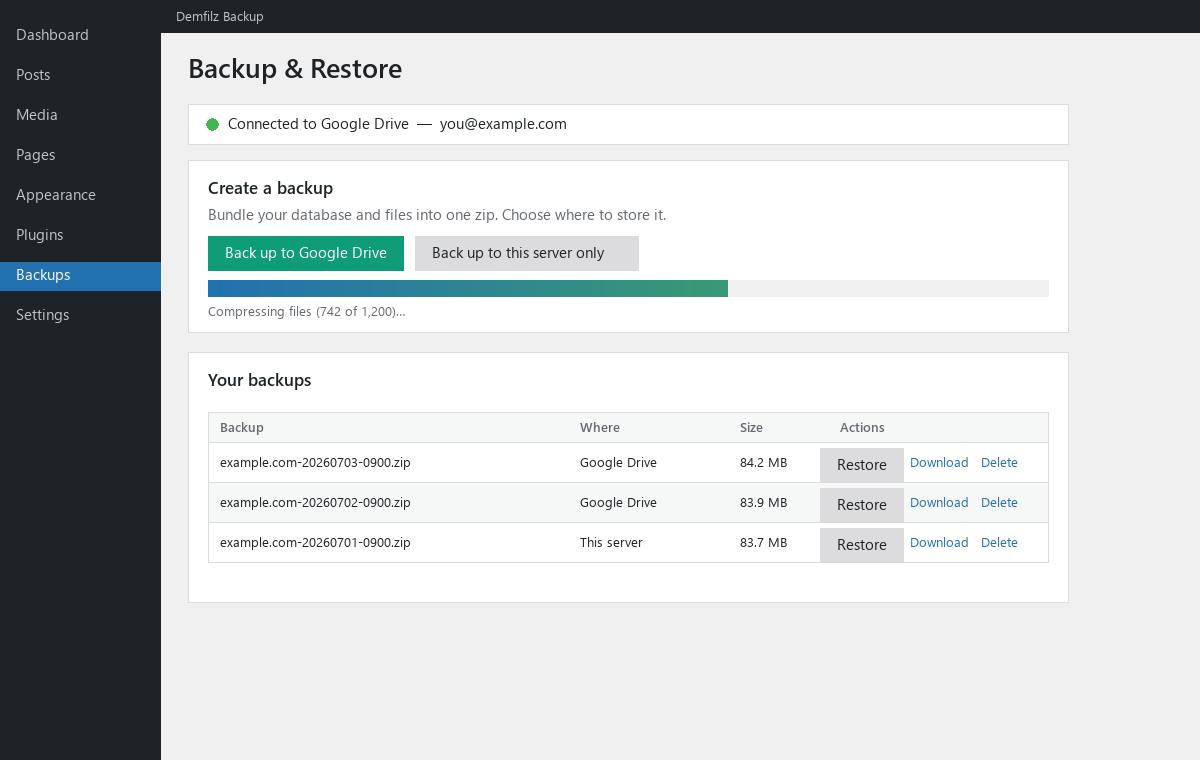
Demfilz Backup makes a complete backup of your WordPress site — the database and your files — packaged into a single zip and stored safely in your own Google Drive. When you need it, restore that backup to bring your site back exactly as it was.
It is built for real-world hosting: backups and restores run in small, resumable steps so large sites don’t hit PHP time or memory limits, and uploads and downloads to Google Drive are chunked (resumable).
Back up
- One click to bundle the database + files into a single
.zip. - Store the backup in Google Drive (your own account) or keep it on the server.
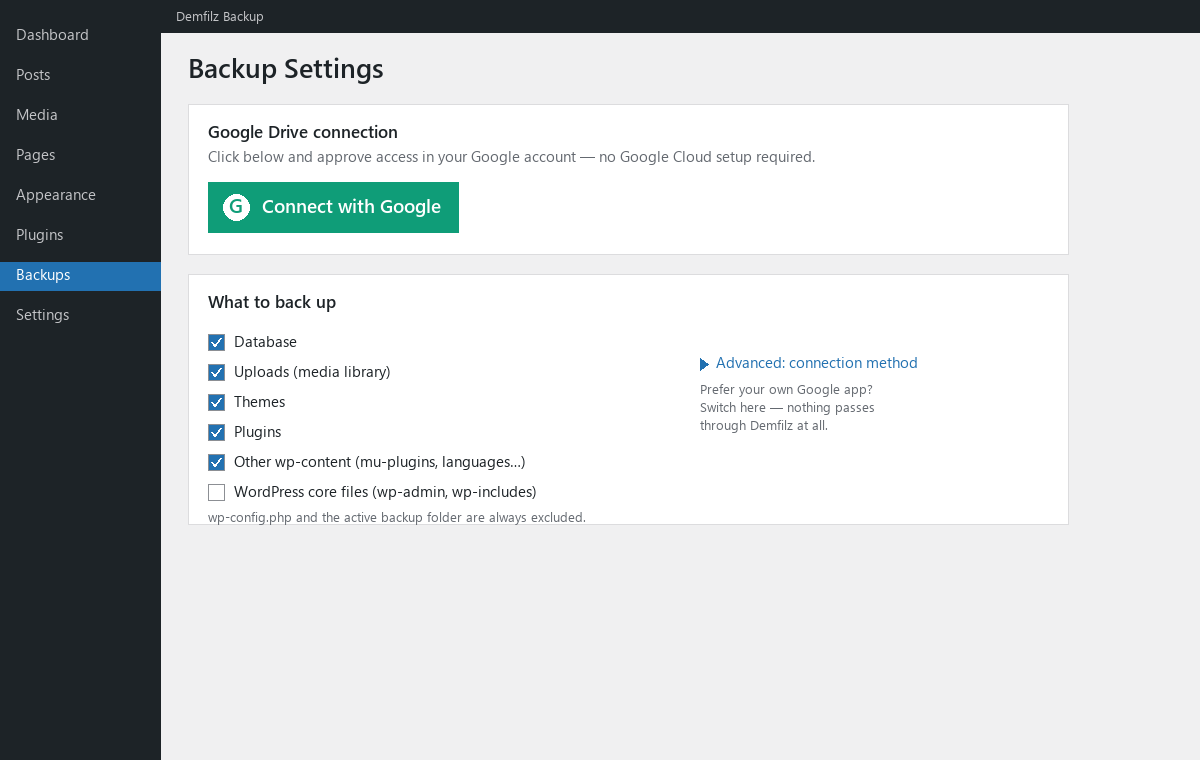
- Choose exactly what to include: database, uploads, themes, plugins, other wp-content, and (optionally) WordPress core.
wp-config.phpand the plugin’s own backup folder are always excluded.
Restore
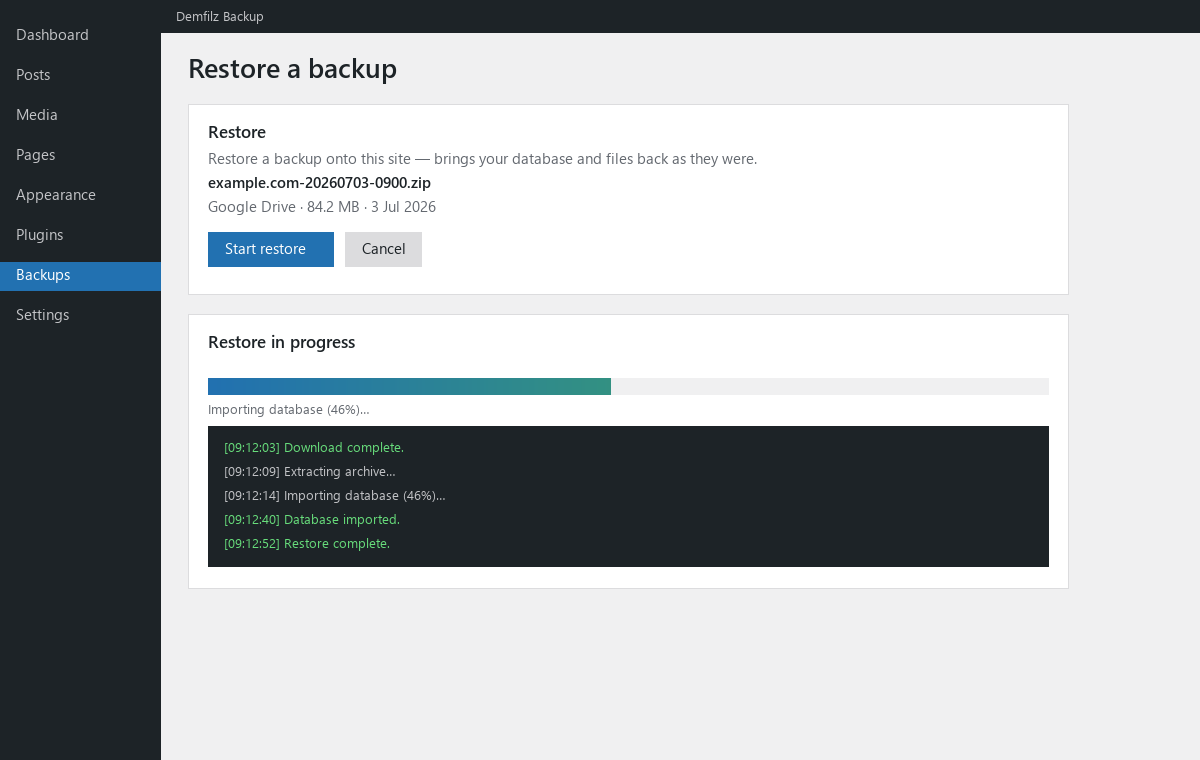
- Restore from a backup in Google Drive, from a local copy, or by uploading a
.zip. - Brings your database and files back as they were — a straightforward rollback / disaster recovery for the site.
Automatic, scheduled backups
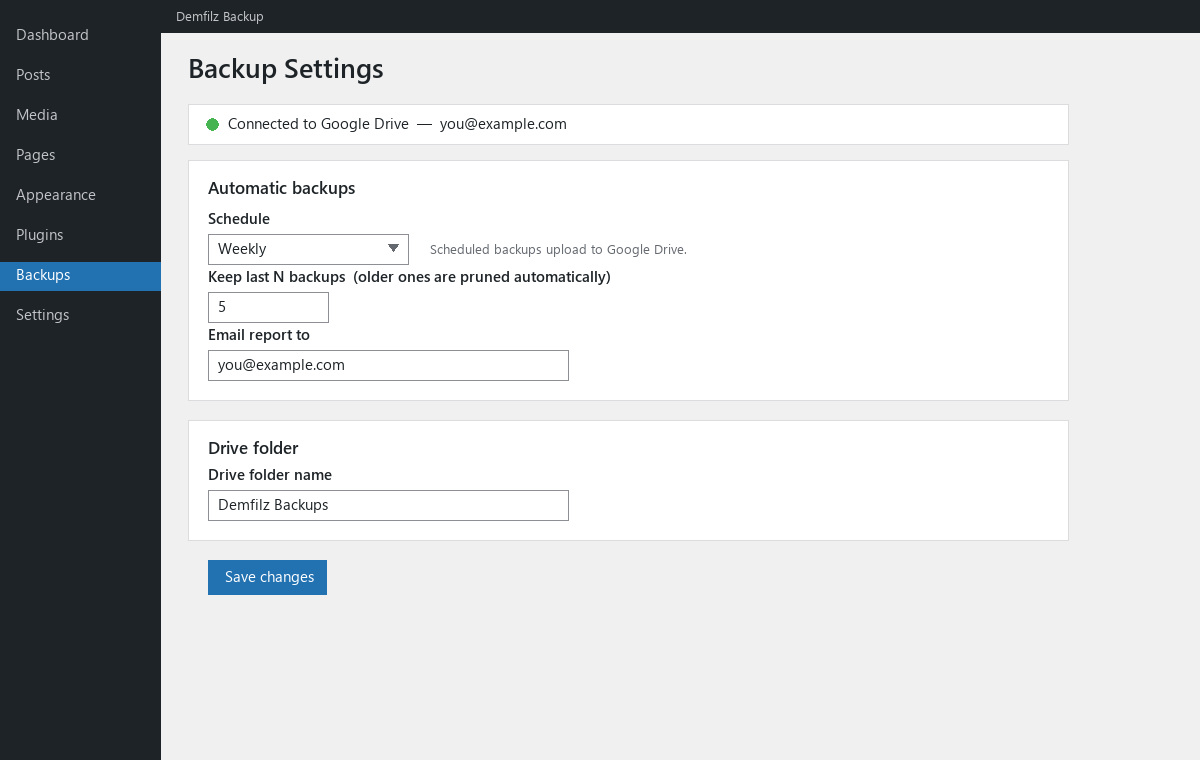
- Daily, weekly or monthly backups to Google Drive via WP-Cron.
- Retention: keep only the most recent N backups and prune the rest automatically.
- Optional email report after each scheduled backup.
Connect in one click
By default you connect Google Drive with a single Connect with Google click — no Google Cloud project, no copying keys. This uses a Demfilz sign-in helper that only brokers the Google authorization; your backups themselves always go directly from your server to your Google Drive. Only the drive.file scope is requested, so the plugin can see and manage only the backup files it creates.
Prefer to use your own Google app? Switch to Advanced → Use my own Google app on the Settings screen and paste your own Client ID and Secret — then nothing passes through Demfilz at all.
Moving a site to a new domain
This plugin restores a backup onto its own site. If you want to move or clone a site to a different URL, the separate Demfilz Backup Pro add-on (available from https://demfilz.com/demfilz-backup) adds serialization-safe cross-URL migration — it is a distinct plugin and is not required for backing up or restoring your site here.
External services
This plugin can connect to the following external services. Which ones apply depends on your settings.
Google Drive (always, once connected). Your backups are uploaded to, listed in, downloaded from and deleted from your own Google Drive account via the Google Drive API (https://www.googleapis.com/). This only happens after you connect an account, and only for the plugin’s own backup files (drive.file scope). See Google’s Privacy Policy (https://policies.google.com/privacy) and Terms (https://policies.google.com/terms).
Demfilz Google sign-in helper (default “Automatic” connection method only). When you use the one-click “Connect with Google” button, the plugin contacts the Demfilz OAuth broker at https://api.demfilz.com/gdrive/ to complete Google sign-in and to refresh access tokens. What is sent: your site URL and the OAuth codes/tokens needed to complete the connection; the broker does not permanently store your tokens. This step exists because a public plugin cannot safely embed a Google client secret, so the secret-holding exchange happens server-side. If you instead choose Advanced → Use my own Google app, this service is not used at all and the plugin talks only to Google. Demfilz privacy policy: https://demfilz.com/privacy .
Installation
- Upload the plugin to
/wp-content/plugins/demfilz-backup, or install it through the Plugins screen. - Activate it through the Plugins screen.
- Go to Backups → Settings and click Connect with Google, then approve access. (That’s it — no Google Cloud setup.)
- Go to Backups → Backup & Restore and click Back up to Google Drive.
Advanced (optional): use your own Google app. On the Settings screen open Advanced → Use my own Google app, create a Google Cloud OAuth client (type: Web application) with the Google Drive API enabled, register the redirect URI shown, paste your Client ID and Secret, save, then click Connect with Google.
Changelog
Backups now keep running if you navigate away, and progress reappears when you come back to the Backup screen.
1.0.1
- Manual backups now keep running when you leave the Backup screen, and the progress bar and activity log reappear when you return to it.
- Added a safeguard so two backups cannot run at the same time.
1.0.0
- Initial release: one-click “Connect with Google” (or use your own Google app), full-site backup (database + files) to Google Drive, scheduled backups with retention, and restore.
Screenshots
For developers
Is this your plugin? Show off the numbers.
Add a live badge to your site, docs or GitHub README. It updates on its own — no account needed.
Best Demfilz Backup alternatives
All backup plugins →





FAQ
Demfilz Backup: quick answers
Straight answers, pulled from live WordPress.org data.
Live data from WordPress.org · checked Nov 17, 2026
Is Demfilz Backup free?
Yes. Demfilz Backup is free to download and use from the official WordPress.org plugin directory.
Is Demfilz Backup safe to use in 2026?
Demfilz Backup is a solid plugin choice in 2026, with a few things worth checking first. It runs on 30+ sites and was last updated 2 weeks ago, and scores 71/100 on our health check.
How many websites use Demfilz Backup?
Demfilz Backup is active on 30+ WordPress websites and has been downloaded 683 times since it launched in July 2026. It was downloaded 331 times in the last 30 days.
Does Demfilz Backup work with WordPress 7.1?
Yes. The developer has tested Demfilz Backup up to WordPress 7.1.4, the latest release. It requires WordPress 6.2 or newer.
What PHP version does Demfilz Backup need?
Demfilz Backup requires PHP 7.4 or higher. Most hosts run PHP 8.x today, so it works on any modern WordPress hosting.
When was Demfilz Backup last updated?
The latest version, 1.0.1, was released on November 1, 2026 (2 weeks ago).
Who makes Demfilz Backup?
Demfilz Backup is developed and maintained by demfilz.
What are the best alternatives to Demfilz Backup?
The most popular alternatives to Demfilz Backup are All-in-One WP Migration and… (5M+ installs), UpdraftPlus: WP Backup & Mi… (4M+ installs) and Jetpack (3M+ installs).
Powered by PageForge
Want thousands of pages that rank like these? Build them in an afternoon.
This directory runs on the same engine as PageForge. Turn any spreadsheet, CSV or API into thousands of fast, SEO-ready WordPress pages — with schema, internal links and AI-written copy baked in.
- CSV, Google Sheets & API data sources
- AI content, schema & internal links per page
- Works with Elementor, Gutenberg, Yoast & Rank Math
- Free on WordPress.org — no credit card


