


Debug This
Peek under the hood with sixty debugging reports just one click away.

Use with caution
Debug This works, but test it on a staging site before relying on it in 2026. It runs on 2K+ sites, is rated 4.8/5 and was last updated 1 year ago, and scores 48/100 on our health check.
- No update in over a year
- Only tested up to WordPress 6.8 (latest is 7.1)
How does it stack up?
Side-by-side on installs, updates, ratings & support


Daily downloads
Download spikes usually follow a new release — each site that auto-updates counts as a download.
Rankings
Where Debug This stands todayWordPress.org search rankings
Live position in the plugin search, top 100| Keyword | Position |
|---|---|
| debug | #17 |
| debugger | #11 |
| developer | >100 |
| hooks | >100 |
| query | >100 |
Version adoption
Share of active sites per release.
Rating breakdown
★★★★★★★★★★ 4.8 from 17 reviews
About Debug This
From the official readme · v0.6.7Description
For admins, developers, and support staff, Debug This provides a ton of information about your WordPress installation, all from the front-end admin bar.
- The current WP_Query object
- Blog info and options
- Embed providers
- Files in rendered HTML (CSS, images, JavaScript)
- Filters and actions
- Images sizes
- Globals and constants
- Menus
- Object cache stats
- Plugins, must-use plugins, and dropins
- Rewrite rules
- Queries
- PHP and server information
- Post attachments
- Post types
- Scripts and styles enqueued
- Shortcodes
- Sidebars and widgets
- Taxonomies and terms
- Themes
- Users
- WP cron schedules and jobs
- WP debug log
Debug This helps you save time and effort when trying to figure out what’s going on. Instead of hardcoding debug snippets or writing complex unit
tests for small functionality, you can simply bring to the surface what you need right from the admin bar.
For example, when viewing a single post, you can see:
- a list of post attachments,
- which menus and sidebars are being displayed,
- the post type, post fields, and meta data,
- the current query variables and query string,
- the rewrite rules applied,
- the author,
- the terms,
- and much more.
Extend
Debug This Functions
New debug modes can be created easily:
add_debug_extension(
    $mode,
    $menu_label,
    $description,
    $callback,
    $group = 'General'
);
Example
add_debug_extension(
    'actions',
    __('Actions', 'debug-this'),
    __('$wp_actions contains all active registered actions', 'debug-this'),
    'foo_callback',
    'Filters And Actions'
);
function foo_callback($buffer, $template){
    global $wp_actions;
    $debug = print_r($wp_actions, true);
    return $debug;
}
You can add links to the header of a debug mode page. Place this code within your debug callback function.
add_debug_header_link('http://urltolink', 'Link Label');
Extensions can be removed as well using remove_debug_extension($mode);
No PRE Tags
If you don’t want your debug output to be enclosed in PRE tags, simply set the following in your extension:
Debug_This::$no_pre = true;
Saved Queries and Execution Time
Retrieve saved queries and execution time by using the following static properties:
Debug_This::$execution_timeDebug_This::$queries– SAVEQUERIES must defined as true
URL Helpers
Debug_This::get_current_debug_url()– current URL with the debug queryDebug_This::get_escape_url()– used for the debug escape link that links to original page URL
WP Actions
debug_this– receives the $mode arg – outputs the debug code sent from the extension modes. The default action is set to priority 5. This allows you to prepend or append any output without conflict using less or greater priorities.
WP Filters
There are a few filters you can use to customize Debug This to your needs:
debug_this_template– receives $template arg – Use your own templatedebug_this_default_mode– receives $mode arg – Alters the mode for the parent DT admin bar button link.debug_this_output– receives $output, $mode args – Filter debug content before it’s rendered
JavaScript
To access the built-in Debug This JS functionality, enqueue your custom script with the dependency set to debug-this. Your script will inherit a jQuery dependency.
Object: debugThis
debugThis.mode– current modedebugThis.defaultModedebugThis.template– current included templatedebugThis.queryVar– the defined query string variable
Functions:
isDebug()getDebugMode()– usesisDebug()
Events:
A jQuery debug-this event is fired from the footer. You can hook into this event with the following;
jQuery(document).bind('debug-this', function(event, debugThis){
    console.log(debugThis);
});
Helper Functions
There are three included functions to help you work with files.
debug_this_get_file_ownership($file)– returnsarray('name' => $name, 'group' => $group)debug_this_get_file_perms($file)– returns string – Example: 0775debug_this_convert_perms_to_rwx($perms)– returns string – converts permission number to RWX format – Example: 0755 folder becomes drwxr-xr-x
Installation
- Upload to your plugins folder, usually
wp-content/plugins/ - Activate the plugin on the plugin screen.
- Navigate to the front-end of your website and hover over the ‘Debug This’ menu item in the admin bar.
Frequently asked questions
How do I use Debug This?
Make sure the admin bar is enabled in your user profile. Visit any page/post/archive on your website and you will see a Debug This menu item on the admin bar.
What PHP version is this compatible with?
We’ve tested on PHP >= 5.2.17
Can I request new debug modes?
Certainly! In order to keep the plugin lightweight and performant, requests that are too localized for the greater good may be refused. If that happens, I will gladly help you build your own debug mode.
Can I alter the plugin or build my own debug modes?
Yes! Visit the Extend section to find out how you can thoroughly extend Debug This for your own needs.
Changelog
0.6.7 – 28.01.2024
- Update: Tested up to WP 6.7
0.6.6 – 18.03.2025
- Fix: Fixed URL query vars
0.6.5 – 28.01.2024
- Update: Tested up to WP 6.7
0.6.4 – 07.01.2022
- Display bug fix
- Added: Sanitization and escapes
0.6.3 – October 10, 2019
- Translation file update
0.6.2 – September 12, 2019
- Translation ready
Screenshots

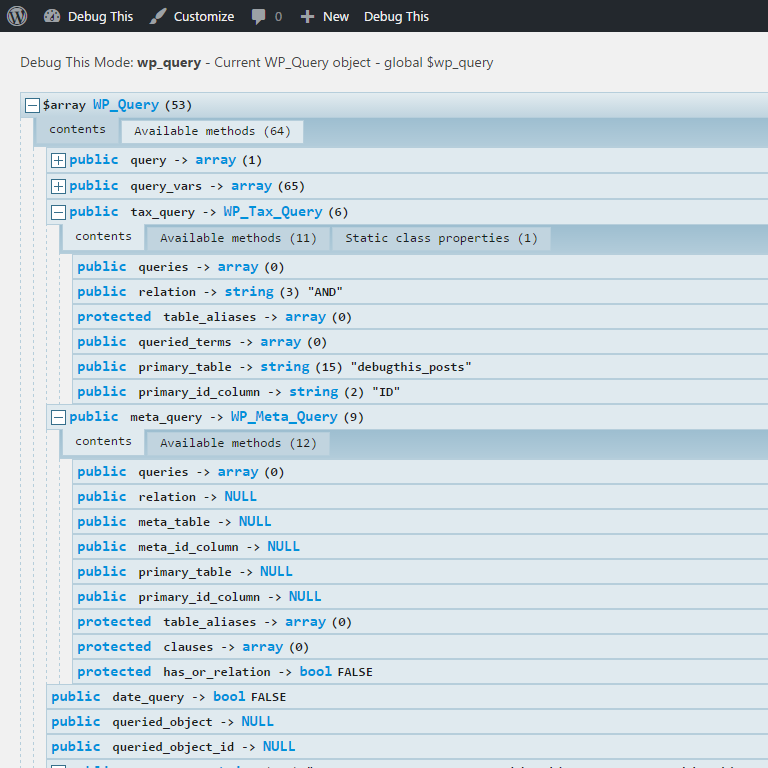
For developers
Is this your plugin? Show off the numbers.
Add a live badge to your site, docs or GitHub README. It updates on its own — no account needed.
Best Debug This alternatives
All debug plugins →




FAQ
Debug This: quick answers
Straight answers, pulled from live WordPress.org data.
Live data from WordPress.org · checked Sep 26, 2026
Is Debug This free?
Yes. Debug This is free to download and use from the official WordPress.org plugin directory.
Is Debug This safe to use in 2026?
Debug This works, but test it on a staging site before relying on it in 2026. It runs on 2K+ sites, is rated 4.8/5 and was last updated 1 year ago, and scores 48/100 on our health check.
How many websites use Debug This?
Debug This is active on 2K+ WordPress websites and has been downloaded 160,431 times since it launched in December 2012. It was downloaded 355 times in the last 30 days.
Does Debug This work with WordPress 7.1?
Debug This is officially tested up to WordPress 6.8.10, while the latest release is 7.1.2. It may still work, but try it on a staging site first.
What PHP version does Debug This need?
Debug This requires PHP 5.6 or higher. Most hosts run PHP 8.x today, so it works on any modern WordPress hosting.
When was Debug This last updated?
The latest version, 0.6.7, was released on June 4, 2025 (1 year ago).
Who makes Debug This?
Debug This is developed and maintained by Razvan Aldea.
What are the best alternatives to Debug This?
The most popular alternatives to Debug This are WP Crontrol (300K+ installs), Query Monitor (200K+ installs) and Debug Bar (20K+ installs).
Powered by PageForge
Want thousands of pages that rank like these? Build them in an afternoon.
This directory runs on the same engine as PageForge. Turn any spreadsheet, CSV or API into thousands of fast, SEO-ready WordPress pages — with schema, internal links and AI-written copy baked in.
- CSV, Google Sheets & API data sources
- AI content, schema & internal links per page
- Works with Elementor, Gutenberg, Yoast & Rank Math
- Free on WordPress.org — no credit card


