


Dealroot – Lead Tracking & UTM Attribution for Contact Forms
Track where every lead comes from: UTM, gclid, ads and searches for Contact Form 7, WPForms, Elementor and 20+ form plugins. Follow leads to sales.

Solid choice
Dealroot is a solid plugin choice in 2026, with a few things worth checking first. Was last updated 2 hours ago, and scores 64/100 on our health check.
- Actively developed — last update 2 hours ago
- Tested with the latest WordPress (7.1)
- Small user base (<10 active installs)
- Very few reviews so far
How does it stack up?
Side-by-side on installs, updates, ratings & support



Daily downloads
Download spikes usually follow a new release — each site that auto-updates counts as a download.
Rankings
Where Dealroot stands todayWordPress.org search rankings
Live position in the plugin search, top 100| Keyword | Position |
|---|---|
| attribution | >100 |
| gclid | #88 |
| google ads | >100 |
| lead tracking | >100 |
| UTM | >100 |
About Dealroot
From the official readme · v1.1.8Description
Dealroot is a lead tracking and UTM attribution plugin for WordPress. It saves every enquiry from Contact Form 7, WPForms, Gravity Forms, Elementor forms and 20 more form plugins with its source: UTM parameters, gclid and the other click IDs, the referrer and the landing page.
Most small businesses know how many visitors they get, but not which of them became customers. Dealroot closes that gap without a CRM.
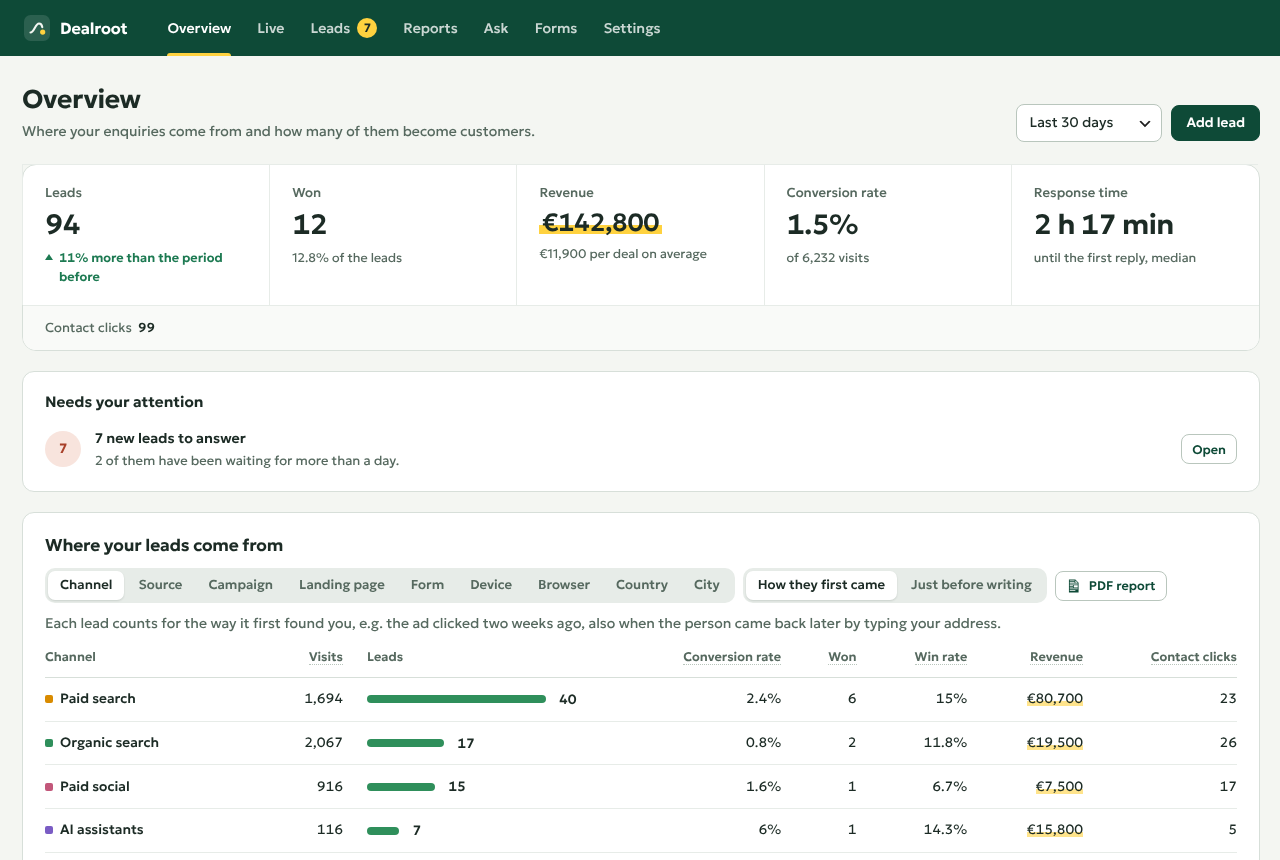
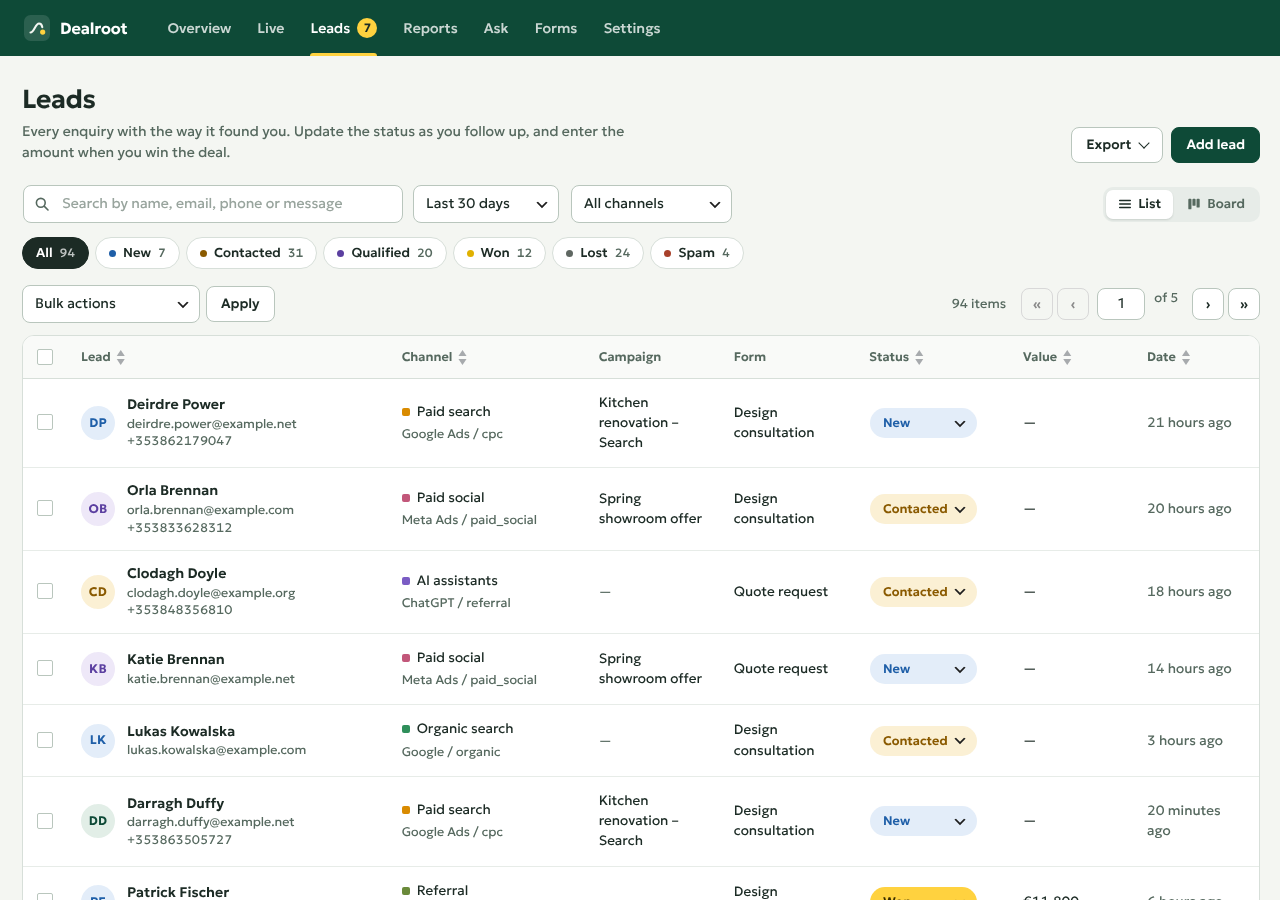
When someone sends one of your forms, Dealroot stores the enquiry with how that person found you: the ad, the search engine, the social post or the website that linked to you. Mark the lead as contacted, won or lost with its value, and see which channels earn you money. You do not need to run ads: organic search, social media, AI assistants, newsletters and referrals are tracked from the first visit.
What you get
- Leads to follow up – an overview of what waits for an answer, every lead in a list or on a board, and a timeline from the first visit to the sale.
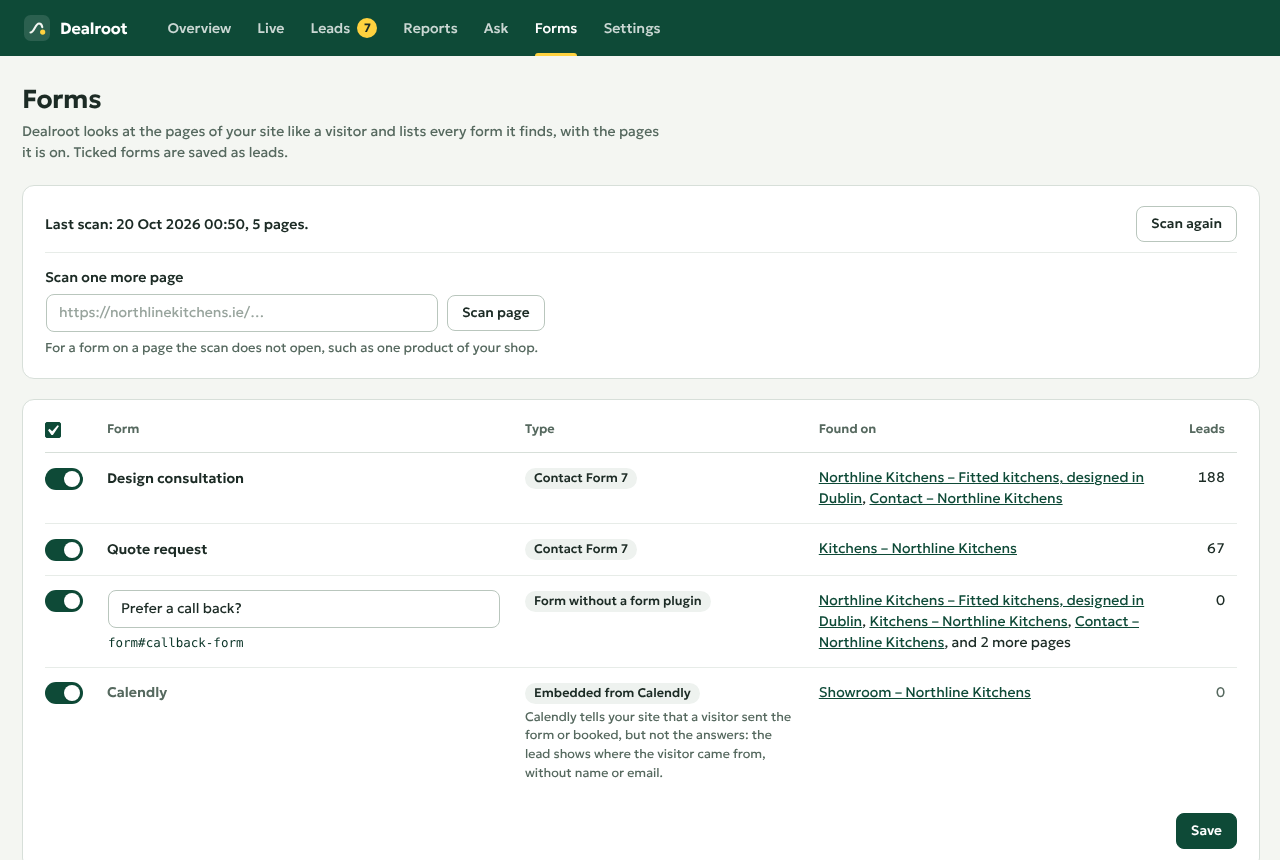
- 25 form plugins and page builders – see the list below. A form scan finds every form on your site, also those built without a form plugin.
- The source of every enquiry – UTM parameters and click IDs of Google, Microsoft, Meta, TikTok, LinkedIn and more, the referrer and the landing page, for the first and the latest visit, sorted into channels that make sense worldwide.
- Reports with charts – revenue next to ad costs, enquiries and customers by channel, campaign, page, form, device and city, when enquiries arrive and how fast you answer, for any period and as a PDF.
- Phone, WhatsApp and email clicks – counted per channel, so a call can still be credited to its ad.
- Form analytics – how many visitors start and send each form, and at which field the others give up. Only anonymous daily totals are stored.
- Live view and map – who is on your site right now, and where your visitors and leads come from.
- AI assistant, one switch – every enquiry summed up, sorted and checked for spam, drafts of your answers, a confirmation within a minute, and questions about your leads in plain words. Optional, see External services.
- The source in your own forms – hidden fields such as utm_source, gclid or dealroot_channel are filled when a form is sent, so the source reaches any CRM your form plugin is connected to, and it can be added below the notification emails of every form.
- Telegram, Google Sheets and webhooks – every new lead on your phone, as a row in your own Google Sheet, or in Make, Zapier, n8n or your own system.
- WooCommerce and other shops – paid orders become won deals with their source.
- Offline conversions – won leads exported in the format Google Ads, Microsoft Advertising and Meta import.
- Google Tag Manager – optionally a generate_lead event in the dataLayer for every sent form, with source, campaign and keyword, so your own tags can use it. Works alongside GTM4WP.
- Ask your AI assistant – Claude, ChatGPT and other assistants connect over MCP and answer questions such as “Which campaign brought the most customers last month?”.
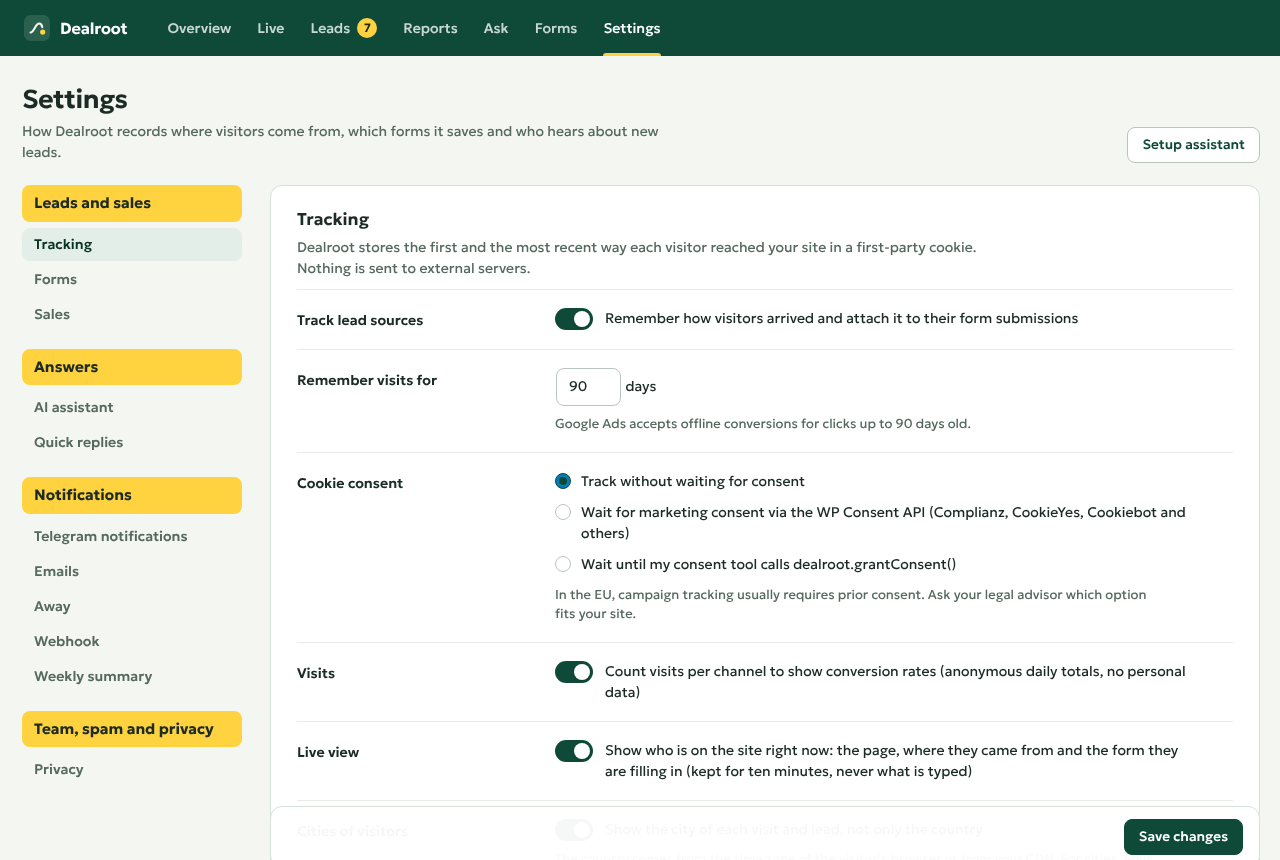
- Privacy – first-party cookie only, or no cookie at all, optional wait for cookie consent (Google Consent Mode v2, Cookiebot, CookieYes, Complianz, the WP Consent API or your own banner), data retention and the WordPress personal data tools.
Dealroot Pro
Everything above is free and stays free. Dealroot Pro is an add-on for businesses that advertise and work with a CRM:
- Conversions to Google Ads, Microsoft Advertising, Meta, TikTok and LinkedIn – leads you mark as qualified or won are reported with the deal value to the platform that brought the visitor, so the ads learn which clicks become customers.
- Recordings and a click map – watch a visit as the visitor saw it, with rage clicks, errors and forms left unsent marked, and see where visitors click and how far they scroll. What is typed into fields is never recorded.
- Phone calls – calls from CallRail, WhatConverts or any other call tracker become leads with the ad that brought them.
- Ad spend and return on ad spend – costs are imported from Google Ads, Microsoft Advertising and Meta every hour, for the cost per lead, the cost per customer and the return on ad spend of each channel, source and campaign.
- Profit, not only revenue – margins per product category or the cost of goods in WooCommerce, for the profit on ad spend.
- CRM and email marketing – HubSpot, Pipedrive, HighLevel, monday.com, ActiveCampaign, Zendesk Sell, Insightly, Nutshell, Bitrix24, Brevo and Mailchimp, connected with one click or one key, in both directions. Any other CRM by webhook.
- Spam filter – sales pitches and bot submissions are put aside automatically.
- Team and reminders – owners, follow-up dates, reminders, and new leads in Slack or Microsoft Teams.
- For agencies – all client sites on one screen, white label and a monthly report for each client.
Supported form plugins
- Contact Form 7, WPForms, Gravity Forms, Fluent Forms, Ninja Forms, Formidable Forms, Forminator, JetFormBuilder, Everest Forms, WS Form, SureForms, MetForm, HappyForms and Jetpack Forms
- Elementor Pro, Divi, Bricks, Beaver Builder, Thrive, Kadence Blocks, Spectra and Otter Blocks
- Mailchimp for WordPress, MailPoet, Ultimate Member and the WooCommerce checkout
- Embedded HubSpot and Tally forms with the answers; Typeform and Calendly with their source
- Any other HTML form: tick it after the form scan, or add
data-dealrootto the form tag - Custom code via
do_action( 'dealroot_capture', $form_id, $form_name, $fields )
Video tutorials
Short how-to videos on the Dealroot YouTube channel:
- Track UTM parameters and gclid in Contact Form 7
- Track UTM parameters and gclid in WPForms
- See the Google Ads keyword of every lead
- Send won leads to Google Ads as offline conversions
- Track phone and WhatsApp clicks by ad and campaign
- See who is on your site right now
- Which ad brought this WooCommerce order?
Translations
English, German, French, Spanish, Italian, Dutch, Polish, Ukrainian and Russian are included.
Credits
The Dealroot screens use the Geologica typeface by the Geologica Project Authors, licensed under the SIL Open Font License 1.1, included in the plugin. The outlines of countries and towns on the maps come from Natural Earth, in the public domain, and ship with the plugin; the maps load nothing from other servers.
External services
Dealroot stores leads, visits and contact clicks in your WordPress database. Nothing is sent anywhere unless you turn on one of the features below.
Telegram
When you connect Telegram under Leads → Settings, your site uses the Telegram Bot API (api.telegram.org) with the bot token you enter. Each new lead is sent to the chat you choose with its name, email address, phone number, form, source and message; “Send test message” sends a sample. Your site sets itself as the webhook of the bot, so Telegram passes on what you write or press in that chat: buttons, replies, forwarded chats and voice messages. Voice messages and forwarded files are downloaded from api.telegram.org to read them, see “Dealroot AI assistant”. Telegram’s terms of service and privacy policy apply.
Webhook
When you enter a webhook URL under Leads → Settings, every new lead, every status change and the test lead are posted to that URL with the contact details, the fields sent and the source. You choose the service, e.g. Make, Zapier or n8n, and its own terms and privacy policy apply.
Google Sheets
Only when you click “Connect Google Sheets” under Leads → Settings, your site signs up at Dealroot Cloud (https://cloud.dealroot.net), see “Dealroot AI assistant”, and you sign in to Google through it. The only permission asked for is drive.file: the plugin can open only the sheets it created. Your site gets a short-lived access token from Dealroot Cloud and sends the leads to the Google Sheets API (sheets.googleapis.com) itself – every lead that is not spam, again when its status or value changes, with ID, date, name, email address, phone number, form, status, value, source, landing page and the fields sent. No lead passes through Dealroot Cloud. Google’s terms and privacy policy apply, and the Dealroot privacy policy to Dealroot Cloud.
Website icons
Only when you turn on “Website icons” under Leads → Settings → Privacy, or click “Show website icons” below the sources report, your server loads the icon of each website in that report from the website itself, e.g. https://google.com/favicon.ico, and keeps it for a month. The request contains no data about your site, its visitors or its users. The terms and privacy policy of each website apply.
Dealroot AI assistant (optional)
Only when you turn on the AI assistant under Leads → Settings, your site signs up once at Dealroot Cloud (https://cloud.dealroot.net), the service of the makers of this plugin in the European Union: it fetches a one-time proof from your site’s address, then gives the site a key to sign its requests. Texts are then sent only for a feature you use:
- each new enquiry with the form name, your site’s language and the topics used before, for its summary, topics and kind, and for the confirmation email if you turn it on;
- for “Write with AI” and “Translate”, the enquiry with the person’s name, your name, your site’s name and your quick replies, or the text to translate;
- a question under “Ask about your leads” or in Telegram, with the questions before it, your site’s name and address, the names of your channels, topics and forms, a few totals, and for orders the names of recent leads; the numbers of an answer are counted on your site;
- a chat, text file, email or voice message you forward in Telegram or record in the plugin;
- once a week, the summaries of enquiries about frequent topics and the figures of “Your week in short”; with Dealroot Pro, the texts of its own AI features.
Email addresses, phone numbers and consent fields are left out, and contact details left in a text are removed before a language model sees it. The text goes to Mistral AI (Paris, France), running in the European Union; when it is not available or the monthly allowance is used up, a model on Dealroot’s own server answers. Voice messages are written down on Dealroot’s own server. Dealroot Cloud does not store or log texts, audio or answers, and they are not used for training. Mistral AI processes them under its commercial terms and privacy policy.
With Dealroot Pro you can enter your own API key of OpenAI, Google Gemini, Anthropic Claude or Mistral AI instead. It is checked once and kept encrypted at Dealroot Cloud, and the texts go through Dealroot Cloud to that provider under your contract with it: OpenAI (privacy), Google Gemini API (privacy), Anthropic (privacy).
Turning the assistant off removes the sign-up. Dealroot Cloud terms and privacy policy.
City databases (optional)
Only when you turn on “Cities of visitors” under Leads → Settings → Tracking, your server downloads location files into wp-content/uploads/dealroot, and the city of each visitor or lead is looked up on your own server. Turning the setting off deletes them. The downloads contain no data about your site or its visitors.
- The free IP to City Lite database of DB-IP (https://download.db-ip.com/free/), right away and then monthly, under Creative Commons Attribution 4.0; DB-IP’s privacy policy applies.
- The postcode list of your site’s country from GeoNames (https://download.geonames.org/export/zip/), and of another country when a lead from there gives a postcode or town, renewed every three months, under Creative Commons Attribution 4.0.
- Only if you enter a MaxMind account ID and license key: GeoLite2 City from MaxMind (https://download.maxmind.com), right away and then weekly; the request carries your ID and key. Used under the GeoLite2 EULA; MaxMind’s privacy policy applies. This product includes GeoLite2 data created by MaxMind, available from https://www.maxmind.com.
Microsoft Clarity
Dealroot does not add Clarity. If the Clarity tag is already on a page, visits in which a form was sent or a contact link was clicked are marked with the events “dealroot_form_sent” and “dealroot_contact_click” through Clarity’s own script and kept, so you can open the recording from the lead. No form data is passed on. Microsoft’s Clarity terms and privacy statement apply.
Installation
- Install and activate the plugin.
- Open Leads → Forms and click Scan site. Untick forms that are not enquiries and save.
- Go to Leads → Settings and choose how to handle cookie consent.
- Optional: connect a Telegram bot to get notified about new leads.
- Submit one of your forms through a link such as
https://example.com/?utm_source=test&utm_medium=cpcand open Leads → All leads.
Changelog
1.1.8
- Changed: the request for a review is quieter. It shows once, right after an enquiry from your site is marked as won, and at most twice in all.
1.1.7
- Improved: click anywhere in a lead row to open the lead, not only on its name.
- Fixed: the Deal box on the lead page lost its inner spacing.
1.1.6
- Elementor 4: the new Atomic Form is captured too, with every field, after Elementor’s own spam checks. The Forms screen finds pages with it.
1.1.5
- The bar at the top of the Dealroot screens shows every screen again, and the admin menu lists them all, as before 1.1.0. “All features” is the last tab of the bar.
1.1.4
- Orders of shops built into a theme: when the shop cancels or refunds an order (“storniert”, “cancelled”, “refunded”), its deal turns lost; when the order is moved to the bin, e.g. a test order, its lead is removed from Dealroot, and counted again if the order is restored.
1.1.3
- Fix: Forms on the overview counted a checkout as left at its last field when it was paid with a button in its own frame, such as PayPal’s, although the order came through. The order now turns it into a sent checkout.
Screenshots


For developers
Is this your plugin? Show off the numbers.
Add a live badge to your site, docs or GitHub README. It updates on its own — no account needed.
Best Dealroot alternatives
All attribution plugins →





FAQ
Dealroot: quick answers
Straight answers, pulled from live WordPress.org data.
Source: WordPress.org
Is Dealroot free?
Yes. Dealroot is free to download and use from the official WordPress.org plugin directory.
Is Dealroot safe to use in 2026?
Dealroot is a solid plugin choice in 2026, with a few things worth checking first. Was last updated 2 hours ago, and scores 64/100 on our health check.
How many websites use Dealroot?
Dealroot is active on <10 WordPress websites and has been downloaded 1,100 times since it launched in November 2026. It was downloaded 1,021 times in the last 30 days.
Does Dealroot work with WordPress 7.1?
Yes. The developer has tested Dealroot up to WordPress 7.2, the latest release. It requires WordPress 6.8 or newer.
What PHP version does Dealroot need?
Dealroot requires PHP 7.4 or higher. Most hosts run PHP 8.x today, so it works on any modern WordPress hosting.
When was Dealroot last updated?
The latest version, 1.1.8, was released on November 29, 2026 (2 hours ago).
Who makes Dealroot?
Dealroot is developed and maintained by Dealroot.
What are the best alternatives to Dealroot?
The most popular alternatives to Dealroot are Easy UTM tracking with cont… (2K+ installs), Molongui Post Contributors:… (400+ installs) and Opinly (300+ installs).
Powered by PageForge
One template and a spreadsheet. A real page for every search.
PageForge turns each row of a CSV into a WordPress page with its own title, URL, SEO fields and schema, built on the layout you already designed. Free on WordPress.org.
- CSV and XLSX, plus Google Sheets on Professional and Enterprise
- Its own title, URL, SEO fields and schema for every page
- Works with the block editor, Elementor, Divi and Avada
- Free on WordPress.org, no credit card