



Molongui Post Contributors: Multi-Role Contributor Attribution
Easily add reviewers, fact-checkers, illustrators, and any other attribution to your WordPress posts and display them towards the post author.

Use with caution
Molongui Post Contributors: Mul… works, but test it on a staging site before relying on it in 2026. It runs on 500+ sites, is rated 5/5 and was last updated 10 months ago, and scores 49/100 on our health check.
- Small user base (500+ active installs)
- Very few reviews so far
- Only tested up to WordPress 6.8 (latest is 7.1)
How does it stack up?
Side-by-side on installs, updates, ratings & supportDaily downloads
Download spikes usually follow a new release — each site that auto-updates counts as a download.
Rankings
Where Molongui Post Contributors:… stands todayWordPress.org search rankings
Live position in the plugin search, top 100| Keyword | Position |
|---|---|
| acknowledgment | #2 |
| attribution | #11 |
| byline | #5 |
| Contributor | #9 |
| multiple-contributors | #2 |
Version adoption
Share of active sites per release.
Rating breakdown
★★★★★★★★★★ 5 from 2 reviews
About Molongui Post Contributors: Multi-Role…
From the official readme · v1.7.3Description
Unlock the power of teamwork on your WordPress site with Molongui Post Contributors. This intuitive plugin lets you effortlessly add and showcase every member of your content team, allowing specific role attribution for reviewers, fact-checkers, photographers, and more. By enhancing collaborative content creation and recognition, Molongui Post Contributors enriches your posts with clear, visible credits. It’s ideal for blogs, news sites, magazines, and educational platforms, boosting collaboration and giving credit where it’s due. Elevate your content game, engage your audience, and celebrate teamwork like never before. Install now to acknowledge every contribution and take your articles to the next level!
Main Features
- Role Attribution: Assign specific roles to each contributor (e.g., reviewer, fact-checker, photographer)
- Easy Integration: Seamlessly integrates with your WordPress theme
- Customizable Displays: Customize how contributor names and roles are displayed on posts
- Automated Credits: Automatically generate and insert contributor credits
- SEO Friendly: Enhances SEO with structured data for contributors
- Responsive Design: Ensures post byline looks great on all devices
- Shortcode Support: Use shortcodes to display post byline anywhere on your site
- Compatibility: Works with all major WordPress page builders
Premium Features
✨ Premium features only available in Molongui Post Contributors Pro
- Multiple Contributors: Add multiple contributors to a single post
- Guest Contributors: Add contributors without a user account (no WP users)
- Additional Layouts: Premium designs for your post byline and posts
- Avatars display
- Custom Post Type Support
- Custom User Role Support
This plugin uses a third-party service to enable live chat communication with our support team, exclusively for administrators in the backend. You can disable this service via the plugin settings page. For more information about the live chat service provider review their privacy policy and terms.
Installation
Automatic Plugin Installation
To install this plugin using the built-in plugin installer:
- Go to: Plugins > Add New.
- Type in Molongui Post Contributors in the search box.
- Click on Install Now to install the plugin.
- The resulting installation screen will list the installation as successful or note any problems during the install.
- If successful, click on the Activate Plugin button to activate the plugin, or Return to Plugin Installer for further actions.
Manual Plugin Installation
To install the plugin manually:
- Download the plugin to your computer.
- Extract the plugin folder to your desktop.
- With your FTP program, upload the extracted plugin folder to the wp-content/plugins folder in your WordPress directory.
- Go to Plugins screen and find the newly uploaded plugin in the list.
- Click Activate to activate it.
If you need further assistance, please, read the “Installing Plugins” article on the WordPress Codex or write us an email so we can assist you.
Requirements
In order to run, Molongui Post Contributors requires:
- PHP version 5.6.20 or greater. Considering WordPress recommends it to be 7.4 or greater, this should not be a problem.
- WordPress 5.2.0 or later
Frequently asked questions
Will Molongui Post Contributors work with my theme?
Yes. Molongui Post Contributors is compatible with any theme. We’ve added integration with most popular themes. You may face some issues though, in such cases, you can open a support ticket with us and we will look into it to find a compatibility fix.
Can I add multiple contributors to a post?
Yes. To add multiple contributors to a single post, you need to upgrade the plugin to the Pro version. You can check all premium features out here.
Is it possible to add contributors that do not have an account in my site?
Yes. To add guest contributors —that’s names that are not WordPress Users— you need to upgrade the plugin to the Pro version. You can check all premium features out here.
Does Molongui Post Contributors work with Elementor?
Yes. To add the post byline in your designs, just use the “Bylines” widget. You can also add a “Shortcode” widget and insert the [molongui_post_byline] shortcode. Both options will display the post byline, but the widget allows you to configure some options.
Does Molongui Post Contributors work with the WP Block Editor?
Yes. To add the post byline in your designs, just use the “Bylines” block. You can also add a “Shortcode” widget and insert the [molongui_post_byline] shortcode. Both options will display the post byline, but the block allows you to configure some options.
Where can I find documentation and user guides?
For help setting up and configuring this plugin, please refer to our documentation.
How do I get support for this plugin?
We’re following the threads on this plugin public Support Forum and based on them, we always try to build up new and better implementations for the plugin. To help us answer questions as quickly as possible please ensure you provide: A link to your site so we can view issues, especially important for issues around appearance of your website Screenshots Environment Report: This can give us a lot of very useful information. Navigate to Settings > Post Contributors > Help, find the System Status panel, and press the Send Report button. Paying Pro Customers If you have purchased a Pro plugin at…
Changelog
1.7.3 (2025-11-25)
- Added: Setting to control displaying the updated date for unedited posts.
- Added: ‘molongui_contributors/byline/show_update_date_for_unedited_posts’ filter to programmatically control displaying the updated date for unedited posts.
- Fixed: Removed trailing separator when post update date is not displayed.
- Changed: Added compatibility with Molongui Authorship 5.2.0
- Changed: Added compatibility with WordPress 6.8.
1.7.2 (2025-02-04)
- Fixed: Updated filter name to ensure the author name on the post byline links to the author page when used with the Molongui Authorship plugin.
1.7.1 (2025-01-20)
- Fixed: Fatal error when loading Elementor editor.
1.7.0 (2025-01-14)
- Added: Option to display an author box for the post contributor. (Requires the Molongui Authorship plugin to be installed.)
1.6.2 (2024-11-25)
- Fixed: Unnecessary body class that caused layout issues with certain themes.
- Changed: Automatically add the ‘Reviewer’ contributor role if no other roles exist.
- Changed: Added more default contributor roles.
- Changed: The modified date is now displayed only if the post has been updated after its original publication.
- Changed: Updated framework files to version 3.2.0.
- Changed: Added compatibility with WordPress 6.7.
1.6.1 (2024-09-11)
- Changed: Replaced incorrect
dateUpdatedproperty withdateModifiedfor WebPage schema.
Screenshots


![[PRO only] Post byline showing avatars for both author and reviewer](https://ps.w.org/molongui-post-contributors/assets/screenshot-5.png?rev=3096585)
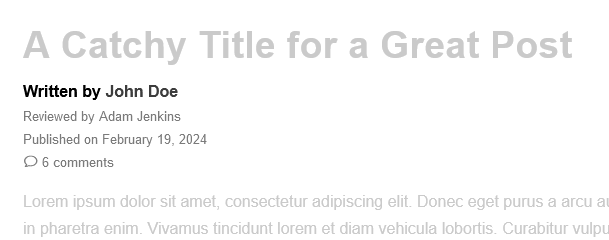
![[PRO only] Post byline showing multiple contributors with avatars, highlighted roles and check icon](https://ps.w.org/molongui-post-contributors/assets/screenshot-7.png?rev=3222525)
![[PRO only] Post byline showing additional user information, avatars, highlighted roles and check icon](https://ps.w.org/molongui-post-contributors/assets/screenshot-8.png?rev=3222525)

For developers
Is this your plugin? Show off the numbers.
Add a live badge to your site, docs or GitHub README. It updates on its own — no account needed.
Best Molongui Post Contributors: M… alternatives
All acknowledgment plugins →| Rank | Plugin | Active installs |
|---|---|---|
| 2 |
 Read and Understood
V2.3 Better sanitization of arguments coming in from POST and written to DB Better job…
Read and Understood
V2.3 Better sanitization of arguments coming in from POST and written to DB Better job…
|
30+ |
FAQ
Molongui Post Contributors: Multi-R…: quick answers
Straight answers, pulled from live WordPress.org data.
Live data from WordPress.org · checked Sep 29, 2026
Is Molongui Post Contributors: Mul… free?
Yes. Molongui Post Contributors: Mul… is free to download and use from the official WordPress.org plugin directory.
Is Molongui Post Contributors: Mul… safe to use in 2026?
Molongui Post Contributors: Mul… works, but test it on a staging site before relying on it in 2026. It runs on 500+ sites, is rated 5/5 and was last updated 10 months ago, and scores 49/100 on our health check.
How many websites use Molongui Post Contributors: Mul…?
Molongui Post Contributors: Mul… is active on 500+ WordPress websites and has been downloaded 8,559 times since it launched in June 2024. It was downloaded 232 times in the last 30 days.
Does Molongui Post Contributors: Mul… work with WordPress 7.1?
Molongui Post Contributors: Mul… is officially tested up to WordPress 6.8.10, while the latest release is 7.1.2. It may still work, but try it on a staging site first.
What PHP version does Molongui Post Contributors: Mul… need?
Molongui Post Contributors: Mul… requires PHP 5.6.20 or higher. Most hosts run PHP 8.x today, so it works on any modern WordPress hosting.
When was Molongui Post Contributors: Mul… last updated?
The latest version, 1.7.3, was released on November 25, 2025 (10 months ago).
Who makes Molongui Post Contributors: Mul…?
Molongui Post Contributors: Mul… is developed and maintained by Molongui.
What are the best alternatives to Molongui Post Contributors: Mul…?
The most popular alternatives to Molongui Post Contributors: Mul… are Read and Understood (30+ installs).
Powered by PageForge
Want thousands of pages that rank like these? Build them in an afternoon.
This directory runs on the same engine as PageForge. Turn any spreadsheet, CSV or API into thousands of fast, SEO-ready WordPress pages — with schema, internal links and AI-written copy baked in.
- CSV, Google Sheets & API data sources
- AI content, schema & internal links per page
- Works with Elementor, Gutenberg, Yoast & Rank Math
- Free on WordPress.org — no credit card


