



Code Snippets
An easy, clean, and simple way to enhance your site with code snippets.

Safe pick
Yes — Code Snippets is a safe, well-maintained plugin to use in 2026. It runs on 1M+ sites, is rated 4.7/5 and was last updated 4 weeks ago, and scores 92/100 on our health check.
- One of the most-used plugins on the web — 1M+ active sites
- Loved by users — 4.7/5 from 509 reviews
- Actively developed — last update 4 weeks ago
- Tested with the latest WordPress (7.1)
- Momentum — downloads up 108.6% vs the previous 30 days
How does it stack up?
Side-by-side on installs, updates, ratings & support



Daily downloads
Download spikes usually follow a new release — each site that auto-updates counts as a download.
Rankings
Where Code Snippets stands todayWordPress.org search rankings
Live position in the plugin search, top 100| Keyword | Position |
|---|---|
| code | #1 |
| css | #4 |
| multisite | #1 |
| php | #1 |
| snippets | #1 |
Version adoption
Share of active sites per release.
Rating breakdown
★★★★★★★★★★ 4.7 from 509 reviews
About Code Snippets
From the official readme · v3.10.2Description
✂ Code Snippets provides an effortless way to enhance your WordPress site.
🚀 Upgrade to Code Snippets Pro for complete CSS, JavaScript, Gutenberg, Elementor and cloud synchronisation integrations. Elevate your snippets experience now!
Say goodbye to the hassle of tweaking your theme’s functions.php file and downloading endless plugins – Code Snippets simplifies the process!
A snippet is like a mini-plugin for your WordPress site, providing added functionality without the clutter.
Unlike other solutions that involve dumping code into your functions.php file, Code Snippets offers an intuitive graphical interface for seamless integration and real-time execution. Managing snippets is as easy as activating and deactivating plugins, only without the bloat and overhead.
🎥 Watch a quick overview by Imran Siddiq:
☁️ Each copy of Code Snippets includes full integration with the community-powered Code Snippets Cloud platform, providing easy access to hundreds of tweaks and enhancements ready to power-up any WordPress site.
🌐 Connect with us:
🌟 Like our plugin? Find it useful? Please consider sharing your experience by leaving a review on WordPress.org. Your feedback is instrumental to shaping our future growth!
🌍 We’d like to thank the wonderful people who have helped contribute translations to allow Code Snippets to be used in different languages. You can find a full list here.
Installation
Automatic Installation
- Log into your WordPress admin
-
Click Plugins
-
Click Add New
-
Search for Code Snippets
-
Click Install Now under “Code Snippets”
- Activate the plugin
Manual Installation
- Download the plugin
- Extract the contents of the zip file
- Upload the contents of the zip file to the
wp-content/plugins/folder of your WordPress installation - Activate the Code Snippets plugin from ‘Plugins’ page.
Network Activating Code Snippets through the Network Dashboard will enable a special interface for running snippets across the entire network.
Frequently asked questions
How can I recover my site if it is crashed by a buggy snippet?
You can recover your site by enabling the Code Snippets safe mode feature. Instructions for how to turn it on are available here: https://codesnippets.pro/doc/safe-mode/.
Will I lose my snippets if I change the theme or upgrade WordPress?
No, the snippets are stored in the WordPress database, independent of the theme and unaffected by WordPress upgrades.
Can the plugin be completely uninstalled?
If you enable the ‘Complete Uninstall’ option on the plugin settings page, Code Snippets will clean up all of its data when deleted through the WordPress ‘Plugins’ menu. This includes all stored snippets. If you would like to preserve the snippets, ensure they are exported first.
Can I copy snippets that I have created to another WordPress site?
Yes! You can individually export a single snippet using the link below the snippet name on the ‘Manage Snippets’ page or bulk export multiple snippets using the ‘Bulk Actions’ feature. Snippets can later be imported using the ‘Import Snippets’ page by uploading the export file.
Can I export my snippets to PHP for a site where I’m not using the Code Snippets plugin?
Yes. Click the checkboxes next to the snippets you want to export, and then choose Export to PHP from the Bulk Actions menu and click Apply. The generated PHP file will contain the exported snippets’ code, as well as their name and description in comments.
Can I run network-wide snippets on a multisite installation?
You can run snippets across an entire multisite network by Network Activating Code Snippets through the Network Dashboard. You can also activate Code Snippets just on the main site, and then individually on other sites of your choice.
Where are the snippets stored in my WordPress database?
Snippets are stored in the wp_snippets table in the WordPress database. The table name may differ depending on what your table prefix is set to.
Where can I go for help or suggest new features?
You can get help with Code Snippets, report bugs or errors, and suggest new features and improvements either on the WordPress Support Forums or on GitHub.
How can I help contribute to the development of the Code Snippets plugin?
The best way to do this is to fork the repository on GitHub and send a pull request.
How can I report security bugs found in this plugin?
You can report security bugs found in the source code of this plugin through the Patchstack Vulnerability Disclosure Program. The Patchstack team will assist with verification, triage, and notification of security vulnerabilities.
Changelog
3.10.2 (2026-09-01)
Added
- Added a confirmation flow for run-once snippet execution and hardened the handler to prevent failed or confusing actions.
Changed
- Snippet names now respect the row truncation Screen Option in the admin list for better readability.
- Version switching AJAX requests now validate the correct nonce, improving reliability when updating snippet versions.
Fixed
- Fixed safe mode fatal errors caused by an undefined wp_get_current_user() call.
- Fixed PHP validation being triggered incorrectly when activating snippets in bulk.
- Fixed saving issues after a user session expires.
- Fixed warnings caused by aliased field names when reading modified snippet fields.
- Fixed vendor autoloader issues by stripping unprefixed namespace references.
- Resolved issues where snippet names and version switches could behave inconsistently in the admin UI.
3.10.1 (2026-08-28)
Changed
- Enhanced active-link visibility in the toolbar with border-based styling.
Fixed
- Fixed a fatal error affecting snippets that use a
namespaceordeclarestatement. - Fixed the snippets page rendering blank when another plugin’s screen settings filter returned an invalid value.
- Fixed snippet saving on hosts that block REST API
PUTandPATCHrequests, by sending writes asPOSTwith a method override. - Fixed the Snippets List Order setting not being applied to the snippets list.
- Fixed admin bar snippet scripts failing to load on the free version, including on the site front end.
- Fixed snippet modified dates being sent without the correct UTC offset.
- Fixed the row truncation screen option not persisting across sessions.
- Fixed inconsistent sidebar label sizes.
- Fixed the sticky editor sidebar showing an unwanted horizontal scrollbar.
3.10.0 (2026-08-24)
Added
- New admin interface for managing snippets, with a cleaner layout, faster interactions, and a more consistent experience across plugin screens.
- Card view for browsing snippets, with a view switcher on the snippets table and Community Cloud.
- Snippet preview modal for viewing snippet code from the snippets table without opening the editor.
- Automatic hiding of unrelated admin notices from other plugins on Code Snippets screens.
- Admin bar snippet drawer, based on the Deckerweb Snippets workflow, for quick access to snippets and Safe Mode from the WordPress admin bar.
- Snippet locking to help prevent accidental edits or deletion of important snippets. Props to https://github.com/mgiannopoulos24.
- Improved screen options on the main snippets table, including controls for visible columns and truncating long snippet names or descriptions.
- Bulk actions and bulk code download support in the redesigned snippets table.
- Featured snippets and improved browsing in Community Cloud.
- WordPress modern theme admin styling compatibility.
- Clearer accessibility labels, headings, tab markup, table checkboxes, sort buttons, copy buttons, and drag-and-drop upload controls.
Changed
- Redesigned the main snippets table with improved search, filtering, sorting, pagination, row actions, and bulk selection.
- Improved the snippet import and migration experience, including clearer file upload handling and third-party plugin migration flows.
- Improved snippet error handling so activation failures, validation errors, and stack traces are easier to understand.
- Improved Community Cloud search and filtering, including server-side filters, better result loading, and clearer empty states.
- Updated the welcome screen, toolbar, import screen, and cloud screens to match the new admin experience.
- Updated internal plugin architecture to a cleaner PSR-4 structure for better long-term maintainability.
- Improved accessibility across the snippets table, import screen, migration flow, Community Cloud, welcome screen, toolbar, dialogs, tooltips, and code editor.
- Improved colour contrast and reduced-motion support across admin screens.
Fixed
- Fixed REST API server error responses on missing snippets.
- Fixed redundant frontend logic, improving overall performance.
- Fixed Community Cloud search results and pagination to respect WordPress screen options.
- Fixed snippet saving and activation feedback to improve validation and runtime error display.
- Fixed downloaded Community Cloud snippets appearing as not downloaded after a page reload.
- Fixed network snippet lookups using the wrong database table on multisite.
- Fixed the inactive snippets count including trashed snippets.
- Fixed featured Community Cloud snippets failing to load with some cloud API responses.
3.9.6 (2026-04-28)
Fixed
- Improved permissions handling with snippets REST API.
- Site admin cannot toggle shared network snippets status.
3.9.5 (2026-02-05)
Fixed
- Improved security when handling actions for downloading and updating cloud snippets.
3.9.4 (2026-01-14)
Added
- New import functionality to migrate snippets from file uploads with drag-and-drop interface.
- Support for importing snippets from other popular plugins (Header Footer Code Manager, Insert Headers and Footers, Insert PHP Code Snippet).
- Enhanced file based execution support with improved multisite mode compatibility.
Fixed
- Fixed multisite capability checks in Plugin class.
- Fixed snippet execution logic for multisite support by centralizing trashed snippet handling.
- Fixed multisite snippet handling to ensure local snippets use correct table and filter out trashed snippets.
Screenshots

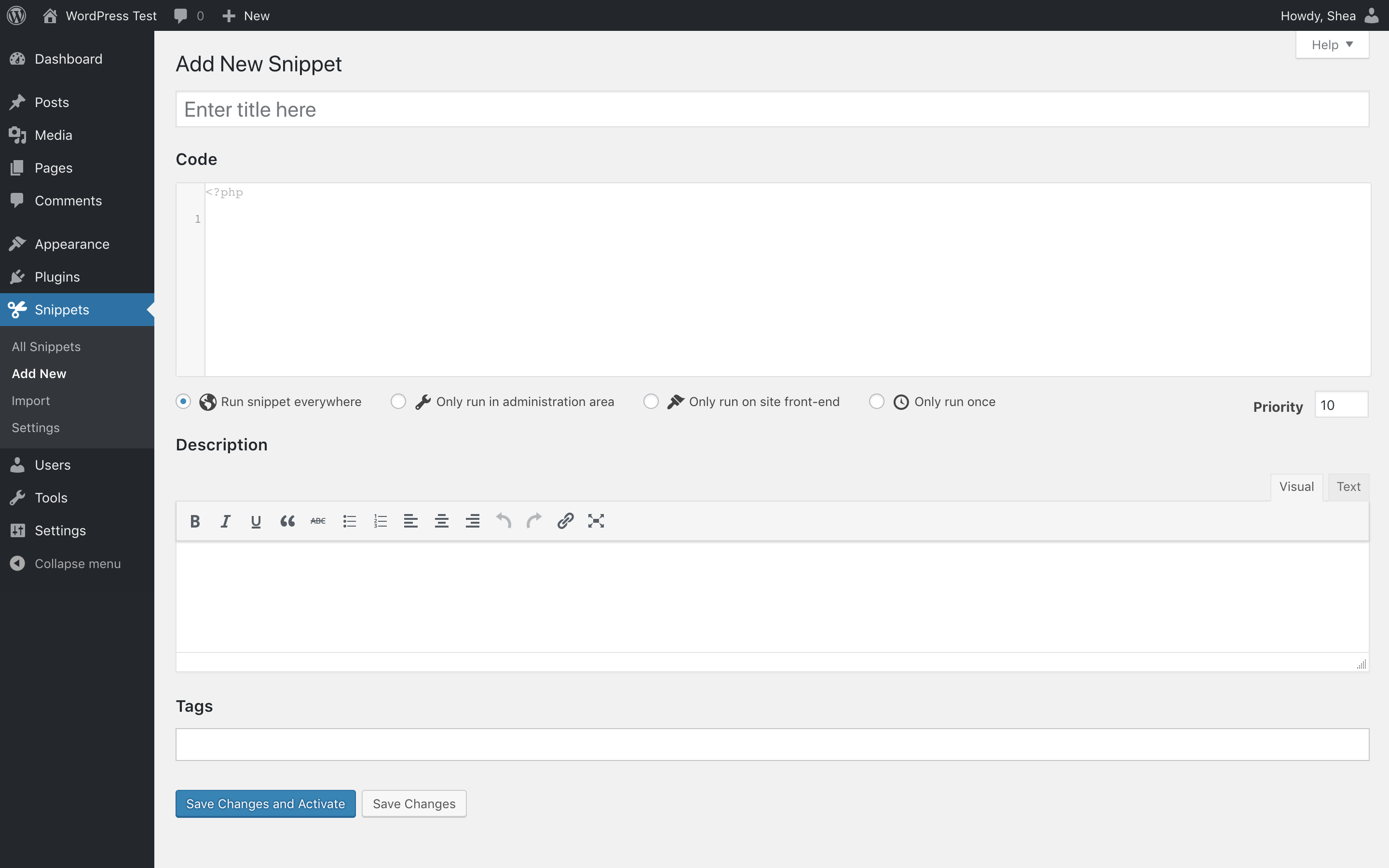


For developers
Is this your plugin? Show off the numbers.
Add a live badge to your site, docs or GitHub README. It updates on its own — no account needed.
Best Code Snippets alternatives
All code plugins →




FAQ
Code Snippets: quick answers
Straight answers, pulled from live WordPress.org data.
Live data from WordPress.org · checked Sep 27, 2026
Is Code Snippets free?
Yes. Code Snippets is free to download and use from the official WordPress.org plugin directory. The developer also sells premium add-ons or a Pro version with extra features.
Is Code Snippets safe to use in 2026?
Yes — Code Snippets is a safe, well-maintained plugin to use in 2026. It runs on 1M+ sites, is rated 4.7/5 and was last updated 4 weeks ago, and scores 92/100 on our health check.
How many websites use Code Snippets?
Code Snippets is active on 1M+ WordPress websites and has been downloaded 23,475,010 times since it launched in June 2012. It was downloaded 1,489,437 times in the last 30 days.
Does Code Snippets work with WordPress 7.1?
Yes. The developer has tested Code Snippets up to WordPress 7.1.2, the latest release. It requires WordPress 5.5 or newer.
What PHP version does Code Snippets need?
Code Snippets requires PHP 7.4 or higher. Most hosts run PHP 8.x today, so it works on any modern WordPress hosting.
When was Code Snippets last updated?
The latest version, 3.10.2, was released on September 2, 2026 (4 weeks ago).
Who makes Code Snippets?
Code Snippets is developed and maintained by Code Snippets Pro.
What are the best alternatives to Code Snippets?
The most popular alternatives to Code Snippets are WPCode (3M+ installs), Head & Footer Code (100K+ installs) and Simple Custom CSS Plugin (100K+ installs).
Powered by PageForge
Want thousands of pages that rank like these? Build them in an afternoon.
This directory runs on the same engine as PageForge. Turn any spreadsheet, CSV or API into thousands of fast, SEO-ready WordPress pages — with schema, internal links and AI-written copy baked in.
- CSV, Google Sheets & API data sources
- AI content, schema & internal links per page
- Works with Elementor, Gutenberg, Yoast & Rank Math
- Free on WordPress.org — no credit card


