



Bye Bye Passwords
Enable passwordless authentication for WordPress using WebAuthn/Passkeys. More secure, more convenient.

Solid choice
Bye Bye Passwords is a solid plugin choice in 2026, with a few things worth checking first. It runs on 10+ sites and was last updated 2 months ago, and scores 62/100 on our health check.
- Tested with the latest WordPress (7.1)
- Small user base (10+ active installs)
- Very few reviews so far
How does it stack up?
Side-by-side on installs, updates, ratings & support



Daily downloads
Download spikes usually follow a new release — each site that auto-updates counts as a download.
Rankings
Where Bye Bye Passwords stands todayWordPress.org search rankings
Live position in the plugin search, top 100| Keyword | Position |
|---|---|
| authentication | >100 |
| passkeys | #32 |
| passwordless | #82 |
| security | >100 |
| webauthn | #13 |
Version adoption
Share of active sites per release.
About Bye Bye Passwords
From the official readme · v1.4.0Description
Bye Bye Passwords brings modern passwordless authentication to WordPress using WebAuthn/Passkeys technology. Say goodbye to weak passwords and hello to secure, convenient login with biometrics, security keys, or platform authenticators.
Key Features
- Passwordless Login – Sign in using Touch ID, Face ID, Windows Hello, or security keys
- Multiple Passkeys – Register multiple devices for convenient access anywhere
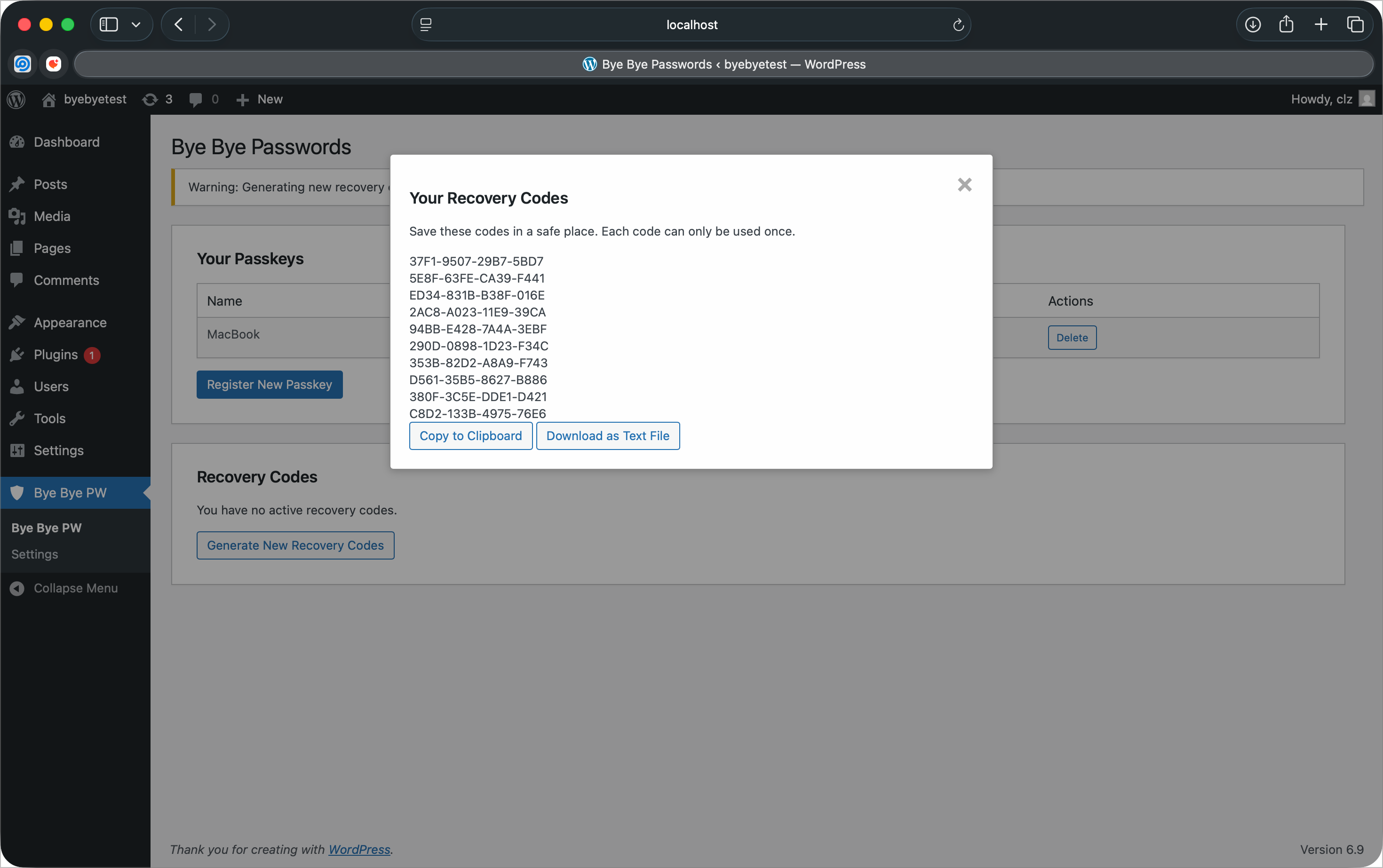
- Recovery Codes – Generate one-time backup codes for emergency access
- Enhanced Security – Eliminate password-based attacks completely
- User-Friendly – Simple setup with no technical knowledge required
- Privacy-Focused – Your authentication data stays on your server
- WordPress Integration – Seamlessly integrated into WordPress admin and login
How It Works
- Register a passkey from your WordPress admin profile
- Use your device’s built-in authentication (fingerprint, face, PIN)
- Sign in instantly without typing passwords
Requirements
- SSL/HTTPS enabled website (required for WebAuthn)
- Modern browser with WebAuthn support
- PHP 8.0 or higher
- WordPress 5.0 or higher
External Services
This plugin may connect to the FIDO Alliance Metadata Service (MDS) to download root certificates for authenticator validation.
FIDO Alliance Metadata Service
- URL: https://mds.fidoalliance.org/
- Purpose: Downloads attestation root certificates to verify the authenticity of security keys and passkey devices
- When: Only when attestation verification is enabled and the plugin needs to update its certificate store (not during normal authentication)
- Data sent: No personal or user data is transmitted – only a standard HTTP GET request
- Service provider: FIDO Alliance
- Terms of Use: https://fidoalliance.org/metadata/
- Privacy Policy: https://fidoalliance.org/privacy-policy/
No user data, credentials, or personal information is ever sent to external services. All authentication happens locally on your server.
Installation
- Upload the plugin folder to the
/wp-content/plugins/directory - Activate the plugin through the ‘Plugins’ menu in WordPress
- Navigate to “Bye Bye Passwords” in the admin menu
- Register your first passkey
- Generate recovery codes as backup
Frequently asked questions
What browsers support WebAuthn/Passkeys?
Chrome/Edge 67+, Firefox 60+, Safari 14+, and Opera 54+ all support WebAuthn.
What happens if I lose my device?
Use your recovery codes to regain access, then register a new passkey. We recommend registering multiple devices.
Is this more secure than passwords?
Yes! Passkeys are phishing-resistant, can’t be stolen in data breaches, and use cryptographic authentication.
Do I need special hardware?
No, most modern devices have built-in authenticators (Touch ID, Face ID, Windows Hello). You can also use USB security keys.
Changelog
Improves passkey setup and sign-in, enforces passwordless mode server-side, and adds safeguards against administrator lockout.
1.4.0
- Improved: Redesigned passkey, recovery-code, settings, profile, and login experiences for clearer setup and sign-in
- Security: Password sign-in is now enforced server-side when disabled
- Safety: Password sign-in automatically remains available until every administrator has a tested passkey and recovery codes
- Safety: Prevented removal of the only passkey while password sign-in is disabled
- Accessibility: Added clearer inline status and error messages, improved labels, and responsive layouts
- Compatibility: Tested with WordPress 7.1
1.3.1
- Compatibility: Tested with WordPress 7.1
1.3.0
- Compatibility: Tested with WordPress 7.0
- Dependency: Verified the bundled WordPress-compatible WebAuthn fork against the latest stable upstream release, 2.2.0
- Compliance: Hardened the WebAuthn entry point against direct access and retained compatibility with the declared WordPress baseline
- Requirements: Corrected the minimum PHP version to 8.0 to match the bundled WebAuthn library
1.2.7
- i18n: Full localization of all user-facing strings in PHP and JavaScript
- i18n: Generated POT template with 100+ translatable strings
- i18n: Added PO scaffolds for 8 languages (Spanish, French, Italian, German, Dutch, Japanese, Chinese, Korean)
1.2.6
- Security: Gate “Disable Password Login” setting behind recovery codes for all administrators
- Enhancement: Show admin recovery code status on settings page
1.2.5
- Compliance: Removed CLAUDE.md development file from plugin distribution
Screenshots




For developers
Is this your plugin? Show off the numbers.
Add a live badge to your site, docs or GitHub README. It updates on its own — no account needed.
Best Bye Bye Passwords alternatives
All authentication plugins →





FAQ
Bye Bye Passwords: quick answers
Straight answers, pulled from live WordPress.org data.
Live data from WordPress.org · checked Sep 29, 2026
Is Bye Bye Passwords free?
Yes. Bye Bye Passwords is free to download and use from the official WordPress.org plugin directory.
Is Bye Bye Passwords safe to use in 2026?
Bye Bye Passwords is a solid plugin choice in 2026, with a few things worth checking first. It runs on 10+ sites and was last updated 2 months ago, and scores 62/100 on our health check.
How many websites use Bye Bye Passwords?
Bye Bye Passwords is active on 10+ WordPress websites and has been downloaded 683 times since it launched in February 2026. It was downloaded 82 times in the last 30 days.
Does Bye Bye Passwords work with WordPress 7.1?
Yes. The developer has tested Bye Bye Passwords up to WordPress 7.1.2, the latest release. It requires WordPress 5.0 or newer.
What PHP version does Bye Bye Passwords need?
Bye Bye Passwords requires PHP 8.0 or higher. Most hosts run PHP 8.x today, so it works on any modern WordPress hosting.
When was Bye Bye Passwords last updated?
The latest version, 1.4.0, was released on August 13, 2026 (2 months ago).
Who makes Bye Bye Passwords?
Bye Bye Passwords is developed and maintained by Clayton LZ.
What are the best alternatives to Bye Bye Passwords?
The most popular alternatives to Bye Bye Passwords are Limit Login Attempts (300K+ installs), WPS Limit Login (100K+ installs) and Two Factor (100K+ installs).
Powered by PageForge
Want thousands of pages that rank like these? Build them in an afternoon.
This directory runs on the same engine as PageForge. Turn any spreadsheet, CSV or API into thousands of fast, SEO-ready WordPress pages — with schema, internal links and AI-written copy baked in.
- CSV, Google Sheets & API data sources
- AI content, schema & internal links per page
- Works with Elementor, Gutenberg, Yoast & Rank Math
- Free on WordPress.org — no credit card


