



Anchor Menu
An accessible anchor menu that highlights the active section and improves navigation on desktop and mobile devices.

Solid choice
Anchor Menu is a solid plugin choice in 2026, with a few things worth checking first. It runs on 10+ sites and was last updated 3 weeks ago, and scores 66/100 on our health check.
- Actively developed — last update 3 weeks ago
- Tested with the latest WordPress (7.1)
- Small user base (10+ active installs)
- Very few reviews so far
How does it stack up?
Side-by-side on installs, updates, ratings & support



Daily downloads
Download spikes usually follow a new release — each site that auto-updates counts as a download.
Rankings
Where Anchor Menu stands todayWordPress.org search rankings
Live position in the plugin search, top 100| Keyword | Position |
|---|---|
| accessibility | >100 |
| anchor | #79 |
| mobile menu | >100 |
| navigation | >100 |
| sticky menu | >100 |
Version adoption
Share of active sites per release.
About Anchor Menu
From the official readme · v1.0.2Description
Anchor Menu is a WordPress plugin designed for showcase websites, blogs, and long-form content pages.
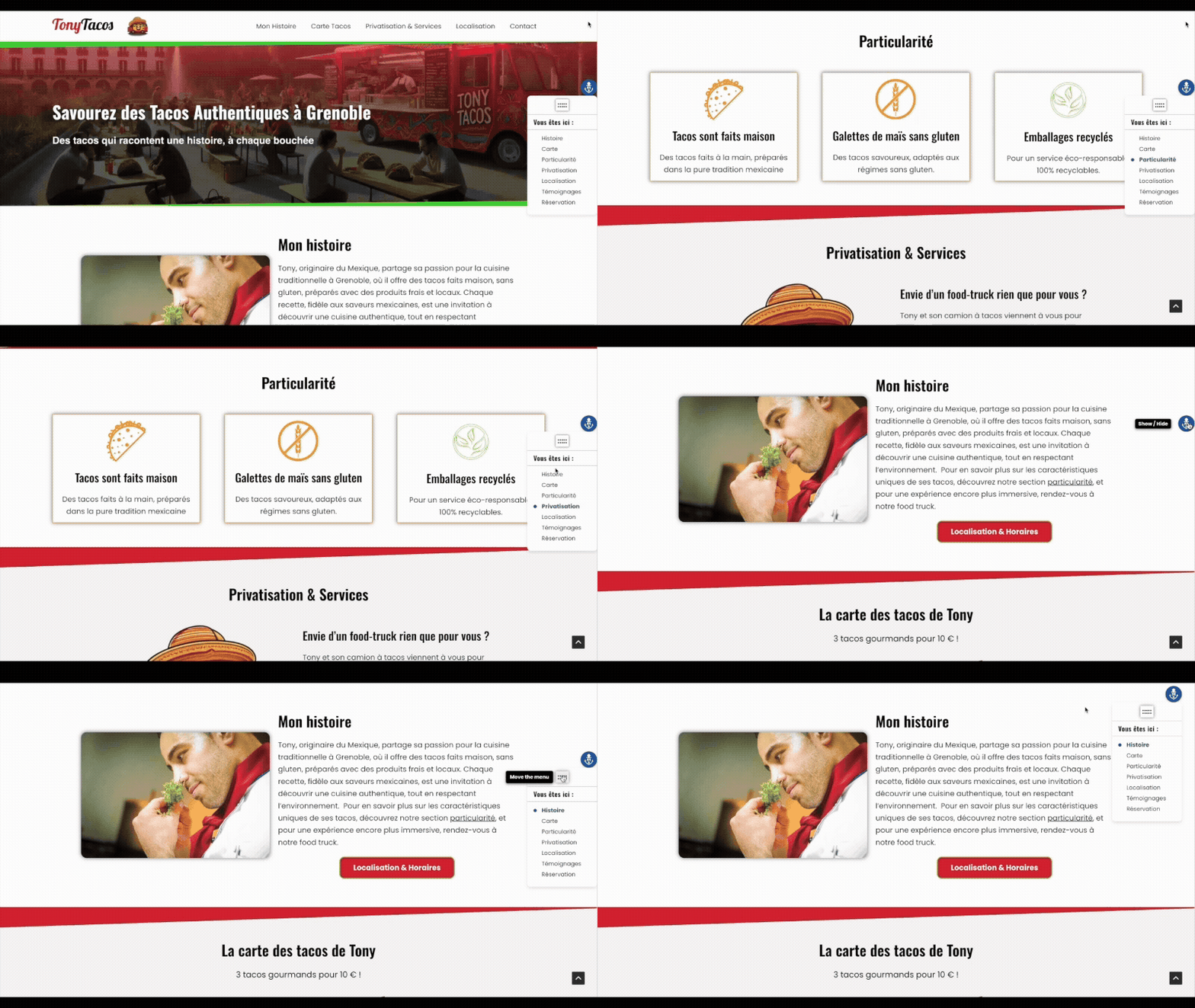
It provides an accessible anchor menu that highlights the current section and improves navigation on both desktop and mobile devices.
Current limitation: Anchor Menu is not designed for WooCommerce. Dynamic product pages are not supported.
Video Tutorials & Overview
Anchor Menu comes with video resources to help you get started quickly.
- Plugin overview and features presentation
- Step-by-step tutorials (English & French)
You can find all videos on the official YouTube channel:
https://www.youtube.com/channel/UClZTid0uXs6FxgFp5BaEryQ
Key Benefits
-
Automatic and intelligent: generates an anchor menu from defined sections.
-
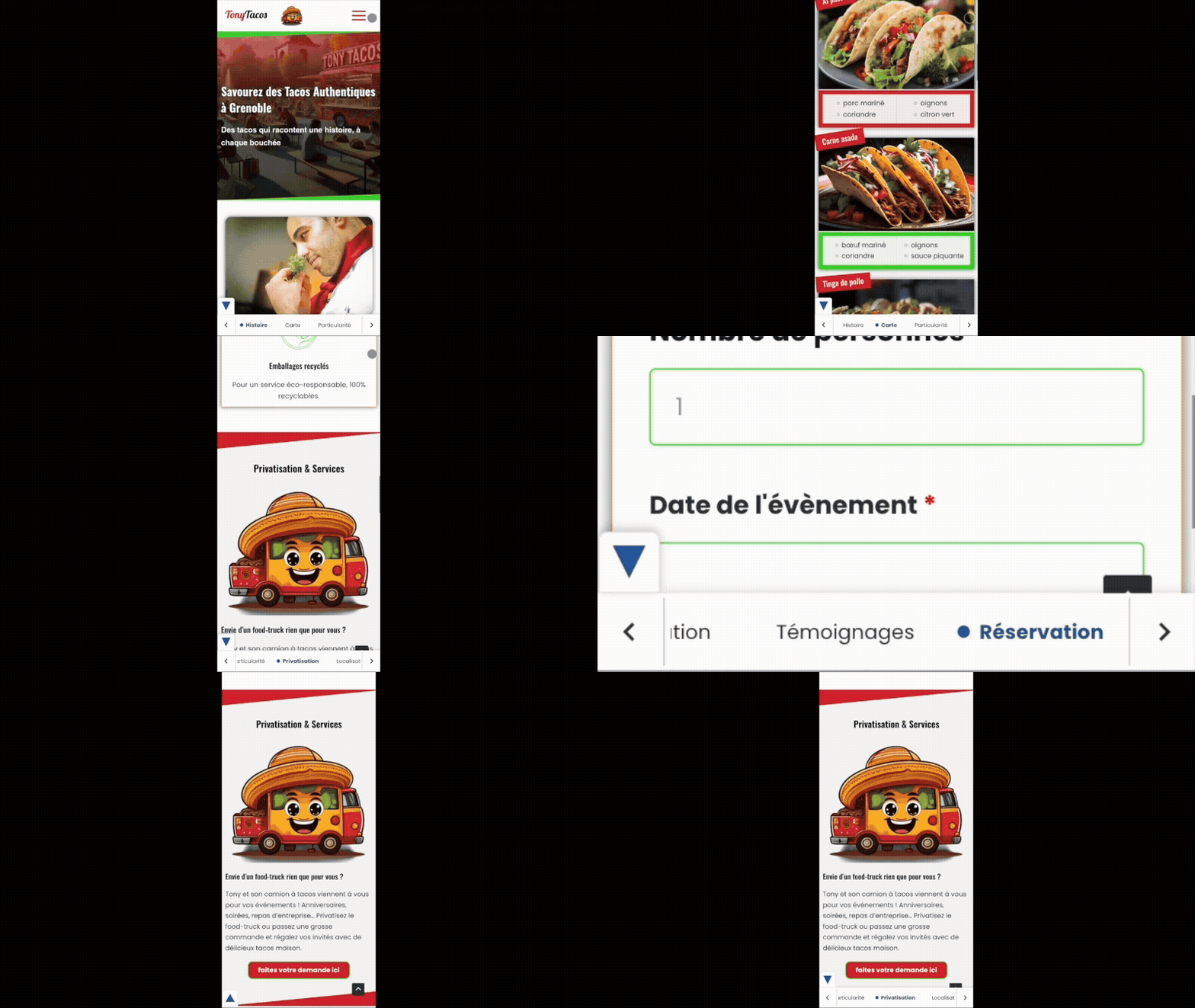
Fully responsive:
- Floating vertical menu on desktop (draggable or collapsible to show only its toggle button).
- Collapsible horizontal bar at the bottom of the screen on mobile.
-
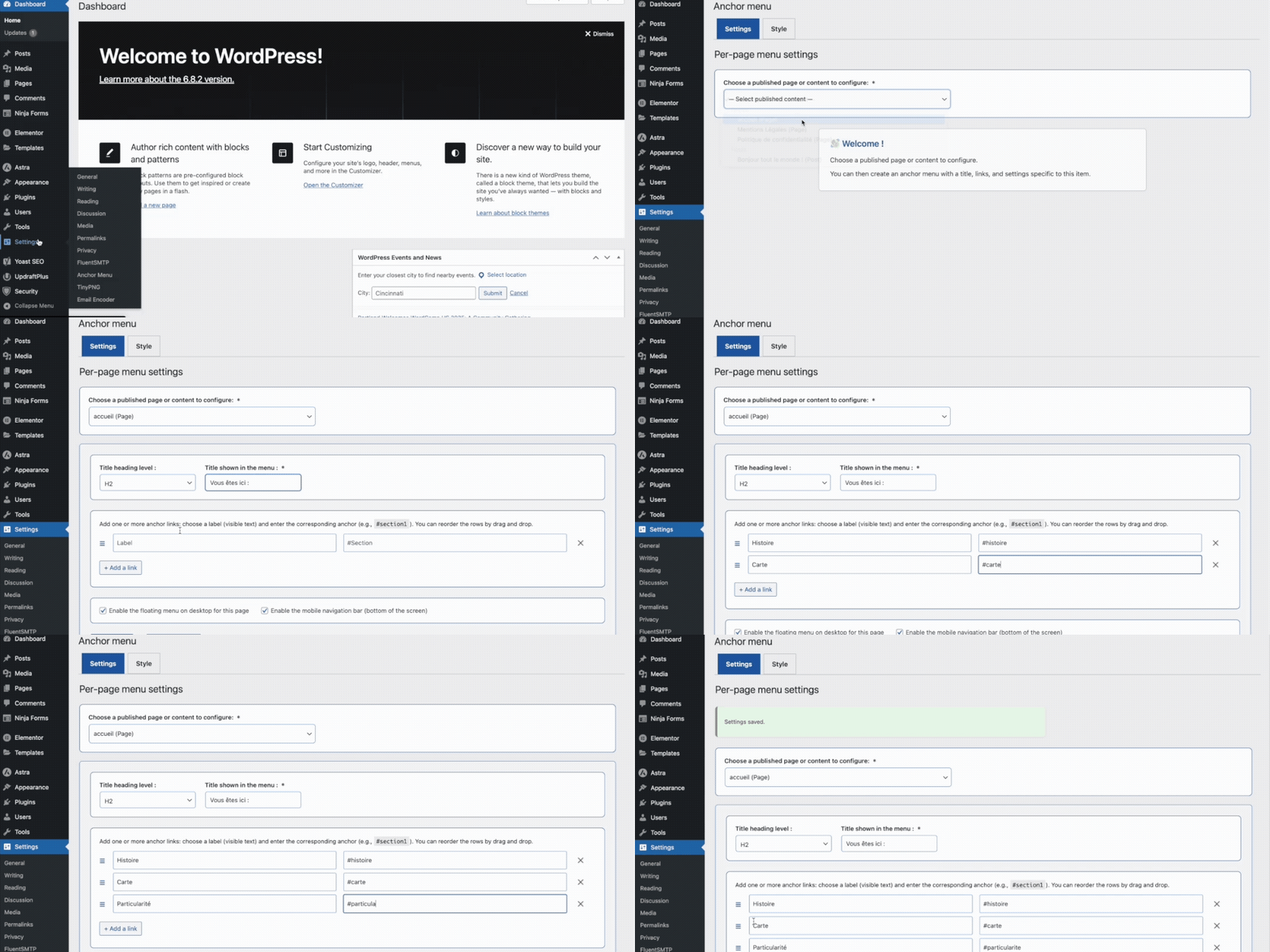
Display control: enable or hide the desktop menu and the mobile bar separately from the admin settings.
-
Visual customization: clean and readable by default, with an admin interface to customize colors, styles, and sizes.
-
Enhanced accessibility: keyboard navigation, screen reader support, optimized contrast, and built-in ARIA attributes.
-
Per-page customization: each page can have its own anchor menu tailored to its content.
-
Clarifies page structure: helps modern search engines and intelligent analysis tools better interpret your content through coherent section-based navigation.
-
SEO friendly: improves structure, internal linking, and readability for search engines.
-
Intuitive interface: fully managed from the WordPress admin, no coding required.
-
Non-intrusive: the mobile menu stays discreet and never blocks the main content.
Installation
From the WordPress admin (recommended method)
- In the WordPress dashboard, go to Plugins > Add New.
- Search for Anchor Menu.
- Click Install, then Activate.
- Go to Settings > Anchor Menu to configure your menu.
Manual installation (via .zip file)
- Download the Anchor Menu plugin archive from its page on WordPress.org.
- In the WordPress dashboard, go to Plugins > Add New > Upload Plugin.
- Select the
.zipfile, then click Install and Activate. - Go to Settings > Anchor Menu to configure your menu.
Frequently asked questions
How do I install Anchor Menu?
To install Anchor Menu: In your WordPress dashboard, go to Plugins > Add New. Search for Anchor Menu. Click Install, then Activate. Go to Settings > Anchor Menu to configure your menu.
Does Anchor Menu work with all themes?
Yes. Anchor Menu works with all WordPress themes that follow coding standards. The plugin has been successfully tested with the default Twenty Twenty-Four and Twenty Twenty-Five themes, as well as Gutenberg- and Elementor-based themes. It is compatible with most modern themes that use standard HTML headings and section tags. If you experience a compatibility issue with a specific theme, you can report it on the WordPress.org support forum.
Is Anchor Menu compatible with WooCommerce?
Current limitation: Anchor Menu is not designed for WooCommerce. Product pages use dynamic content and unpredictable IDs that are not compatible with the plugin’s anchor system. Anchor Menu is optimized for showcase websites, blogs, and standard content pages.
Does Anchor Menu work with other WordPress plugins?
Yes. Anchor Menu is compatible with most WordPress plugins. It has been successfully tested with major SEO plugins (Yoast SEO, Rank Math), caching plugins (WP Super Cache, W3 Total Cache), security plugins (Solid Security), translation plugins (TranslatePress), and form builders such as Ninja Forms. If you experience a compatibility issue with a specific plugin, you can report it on the WordPress.org support forum.
Do I need to know how to code to use Anchor Menu?
No coding skills are required. Anchor Menu is fully managed from the WordPress admin interface with a simple and intuitive setup. You only need to assign IDs to your sections or blocks, which can be done directly in the WordPress editor or in page builders like Gutenberg and Elementor.
Does Anchor Menu slow down my site?
No. Anchor Menu is lightweight and optimized. CSS and JS files are intentionally small, with no unnecessary dependencies. Inline CSS is limited to what is strictly necessary, and no heavy script runs on scroll. Performance tests (Lighthouse mobile and desktop) confirmed that the plugin does not impact core metrics (CLS, LCP).
Are the plugin files loaded on every page?
No. Scripts and styles are loaded only on pages where Anchor Menu is enabled (via shortcode or settings). This keeps your website lightweight.
Is Anchor Menu secure?
Yes. Only administrators can change the plugin settings. Anchor Menu follows WordPress security best practices: data sanitization, proper escaping, and use of the WordPress Settings API. It also removes its own data cleanly upon uninstall.
Is Anchor Menu accessible?
Yes. The plugin supports full keyboard navigation, includes ARIA roles and labels, and uses accessible color contrasts (≥ 4.5:1). The interface and the rendered menu both follow accessibility guidelines.
What happens if I uninstall Anchor Menu?
When uninstalled, Anchor Menu removes only its own data stored in the database (settings and options). No other site data is touched.
Can I contribute to translating Anchor Menu?
Yes. Anchor Menu is translation-ready and already available in multiple languages. You can contribute directly on the official platform: https://translate.wordpress.org/
How does Anchor Menu help with AI-based SEO (GEO)?
AI systems (Google AI, ChatGPT, etc.) understand pages better when the content is clearly structured into sections. Anchor Menu creates a clean table of contents with anchors and headings, making long-form content easier for AI to analyse, summarise, and recommend.
Why are long and well-structured pages important for AI?
Modern AI prefers pages that provide detailed, high-quality explanations. This kind of expert content is naturally longer, and Anchor Menu makes it easier to navigate — both for readers and for AI engines, which interpret each section more accurately.
Does Anchor Menu improve content readability for AI?
Yes. The plugin clarifies the hierarchy of your content (H1 → H2 → H3) and exposes each section through anchor links. This helps AI engines understand your topics, extract key information, and identify sub-themes more efficiently.
Is Anchor Menu useful for GEO on non-commercial websites?
Absolutely. Whether it’s a blog, documentation, a knowledge page, or an informational article, AI rewards clear content organisation. Anchor Menu enhances clarity, navigation, and perceived expertise — all important signals for modern AI-driven search.
Changelog
Compatibility update for WordPress 7.1.
1.0.2
- Tested up to WordPress 7.1.
1.0.1
- Fix: mobile bar now uses position fixed to eliminate phantom space at bottom of page.
- Fix: toggle button repositioned (left 6px when collapsed) for better tap accessibility on iPhone rounded corners.
- Tested up to WordPress 7.0.
1.0.0
- Initial release with desktop and mobile menus, per-page customization, accessibility features, and optimized loading.
Screenshots
For developers
Is this your plugin? Show off the numbers.
Add a live badge to your site, docs or GitHub README. It updates on its own — no account needed.
Best Anchor Menu alternatives
All accessibility plugins →





FAQ
Anchor Menu: quick answers
Straight answers, pulled from live WordPress.org data.
Live data from WordPress.org · checked Oct 1, 2026
Is Anchor Menu free?
Yes. Anchor Menu is free to download and use from the official WordPress.org plugin directory.
Is Anchor Menu safe to use in 2026?
Anchor Menu is a solid plugin choice in 2026, with a few things worth checking first. It runs on 10+ sites and was last updated 3 weeks ago, and scores 66/100 on our health check.
How many websites use Anchor Menu?
Anchor Menu is active on 10+ WordPress websites and has been downloaded 644 times since it launched in February 2026. It was downloaded 138 times in the last 30 days.
Does Anchor Menu work with WordPress 7.1?
Yes. The developer has tested Anchor Menu up to WordPress 7.1.2, the latest release. It requires WordPress 6.4 or newer.
What PHP version does Anchor Menu need?
Anchor Menu requires PHP 7.4 or higher. Most hosts run PHP 8.x today, so it works on any modern WordPress hosting.
When was Anchor Menu last updated?
The latest version, 1.0.2, was released on September 8, 2026 (3 weeks ago).
Who makes Anchor Menu?
Anchor Menu is developed and maintained by anchormenu.
What are the best alternatives to Anchor Menu?
The most popular alternatives to Anchor Menu are Web Accessibility (formally… (500K+ installs), Auto Image Attributes From… (100K+ installs) and Accessibility by UserWay (80K+ installs).
Powered by PageForge
Want thousands of pages that rank like these? Build them in an afternoon.
This directory runs on the same engine as PageForge. Turn any spreadsheet, CSV or API into thousands of fast, SEO-ready WordPress pages — with schema, internal links and AI-written copy baked in.
- CSV, Google Sheets & API data sources
- AI content, schema & internal links per page
- Works with Elementor, Gutenberg, Yoast & Rank Math
- Free on WordPress.org — no credit card


