



Access Defender – Advanced VPN & Proxy Blocker
Advanced VPN & proxy blocker for WordPress. 99.9% accuracy, multi-API rotation, real-time monitoring. Protect against fraud & spam.

Consider an alternative
Access Defender shows warning signs in 2026 — compare the alternatives below before installing. It runs on 50+ sites, is rated 3/5 and was last updated 12 months ago, and scores 41/100 on our health check.
- Small user base (50+ active installs)
- Very few reviews so far
- Only tested up to WordPress 6.8 (latest is 7.1)
How does it stack up?
Side-by-side on installs, updates, ratings & support



Daily downloads
Download spikes usually follow a new release — each site that auto-updates counts as a download.
Rankings
Where Access Defender stands todayWordPress.org search rankings
Live position in the plugin search, top 100| Keyword | Position |
|---|---|
| firewall | >100 |
| privacy | >100 |
| protection | >100 |
| security | >100 |
| spam | >100 |
Version adoption
Share of active sites per release.
Rating breakdown
★★★★★★★★★★ 3 from 2 reviews
About Access Defender
From the official readme · v1.1.2Description
Access Defender is the most comprehensive WordPress security plugin for blocking VPNs, proxies, and suspicious traffic. Protect your website from malicious users, spam, fraud, and unauthorized access with our advanced multi-provider detection system.
NEW in Version 1.1.0: Revolutionary multi-provider system with automatic failover, real-time monitoring, and enhanced reliability!
Quick Start Video Tutorial
Watch our step-by-step installation and configuration guide:
Key Features
Advanced VPN & Proxy Detection
- 99.9% Detection Accuracy – Industry-leading precision in identifying VPNs, proxies, and hosting providers
- Multiple Detection Methods – Comprehensive IP analysis using advanced algorithms
- Real-time Threat Assessment – Instant blocking of suspicious traffic
Multi-Provider System (NEW!)
- 4+ API Providers – Choose from free and premium services
- Smart Auto-Rotation – Automatic switching between providers when limits are reached
- Zero Downtime Protection – Seamless failover ensures continuous security
- Load Balancing – Distribute requests across multiple providers for optimal performance
Real-time Monitoring & Analytics
- Live Usage Statistics – Monitor API calls, success rates, and provider performance
- Detailed Reporting – Track blocked attempts, provider efficiency, and security metrics
- Performance Insights – Optimize your security setup with actionable data
Smart Configuration Options
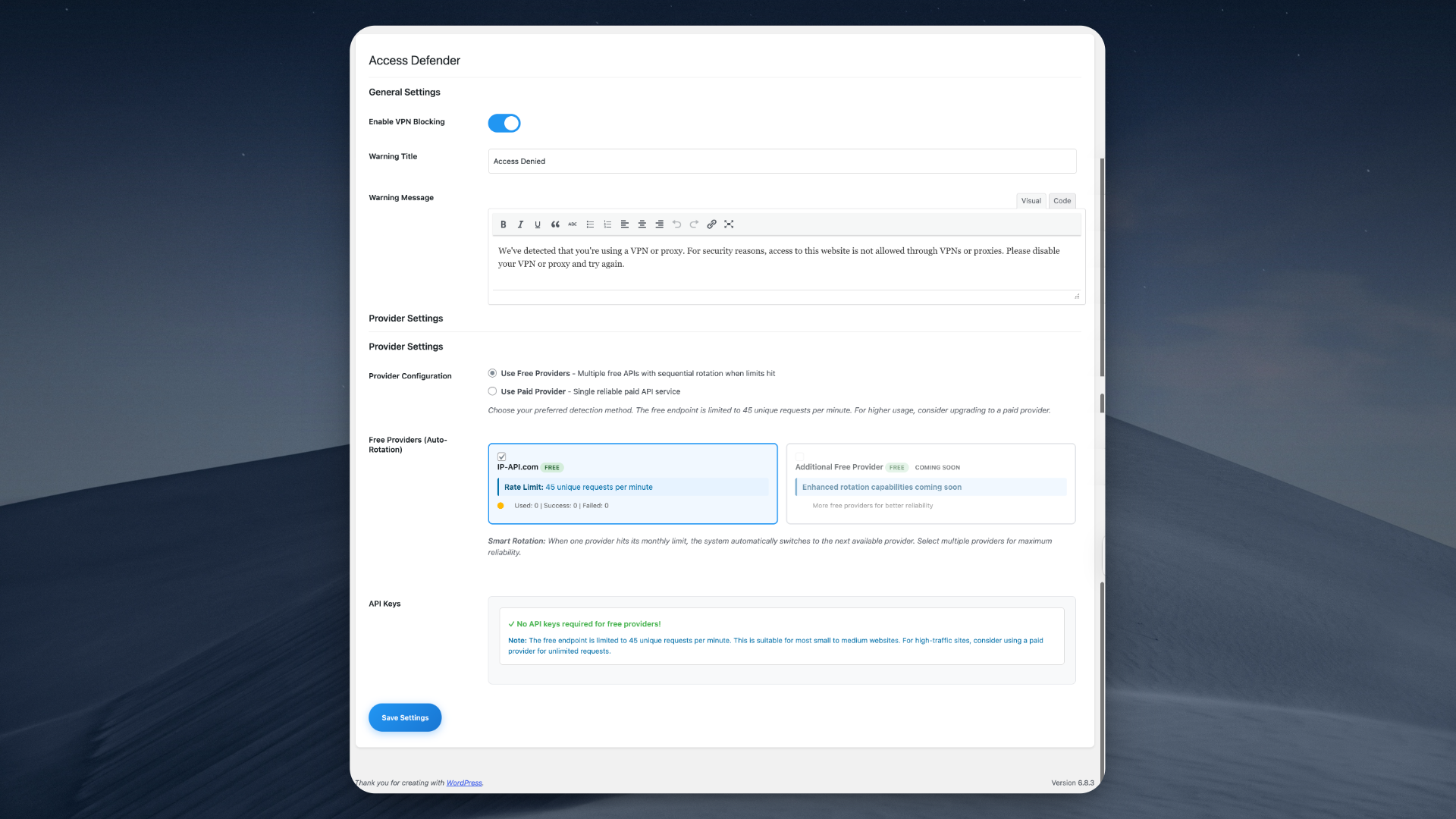
- Free Provider Auto-Rotation – Perfect for small to medium websites
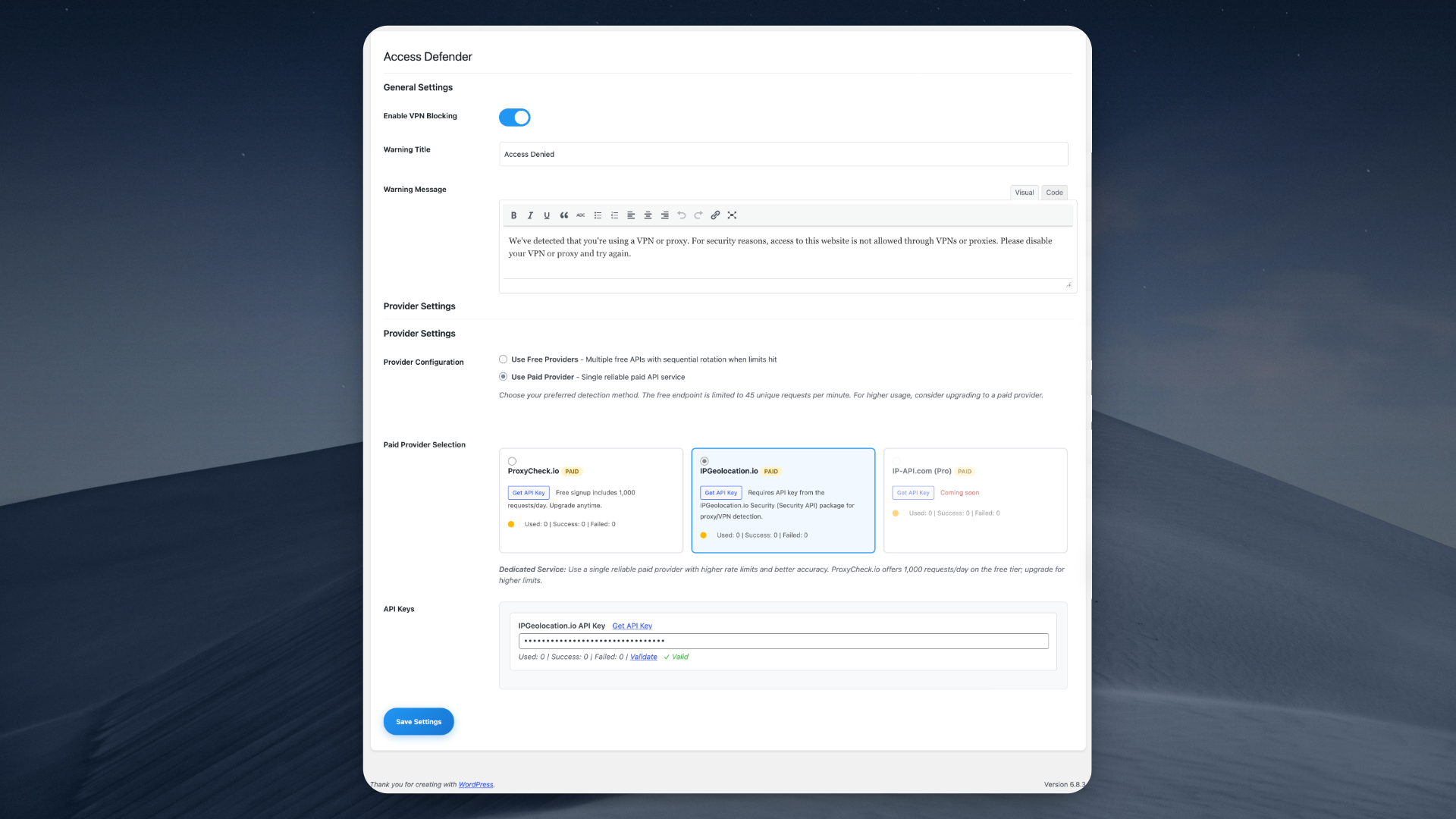
- Premium Provider Support – Enhanced reliability for high-traffic sites
- Flexible API Management – Easy switching between providers
- Custom Rate Limiting – Intelligent request management
User-Friendly Features
- One-Click Setup – Get protected in minutes
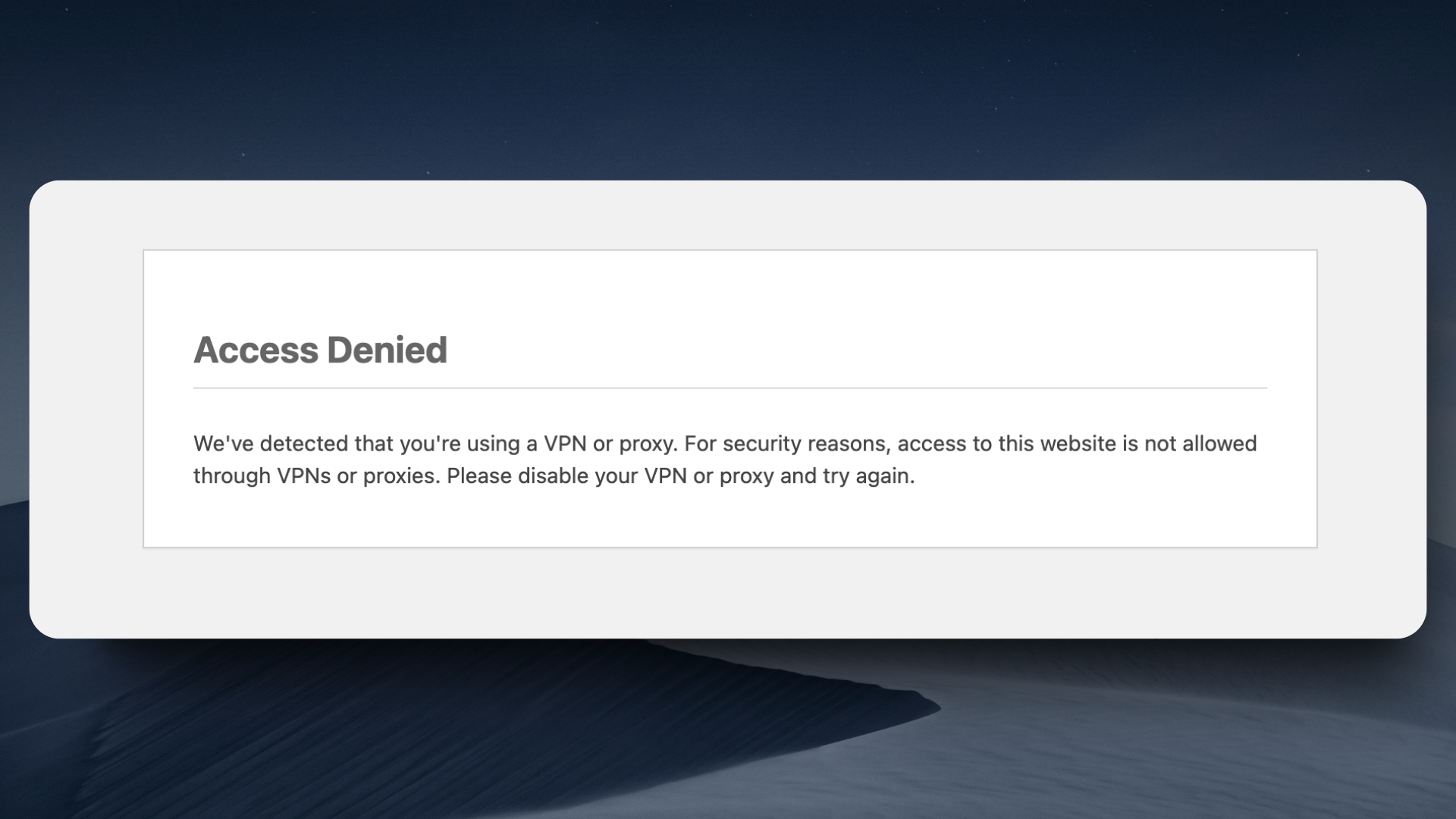
- Customizable Block Messages – Professional warning pages for blocked users
- Admin Bypass – Administrators never get blocked
- Bot-Friendly – Automatic detection and allowance of search engine crawlers
Why Choose Access Defender?
For Website Owners:
- Protect against fraud, spam, and malicious activities
- Reduce server load from suspicious traffic
- Improve website performance and user experience
- Maintain compliance with security standards
For E-commerce Sites:
- Prevent fraudulent transactions and chargebacks
- Block suspicious purchasing patterns
- Protect customer data and payment information
- Reduce cart abandonment from bot traffic
For Content Creators:
- Protect premium content from unauthorized access
- Prevent content scraping and theft
- Ensure genuine user engagement metrics
- Maintain advertising revenue integrity
Supported API Providers
Free Providers (Auto-Rotation Enabled):
- IP-API.com (Free) – 45 requests/minute, reliable detection
- Additional Free APIs – Coming soon for enhanced rotation
Premium Providers (Enhanced Performance):
- ProxyCheck.io – Professional-grade detection with 99.9% accuracy
- IPGeolocation.io – Advanced geolocation and VPN detection
- IP-API.com (Pro) – Premium tier with higher limits (Coming Soon)
Smart Provider Management:
- Sequential rotation through free providers
- Automatic failover when rate limits are reached
- Real-time provider health monitoring
- Intelligent request distribution
Perfect For
- E-commerce Websites – Prevent fraud and protect transactions
- Membership Sites – Control access to premium content
- Corporate Websites – Maintain security compliance
- News & Media Sites – Protect against content scraping
- SaaS Platforms – Prevent abuse and unauthorized access
- Any WordPress Site – Universal security enhancement
Privacy & Security
Data Collection & Processing:
Access Defender prioritizes your privacy while providing robust security. Here’s how we handle data:
API Provider Data Sharing:
When checking IP addresses, minimal data is shared with selected API providers for detection purposes only.
Supported Providers & Their Policies:
- IP-API.com – Privacy Policy
- ProxyCheck.io – Privacy Policy
- IPGeolocation.io – Privacy Policy
Data Security Measures:
- Encrypted API Communications – All provider requests use HTTPS
- No Personal Data Storage – Only IP addresses are processed temporarily
- Automatic Data Purging – Logs are cleared regularly
- Secure Key Management – API keys are encrypted in database
- WordPress Security Standards – Full compliance with WP security guidelines
Analytics & Telemetry:
- Opt-in Only – Data collection requires your explicit consent
- Anonymous Usage Data – Helps improve plugin performance
- No Personal Information – Only technical usage statistics
- Full Control – Disable anytime in settings
License & Legal
Open Source License
Access Defender is licensed under GPLv2 or later. This ensures the plugin remains free and open-source while providing you with the flexibility to use, modify, and distribute it according to your needs.
License Details:
- Free to use for personal and commercial projects
- Modify and customize according to your requirements
- Redistribute under the same license terms
- Access to complete source code
- Community-driven development and support
Important Legal Information:
This plugin provides security features but users should understand:
- No 100% Guarantee: No security measure is completely foolproof
- Third-party Dependencies: Plugin functionality depends on external API services
- Service Availability: API provider changes may affect functionality
- User Responsibility: Proper configuration and monitoring are essential
Best Practices:
- Regularly monitor plugin performance
- Keep plugin updated to latest version
- Test configuration on staging environment
- Maintain backup security measures
- Review API provider terms periodically
By using Access Defender, you acknowledge these terms and agree to use the plugin responsibly as part of a comprehensive security strategy.
Installation
Quick Start (Recommended)
-
Install from WordPress Dashboard:
- Go to Plugins > Add New
- Search for “Access Defender”
- Click Install Now → Activate
-
Configure in 2 Minutes:
- Navigate to Settings > Access Defender
- Choose your provider preference (Free Auto-Rotation or Premium)
- Customize your block message
- Save settings and you’re protected!
Manual Installation
- Download the plugin zip file
- Go to Plugins > Add New > Upload Plugin
- Upload and activate the plugin
- Follow the configuration steps above
Configuration Guide
For Free Users (Recommended Start):
- Select “Free Providers with Auto-Rotation”
- Enable multiple free APIs for maximum uptime
- Monitor usage in real-time dashboard
- Upgrade to premium when needed
For Premium Users:
- Choose your preferred Premium Provider
- Enter your API Key (get from provider’s website)
- Validate key and start advanced protection
- Monitor enhanced statistics and performance
Customization Options:
- Warning Title – Professional “Access Denied” message
- Warning Message – Explain why access was blocked
- Admin Bypass – Ensure administrators are never blocked
- Bot Detection – Allow legitimate search engine crawlers
Frequently asked questions
How accurate is the VPN/Proxy detection?
Access Defender achieves 99.9% accuracy by using multiple detection methods and premium API providers. Our multi-provider system ensures the highest possible detection rates while minimizing false positives.
What’s the difference between free and premium providers?
Free Providers: Perfect for small-medium sites, auto-rotation prevents downtime, 45+ requests/minute combined Premium Providers: Higher limits (1000+ requests/minute), faster response times, 99.9% uptime, advanced detection algorithms
How does auto-rotation work?
Our smart system uses free providers sequentially. When one hits its rate limit, it automatically switches to the next available provider. This ensures zero downtime and continuous protection.
Can I use multiple premium providers?
Currently, you can select one premium provider at a time, but you can easily switch between them. We recommend choosing the provider that best fits your traffic volume and budget.
Can I monitor the plugin’s performance?
Yes! Access Defender includes a real-time dashboard showing: – API usage statistics – Success/failure rates – Provider performance metrics – Blocked attempt logs – Monthly usage tracking
Will this affect my website’s performance?
No! Access Defender is optimized for speed: – Lightweight code (< 1MB) – Asynchronous API calls – Smart caching mechanisms – Minimal server resource usage
Will search engines be blocked?
Never! Access Defender automatically detects and allows legitimate search engine bots (Google, Bing, Yahoo, etc.) ensuring your SEO remains unaffected.
What if I need help with setup?
We provide comprehensive support: – Detailed documentation – Video tutorials – Email support – Community forums
Changelog
Major update with multiple API providers and auto-rotation! Your existing settings will be automatically migrated. New features include real-time dashboard, enhanced detection accuracy, and smart provider management.
1.1.2
- Improved: Enhanced stability and performance optimizations
- Fixed: Minor bug fixes and improvements
- Updated: Code quality and documentation improvements
1.1.1
- Fixed: VPN blocking setting not saving when disabled
1.1.0
- Added: Multiple API provider support (1 free + 2 premium providers)
- Added: Smart auto-rotation system for free providers
- Added: Real-time usage dashboard and statistics
- Added: Enhanced provider management system
- Added: Improved error handling and logging
- Added: Better admin interface with provider selection
- Improved: Detection accuracy and performance
- Improved: Code architecture and maintainability
- Fixed: Various minor bugs and edge cases
- Breaking: Settings structure updated (automatic migration included)
1.0.2
- Fixed: Compatibility with WordPress 6.4
- Improved: Error handling for API timeouts
- Updated: Security enhancements
1.0.1
- Fixed: Minor CSS styling issues
- Improved: Admin interface responsiveness
- Added: Better error messages for configuration
1.0.0
- Initial release
- Basic VPN/Proxy detection using single API
- Simple block message customization
- Admin bypass functionality
Screenshots
For developers
Is this your plugin? Show off the numbers.
Add a live badge to your site, docs or GitHub README. It updates on its own — no account needed.
Best Access Defender alternatives
All firewall plugins →





FAQ
Access Defender: quick answers
Straight answers, pulled from live WordPress.org data.
Live data from WordPress.org · checked Sep 30, 2026
Is Access Defender free?
Yes. Access Defender is free to download and use from the official WordPress.org plugin directory.
Is Access Defender safe to use in 2026?
Access Defender shows warning signs in 2026 — compare the alternatives below before installing. It runs on 50+ sites, is rated 3/5 and was last updated 12 months ago, and scores 41/100 on our health check.
How many websites use Access Defender?
Access Defender is active on 50+ WordPress websites and has been downloaded 2,233 times since it launched in October 2024. It was downloaded 94 times in the last 30 days.
Does Access Defender work with WordPress 7.1?
Access Defender is officially tested up to WordPress 6.8.10, while the latest release is 7.1.2. It may still work, but try it on a staging site first.
What PHP version does Access Defender need?
Access Defender requires PHP 7.4 or higher. Most hosts run PHP 8.x today, so it works on any modern WordPress hosting.
When was Access Defender last updated?
The latest version, 1.1.2, was released on October 2, 2025 (12 months ago).
Who makes Access Defender?
Access Defender is developed and maintained by Huzaifa Al Mesbah.
What are the best alternatives to Access Defender?
The most popular alternatives to Access Defender are Wordfence Security (5M+ installs), Limit Login Attempts Securi… (1M+ installs) and Security Optimizer (1M+ installs).
Powered by PageForge
Want thousands of pages that rank like these? Build them in an afternoon.
This directory runs on the same engine as PageForge. Turn any spreadsheet, CSV or API into thousands of fast, SEO-ready WordPress pages — with schema, internal links and AI-written copy baked in.
- CSV, Google Sheets & API data sources
- AI content, schema & internal links per page
- Works with Elementor, Gutenberg, Yoast & Rank Math
- Free on WordPress.org — no credit card


