



Yubikey
Enhanced login security for WordPress by requiring the presentation of a One Time Password (OTP) from a registered Yubikey

Consider an alternative
Yubikey shows warning signs in 2026 — compare the alternatives below before installing. It runs on 40+ sites, is rated 5/5 and was last updated 1 year ago, and scores 40/100 on our health check.
- Small user base (40+ active installs)
- Very few reviews so far
- No update in over a year
- Only tested up to WordPress 6.8 (latest is 7.1)
How does it stack up?
Side-by-side on installs, updates, ratings & support



Daily downloads
Download spikes usually follow a new release — each site that auto-updates counts as a download.
Rankings
Where Yubikey stands todayWordPress.org search rankings
Live position in the plugin search, top 100| Keyword | Position |
|---|---|
| login | >100 |
| MFA | #12 |
| otp | #99 |
| security | >100 |
| yubikey | #2 |
Version adoption
Share of active sites per release.
Rating breakdown
★★★★★★★★★★ 5 from 1 reviews
About Yubikey
From the official readme · v1.0.1Description
This plugin dramatically enhances the security of your WordPress website by adding Multi Factor Authentication (MFA) in the form of One Time Passwords (OTP)
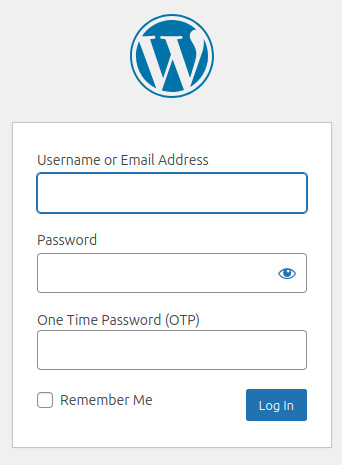
using Yubikey USB Tokens. In addition to providing your username and password to login, this plugin requests an OTP code
generated by a Yubikey, validates this via an API and only grants access if this check passes. The requirement to use an OTP can be set on a user by user
basis and there is also a feature to require users above a certain privilege level to always use OTP.
External services
This plugin connects to an API to validate the OTP tokens generated by your security key. This is required because storing the private keys
on the same web server as the site you wish to protect would be a security risk.
By default Yubico’s own validation server is employed, although you may setup your own server and use this instead
The default Yubico API only collects the one time password (OTP) data as provided by your security key when you login. The service validates this
and then stores this token as “used” so it may not be replayed as part of an attack. It does not collect any other data (such as what URL is being
authenticated using the key etc.)
This service is provided by “Yubico AB”: Privacy Policy, Terms of Use
Installation
- Buy a Yubikey if you do not already have one that supports OTP
- If you want to use Yubico’s cloud validation server, Create a Yubico ID & API Key
- Unzip plugin into your /wp-content/plugins/ directory.
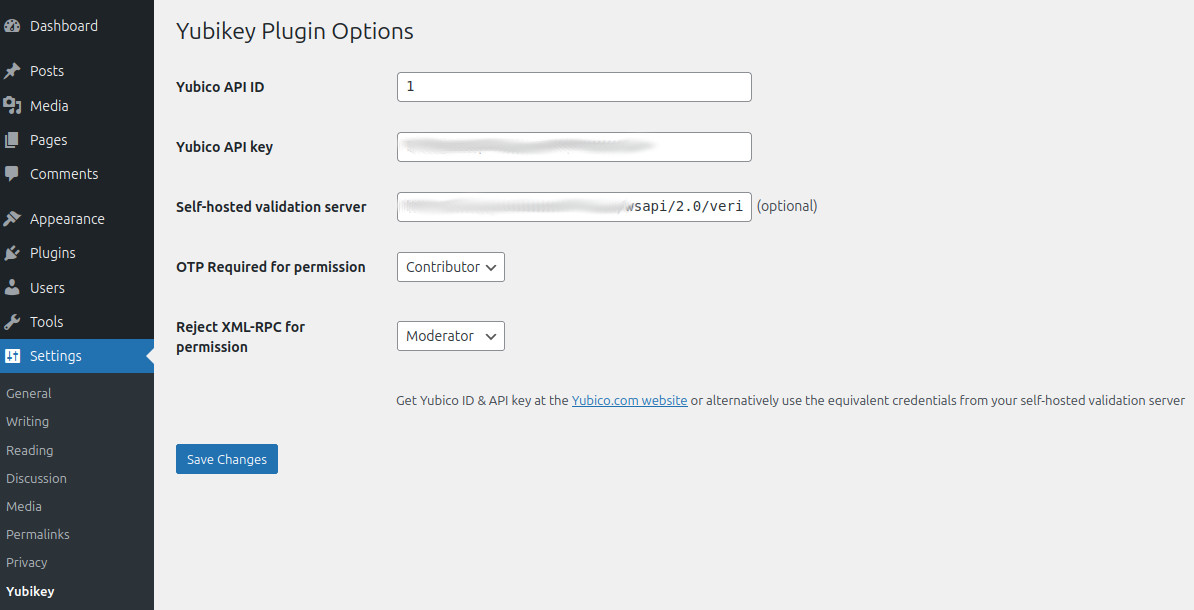
- Enter Yubico ID & API key on the Settings -> Yubikey options page
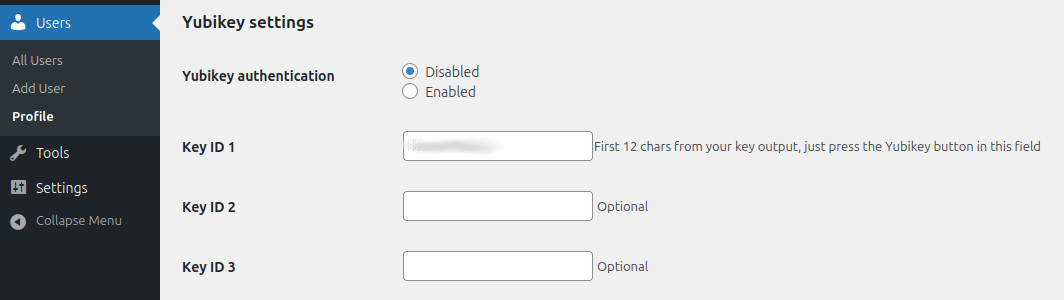
- Enter Key ID on the Users -> Profile and Personal options page. The Key ID is the first 12 characters produced when your Yubikey
generates an OTP – these remain constant and are used to identify your key with the validation server
Frequently asked questions
Where can I learn more about how Yubikey OTP works?
Please visit the Yubico OTP Webpage
How much does the Yubikey cost?
There are a variety of keys available, but the cheapest key that will work with the OTP model currently retails at $50. You can find information on this key by visiting the associated Yubico Product Page
Can I use my own validation server?
While setting up such a server is beyond the scope of this FAQ, yes you can. Simply put the URL of your validation server in the “Private Validation Server API URL” field on the Settings -> Yubikey adin page. Remember to update the ID and API Key fields to a pair that is supported by your server.
Does the plugin force OTP use by all users?
No, unless you set the “Profile from which OTP is mandatory” setting, in which case users with this permission or above will need an OTP to login. If you enable this feature it is critical that all users on your site who hold this permission profile or above have already setup OTP in their profile, otherwise they will be locked out of the site! All other users will only require an OTP if they set one up in their user profile.
What is the “Allow XML-RPC login below profile” setting for?
When a user enables OTP in their profile, they will be unable to login to WordPress using the XML-RPC API (most commonly known as the method by which the WordPress smartphone app accesses WordPress sites). If you enable this setting, users below this permission level will be allowed to login via XML-RPC (the WordPress app) without use of an OTP (the app does not support use of OTP or supplemental login fields).
I enabled OTP on my profile and now I’m locked out of the site, can I get back in?
Of course; just rename the yubikey plugin directory in wp-content/plugins/ and the plugin will automatically be disbaled. With the plugin disabled you will be able to login with just your plain username and password.
Changelog
1.0.1
- Added restriction so plugin file cannot be accessed directly
- Added a description in the readme file that explains the use of the external Yubico validation service
1.0
- Forked from “yubikey-plugin” by Henrik Schack
- Updated Yubikey API support to version 2.0
** Inclusion of nonce field
** Upgrading to HTTPS
** Enabled support for hash validation of the request as well as the response for greater security - Added support for self-hosted validation server
- Configurable “minimum permission” that can bypass use of OTP, for example, if you’re an admin you must use OTP, a subscriber need not
- Optional restriction on ability of users above a certain access level from accessing the XML-RPC API
- Ensure that OTP requirement is bypassed when logging in via the XML-RPC API
- POT file updated with changed language strings (bundled translations from fork remain but will require updating)
- Ensured plugin passes all requirements of the WordPress Plugin Check (PCP)
Screenshots
For developers
Is this your plugin? Show off the numbers.
Add a live badge to your site, docs or GitHub README. It updates on its own — no account needed.
Best Yubikey alternatives
All login plugins →





FAQ
Yubikey: quick answers
Straight answers, pulled from live WordPress.org data.
Live data from WordPress.org · checked Oct 14, 2026
Is Yubikey free?
Yes. Yubikey is free to download and use from the official WordPress.org plugin directory.
Is Yubikey safe to use in 2026?
Yubikey shows warning signs in 2026 — compare the alternatives below before installing. It runs on 40+ sites, is rated 5/5 and was last updated 1 year ago, and scores 40/100 on our health check.
How many websites use Yubikey?
Yubikey is active on 40+ WordPress websites and has been downloaded 1,358 times since it launched in May 2008. It was downloaded 87 times in the last 30 days.
Does Yubikey work with WordPress 7.1?
Yubikey is officially tested up to WordPress 6.8.11, while the latest release is 7.1.3. It may still work, but try it on a staging site first.
When was Yubikey last updated?
The latest version, 1.0.1, was released on May 9, 2025 (1 year ago).
Who makes Yubikey?
Yubikey is developed and maintained by Kieran O'Shea.
What are the best alternatives to Yubikey?
The most popular alternatives to Yubikey are WPS Hide Login (2M+ installs), Loginizer (1M+ installs) and Security Optimizer (1M+ installs).
Powered by PageForge
Want thousands of pages that rank like these? Build them in an afternoon.
This directory runs on the same engine as PageForge. Turn any spreadsheet, CSV or API into thousands of fast, SEO-ready WordPress pages — with schema, internal links and AI-written copy baked in.
- CSV, Google Sheets & API data sources
- AI content, schema & internal links per page
- Works with Elementor, Gutenberg, Yoast & Rank Math
- Free on WordPress.org — no credit card


