



WPS Hide Login
Change wp-login.php to anything you want.

Safe pick
Yes — WPS Hide Login is a safe, well-maintained plugin to use in 2026. It runs on 2M+ sites, is rated 4.8/5 and was last updated 3 days ago, and scores 83/100 on our health check.
- One of the most-used plugins on the web — 2M+ active sites
- Loved by users — 4.8/5 from 2,113 reviews
- Actively developed — last update 3 days ago
- Tested with the latest WordPress (7.1)
- Momentum — downloads up 218.4% vs the previous 30 days
How does it stack up?
Side-by-side on installs, updates, ratings & support



Daily downloads
Download spikes usually follow a new release — each site that auto-updates counts as a download.
Rankings
Where WPS Hide Login stands todayWordPress.org search rankings
Live position in the plugin search, top 100| Keyword | Position |
|---|---|
| custom login url | #2 |
| login | #3 |
| rename | #12 |
| wp login | #2 |
| wp-login.php | #1 |
Version adoption
Share of active sites per release.
Rating breakdown
★★★★★★★★★★ 4.8 from 2,113 reviews
About WPS Hide Login
From the official readme · v1.9.20Description
English
WPS Hide Login is a very light plugin that lets you easily and safely change the url of the login form page to anything you want. It doesn’t literally rename or change files in core, nor does it add rewrite rules. It simply intercepts page requests and works on any WordPress website. The wp-admin directory and wp-login.php page become inaccessible, so you should bookmark or remember the url. Deactivating this plugin brings your site back exactly to the state it was before.
This plugin is kindly proposed by WPServeur the specialized WordPress web host.
Discover also our other free extensions:
– WPS Limit Login to block brute force attacks.
– WPS Bidouille to optimize your WordPress and get more info.
– WPS Cleaner to clean your WordPress site.
This plugin is only maintained, which means we do not guarantee free support. Consider reporting a problem and be patient.
Français
WPS Hide Login est un plugin très léger qui vous permet de changer facilement et en toute sécurité l’url de la page de formulaire de connexion. Il ne renomme pas littéralement ou ne modifie pas les fichiers dans le noyau, ni n’ajoute des règles de réécriture. Il intercepte simplement les demandes de pages et fonctionne sur n’importe quel site WordPress. Le répertoire wp-admin et la page wp-login.php deviennent inaccessibles, vous devez donc ajouter un signet ou vous souvenir de l’URL. Désactiver ce plugin ramène votre site exactement à l’état dans lequel il était auparavant.
Ce plugin vous est gentiment proposé par WPServeur l’hébergeur spécialisé WordPress.
Plus d’infos sur son utilisation : https://wpformation.com/wps-hide-login-url-connexion-wordpress/
Découvrez également nos autres extensions gratuites :
– WPS Limit Login pour bloquer les attaques par force brute.
– WPS Bidouille pour optimiser votre WordPress et faire le plein d’infos.
– WPS Cleaner pour nettoyer votre site WordPress.
Ce plugin est seulement maintenu, ce qui signifie que nous ne garantissons pas un support gratuit. Envisagez de signaler un problème et soyez patient.
Compatibility
English
Requires WordPress 4.1 or higher. All login related things such as the registration form, lost password form, login widget and expired sessions just keep working.
It’s also compatible with any plugin that hooks in the login form, including:
- BuddyPress,
- bbPress,
- Jetpack,
- WPS Limit Login,
- and User Switching.
Obviously it doesn’t work with plugins or themes that hardcoded wp-login.php.
Works with multisite, with subdomains and subfolders. Activating it for a network allows you to set a networkwide default. Individual sites can still rename their login page to something else.
If you’re using a page caching plugin other than WP Rocket, you should add the slug of the new login url to the list of pages not to cache. WP Rocket is already fully compatible with the plugin.
Français
Nécessite WordPress 4.1 ou supérieur. Toutes les choses liées à la connexion telles que le formulaire d’inscription, le formulaire de mot de passe perdu, le widget de connexion et les sessions expirées continuent de fonctionner.
Il est également compatible avec tout plugin qui se connecte au formulaire de connexion, notamment:
- BuddyPress,
- bbPress,
- Jetpack,
- WPS Limit Login,
- and User Switching.
Évidemment, cela ne fonctionne pas avec les plugins ou les thèmes hardcoded wp-login.php.
Fonctionne en multisite, avec sous-domaines ou sous dossiers. L’activer pour un réseau vous permet de définir une valeur par défaut pour l’ensemble du réseau. Les sites individuels peuvent toujours renommer leur page de connexion pour autre chose.
Si vous utilisez un plugin de mise en cache de pages autre que WP Rocket, vous devez ajouter le slug de la nouvelle URL de connexion à la liste des pages à ne pas mettre en cache. WP Rocket est déjà entièrement compatible avec le plugin.
Installation
English
- Go to Plugins › Add New.
- Search for WPS Hide Login.
- Look for this plugin, download and activate it.
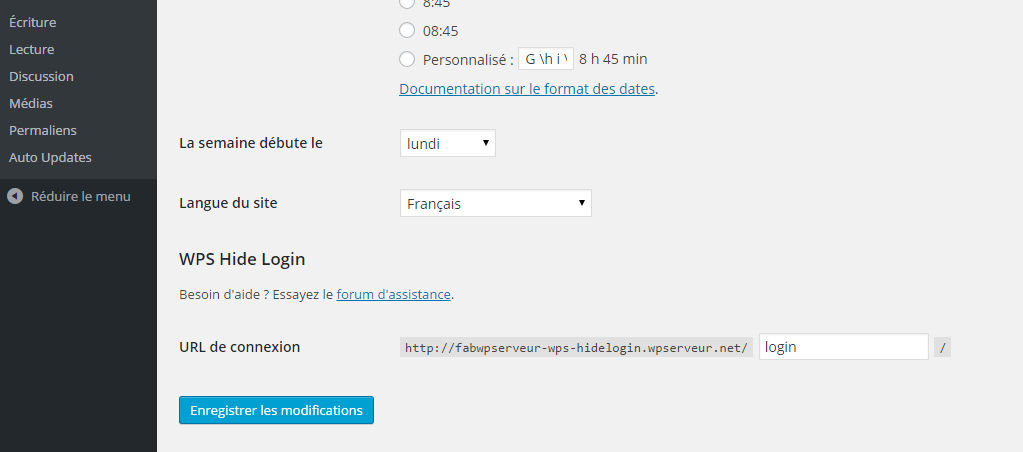
- The page will redirect you to the settings. Change your login url there.
- You can change this option any time you want, just go back to Settings › WPS Hide Login.
Français
- Aller dans Extensions › Ajouter.
- Rechercher WPS Hide Login.
- Recherchez ce plugin, téléchargez-le et activez-le.
- La page vous redirigera vers les paramètres. Changez votre URL de connexion.
- Vous pouvez changer cette option quand vous le souhaitez, il vous suffit de retourner dans Paramètres > WPS Hide Login.
Changelog
1.9.20
- Fix security (Thanks Lafin Miku)
- Tested up to 7.2
1.9.19
- Tested up to 7.1
1.9.18
- Tested up to 6.9
- Fix early translation loading (Thanks @mondalaci)
1.9.17.2
- Tested up to 6.8
1.9.17.1
- Fix link dashboard in admin network > sites
1.9.17
- Tested up to 6.6
- Fix link dashboard in admin network > sites
Screenshots

For developers
Is this your plugin? Show off the numbers.
Add a live badge to your site, docs or GitHub README. It updates on its own — no account needed.
Best WPS Hide Login alternatives
All custom login url plugins →





FAQ
WPS Hide Login: quick answers
Straight answers, pulled from live WordPress.org data.
Live data from WordPress.org · checked Nov 16, 2026
Is WPS Hide Login free?
Yes. WPS Hide Login is free to download and use from the official WordPress.org plugin directory.
Is WPS Hide Login safe to use in 2026?
Yes — WPS Hide Login is a safe, well-maintained plugin to use in 2026. It runs on 2M+ sites, is rated 4.8/5 and was last updated 3 days ago, and scores 83/100 on our health check.
How many websites use WPS Hide Login?
WPS Hide Login is active on 2M+ WordPress websites and has been downloaded 33,589,946 times since it launched in April 2015. It was downloaded 840,269 times in the last 30 days.
Does WPS Hide Login work with WordPress 7.1?
Yes. The developer has tested WPS Hide Login up to WordPress 7.2, the latest release. It requires WordPress 4.1 or newer.
What PHP version does WPS Hide Login need?
WPS Hide Login requires PHP 7.0 or higher. Most hosts run PHP 8.x today, so it works on any modern WordPress hosting.
When was WPS Hide Login last updated?
The latest version, 1.9.20, was released on November 12, 2026 (3 days ago).
Who makes WPS Hide Login?
WPS Hide Login is developed and maintained by Remy Perona.
What are the best alternatives to WPS Hide Login?
The most popular alternatives to WPS Hide Login are Rename wp-admin login (9K+ installs), Login Page Styler (2K+ installs) and Custom Login URL (1K+ installs).
Powered by PageForge
Want thousands of pages that rank like these? Build them in an afternoon.
This directory runs on the same engine as PageForge. Turn any spreadsheet, CSV or API into thousands of fast, SEO-ready WordPress pages — with schema, internal links and AI-written copy baked in.
- CSV, Google Sheets & API data sources
- AI content, schema & internal links per page
- Works with Elementor, Gutenberg, Yoast & Rank Math
- Free on WordPress.org — no credit card


