


WP Telegram Comments
Add comments to posts/pages on your WordPress website by using Telegram Comments Widget.

Use with caution
WP Telegram Comments works, but test it on a staging site before relying on it in 2026. It runs on 100+ sites, is rated 4.7/5 and was last updated 10 months ago, and scores 51/100 on our health check.
- Small user base (100+ active installs)
- Only tested up to WordPress 6.9 (latest is 7.1)
How does it stack up?
Side-by-side on installs, updates, ratings & support
![Disable Comments – Remove Comments & Stop Spam [Multi-Site Support]](https://ps.w.org/disable-comments/assets/icon-256x256.png?rev=2509854)


Daily downloads
Download spikes usually follow a new release — each site that auto-updates counts as a download.
Rankings
Where WP Telegram Comments stands todayWordPress.org search rankings
Live position in the plugin search, top 100| Keyword | Position |
|---|---|
| comments | #73 |
| discuss | #23 |
| social | >100 |
| telegram | #28 |
| widget | >100 |
Version adoption
Share of active sites per release.
Rating breakdown
★★★★★★★★★★ 4.7 from 10 reviews
About WP Telegram Comments
From the official readme · v1.2.8Description
Comments on WordPress posts not only fill your database tables, rather they also make it difficult to moderate efficiently. Telegram comments removes this drawback because the comments are stored on Telegram servers and every comment is from an authenticated Telegram user.
Why Telegram Comments?
- ✅ It saves you database memory
- ✅ Comments are from authenticated Telegram Users
- ❌ No place for spam bots
Features
- ⚡️ Ultra lightweight comments widget
- 🛒 Supports WooCommerce products and other Custom Post Types
- 🛂 You can exclude specific posts/pages for comments
- 🔔 Users can subscribe to comments and get the notifications on Telegram
- 👏 Comments can have Like 👍 and Dislike 👎 Feedback
- 📸 Comments support multimedia attachments
- ⤴️ Users can reply to comments intuitively
- ✏️ Comments can be edited or deleted anytime
Excellent Support
Join the Chat
We have a public group on Telegram to provide help setting up the plugin, discuss issues, features, translations etc. Join @WPTelegramChat
For rules, see the pinned message. No spam please.
Get in touch
- Website wpsocio.com
- Telegram @WPTelegram
- Facebook @WPTelegram
- Twitter @WPTelegram
Contribution
Development takes place in our Github monorepo, and all contributions welcome.
Installation
Automatic installation
Automatic installation is the easiest way — WordPress will handle the file transfer, and you won’t need to leave your web browser. To do an automatic install of the plugin:
- Log in to your WordPress dashboard
- Navigate to the Plugins menu, and click “Add New”
- In the search field type “wptelegram-comments” and hit Enter
- Locate the plugin in the list of search results
- Click on “Install Now” and wait for the installation to complete
- Click on “Activate”
Manual installation
Manual installation method requires downloading the plugin and uploading it to your web server via your favorite FTP application. The official WordPress documentation contains instructions on how to do this here.
Updating
Automatic updates should work smoothly, but we still recommend you back up your site.
Changelog
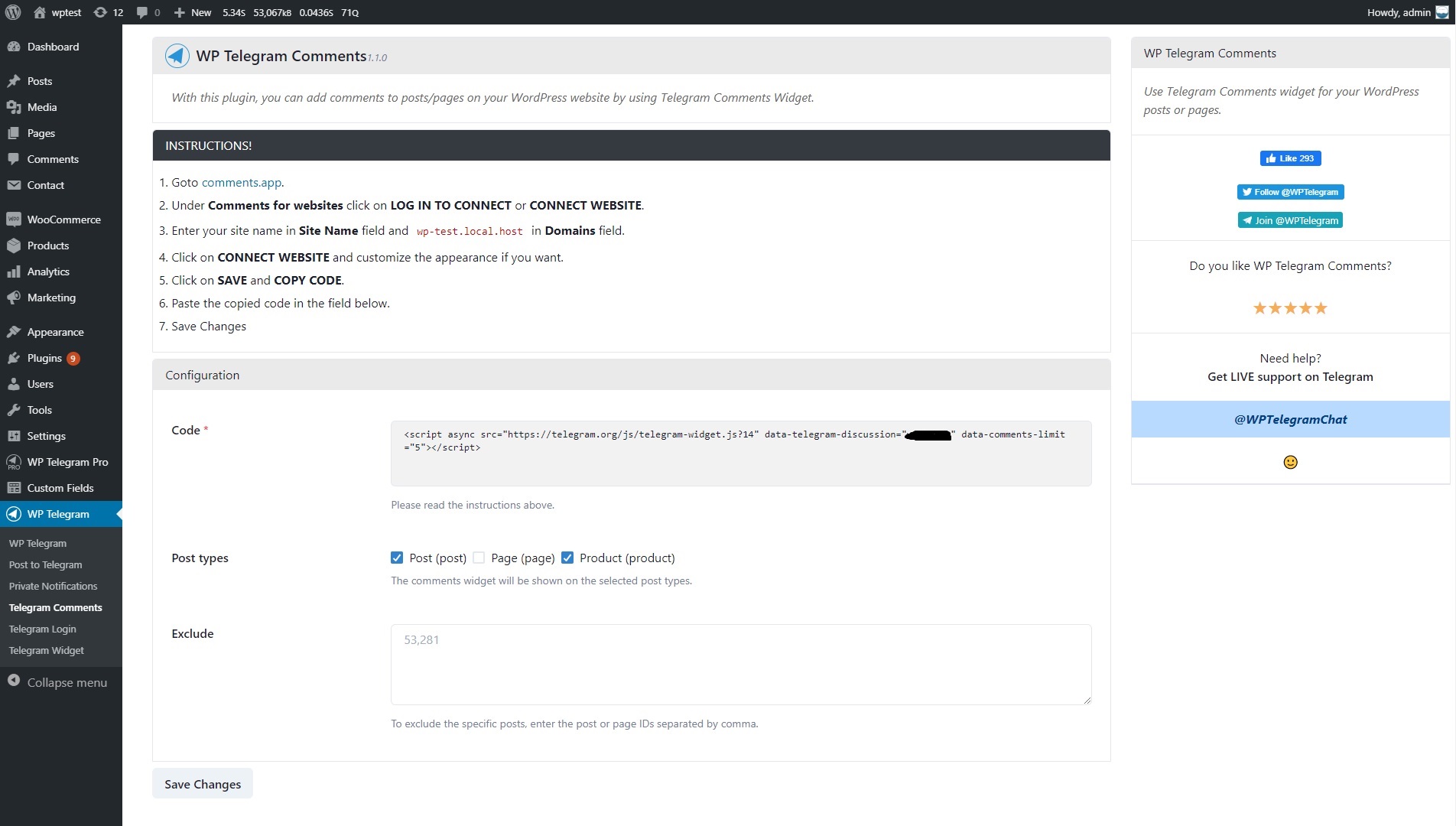
Screenshots
For developers
Is this your plugin? Show off the numbers.
Add a live badge to your site, docs or GitHub README. It updates on its own — no account needed.
Best WP Telegram Comments alternatives
All comments plugins →




FAQ
WP Telegram Comments: quick answers
Straight answers, pulled from live WordPress.org data.
Live data from WordPress.org · checked Oct 20, 2026
Is WP Telegram Comments free?
Yes. WP Telegram Comments is free to download and use from the official WordPress.org plugin directory.
Is WP Telegram Comments safe to use in 2026?
WP Telegram Comments works, but test it on a staging site before relying on it in 2026. It runs on 100+ sites, is rated 4.7/5 and was last updated 10 months ago, and scores 51/100 on our health check.
How many websites use WP Telegram Comments?
WP Telegram Comments is active on 100+ WordPress websites and has been downloaded 19,770 times since it launched in September 2019. It was downloaded 267 times in the last 30 days.
Does WP Telegram Comments work with WordPress 7.1?
WP Telegram Comments is officially tested up to WordPress 6.9.10, while the latest release is 7.1.3. It may still work, but try it on a staging site first.
What PHP version does WP Telegram Comments need?
WP Telegram Comments requires PHP 8.0 or higher. Most hosts run PHP 8.x today, so it works on any modern WordPress hosting.
When was WP Telegram Comments last updated?
The latest version, 1.2.8, was released on December 31, 2025 (10 months ago).
Who makes WP Telegram Comments?
WP Telegram Comments is developed and maintained by WP Socio.
What are the best alternatives to WP Telegram Comments?
The most popular alternatives to WP Telegram Comments are Akismet Anti-spam: Spam Pro… (5M+ installs), Disable Comments (1M+ installs) and Antispam Bee (700K+ installs).
Powered by PageForge
Want thousands of pages that rank like these? Build them in an afternoon.
This directory runs on the same engine as PageForge. Turn any spreadsheet, CSV or API into thousands of fast, SEO-ready WordPress pages — with schema, internal links and AI-written copy baked in.
- CSV, Google Sheets & API data sources
- AI content, schema & internal links per page
- Works with Elementor, Gutenberg, Yoast & Rank Math
- Free on WordPress.org — no credit card


