



Gravatar Enhanced – Avatars, Profiles, and Privacy
The official Gravatar plugin, featuring privacy-focused settings, easy profile updates, and customizable Gravatar Profile blocks.

Safe pick
Yes — Gravatar Enhanced is a safe, well-maintained plugin to use in 2026. It runs on 200K+ sites, is rated 5/5 and was last updated 2 weeks ago, and scores 82/100 on our health check.
- Proven at scale on 200K+ active sites
- Actively developed — last update 2 weeks ago
- Tested with the latest WordPress (7.1)
- Momentum — downloads up 188.1% vs the previous 30 days
- Very few reviews so far
How does it stack up?
Side-by-side on installs, updates, ratings & support



Daily downloads
Download spikes usually follow a new release — each site that auto-updates counts as a download.
Rankings
Where Gravatar Enhanced stands todayWordPress.org search rankings
Live position in the plugin search, top 100| Keyword | Position |
|---|---|
| avatar | #3 |
| comments | #75 |
| privacy | #6 |
| profile | #6 |
| profile picture | #5 |
Version adoption
Share of active sites per release.
Rating breakdown
★★★★★★★★★★ 5 from 3 reviews
About Gravatar Enhanced
From the official readme · v0.15.0Description
Elevate your WordPress site with Gravatar Enhanced – the plugin that simplifies digital identity and improves user engagement.
Seven Ways Gravatar Enhanced Improves WordPress:
✓ Privacy Protection – Automatic referrer blocking and optional IP address proxy
✓ Accessibility Improvements – Alt-text for all avatars to support screen readers
✓ One-Click Profile Updates – Edit Gravatar directly from the WordPress dashboard
✓ Versatile Profile Block & Patterns – Showcase authors and team members anywhere
✓ Comment Engagement Tools – Remind users to create avatars for better discussions
✓ Comment Form Integration – Show Gravatar directly in the comment form
✓ WooCommerce Integration – Personalized account pages for customers
Privacy Protection
Just by enabling the plugin, the plugin ensures that no referrer information is sent to Gravatar. The opt-in proxy service also keeps IP addresses from being exposed or logged.
Accessibility Improvements
All avatars now include alt-text, enhancing the experience for users with screen readers. Alt-text can be edited in the Gravatar Profile editor.
One-Click Profile Updates
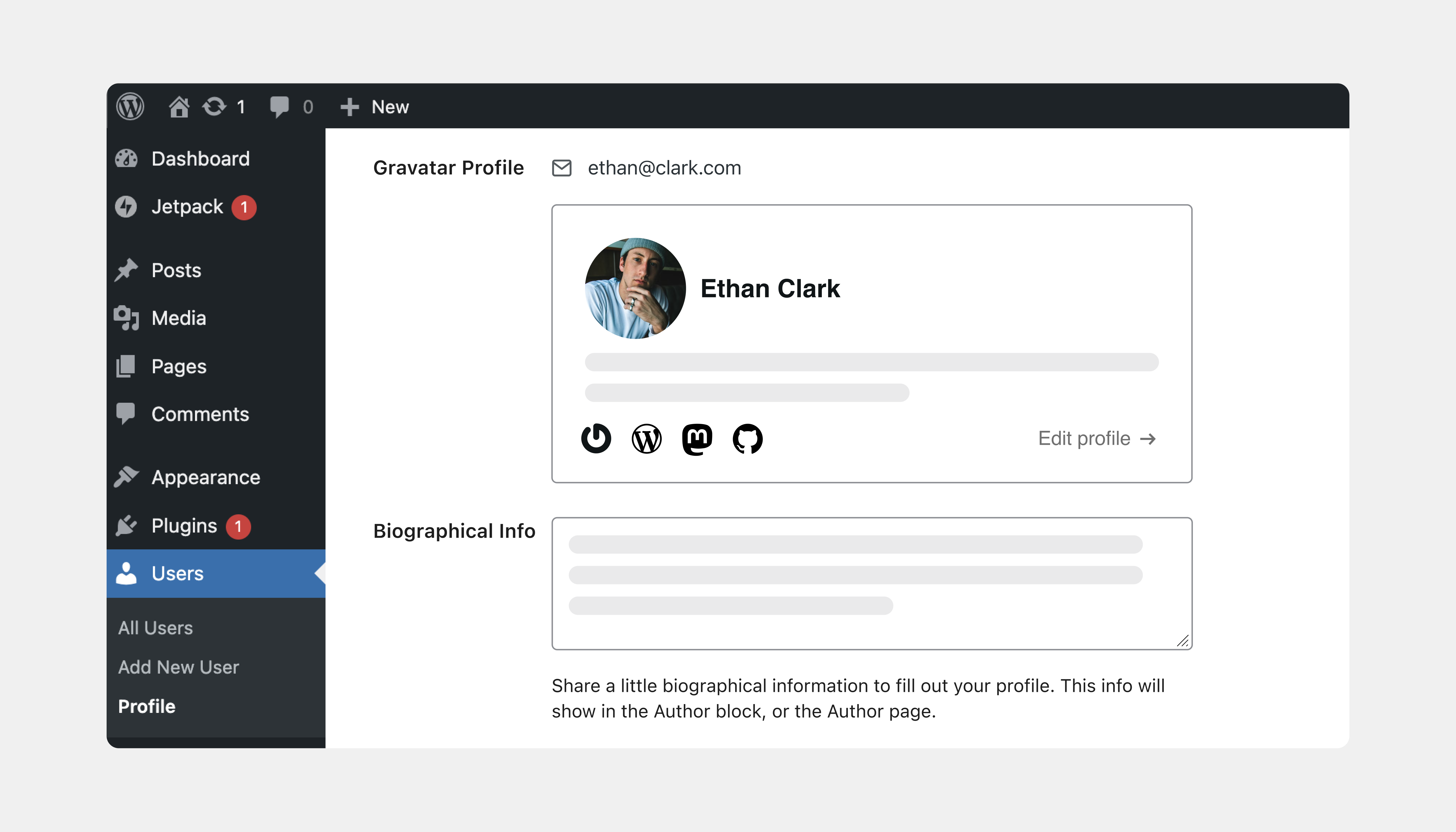
Visit Users > Your Profile to edit your Gravatar profile directly from WordPress. Preview your hovercard and make updates with ease.
Gravatar Profile Block & Patterns
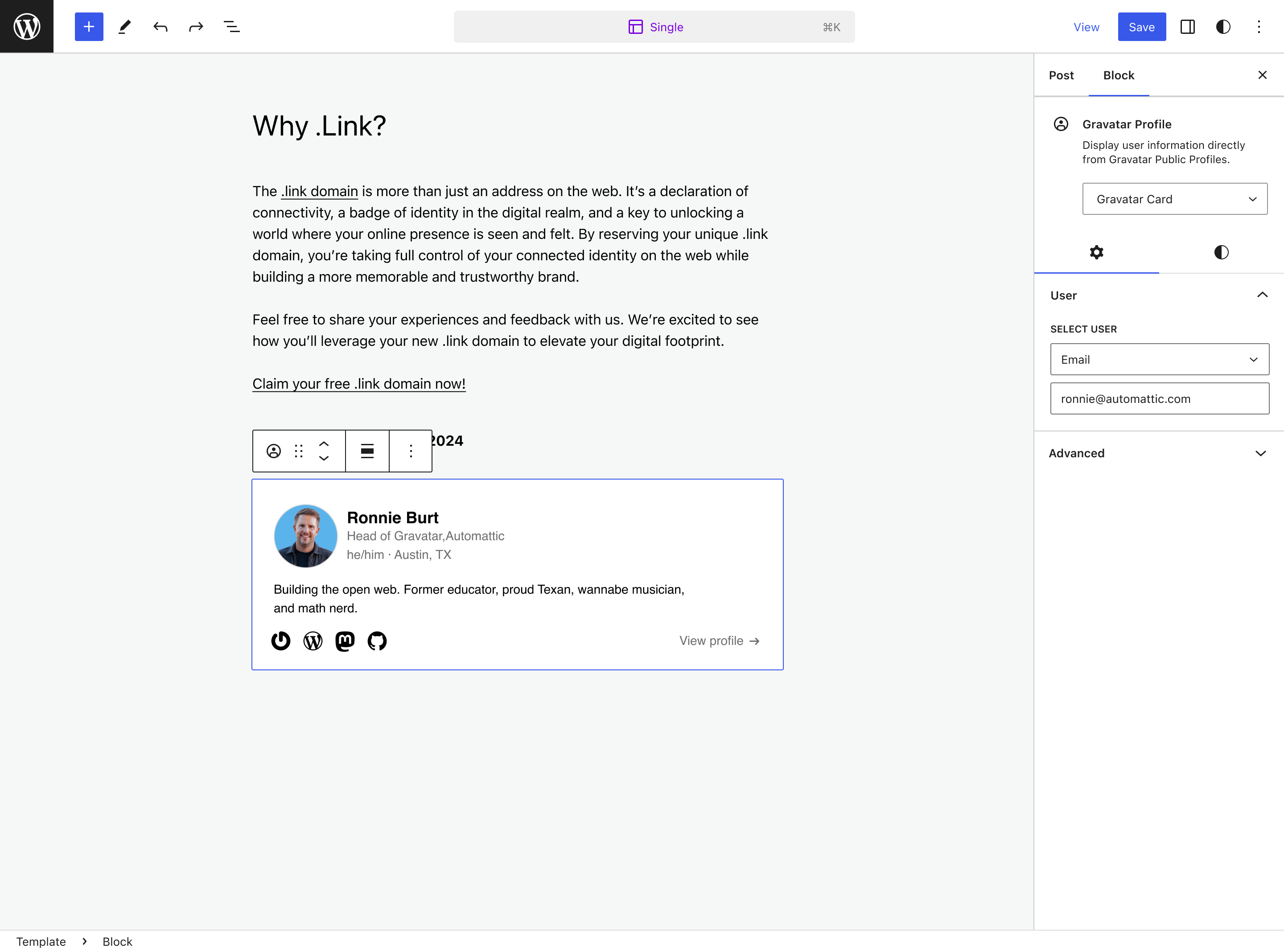
Enhance your website with our custom Gravatar profile block and patterns. Seamlessly integrate Gravatar profiles into posts, pages, or biographies to elegantly showcase team members, guest contributors, speakers, event attendees, authors, and more.
Comment Engagement Tools
Automatically remind commenters without avatars to create a Gravatar, increasing visual engagement on your blog.
Comment Form Integration
When the plugin is enabled we will show a Gravatar profile directly in the comment form, and allow the profile to be updated, so users can feel confident their details are correct, and the site shows richer comments.
WooCommerce Integration
Enhance your WooCommerce store by displaying user Gravatar avatars on the My Account page. Customers can view and update their avatars directly from their account dashboard, improving personalization and user engagement.
- Seamless Integration: Automatically works if WooCommerce is installed and activated.
- Direct Avatar Management: Users can change their Gravatar avatars without leaving your site.
- Improved Personalization: Adds a personal touch to the shopping experience, fostering customer loyalty.
Automatic Installation
- Click ‘Add New Plugin’ from your WordPress plugins page and search for ‘Gravatar Enhanced’
- Press the ‘Install Now’ button
- Activate the plugin
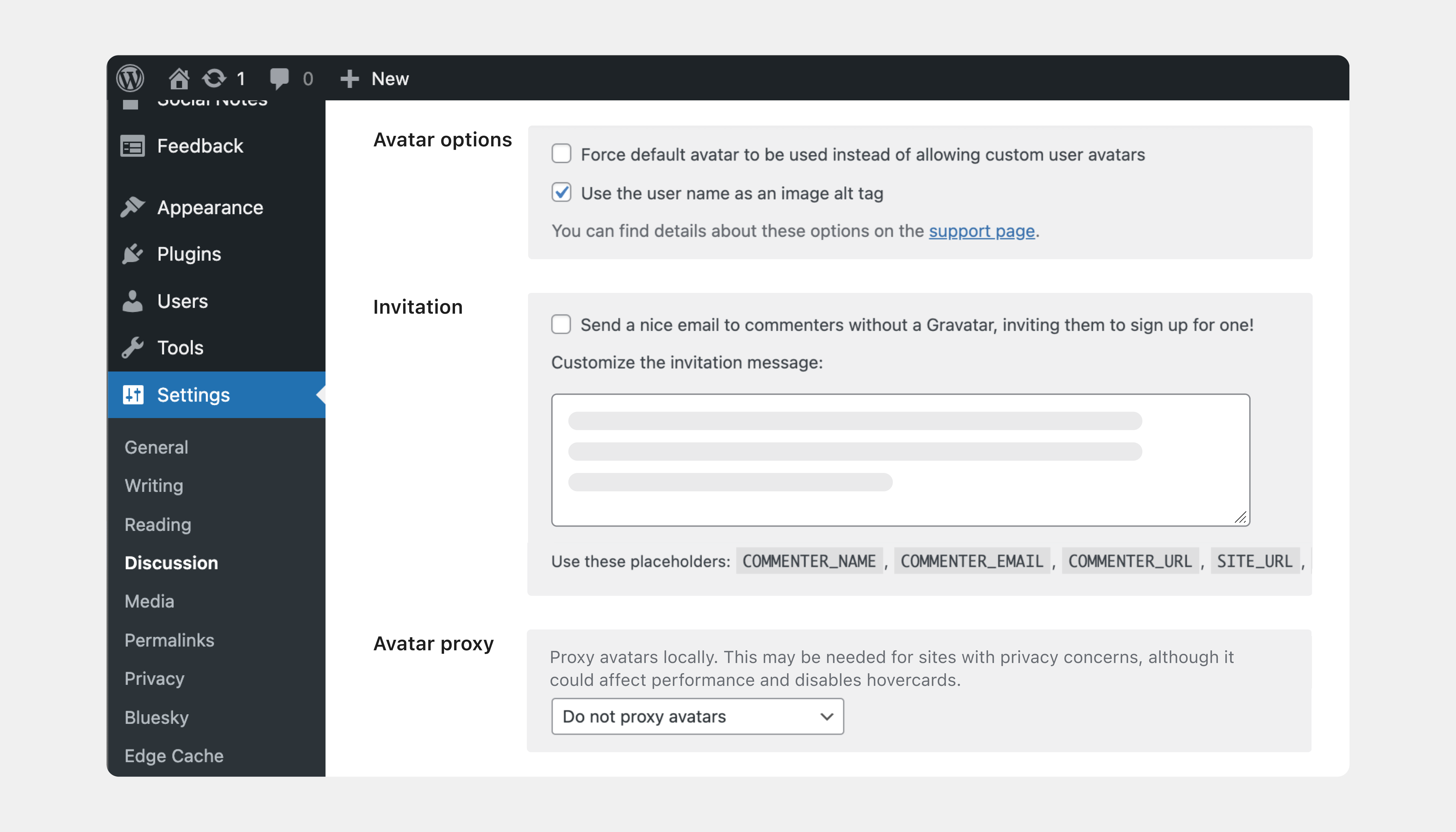
- Go to the “Discussion” Settings page to enable the new features.
Manual Installation
- Download the plugin from https://wordpress.org/plugins/gravatar-enhanced/
- Upload and extract the plugin to your
/wp-content/plugins/directory - Activate the plugin through the ‘Plugins’ menu in WordPress
- Go to the “Discussion” Settings page to enable the new features.
Changelog
0.15.0
- Use latest hovercards
0.14.0
- Fix: Only load Quick Editor profile details for users the current user is allowed to edit
- Fix: Improve sanitisation of Gravatar Profile block attributes
- Fix error when uninstalling the plugin
- Don’t show a hovercard on the WooCommerce Customer Account block avatar
- Require WordPress 7.1
0.13.1
- Pass translations to hovercards
0.13.0
- Further update the quick editor integration on the profile page
- Improve sanitisation of block data
- Use latest hovercards
0.12.0
- Update the quick editor integration on the profile page
- Fix: Add support for core’s SHA-256 handling
- Fix Gravatar card on author archive page when no posts
- Upgrade the
@gravatar-com/hovercardspackage to v0.13.0
0.11.0
- Add a Gravatar invitation link to the Profile block
- Fix support for Author in templates for Profile block.
- Upgrade the
@gravatar-com/hovercardspackage to v0.12.0 - Upgrade the
@gravatar-com/quick-editorpackage to v0.8.0 - Upgrade the tested up version to 6.8
Screenshots
For developers
Is this your plugin? Show off the numbers.
Add a live badge to your site, docs or GitHub README. It updates on its own — no account needed.



Best Gravatar Enhanced alternatives
All avatar plugins →





FAQ
Gravatar Enhanced: quick answers
Straight answers, pulled from live WordPress.org data.
Live data from WordPress.org · checked Nov 16, 2026
Is Gravatar Enhanced free?
Yes. Gravatar Enhanced is free to download and use from the official WordPress.org plugin directory.
Is Gravatar Enhanced safe to use in 2026?
Yes — Gravatar Enhanced is a safe, well-maintained plugin to use in 2026. It runs on 200K+ sites, is rated 5/5 and was last updated 2 weeks ago, and scores 82/100 on our health check.
How many websites use Gravatar Enhanced?
Gravatar Enhanced is active on 200K+ WordPress websites and has been downloaded 64,246 times since it launched in February 2011. It was downloaded 8,944 times in the last 30 days.
Does Gravatar Enhanced work with WordPress 7.1?
Yes. The developer has tested Gravatar Enhanced up to WordPress 7.1.4, the latest release. It requires WordPress 7.1 or newer.
What PHP version does Gravatar Enhanced need?
Gravatar Enhanced requires PHP 7.4 or higher. Most hosts run PHP 8.x today, so it works on any modern WordPress hosting.
When was Gravatar Enhanced last updated?
The latest version, 0.15.0, was released on October 30, 2026 (2 weeks ago).
Who makes Gravatar Enhanced?
Gravatar Enhanced is developed and maintained by Automattic.
What are the best alternatives to Gravatar Enhanced?
The most popular alternatives to Gravatar Enhanced are Simple Local Avatars (100K+ installs), One User Avatar (100K+ installs) and User Profile Picture (30K+ installs).
Powered by PageForge
Want thousands of pages that rank like these? Build them in an afternoon.
This directory runs on the same engine as PageForge. Turn any spreadsheet, CSV or API into thousands of fast, SEO-ready WordPress pages — with schema, internal links and AI-written copy baked in.
- CSV, Google Sheets & API data sources
- AI content, schema & internal links per page
- Works with Elementor, Gutenberg, Yoast & Rank Math
- Free on WordPress.org — no credit card


