



Clear All Cache for WP Super Cache
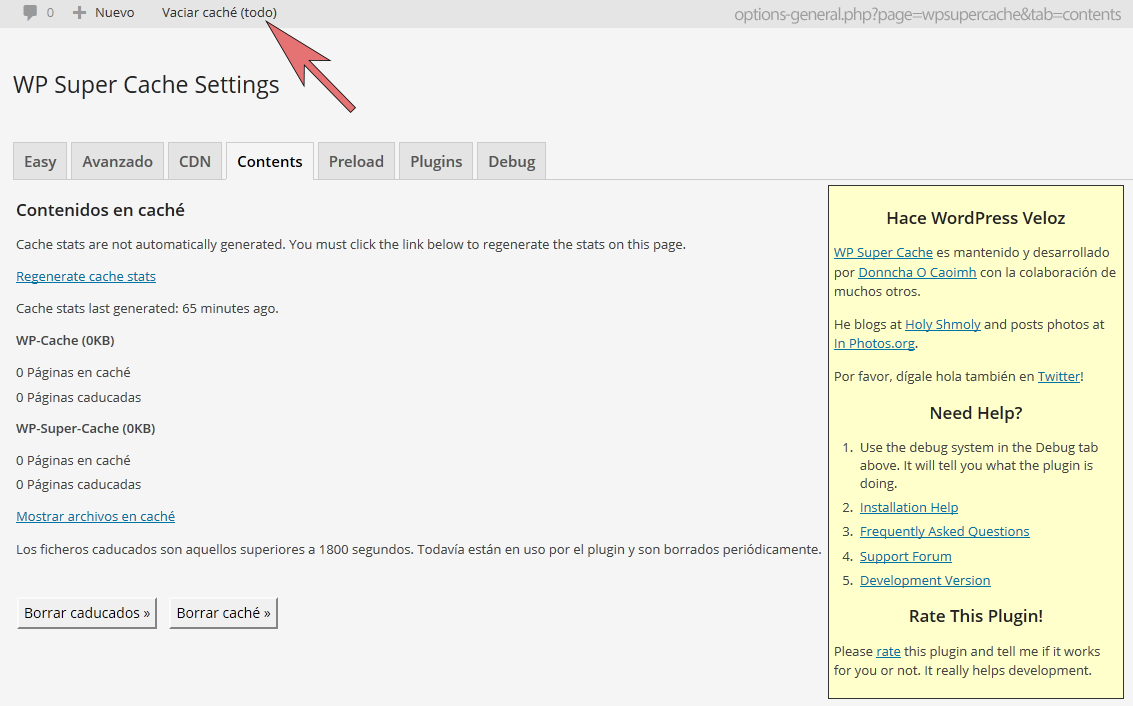
Clear all cache for WP Super Cache adds a menu entry to the admin menu to clear the cache completely .

Use with caution
Clear All Cache for WP Super Ca… works, but test it on a staging site before relying on it in 2026. It runs on 6K+ sites, is rated 3.1/5 and was last updated 8 months ago, and scores 48/100 on our health check.
- Mixed reviews — 3.1/5 from 11 ratings
- Only tested up to WordPress 6.9 (latest is 7.1)
How does it stack up?
Side-by-side on installs, updates, ratings & support



Daily downloads
Download spikes usually follow a new release — each site that auto-updates counts as a download.
Rankings
Where Clear All Cache for WP Supe… stands todayWordPress.org search rankings
Live position in the plugin search, top 100| Keyword | Position |
|---|---|
| cache | #34 |
| caching | >100 |
| empty cache | #8 |
| emtpy wp super cache | #1 |
| performance | >100 |
Version adoption
Share of active sites per release.
Rating breakdown
★★★★★★★★★★ 3.1 from 11 reviews
About Clear All Cache for WP Super Cache
From the official readme · v2.4Description
The plugin clears completely the cache from WP Super Cache, directly from the admin menu.
We created this plugin, in order to be able to clear the cache completely from the admin menu and not having to navigate to CONTENTS tab in WP Super Cache Settings.
In some configuration WP Super Cache shows a menu entry to empty the cache in the menu, but it only empties the cache from the current page. See: The “Delete Cache” button on the admin menu only deletes the cache for the current page.
Nevertheless in the majority of the sites that have WP Super Cache installed it doesn’t display this menu entry.
Please note that this menu option is only visible for WordPress ADMINISTRATORS.
This is an add-on to WP SUPER CACHE:
Please keep in mind that this plugin is an add-on to the WP SUPER CACHE plugin. You need to install and activate WP SUPER CACHE so that this add-on works.If you are having trouble with this plugin, feel free to use the Clear All Cache for WP Super Cache Support. If you are having problems with the WP SUPER CACHE plugin, you should ask for support at WP Super Cache Support.
What can I do with this plugin?
The plugin clears completely the cache from WP Super Cache, directly from the admin menu.
Clear All Cache for WP Super Cache Plugin in your Language!
This first release is avaliable in English and Spanish. In the languages folder we have included the necessarry files to translate this plugin.
If you would like the plugin in your language and you’re good at translating, please drop us a line at Contact us.
Further Reading
You can access the description of the plugin in Spanish at: Clear All Cache for WP Super Cache Plugin en castellano.
Contact
For further information please send us an email.
Installation
- Upload the
wp-super-cache-clear-cache-menufolder to the/wp-content/plugins/directory (or to the directory where your WordPress plugins are located) - Activate the Clear All Cache for WP Super Cache Plugin through the ‘Plugins’ menu in WordPress.
- Puling doesn’t need any configuration.
Please don’t use it with WordPress MultiSite, as it has not been tested.
Frequently asked questions
What is Clear All Cache for WP Super Cache Plugin good for?
It empties completely the WP SUPER CACHE cache without having to navigate to the CONTENTS tab in WP Super Cache Settings, this plugin is for you.
Why should I make use of the Clear All Cache for WP Super Cache Plugin?
If you use WP Super Cache and want to be able to empty completely the cache without having to navigate to the CONTENTS tab in WP Super Cache Settings, this plugin is for you.
Do I need to install the WP Super Cache plugin to make this one work?
Yes. This is an add-on of the WP SUPER CACHE plugin. You need to install and activate this plugin before you can use our plugin.
Are you the developers of the WP SUPER CACHE plugin?
No we are not. We have only developed this add-on to make life with WP Super Cache easier for everybody that uses it.
Does Clear All Cache for WP Super Cache make changes to the database?
No.
How can I check out if the plugin works for me?
Install and activate. You will see a new menu entry in the administration area to empty the cache. Access this menu entry and your cache will be emptied and you are taken to the CONTENTS tab in WP Super Cache Settings.
What can I do if I need support?
If you are having trouble with this plugin, feel free to use the Clear All Cache for WP Super Cache Support. If you are having problems with the WP SUPER CACHE plugin, you should ask for support at WP Super Cache Support because they will be able to help you better.
Can every registered user use this plugin?
No. This menu option is only available for WordPress ADMINISTRATORS.
How can I remove Clear All Cache for WP Super Cache?
You can simply activate, deactivate or delete it in your plugin management section.
What happens if I activate the plugin without using WP SUPER CACHE?
Nothing. The plugin checks that WP SUPER CACHE is activated.
Are there any known incompatibilities?
Please don’t use it with WordPress MultiSite, as it has not been tested.
Do you make use of Clear All Cache for WP Super Cache yourself?
Of course we do. 😉
Changelog
UPDATED: Security fixes.
2.4 (01FEB2026)
- The plugin was hardened by adding explicit capability checks, preventing direct file access, avoiding front-end loading of admin files, guarding all function declarations to prevent fatal errors, and namespacing the admin-bar menu ID to avoid collisions.
2.3 (29JAN2026)
- Solved warning translation loading was triggered too early.
2.0 (19/SEP/2019)
- Updated name from “WP Super Cache – Clear all cache” to “Clear All Cache for WP Super Cache” in order to comply with the WordPress plugin repository trademark guidelines.
1.4.0
- Changed function_exists(‘is_plugin_active’) handling so that it doesn’t load when outside of the WordPress administration.
1.3.1
- Minor update to fix a problem with automatic update from WordPress plugin repository.
- Corrected two typos. Thanks to Kevin W. McCarthy.
1.3
- Updated the code to fix the bug inspirationdate found: “The link added is relative so it doesn’t work when the toolbar is displayed on the frontend”.
Screenshots

For developers
Is this your plugin? Show off the numbers.
Add a live badge to your site, docs or GitHub README. It updates on its own — no account needed.
Best Clear All Cache for WP Super… alternatives
All cache plugins →





FAQ
Clear All Cache for WP Super Cache: quick answers
Straight answers, pulled from live WordPress.org data.
Live data from WordPress.org · checked Sep 28, 2026
Is Clear All Cache for WP Super Ca… free?
Yes. Clear All Cache for WP Super Ca… is free to download and use from the official WordPress.org plugin directory.
Is Clear All Cache for WP Super Ca… safe to use in 2026?
Clear All Cache for WP Super Ca… works, but test it on a staging site before relying on it in 2026. It runs on 6K+ sites, is rated 3.1/5 and was last updated 8 months ago, and scores 48/100 on our health check.
How many websites use Clear All Cache for WP Super Ca…?
Clear All Cache for WP Super Ca… is active on 6K+ WordPress websites and has been downloaded 285,273 times since it launched in April 2014. It was downloaded 715 times in the last 30 days.
Does Clear All Cache for WP Super Ca… work with WordPress 7.1?
Clear All Cache for WP Super Ca… is officially tested up to WordPress 6.9.9, while the latest release is 7.1.2. It may still work, but try it on a staging site first.
When was Clear All Cache for WP Super Ca… last updated?
The latest version, 2.4, was released on February 1, 2026 (8 months ago).
Who makes Clear All Cache for WP Super Ca…?
Clear All Cache for WP Super Ca… is developed and maintained by apasionados.
What are the best alternatives to Clear All Cache for WP Super Ca…?
The most popular alternatives to Clear All Cache for WP Super Ca… are WP Super Cache (1M+ installs), WP Fastest Cache (1M+ installs) and WP-Optimize (1M+ installs).
Powered by PageForge
Want thousands of pages that rank like these? Build them in an afternoon.
This directory runs on the same engine as PageForge. Turn any spreadsheet, CSV or API into thousands of fast, SEO-ready WordPress pages — with schema, internal links and AI-written copy baked in.
- CSV, Google Sheets & API data sources
- AI content, schema & internal links per page
- Works with Elementor, Gutenberg, Yoast & Rank Math
- Free on WordPress.org — no credit card


