


WP Fastest Cache – WordPress Cache Plugin
The simplest and fastest WP Cache system

Safe pick
Yes — WP Fastest Cache is a safe, well-maintained plugin to use in 2026. It runs on 1M+ sites, is rated 4.9/5 and was last updated 2 weeks ago, and scores 92/100 on our health check.
- One of the most-used plugins on the web — 1M+ active sites
- Loved by users — 4.9/5 from 4,234 reviews
- Actively developed — last update 2 weeks ago
- Tested with the latest WordPress (7.1)
- Momentum — downloads up 65.5% vs the previous 30 days
How does it stack up?
Side-by-side on installs, updates, ratings & support



Daily downloads
Download spikes usually follow a new release — each site that auto-updates counts as a download.
Rankings
Where WP Fastest Cache stands todayWordPress.org search rankings
Live position in the plugin search, top 100| Keyword | Position |
|---|---|
| cache | #2 |
| core web vitals | #3 |
| Optimize | #17 |
| pagespeed | #6 |
| performance | #16 |
Version adoption
Share of active sites per release.
Rating breakdown
★★★★★★★★★★ 4.9 from 4,234 reviews
About WP Fastest Cache
From the official readme · v1.5.5Description
Official Website
You can find more information on our website (wpfastestcache.com)
Welcome to the page of the WP Fastest Cache plugin, a WordPress cache plugin developed to speed up WordPress sites.
In today’s world where every second counts, optimizing your website’s performance is very important. Meet WP Fastest Cache, your caching plugin that you can use to speed up WordPress websites.
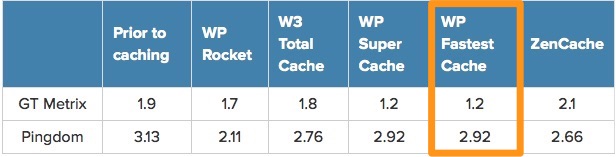
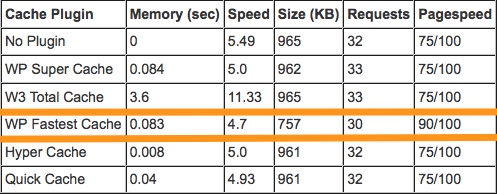
Optimize the performance of your website with WP Fastest Cache. Improve Google PageSpeed, Core Web Vitals, GTmetrix and Pingdom score with our wp cache plugin.
In addition, page speed is a ranking factor in Google’s search algorithm. Therefore, using cache plugins helps improve your SEO ranking. Our WordPress optimization plugin not only accelerates your site but also boosts SEO rankings.
Features
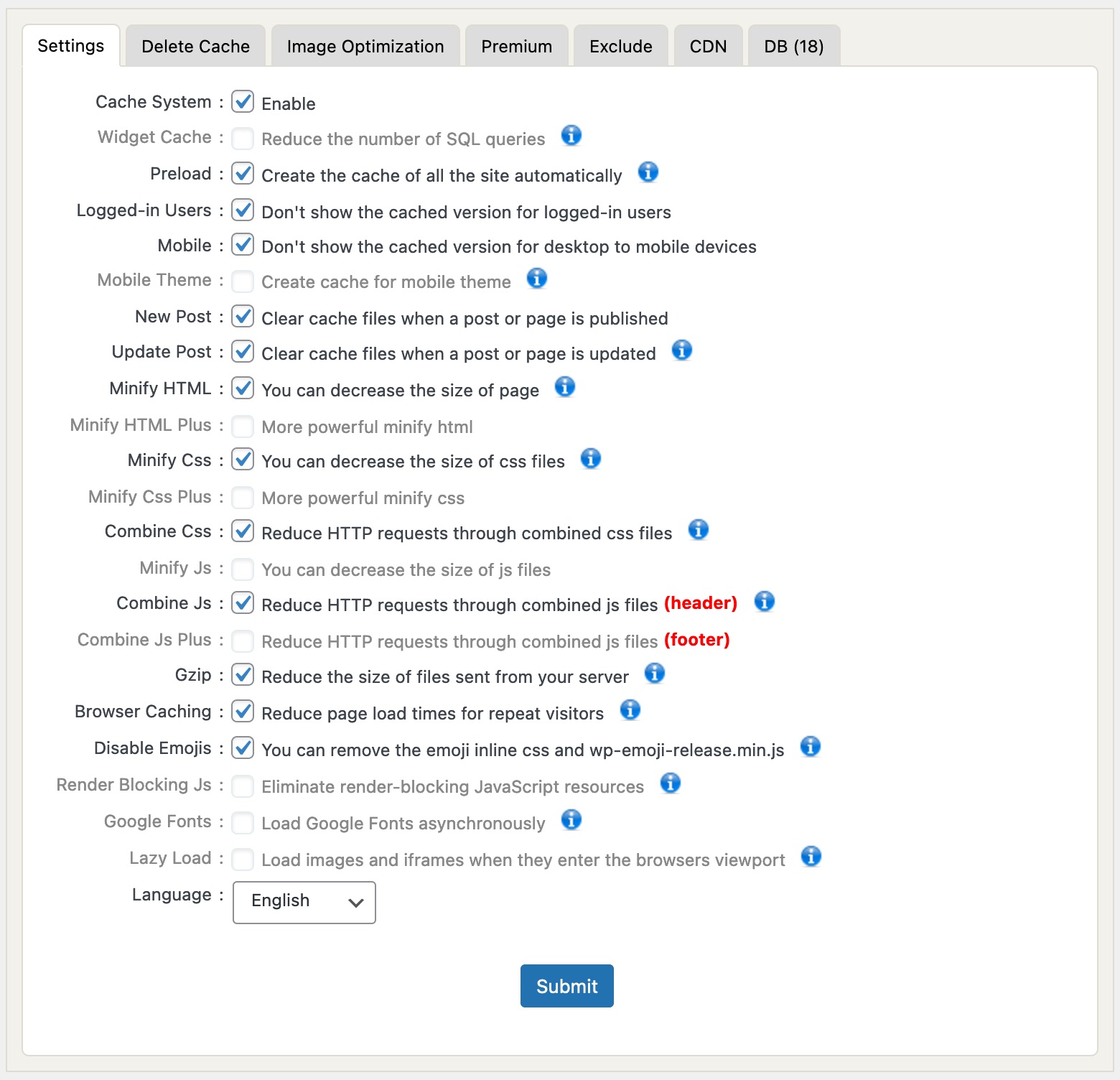
- Mod_Rewrite which is the fastest method is used in this plugin
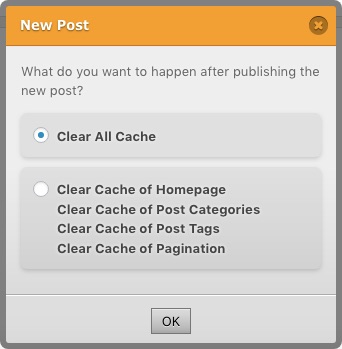
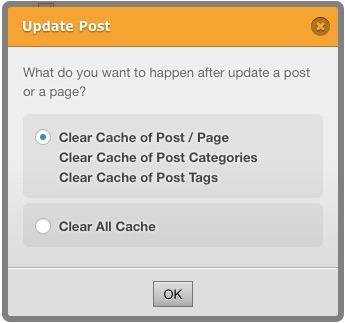
- All cache files are deleted when a post or page is published
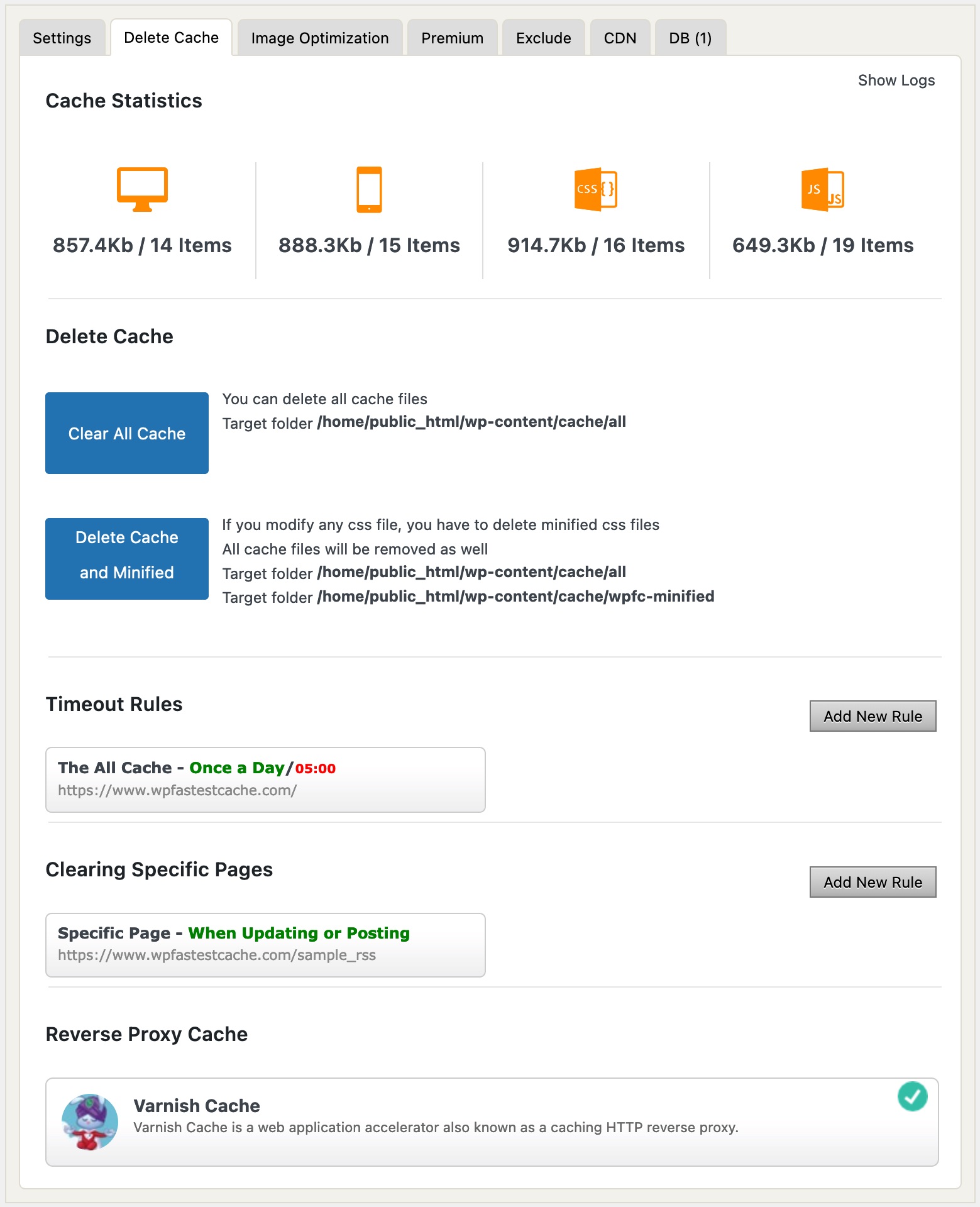
- Admin can delete all cached files from the options page
- Admin can delete minified css and js files from the options page
- Block cache for specific page or post with Short Code
- Cache Timeout – All cached files are deleted at the determinated time
- Cache Timeout for specific pages
- Enable/Disable cache option for mobile devices
- Enable/Disable cache option for logged-in users
- SSL support
- CDN support – Effortlessly enhance website speed and performance with seamless CDN integration, supporting Bunny CDN, Cloudflare, and various other leading CDN providers. CDN integration modifies the URLs of static resources, enabling these assets to be served from your CDN service provider
- Cloudflare support – Cloudflare integration triggers the clearing of the cache on Cloudflare through API when a cache purge is initiated. As a result, WP Fastest Cache and Cloudflare operate seamlessly in tandem
- Preload Cache – Create the cache of all the site automatically
- Exclude pages and user-agents
- WP-CLI cache clearing
- Proxy Cache – Varnish Cache Integration to clear proxy cached content automatically when the cache created by WP Fastest Cache is cleared
Performance Optimization
WP Fastest Cache is not only a wp cache plugin but also a speed optimization wordpress cache plugin. There are many features such as Minify Html, Minify Css, Enable Gzip Compression, Leverage Browser Caching, Add Expires Headers, Combine CSS, Combine JS, Disable Emoji.
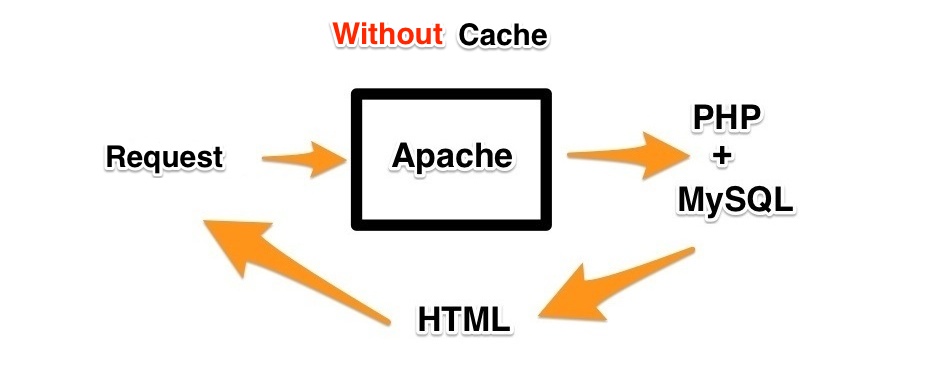
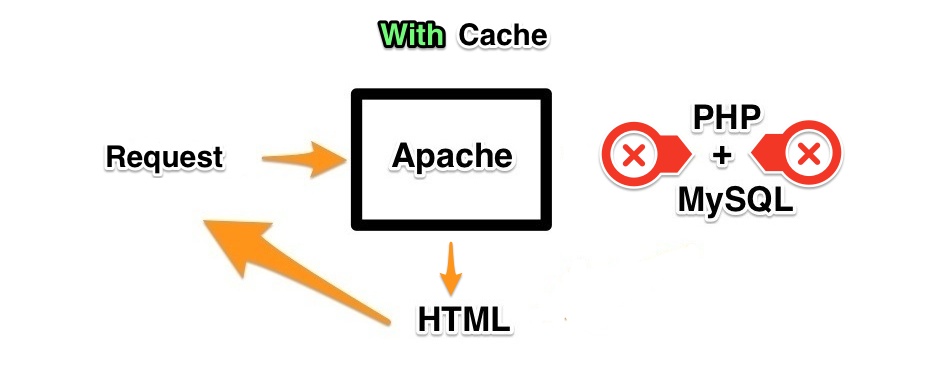
- Page Caching – Page caching feature generates and store static HTML files from your dynamic WordPress blog to reduce initial server response time, and improving page load time. Page cache and caching play a critical role in improving website speed and overall web performance. By storing frequently accessed data, effective caching reduces server workload and significantly improves cache performance, allowing pages to be delivered faster to users. This optimization directly lowers load time and enhances page speed, resulting in a smoother user experience and better SEO.
- Minify Html – Using an HTML minifier is an effective way to reduce HTML size and optimize HTML by removing unnecessary spaces, comments, and line breaks. A smaller HTML file helps reduce page size, which directly improves page speed and leads to a faster website experience for users. By focusing on web performance optimization, optimized HTML allows browsers to load and render pages more efficiently, helping to improve website speed, lower bandwidth usage, and deliver better overall performance across all devices
- Minify Css – CSS minify techniques play a crucial role in modern web development by reducing unnecessary characters through a reliable css minifier. With effective css compression, developers can compress CSS files and apply proper css minification to optimize CSS for production environments. This approach helps reduce CSS file size, which directly contributes to improve website speed and overall css performance optimization. As part of a broader page speed optimization strategy, these practices significantly enhance website performance optimization and lead to better website loading performance, especially on mobile and low-bandwidth connections
- Enable Gzip Compression – Reduce the size of files sent from your server to increase the speed to which they are transferred to the browser
- Leverage browser caching – Browser cache plays a critical role in how efficiently a web browser cache stores static resources like images, stylesheets, and scripts, directly impacting page load speed. By allowing returning visitors to load files from their local browser cache instead of downloading them again, websites can significantly reduce server requests and improve website speed. Properly configured browser caching not only creates a faster and smoother user experience but also helps lower bandwidth usage and enhance overall site performance
- Combine CSS – Reduce number of HTTP round-trips by combining multiple CSS resources into one
- Combine JS – Combining JavaScript files is a core technique in javascript optimization and js optimization, especially when the goal is to reduce requests and improve page load speed. By combine js assets or combine javascript files into a single bundle, developers can streamline how scripts are delivered to the browser. Whether you call it js combine or javascript combine, the idea is the same: fewer HTTP requests mean faster performance. Similarly, approaches that merge js or merge javascript—also known as js merge or javascript merge—help eliminate overhead caused by loading multiple separate files. When done correctly, combining and merging scripts leads to cleaner delivery, better caching, and noticeably faster websites
- Disable Emoji – You can remove the emoji inline css and wp-emoji-release.min.js
Premium Performance Optimization
The free version is enough to speed up your site but in the premium version there are extra features such as Mobile Cache, Widget Cache, Minify HTML Plus, Minify CSS Plus, Minify JS, Combine JS Plus, Defer Javascript, Optimize Images, Convert WebP, Database Cleanup, Google Fonts Async, Lazy Load and Delay JS for super fast load times.
- Mobile Cache
- Widget Cache
- Minify HTML Plus
- Minify CSS Plus
- Minify Javascript – Minify JS is a core step in web performance optimization because js minify techniques remove unnecessary characters, comments, and whitespace, making files smaller and faster to load. Through proper javascript minification, developers can compress JavaScript assets and significantly reduce transfer size, which directly supports effective js optimization and overall javascript optimization strategies. When combined with caching and code splitting, minified scripts help improve website speed, lower bandwidth usage, and enhance user experience. As a result, page speed optimization becomes easier to achieve, leading to faster render times and better search engine rankings.
- Combine JS Plus
- Defer Javascript – Eliminate render-blocking JavaScript resources. Consider delivering critical JS inline and deferring all non-critical JS
- Optimize Images – Optimized images load faster and consume less cellular data. Looking for an easy image compressor? Our tool lets you compress images instantly, including Compress JPEG and Compress PNG options. Enjoy fast image compression to reduce image size without losing quality. Perfect for quick image optimization with a smart image optimizer designed for all your needs.
- Convert WebP – Serve images in next-gen formats. Image formats like JPEG 2000, JPEG XR, and WebP often provide better compression than PNG or JPEG, which means faster downloads and less data consumption. A fast and reliable WebP converter helps you convert to WebP in seconds. Whether you need a WebP convert tool, a JPG to WEBP Converter, PNG to WEBP Converter, or a simple image to WebP option, you can easily optimize your images. Quickly handle JPG to WEBP, PNG to WEBP, jpg convert to webp, and png convert to webp tasks to reduce file size and improve web performance.
- Database Cleanup – To keep your system running smoothly, it’s important to clean database structures regularly and ensure you clean DB records that are no longer needed. A database cleaner is essential for effective database cleaning and long-term database optimization. By removing unused entries and organizing data efficiently, you can significantly improve database performance and speed up database operations. Modern db cleaner tools automate the entire db cleaning process, helping developers maintain fast, reliable, and scalable systems. The Database Cleanup feature clears out all of the garbage datas such as post revisions, trashed posts & pages, comments from trash & spam, trackbacks and pingbacks, transient options, orphaned post meta, comment meta, user meta, term meta, and term relationship etc.
- Google Fonts Async
- Lazy Load – Lazy loading technique improve page speed and overall website loading time by loading content only when it is needed. Using lazy load images, lazy loading images, lazy load videos, and lazy load iframe helps reduce initial load size, enhances web performance, and delivers a smoother user experience. When implemented correctly, these methods make it easier to optimize website performance, lower bandwidth usage, and ensure faster, more efficient page delivery for both users and search engines.
- Delay JS – The Delay JavaScript feature helps reduce the ‘Reduce unused JavaScript’ warning in the Google PageSpeed Insights tool
Information
It is very inconvenient to use multiple caching plugins at the same time. That’s why you need to disable plugins such as LiteSpeed Cache, WP-Optimize, W3 Total Cache, WP Super Cache, SiteGround Optimizer, Breeze while using WP Fastest Cache.
WP Fastest Cache is compatible with most popular plugins such as Contact Form 7, Yoast SEO, Elementor Website Builder, Classic Editor, Akismet Spam Protection, WooCommerce, Contact Form by WPForms, Really Simple SSL, All-in-One WP Migration, Yoast Duplicate Post, Wordfence Security – Firewall & Malware Scan, WordPress Importer, UpdraftPlus WordPress Backup Plugin, MonsterInsights, All in One SEO, WP Mail SMTP by WPForms.
Supported Languages
Although there are over 7000 languages spoken in the world today, we feel very lucky to support 30 languages for now.
However, localizing or adapting a plugin to another language or culture is time consuming and a demanding task. That’s where the amazing Translation Contributors team of WordPress comes into play. These selfless people spent their precious time without expecting anything in return so that other people can use the add-ons more easily. We sincerely thank all of them.
Chinese Simplified (China), Chinese Traditional (Taiwan), Czech, Dutch (Belgium), Dutch (Netherlands), English (South Africa), English (UK), Finnish, French (France), Galician, German (Germany), Hungarian, Indonesian, Italian, Japanese, Korean (Korea), Persian, Russian, Slovak (Slovakia), Slovenian, Spanish (Argentina), Spanish (Chile), Spanish (Colombia), Spanish (Ecuador), Spanish (Mexico), Spanish (Spain), Spanish (Venezuela), Swedish, Turkish, Ukrainian
Installation
- Upload
wp-fastest-cacheto the/wp-content/plugins/directory - Activate the plugin through the ‘Plugins’ menu in WordPress
- Permission of .htacces must 644
- Enable this plugin on option page
Changelog
....
1.5.5
- Added path validation to singleDeleteCache() and delete_next_prev_cache() to prevent directory traversal through percent-encoded URLs before cache paths are deleted
- Fixed: Google Analytics campaign parameters (utm_source, utm_medium, utm_campaign, utm_term, and utm_content) not being served from the main page cache via .htaccess
- Fixed: The Google Analytics exclusion rule not being added to the Start WPFC Exclude section in .htaccess
- Added Google Ads query parameter support for cache serving and page exclusion
- Fixed: XML cache files are now served directly via .htaccess instead of being served through PHP
- Fixed: Exclude Pages “Contains” rule not matching query string parameters in URLs
- Refactored cache purge handling to reduce duplicated Varnish and Cloudflare logic
- Refactored cache deletion logic by centralizing desktop and mobile cache path cleanup
- Improved WooCommerce product cache clearing for WPML translations
- Reverted: Prevent caching responses that include private or non-cacheable HTTP headers, including Cache-Control: no-store, private, no-cache, expired Expires, and Set-Cookie
1.5.4
- Fixed: The plugin language selector now works independently of the WordPress site language
- to update the translations
- Removed unused static assets
- Preserve the Security tab when navigating its links by keeping #wpfc-security in the URL
- [FEATURE] Added the WPFC_CACHE_QUERYSTRING_PARAMS constant to cache allowlisted query-string URLs separately [Details]
- Fixed: Prevented sitemap preload from saving an empty sitemap list when no child sitemaps could be extracted
- Fixed: Incorrect term totals for custom taxonomies in preload
- [FEATURE] Preloading for paginated home, category, tag and custom taxonomy archive pages
- Test CDN connectivity using the active theme’s style.css URL instead of the CDN URL alone
- Security Tool: Added detection and blocking for ICEcoder terminal command injection attempts
- Security Tool: Added detection and blocking for React2Shell
- Security Tool: Added detection and blocking for Oversized POST Parameter Attacks
- Fixed: Deleting an IP from Security Center now removes all associated child log entries along with the parent record, preventing orphaned security logs
- Fixed: Prevented unnecessary cache clearing when Flamingo saves contact form submissions as posts
- Prevent caching of WordPress activation pages (wp-activate.php) by excluding activation requests based on both the request URL and WordPress’s current page context
- Skip cache generation during WordPress installation and for requests carrying activation-related cookies (wp-activate-*)
- Prevent caching responses that include private or non-cacheable HTTP headers, including Cache-Control: no-store, private, no-cache, expired Expires, and Set-Cookie
1.5.3
- [FEATURE] Added an Exclude Pages rule to exclude URLs containing Facebook Click ID (fbclid) parameters from cache
- Updated Yandex parameter handling to include etext, alongside yclid, yadclid, ymclid, ysclid, yzclid, yqrid, and ybaip
- [FEATURE] Added the Security tool to help protect your site from malicious scans, brute-force attacks, SQL injection attempts, XSS, path traversal attacks and other suspicious activity [Details]
- Fixed: The active settings tab now stays selected after a page refresh, and its change handlers run when restored
- Updated the .htaccess admin cookie exclusion rules only when the affected user is an administrator
- Added handling for deleted administrator accounts so their exclusion rules are refreshed after deletion.
- Added locking and safer file replacement when updating .htaccess, and skip writes when the file cannot be read, the marker is missing, or the content is unchanged
1.5.2
- Security Enhancements
- Allow Author role and above for the Auto Cache feature
- [FEATURE] Added support for clearing the cache by URL [Details]
- Fixed: Incorrect cache expiration header configuration
- Added manage_options capability checks to Varnish cache AJAX actions, preventing unauthorized users from modifying, pausing, resuming, removing, or purging Varnish cache settings
- Added administrator-only access checks for specific page cache actions, preventing unauthorized users from viewing, adding, or removing cache-clearing rules
1.5.1
- [Improvement] Validates Polylang domain mappings against an allowlist to prevent security risks
- [Improvement] Added protection against feed cache poisoning via query string parameters
- Prevent caching URLs that contain query strings
1.5.0
- Fixed: Replaced the non-standard text/js MIME type with a valid JavaScript content type for missing minified JS file responses
- Fixed: Resolved an issue where the preload tool could fail while processing the sitemap.
Screenshots

For developers
Is this your plugin? Show off the numbers.
Add a live badge to your site, docs or GitHub README. It updates on its own — no account needed.
Best WP Fastest Cache alternatives
All cache plugins →



FAQ
WP Fastest Cache: quick answers
Straight answers, pulled from live WordPress.org data.
Live data from WordPress.org · checked Nov 17, 2026
Is WP Fastest Cache free?
Yes. WP Fastest Cache is free to download and use from the official WordPress.org plugin directory.
Is WP Fastest Cache safe to use in 2026?
Yes — WP Fastest Cache is a safe, well-maintained plugin to use in 2026. It runs on 1M+ sites, is rated 4.9/5 and was last updated 2 weeks ago, and scores 92/100 on our health check.
How many websites use WP Fastest Cache?
WP Fastest Cache is active on 1M+ WordPress websites and has been downloaded 69,466,091 times since it launched in August 2013. It was downloaded 1,208,469 times in the last 30 days.
Does WP Fastest Cache work with WordPress 7.1?
Yes. The developer has tested WP Fastest Cache up to WordPress 7.1.4, the latest release. It requires WordPress 5.7 or newer.
When was WP Fastest Cache last updated?
The latest version, 1.5.5, was released on November 5, 2026 (2 weeks ago).
Who makes WP Fastest Cache?
WP Fastest Cache is developed and maintained by Emre Vona.
What are the best alternatives to WP Fastest Cache?
The most popular alternatives to WP Fastest Cache are WP Super Cache (1M+ installs), WP-Optimize (1M+ installs) and SpeedyCache (500K+ installs).
Powered by PageForge
Want thousands of pages that rank like these? Build them in an afternoon.
This directory runs on the same engine as PageForge. Turn any spreadsheet, CSV or API into thousands of fast, SEO-ready WordPress pages — with schema, internal links and AI-written copy baked in.
- CSV, Google Sheets & API data sources
- AI content, schema & internal links per page
- Works with Elementor, Gutenberg, Yoast & Rank Math
- Free on WordPress.org — no credit card


