


WP Google Analytics Events – No-Code Custom Event Tracking for Google Analytics
“Analytics is about tracking the metrics that are critical to your business” – Lean Analytics

Use with caution
WP Google Analytics Events works, but test it on a staging site before relying on it in 2026. It runs on 5K+ sites, is rated 4.5/5 and was last updated 2 years ago, and scores 44/100 on our health check.
- Loved by users — 4.5/5 from 33 reviews
- No update in 2 years
- Only tested up to WordPress 6.3 (latest is 7.1)
How does it stack up?
Side-by-side on installs, updates, ratings & support



Daily downloads
Download spikes usually follow a new release — each site that auto-updates counts as a download.
Rankings
Where WP Google Analytics Events stands todayWordPress.org search rankings
Live position in the plugin search, top 100| Keyword | Position |
|---|---|
| analytics | >100 |
| events | >100 |
| ga | #83 |
| >100 | |
| google analytics | >100 |
Version adoption
Share of active sites per release.
Rating breakdown
★★★★★★★★★★ 4.5 from 33 reviews
About WP Google Analytics Events
From the official readme · v2.8.2Description
“Analytics is about tracking the metrics that are critical to your business” – Lean Analytics
Using Google Analytics GA4? Use our new plugin – Goal Tracker for Google Analytics GA4
⚠️ WP Google Analytics Events is not compatible with Google Analytics GA4.
Instead, You can use our new plugin for GA4 – Download Goal Tracker for Google Analytics GA4
With WP Google Analytics Events, you don’t have to write code to use Events in Google Analytics.
The plugin allows you to fire events whenever someone interacts or views elements on your website.
You can create a Google Analytics event when a visitor scrolls down and views your pricing table. Track video, banners, Call to Action buttons, email links, and more.
If you really want to know what people are doing on your website, the default options are limited when it comes to in-page tracking in Google Analytics.
Page tracking is not enough these days, and if you want to match measurable metrics for your KPIs, its necessary to use events.
Tracking events is usually done by writing JavaScript code, and that is not the WordPress way.
That’s why we created WP Google Analytics Events, so you don’t have to write elaborate code every time you want to learn something new about your visitors.
Become a Pro
WP Google Analytics Events Pro is the professional version of our plugin and adds more tracking capabilities:
- One-Click Link Tracking
- Placeholders to enrich your event data
- Track Self-Hosted Media audio and video
- YouTube and Vimeo support
- Plugin Management permissions for teams
- Access to our Pro support team
Check out the Pro version
Here are some of the things you can do with WP Google Analytics Events:
- Setting event-driven goals in Google Analytics
- Tracking in-page navigation
- Comparing call to action button performance
- Understanding what percentage of your visitors got to the end of an article
- Tracking contact form submissions
- Track Links
- We work along with Google Tag Manager and will allow you to do things it can’t do out of the box.
Documentation
Installation
Add the plugin by uploading the zip file or by installing it from the WordPress Plugin directory.
Activate the plugin and go to the WP Google Analytics Settings page.
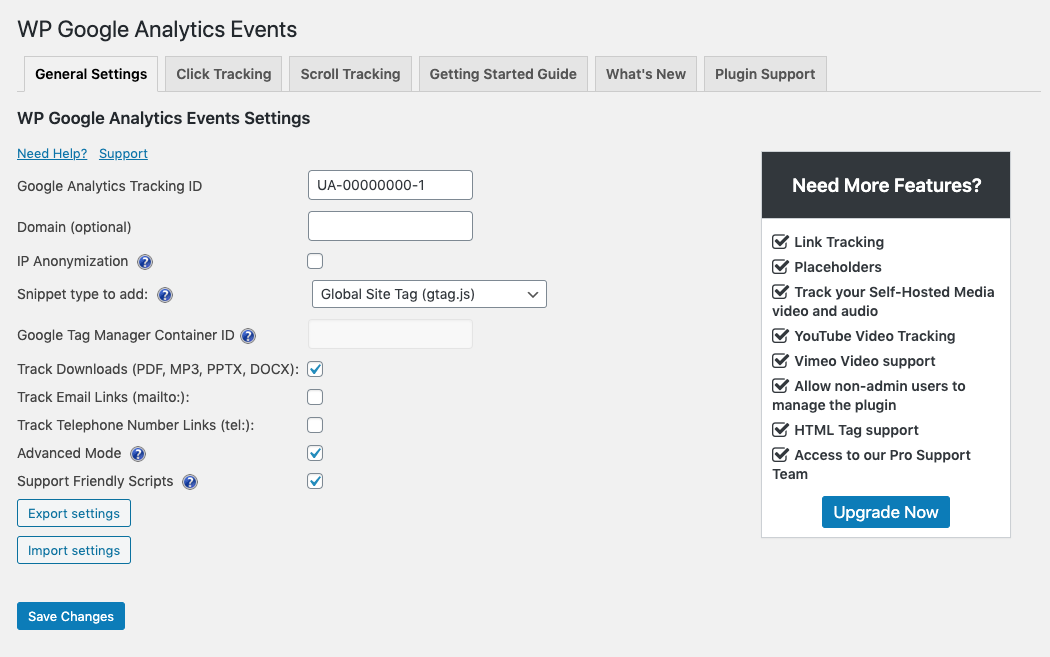
Fill in your Google Analytics account identifier, add scroll and start creating scroll and click events.
Frequently asked questions
What Is Google Analytics Event Tracking?
Glad you asked, here is our Complete Introduction to Event Tracking in Google Analytics.
Where can I see the events in Google Analytics?
There are two places that show events in GA – The real-time dashboard under “events” – An event should show up here in (almost) real-time. The full report can be found under “Behavior” -> “Events”. Note that it can take up to 24 hours to show up in this section.
Do I have to write any code to use this plugin?
Don’t be silly. This is why we made this plugin. But on a serious note, this could get a little technical so take a look at our Plugin Documentation page.
What are some examples of using events?
There are many benefits of using events, and you can get very creative: Setting event-driven goals in Google Analytics Tracking in page navigation Comparing call to action button performance Understanding what percentage of your visitors got to the end of an article Tracking contact form submissions Track Links
Can the plugin work along the Google Tag Manager?
Yes, our plugin can work with GTM by using the Data Layer. Read more about how to set it up in our Google Tag Manager implementation guide.
I’m stuck and need support
You can always use the support tab to open a ticket. Please note that while we do our best to answer your questions, we don’t check this forum every day. If you are looking for more in-depth support, we encourage you to check out WP Google Analytics Events Pro.
Changelog
Version 2.8.1
Security updates
Version 2.7.1
- Fixing an issue with bulk actions where cached settings would not update.
Version 2.7.0
- We added the Google Analytics reports section to each dashboard.
Version 2.6.3
- User interface improvements.
- Fixin a bug with non-interaction.
Version 2.6.2
- Fixes a bug where tracking anchor links leads to an invalid page.
Version 2.6.1
- Added the force Google Analytics snippet option in the General Settings tab.
- Added tracking for email and download links.
Screenshots


For developers
Is this your plugin? Show off the numbers.
Add a live badge to your site, docs or GitHub README. It updates on its own — no account needed.
Best WP Google Analytics Events alternatives
All analytics plugins →





FAQ
WP Google Analytics Events: quick answers
Straight answers, pulled from live WordPress.org data.
Live data from WordPress.org · checked Sep 27, 2026
Is WP Google Analytics Events free?
Yes. WP Google Analytics Events is free to download and use from the official WordPress.org plugin directory.
Is WP Google Analytics Events safe to use in 2026?
WP Google Analytics Events works, but test it on a staging site before relying on it in 2026. It runs on 5K+ sites, is rated 4.5/5 and was last updated 2 years ago, and scores 44/100 on our health check.
How many websites use WP Google Analytics Events?
WP Google Analytics Events is active on 5K+ WordPress websites and has been downloaded 339,481 times since it launched in June 2013. It was downloaded 594 times in the last 30 days.
Does WP Google Analytics Events work with WordPress 7.1?
WP Google Analytics Events is officially tested up to WordPress 6.3.12, while the latest release is 7.1.2. It may still work, but try it on a staging site first.
When was WP Google Analytics Events last updated?
The latest version, 2.8.2, was released on April 2, 2024 (2 years ago).
Who makes WP Google Analytics Events?
WP Google Analytics Events is developed and maintained by yuvalo.
What are the best alternatives to WP Google Analytics Events?
The most popular alternatives to WP Google Analytics Events are Site Kit by Google (5M+ installs), MonsterInsights (2M+ installs) and WP Statistics (600K+ installs).
Powered by PageForge
Want thousands of pages that rank like these? Build them in an afternoon.
This directory runs on the same engine as PageForge. Turn any spreadsheet, CSV or API into thousands of fast, SEO-ready WordPress pages — with schema, internal links and AI-written copy baked in.
- CSV, Google Sheets & API data sources
- AI content, schema & internal links per page
- Works with Elementor, Gutenberg, Yoast & Rank Math
- Free on WordPress.org — no credit card


