



Post Views Counter
Count and display post views, track site-wide visits, and see what content works – inside WordPress. Fast, easy to use and privacy-first.

Safe pick
Yes — Post Views Counter is a safe, well-maintained plugin to use in 2026. It runs on 100K+ sites, is rated 4.9/5 and was last updated 2 weeks ago, and scores 96/100 on our health check.
- Proven at scale on 100K+ active sites
- Loved by users — 4.9/5 from 1,241 reviews
- Actively developed — last update 2 weeks ago
- Tested with the latest WordPress (7.1)
- Momentum — downloads up 90.5% vs the previous 30 days
How does it stack up?
Side-by-side on installs, updates, ratings & support



Daily downloads
Download spikes usually follow a new release — each site that auto-updates counts as a download.
Rankings
Where Post Views Counter stands todayWordPress.org search rankings
Live position in the plugin search, top 100| Keyword | Position |
|---|---|
| analytics | #88 |
| Counter | #1 |
| pageviews | #4 |
| postviews | #2 |
| statistics | #21 |
Version adoption
Share of active sites per release.
Rating breakdown
★★★★★★★★★★ 4.9 from 1,241 reviews
About Post Views Counter
From the official readme · v1.8.2Description
Post Views Counter counts how many times your posts, pages and other content are viewed, shows those counts on your site, and helps you see which content works – right inside WordPress. No external tools. No bloat. Just the numbers you need to see what’s working.
It counts two things:
- Views – Counted views of your selected posts, pages and other content, according to your counting settings. Views can be displayed on your site and used to sort content.
- Visits – A Visit starts with a browser’s first counted view and covers subsequent counted content views within the fixed Count Interval. Visits are shown as site-wide totals beside Views, not per post.
Key Benefits
Clarity, speed, and control:
- Clear, Focused Metrics – Views for every post and Visits for the whole site give you a clear picture of how your content is performing.
- Made for WordPress – Runs entirely in your site. No GA, no third-party pipes; accurate counts in your Dashboard and post lists.
- Your counting rules – Choose which content to count, exclude selected visitors, and set the interval for repeat counts.
- Privacy-first – Views and Visits are stored as aggregate totals on your server. Browser storage helps prevent repeat counting within your Count Interval. Pro offers cookieless browser storage; its optional Strict Counts feature also caches IP-derived data to limit repeat counts.
- Works at scale – Minimal overhead, no external scripts, Multisite-ready.
- Display anywhere – Automatically show counts, or place them exactly where you want via blocks, shortcode or PHP.
Features
Practical features that matter:
- Count & display views for any post type you select.
- Count Visits and see them beside Views in the dashboard chart.
- Three counting modes: PHP, JavaScript, REST API
- Post Views dashboard widget: a chart of Views, Visits or both, with a Views comparison for the selected month. A month in progress is compared with the same days of the previous month.
- Top Posts dashboard widget, month by month.
- Sortable Post Views admin column, with a Views chart for each post.
- Traffic Signals admin column that flags unusual traffic changes compared with the same days of the previous month.
- Weekly email summary of how your content performed.
- Exclude bots, logged-in users, specific roles, or IPs
- Manually adjust a post’s views when needed.
- Query and order content by views (developer-friendly)
- Custom REST API endpoints
- Count Interval to set the fixed window for repeat counts from the same browser.
- One-click data import from WP-PostViews, Statify and Page Views Count
- Show the counter automatically, or place it with the Post Views block, shortcode or PHP function.
- Most Viewed Posts block and widget.
- Multisite compatible
- WPML/Polylang compatible; translation-ready (.pot)
Post Views Counter Pro
More capability without extra complexity:
- Fast AJAX counting that keeps counting light on busy sites.
- Caching compatibility and dynamic loading to count through cached pages and refresh displayed counts when a compatible counting mode is selected.
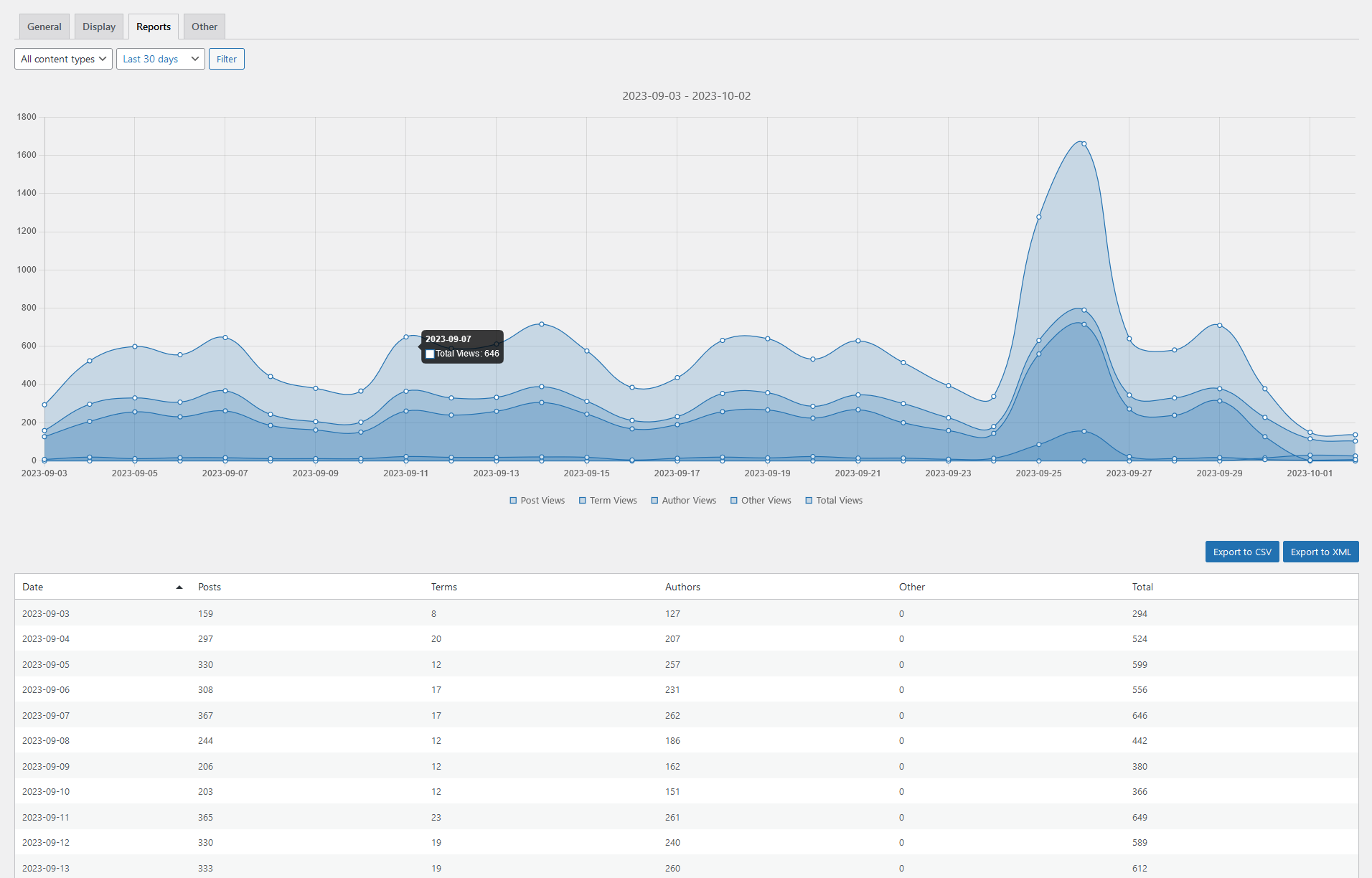
- Reports: Views by Date, Post and Author to spot winners, trends and top contributors, plus Visits in aggregate date reports.
- Visit trends and Views per visit in dashboard insights and email summaries.
- Performance Insights that explain how a post’s Views changed, in the admin column, Traffic Signals and email summaries.
- Daily, weekly and monthly email summaries with insights.
- Traffic sources: aggregate stats on referrers, devices, browsers, operating systems and languages.
- Views for taxonomy terms, authors and other archives.
- Customizable Views Period (e.g., last 7/30 days) to control the views count timeframe.
- Export to CSV/XML to download and share data.
- Integrations for ordering by views in popular builders (e.g., Elementor Pro, Divi, GenerateBlocks).
Installation
- Install Post Views Counter either via the WordPress.org plugin directory, or by uploading the files to your server
- Activate the plugin through the ‘Plugins’ menu in WordPress
- Go to the Post Views Counter settings and set your options.
Changelog
Adds the Status tab and support report, fixes cached-page counting, and strengthens statistics recovery and manual Views editing.
1.8.2
- New: Status tab with counting activity, configuration and data checks, button-triggered delivery checks, and a support report you can copy or download.
- Fix: Keep JavaScript and REST API counting working when cached pages contain expired tokens.
- Fix: Keep counting Views during Visits state recovery and restart the derived-metrics history after a counting gap.
- Fix: Distinguish failed statistics reads from zero counts and avoid caching failed reads.
- Fix: Report failed manual Views edits, preserve large totals, and prevent cancelled or unconfirmed editor updates from being replayed.
- Fix: Assign counted Views to the same counting-clock period as their Visit decision.
- Fix: Keep multisite activation and deactivation within the current network and preserve statistics during activation recovery.
- Fix: Prevent concurrent ownership of schema maintenance, buffered-count saves and summary email sending.
- Tweak: Group related Status checks, clarify license settings, and add settings-tab icons.
- Tweak: Use WordPress notices for Status results and highlight warnings and critical findings in the Status tab icon.
1.8.1
- Fix: Activate the plugin over existing statistics without losing stored Views.
- Fix: Protect existing statistics marked for deletion by a previous deactivation and clarify activation errors.
- Fix: Preserve Views access during Visits cache recovery and improve Plugin Status diagnostics.
- Fix: Restore frontend counter alignment in themes with centered content layouts.
1.8.0
- New: Site-wide Visits tracking.
- New: Views, Visits and combined display modes in the Post Views dashboard chart.
- New: Monthly Views comparisons in the Post Views dashboard widget.
- New: Custom Format for frontend Views counters in Display settings, shortcodes and PHP functions.
- New: Traffic Signals for changes in visits starting on a post.
- Fix: Block editor counter editing permissions, duplicate saves and error reporting.
- Fix: Counter input validation and Bulk Edit updates for saved posts.
- Fix: Access checks for admin column Views charts.
- Fix: Exclude non-post counts from post charts and summary emails.
- Fix: Traffic Signals and modal periods follow Count Time, including month-end comparisons.
- Fix: Preserve daily history when Cleanup Interval is set to 0.
- Fix: Prevent false Traffic Signals when daily history is incomplete.
- Fix: Keep keyboard focus inside the Views chart modal after navigating between periods.
- Fix: Restore the Views counter in the block editor on WordPress 6.4.
- Fix: Restore lifetime totals in pvc_get_views() when no period is specified.
- Tweak: Limit form-based counter edits to the submitted post; use pvc_update_post_views() for programmatic updates.
- Tweak: Use stored totals for manual Views edits, independently of pvc_get_post_views filters.
- Tweak: Remove pvcArgsQuickEdit.nonce from post lists; retain the save_bulk_post_views AJAX action for compatibility.
- Tweak: Reduce Traffic Signals reads to one database query per posts list page.
- Tweak: Use native Views column sorting with a stable tie-break.
- Tweak: Unify the frontend counter label to Views.
- Tweak: Replace frontend Dashicons with a CSS counter icon.
- Tweak: Retire the Icon Class setting; custom icons now require the pvc_counter_icon_class or pvc_counter_icon filter.
1.7.15
- Fix: Improve Statify import reliability with deterministic batching and collation-safe cursors.
- Fix: Isolate provider failures and report transaction outcomes accurately.
- Fix: Preserve import strategy compatibility and correct strategy statistics.
- Fix: Restore WordPress 7.1 block editor compatibility, including iframed placeholder styles and block cleanup.
- Tweak: Improve block editor controls and admin toolbar accessibility.
1.7.14
- Fix: Counter loading states and target metadata.
- Tweak: Pass raw post views shortcode attributes to filters.
- Tweak: Improve license settings integration and compatibility.
1.7.13
- Fix: Save post views correctly from WooCommerce product Quick Edit.
Screenshots


For developers
Is this your plugin? Show off the numbers.
Add a live badge to your site, docs or GitHub README. It updates on its own — no account needed.
Best Post Views Counter alternatives
All analytics plugins →





FAQ
Post Views Counter: quick answers
Straight answers, pulled from live WordPress.org data.
Live data from WordPress.org · checked Nov 16, 2026
Is Post Views Counter free?
Yes. Post Views Counter is free to download and use from the official WordPress.org plugin directory.
Is Post Views Counter safe to use in 2026?
Yes — Post Views Counter is a safe, well-maintained plugin to use in 2026. It runs on 100K+ sites, is rated 4.9/5 and was last updated 2 weeks ago, and scores 96/100 on our health check.
How many websites use Post Views Counter?
Post Views Counter is active on 100K+ WordPress websites and has been downloaded 6,040,967 times since it launched in July 2014. It was downloaded 165,098 times in the last 30 days.
Does Post Views Counter work with WordPress 7.1?
Yes. The developer has tested Post Views Counter up to WordPress 7.2, the latest release. It requires WordPress 6.4 or newer.
What PHP version does Post Views Counter need?
Post Views Counter requires PHP 7.4 or higher. Most hosts run PHP 8.x today, so it works on any modern WordPress hosting.
When was Post Views Counter last updated?
The latest version, 1.8.2, was released on November 2, 2026 (2 weeks ago).
Who makes Post Views Counter?
Post Views Counter is developed and maintained by dFactory.
What are the best alternatives to Post Views Counter?
The most popular alternatives to Post Views Counter are Site Kit by Google (5M+ installs), MonsterInsights (2M+ installs) and WP Statistics (500K+ installs).
Powered by PageForge
Want thousands of pages that rank like these? Build them in an afternoon.
This directory runs on the same engine as PageForge. Turn any spreadsheet, CSV or API into thousands of fast, SEO-ready WordPress pages — with schema, internal links and AI-written copy baked in.
- CSV, Google Sheets & API data sources
- AI content, schema & internal links per page
- Works with Elementor, Gutenberg, Yoast & Rank Math
- Free on WordPress.org — no credit card


