


Analytify – Google Analytics 4 Tracking and Reporting in WordPress
The easiest way to connect Google Analytics 4 to WordPress. See real-time stats, eCommerce, and events tracking, right in your dashboard.

Safe pick
Yes — Analytify is a safe, well-maintained plugin to use in 2026. It runs on 20K+ sites, is rated 4.7/5 and was last updated 2 months ago, and scores 84/100 on our health check.
- Proven at scale on 20K+ active sites
- Loved by users — 4.7/5 from 488 reviews
How does it stack up?
Side-by-side on installs, updates, ratings & support



Daily downloads
Download spikes usually follow a new release — each site that auto-updates counts as a download.
Rankings
Where Analytify stands todayWordPress.org search rankings
Live position in the plugin search, top 100| Keyword | Position |
|---|---|
| analytics | #29 |
| ga4 | #15 |
| google analytics | #23 |
| google analytics dashboard | #19 |
| WordPress analytics | #16 |
Version adoption
Share of active sites per release.
Rating breakdown
★★★★★★★★★★ 4.7 from 488 reviews
About Analytify
From the official readme · v9.1.2Description
Homepage | Documentation | Support | Demo | Premium Version
Google Analytics, without leaving WordPress
Analytify brings Google Analytics 4 into your WordPress dashboard, so you can see how your site is actually performing without ever logging into Analytics. Trusted by 20,000+ websites and an official Google Analytics Technology Partner, Analytify turns raw GA4 data into a dashboard you’ll actually want to check.
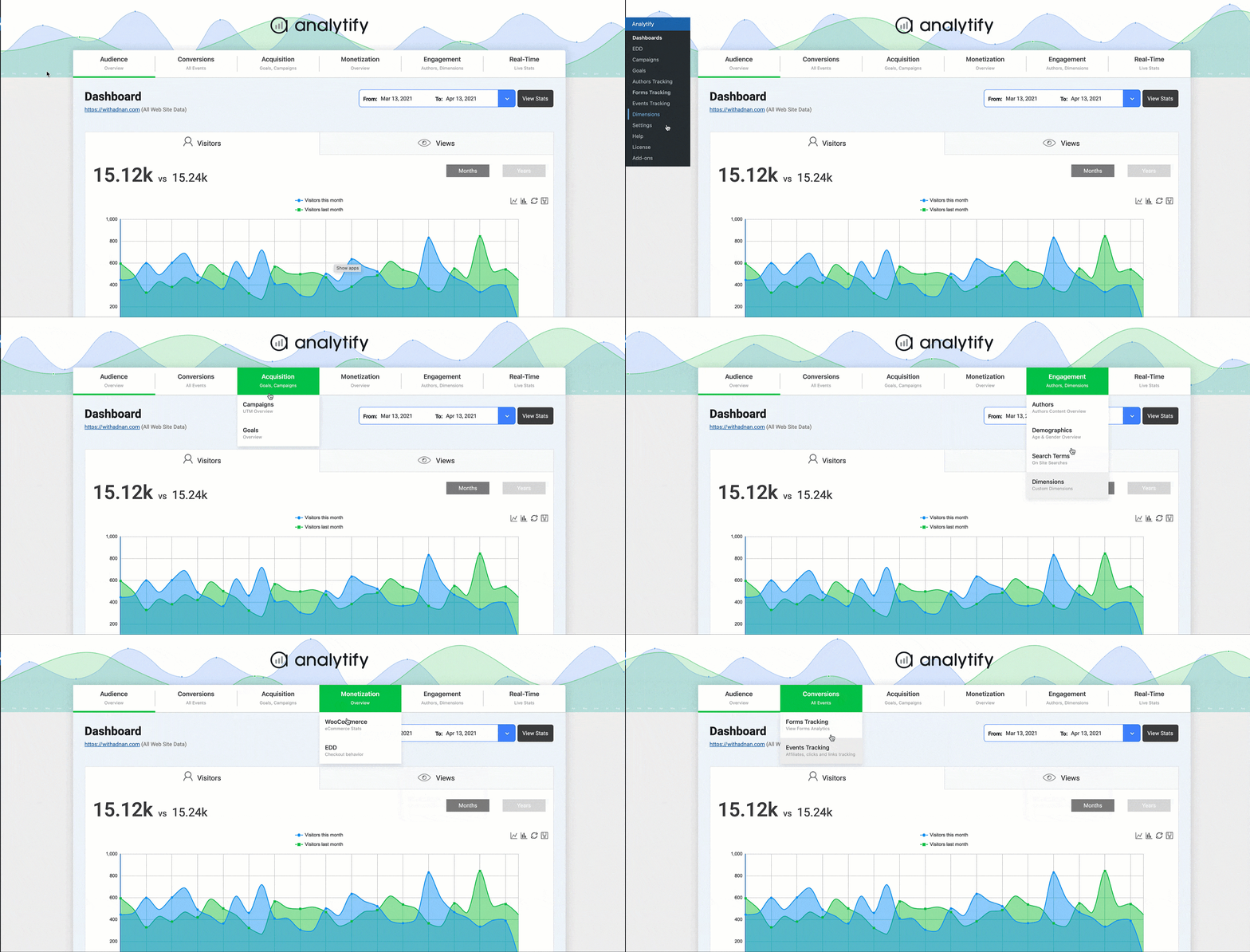
Connect your site in one click, no code and no developer required. Once connected, your stats show up on the main WordPress dashboard and, for any individual post or page, right inside the editor too, so you can see how that specific piece of content is performing without switching tabs.
What you get free
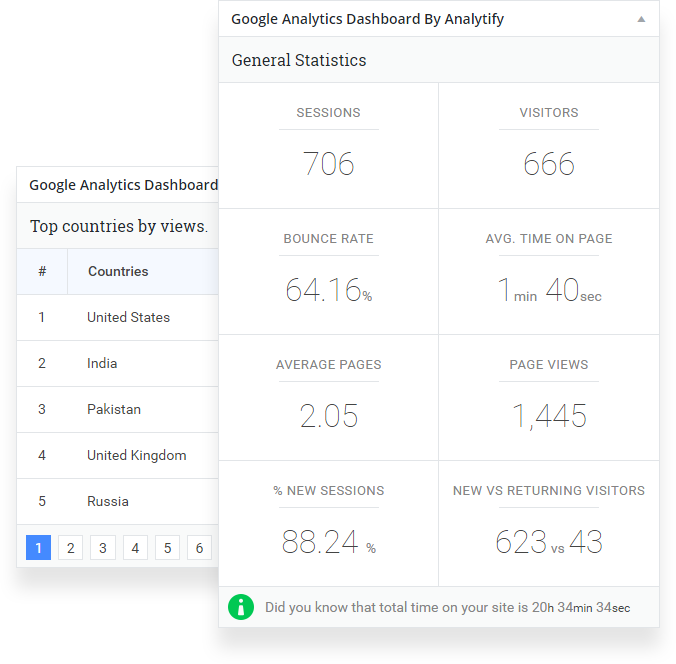
- Core stats at a glance. Visitors, page views, new vs. returning visitors, top pages, and geographic data, all in one dashboard.
- Page-level stats in the admin. See views, users, bounce rate, and average time on page for any post, right where you’re already editing it.
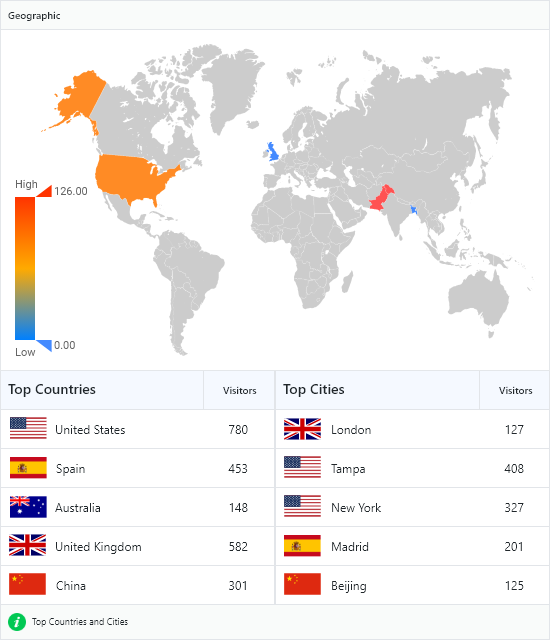
- Geographic breakdown. A visual map showing exactly which countries and cities send you traffic.
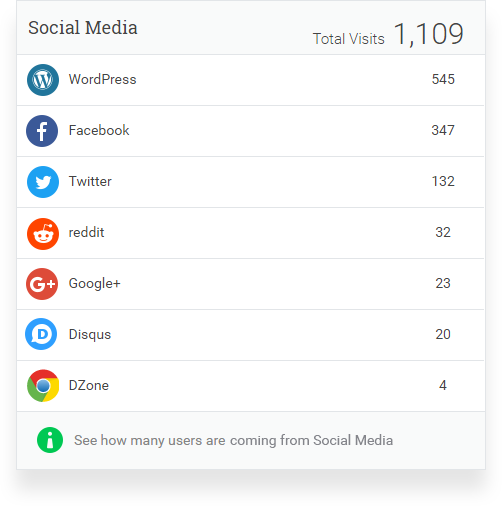
- Social media stats. See how much traffic your social channels are actually sending.
- SEO insight. See which posts and pages perform best, so you know what to write more of.
- System stats. Visitor breakdowns by operating system, browser, and device.
- Search Console insights. See your top search queries, clicks, and click-through rate alongside your Analytics data, no separate login required.
- Ad-blocker-resistant tracking. Analytify can serve Google Analytics from your own domain instead of Google’s, so you keep more accurate data even when visitors run an ad blocker.
- Cleaner tracking data (new). Tell Analytify which URL query parameters to ignore, so the same page doesn’t get split into multiple entries in your reports.
- Faster admin load times (new). Core plugin JavaScript is now minified.
- GDPR-ready & consent-friendly. Native integration with CookieYes and Google Consent Mode v2, plus developer filters for any other consent management plugin (see “Built for developers” below).
- Multilingual. Fully translatable and WPML-compatible, with community translations including French, Turkish, and Hungarian.
Upgrade to Pro for advanced tracking
The free version covers what most sites need to get started. Analytify Pro adds:
- Real-time reporting. The same real-time view you’d get in Google Analytics, without leaving WordPress.
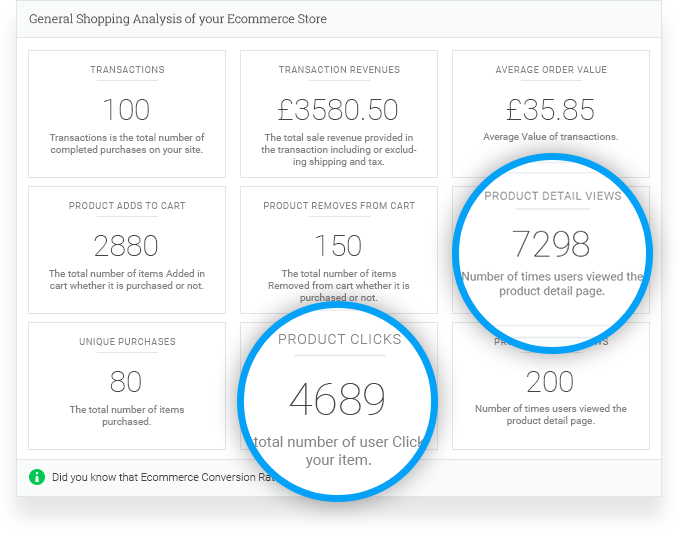
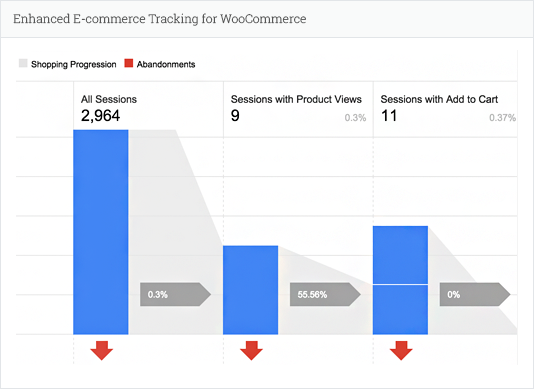
- Enhanced eCommerce for WooCommerce. Track product clicks, impressions, add-to-cart events, average order value, transaction revenue, and cart abandonment, right inside WordPress.
- Enhanced eCommerce for Easy Digital Downloads. Track digital sales, transactions, and revenue, synced with Google Analytics.
- Multistep form tracking (new). Automatically detects multi-step forms and tracks impressions, step views, submissions, and abandonment rate.
- LMS & membership tracking (new). Dedicated dashboards for LearnDash and LifterLMS course performance, and for Paid Memberships Pro membership growth, renewals, and cancellations.
- Multi-platform pixel tracking (new). Manage pixels for Meta, TikTok, Microsoft, Snapchat, X, Pinterest, and LinkedIn from one settings screen.
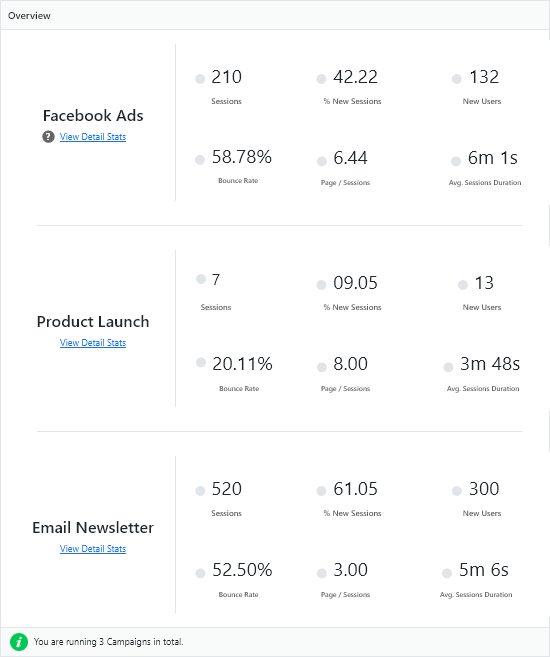
- Campaign tracking. See which campaigns are actually driving traffic and conversions.
- Goals dashboard, events, and forms tracking. Track custom events and form submissions (Contact Form 7, Gravity Forms, WPForms, Formidable Forms, and more).
- Custom dimensions. Track the specific data points that matter to your site.
- Video engagement tracking. See how visitors interact with embedded YouTube videos on your posts and pages.
- Site speed insights. A Google PageSpeed Insights dashboard right inside WordPress, so you can see how fast your site loads without leaving your site.
- Author-specific analytics (new). Give each author a dashboard showing stats for their own posts only.
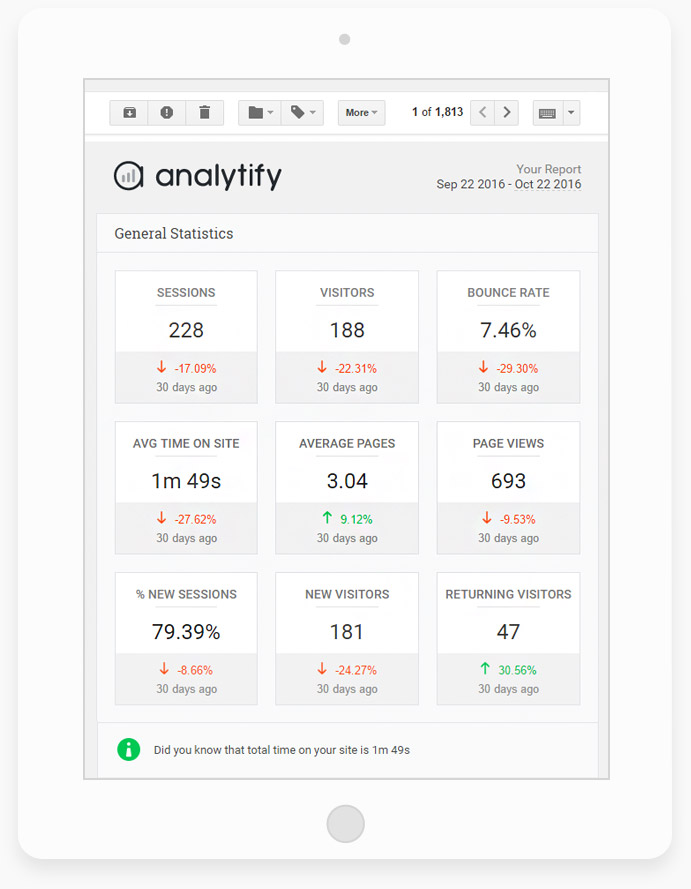
- Automated email reports. Schedule stats to land in your inbox, or your client’s.
- Shortcodes. Simple and advanced custom stat displays for posts, pages, and widgets on the front end.
- A free bonus: the Google Analytics Dashboard Widget add-on stays free either way.
Setup
- Install and activate Analytify.
- Go to Analytify > Settings and connect your Google Analytics account with one click.
- Select your GA4 property, and your dashboard starts filling in with data.
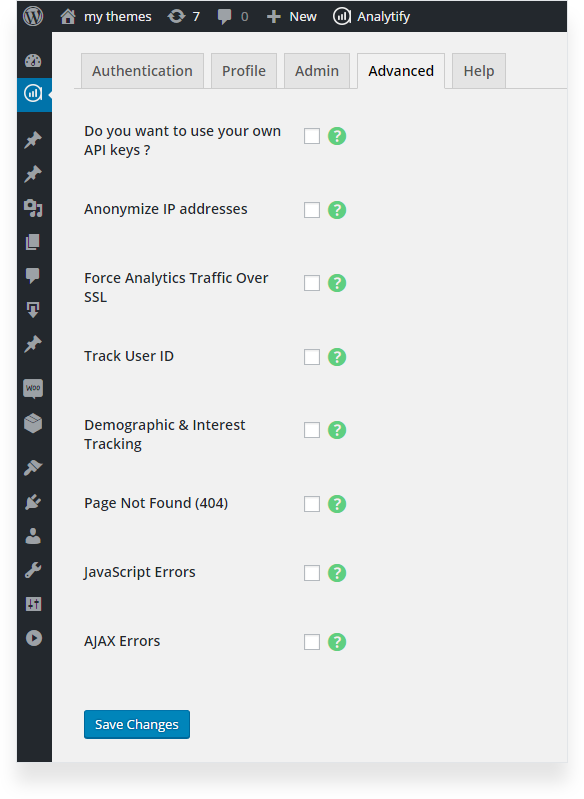
- Optional: for your own API rate limits, add your own Google API keys under the Advanced tab, using your own project from the Google Console. Video guide or written tutorial.
Using Analytify with Google Tag Manager
Already firing custom events through Google Tag Manager? Analytify can run alongside GTM without double-counting the same events. Watch how to set it up.
Built for developers
Analytify ships with filters for consent management, so you can wire it up to any cookie consent plugin without touching core code:
analytify_consent_server_blocks_tracking, return true server-side when a visitor hasn’t consented, so Analytify won’t print gtag in the page head.analytify_consent_defer_gtag, return true to load gtag only after consent is granted in the browser.analytify_consent_ready_dom_events, the browser events that trigger deferred gtag loading (defaults toanalytifyConsentGranted).analytify_consent_deferred_js_loader_name, the global function your front end can call to load gtag right after consent (defaults toanalytifyLoadGtagAfterConsent).
When CookieYes is active, Analytify automatically outputs Google Consent Mode v2 defaults before loading gtag.js; disable this with analytify_gtag_consent_defaults_enabled if your CMP already handles it.
Analytify is also open source on GitHub, issues and pull requests are welcome.
What people are saying
“We’ve used MonsterInsights for years, switched to Analytify and couldn’t be happier. Great metrics that are thoughtfully laid out. Highly recommend the paid version.”
— Maine Hosting, Analytify user“I often reach out to support for help with issues and they are always responsive and keep me up to date on status of updates that may take a bit longer. Every time they’re ready to push an update, I get notified and asked if I would like to try out the beta first. Working with them the last 2 years has been worth it for me and my clients.”
— Integrantsvs, Analytify user“I switched all my sites over to Analytify a couple of years ago and I’m glad I did. Being able to provide my clients with some basic Google Analytics reports right on their dashboard is perfect. Most just want some reassurance that the site is getting traffic, and the Dashboard widget does the job. And when a client wants a bit more than that, the additional pages of reports help to provide deeper insight. All without having to have a separate Google Analytics login or have to learn how to generate reports.”
— Matt Scheidler, Analytify user
If you find Analytify useful, a rating or review helps other WordPress users find it. Questions? Ask on the support forum or through premium support.
Installation
This section describes how to install the Google Analytics Dashboard by Analytify plugin and get it working.
1) Install
Modern Way:
- Go to the WordPress Dashboard “Add New Plugin” section.
- Search For “Analytify”.
- Install, then Activate it.
Old Way:
- Unzip (if it is zipped) and Upload
wp-analyifyfolder to the/wp-content/plugins/directory - Activate the plugin through the ‘Plugins’ menu in WordPress
2) Configure
- Reach out to the Analytify -> Settings Page
- Go to “Step 1”, click the “Log in with Google Analytics Account” button
- Connect and give Analytify App access to your Google Analytics account.
- After authentication, select your preferred profiles for front/admin Statistics via Settings -> Profile tab.
Changelog
Important Release, Update carefully. Report us back if you face any issues. Thanks for using Analytify.
9.1.2 – 2026-08-17
- Enhancement: All CSS/JS assets are now properly minified for faster page loads.
9.1.1 – 2026-08-04
- New Feature: Install and activate the Google Analytics Dashboard Widget add-on directly from the Add-ons page.
- Enhancement: Search Console Keywords csv export report now shows Click-Through Rate (CTR) and Average Position.
- Enhancement: More reliable Top Pages links and higher default row limit in reports.
- Bug Fix: Fixed dashboard/CSV/Excel export occasionally skipping chart data.
- Bug Fix: Fixed incorrect status messages while installing/activating an add-on.
- Bug Fix: Fixed translated text not loading on the Add-ons page.
- Security: Hardened CSV export against a formula-injection bypass in exported links.
- Security: Restored proper permission checks when activating add-ons.
- Security: Improved filtering of unsafe links in dashboard exports.
9.1.0 – 2026-07-15
- New Feature: Introduced new export dashboard reports to Excel, PDF, or CSV.
- New Feature: Show which Google account is connected under Authentication settings.
- Enhancement: Better compatibility with cookie consent plugins, including support for Google’s latest consent standards.
- Enhancement: Added a tooltip to the Browser Breakdown chart.
- Enhancement: Review notice is now dismissed/snoozed per user instead of site-wide, and only shown to users with dashboard access.
- Enhancement: Limited dashboard access for Subscriber accounts.
- Enhancement: Smoother setup when connecting your Google Analytics account.
- Enhancement: Improved reliability of comparison data in scheduled email reports.
- Bug Fix: New vs. Returning Users now shows exact counts instead of rounded numbers.
- Bug Fix: Fixed 404, JavaScript, and AJAX error (Advanced settings) tracking.
- Security: Hardened CSV export to prevent unsafe file content when opened in Excel or Sheets.
- Security: Improved account verification email security.
- Compatibility: Compatible with PHP 8.5.
- Compatibility: Compatible with WordPress 7.0.
9.0.2 – 2026-05-12
- Bug Fix: Resolved Dutch, French, and Spanish translation issues.
- Enhancement: Refactored and optimized code for improved maintainability and performance.
9.0.1 – 2026-05-01
- Security: Bundled jsPDF and html2canvas locally for dashboard PDF exports; updated versions.
- Enhancement: Minor dashboard asset loading cleanup and improvements.
9.0.0 – 2026-04-29
- New Feature: Introduced new paid module Pixels Tracking.
- New Feature: Introduced new paid module LifterLMS Tracking.
- New Feature: Introduced new paid module LearnDash Tracking.
- New Feature: Introduced new paid module Paid Memberships Pro Tracking.
- New Feature: Added custom dimensions to support enhanced
tel:link tracking ahead of Enhanced Tel Link Analytics reports. - New Feature: Custom date range for scheduled email reports, including “yesterday” and safer scheduling.
- New Feature: Exclude selected URL query parameters from tracking (Advanced).
- Enhancement: Locally hosted GA serves minified
gtag.min.jsand drops legacygtag.jshandling. - Enhancement: Switched from
error_logto Analytify logger; improved diagnostic log and debugging UX. - Enhancement: “Send Email” reports: loading states, strings, and more reliable background sends.
- Enhancement: Code re-factorization and improvements.
- Enhancement: Pie chart sizing and spacing on the dashboard.
- Bug Fix: YouTube video tracking script error and noisy console output.
- Bug Fix: General Stats email template styling and safer comparison label escaping.
- Bug Fix: Measurement Protocol GA4 class reference so MP events load and send correctly.
- Compatibility: Compatible with WordPress 7.0
Screenshots
For developers
Is this your plugin? Show off the numbers.
Add a live badge to your site, docs or GitHub README. It updates on its own — no account needed.
Best Analytify alternatives
All analytics plugins →





FAQ
Analytify: quick answers
Straight answers, pulled from live WordPress.org data.
Source: WordPress.org
Is Analytify free?
Yes. Analytify is free to download and use from the official WordPress.org plugin directory. The developer also sells premium add-ons or a Pro version with extra features.
Is Analytify safe to use in 2026?
Yes — Analytify is a safe, well-maintained plugin to use in 2026. It runs on 20K+ sites, is rated 4.7/5 and was last updated 2 months ago, and scores 84/100 on our health check.
How many websites use Analytify?
Analytify is active on 20K+ WordPress websites and has been downloaded 2,565,219 times since it launched in January 2015. It was downloaded 4,794 times in the last 30 days.
Does Analytify work with WordPress 7.1?
Analytify is officially tested up to WordPress 7.0.9, while the latest release is 7.1.5. It may still work, but try it on a staging site first.
When was Analytify last updated?
The latest version, 9.1.2, was released on September 25, 2026 (2 months ago).
Who makes Analytify?
Analytify is developed and maintained by Adnan.
What are the best alternatives to Analytify?
The most popular alternatives to Analytify are Site Kit by Google (5M+ installs), MonsterInsights (2M+ installs) and WP Statistics (500K+ installs).
Powered by PageForge
One template and a spreadsheet. A real page for every search.
PageForge turns each row of a CSV into a WordPress page with its own title, URL, SEO fields and schema, built on the layout you already designed. Free on WordPress.org.
- CSV and XLSX, plus Google Sheets on Professional and Enterprise
- Its own title, URL, SEO fields and schema for every page
- Works with the block editor, Elementor, Divi and Avada
- Free on WordPress.org, no credit card