


Unit Of Measure (UOM) for WooCommerce
Unit Of Measure (UOM) for WooCommerce allows you to add a unit of measure, or any text after the price of a WooCommerce product.

Safe pick
Yes — Unit Of Measure (UOM) for WooCo… is a safe, well-maintained plugin to use in 2026. It runs on 3K+ sites, is rated 5/5 and was last updated 1 week ago, and scores 88/100 on our health check.
- Loved by users — 5/5 from 23 reviews
- Actively developed — last update 1 week ago
- Tested with the latest WordPress (7.1)
- Momentum — downloads up 4804% vs the previous 30 days
How does it stack up?
Side-by-side on installs, updates, ratings & support



Daily downloads
Download spikes usually follow a new release — each site that auto-updates counts as a download.
Rankings
Where Unit Of Measure (UOM) for W… stands todayWordPress.org search rankings
Live position in the plugin search, top 100| Keyword | Position |
|---|---|
| woocommerce | >100 |
| woocommerce-price | #51 |
Version adoption
Share of active sites per release.
Rating breakdown
★★★★★★★★★★ 5 from 23 reviews
About Unit Of Measure (UOM) for WooCommerce
From the official readme · v3.3.1Description
Unit Of Measure (UOM) for WooCommerce allows you to add a unit of measure (UOM), or any text you require after the price in WooCommerce.
Requires WooCommerce to be installed.
Installation
- Upload Unit Of Measure (UOM) for WooCommerce to the
/wp-content/plugins/directory - Activate the plugin through the ‘Plugins’ menu in WordPress
- Go to “Inventory” tab in the product data area and put in your unit of measure
- Publish or update your product
- That’s it.
Frequently asked questions
Where will the unit of measure output on the product?
After the price.
Can I add a unit of measure to a simple or variation product?
Yes you can. At this stage you can not change the unit of measure per variation but you can add a “global” (displays on all variations) like unit for the product.
Can I upload the unit of measure text when with WooCommerce CSV Import Suite?
Yes you can, follow these steps: – Add a column to your Import Product CSV document – Add the following title to your new column, meta:_woo_uom_input – Fill your column with your required unit of measure or whatever text you want to add after the price for your product
Will this work with my theme?
Hard to say really, so many themes to test so little time.
Changelog
3.3.1
- Addressed WordPress.org plugin review feedback.
- Tested on WordPress 7.1.2
- Tested on WooCommerce 11.1.2
3.3.0
- This plugin is now known as Unit Of Measure (UOM) for WooCommerce, its a trademark thing.
- Security and coding standards fixes: capability check when saving the UOM, UOM output escaped with esc_html(), product resolved from the price filter instead of the global post (fixes wrong/missing UOM in loops, blocks and widgets), removed unused legacy files, WordPress Coding Standards clean up.
- Now requires WordPress 6.5 and PHP 7.4.
- Tested on WordPress 7.1.2
- Tested on WooCommerce 11.1.2
3.2.0
- Tested on WordPress 6.6.2
- Tested on WooCommerce 9.3.3
- Feature added to display UOM text on the cart page
3.1.0
- Added compatible with High Performance Order Storage (HPOS)
- Tested on WordPress 6.5.3
- Tested on WooCommerce 8.9.0
3.0.3
- Tested on WordPress 5.9
- Tested on WooCommerce 6.2.0
- Changed filter priority to fire later
3.0.2
- Tested on WordPress 5.5.1
- Tested on WooCommerce 4.6.1
Screenshots
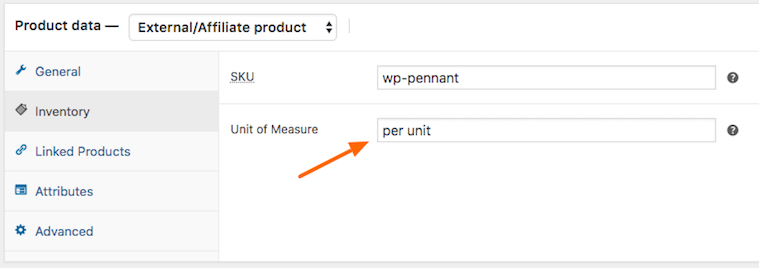

For developers
Is this your plugin? Show off the numbers.
Add a live badge to your site, docs or GitHub README. It updates on its own — no account needed.
Best Unit Of Measure (UOM) for Woo… alternatives
All woocommerce plugins →





FAQ
Unit Of Measure (UOM) for WooCommer…: quick answers
Straight answers, pulled from live WordPress.org data.
Live data from WordPress.org · checked Oct 9, 2026
Is Unit Of Measure (UOM) for WooCo… free?
Yes. Unit Of Measure (UOM) for WooCo… is free to download and use from the official WordPress.org plugin directory.
Is Unit Of Measure (UOM) for WooCo… safe to use in 2026?
Yes — Unit Of Measure (UOM) for WooCo… is a safe, well-maintained plugin to use in 2026. It runs on 3K+ sites, is rated 5/5 and was last updated 1 week ago, and scores 88/100 on our health check.
How many websites use Unit Of Measure (UOM) for WooCo…?
Unit Of Measure (UOM) for WooCo… is active on 3K+ WordPress websites and has been downloaded 57,280 times since it launched in June 2015. It was downloaded 1,226 times in the last 30 days.
Does Unit Of Measure (UOM) for WooCo… work with WordPress 7.1?
Yes. The developer has tested Unit Of Measure (UOM) for WooCo… up to WordPress 7.1.3, the latest release. It requires WordPress 6.5 or newer.
What PHP version does Unit Of Measure (UOM) for WooCo… need?
Unit Of Measure (UOM) for WooCo… requires PHP 7.4 or higher. Most hosts run PHP 8.x today, so it works on any modern WordPress hosting.
When was Unit Of Measure (UOM) for WooCo… last updated?
The latest version, 3.3.1, was released on September 30, 2026 (1 week ago).
Who makes Unit Of Measure (UOM) for WooCo…?
Unit Of Measure (UOM) for WooCo… is developed and maintained by Brad Davis.
What are the best alternatives to Unit Of Measure (UOM) for WooCo…?
The most popular alternatives to Unit Of Measure (UOM) for WooCo… are Google for WooCommerce (800K+ installs), WooCommerce PayPal Payments (800K+ installs) and WooCommerce Stripe Payment… (700K+ installs).
Powered by PageForge
Want thousands of pages that rank like these? Build them in an afternoon.
This directory runs on the same engine as PageForge. Turn any spreadsheet, CSV or API into thousands of fast, SEO-ready WordPress pages — with schema, internal links and AI-written copy baked in.
- CSV, Google Sheets & API data sources
- AI content, schema & internal links per page
- Works with Elementor, Gutenberg, Yoast & Rank Math
- Free on WordPress.org — no credit card


