


WPC Smart Quick View for WooCommerce
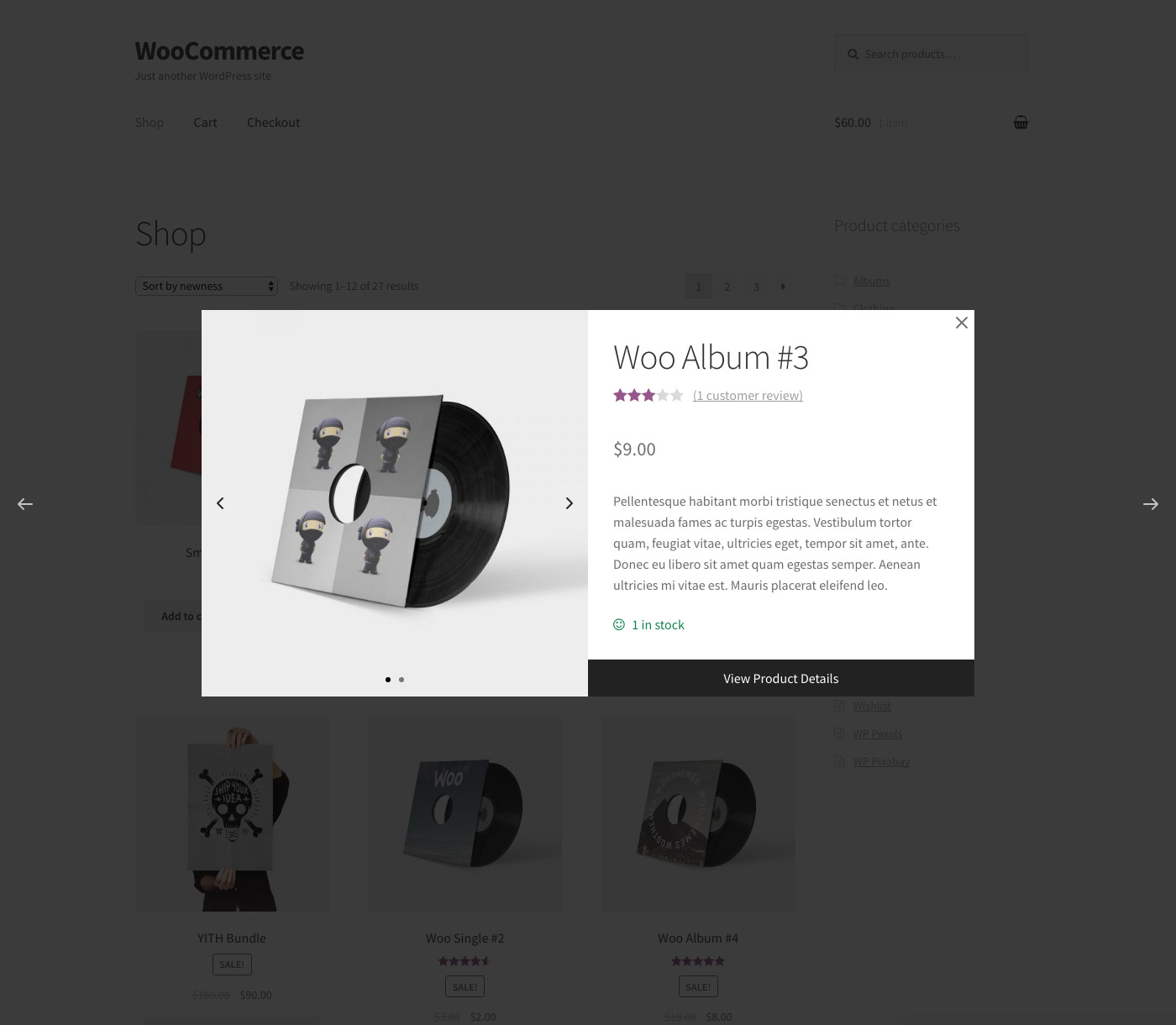
WPC Smart Quick View allows users to get a quick look at products without opening the product page.

Safe pick
Yes — WPC Smart Quick View for WooCom… is a safe, well-maintained plugin to use in 2026. It runs on 80K+ sites, is rated 4.9/5 and was last updated 3 days ago, and scores 89/100 on our health check.
- Proven at scale on 80K+ active sites
- Loved by users — 4.9/5 from 31 reviews
- Actively developed — last update 3 days ago
- Tested with the latest WordPress (7.1)
How does it stack up?
Side-by-side on installs, updates, ratings & support



Daily downloads
Download spikes usually follow a new release — each site that auto-updates counts as a download.
Rankings
Where WPC Smart Quick View for Wo… stands todayWordPress.org search rankings
Live position in the plugin search, top 100| Keyword | Position |
|---|---|
| quick view | #1 |
| quickview | #2 |
| woocommerce | >100 |
| wpc | #2 |
Version adoption
Share of active sites per release.
Rating breakdown
★★★★★★★★★★ 4.9 from 31 reviews
About WPC Smart Quick View for WooCommerce
From the official readme · v4.4.3Description
WPC Smart Quick View for WooCommerce allows shop owners to set up a Quick view popup, which enables customers to get a quick summary of the product details without leaving the current page. WPC Smart Quick View brings about an advanced site navigation experience for your visitors and helps people in decision-making; thus, turning more visitors into potential customers. It also helps to minimize the bounce rate and improve the site ranking. Besides, WPC Smart Quick View is fully optimized for SEO, compatible with any WordPress themes & WPML plugin for site translation. Especially, even on small screen hand-held devices, your site appearance would still be great thanks to the plugin’s high adaptability.
Live demo
Visit our live demo 01 or live demo 02 to see how this plugin works.
Features
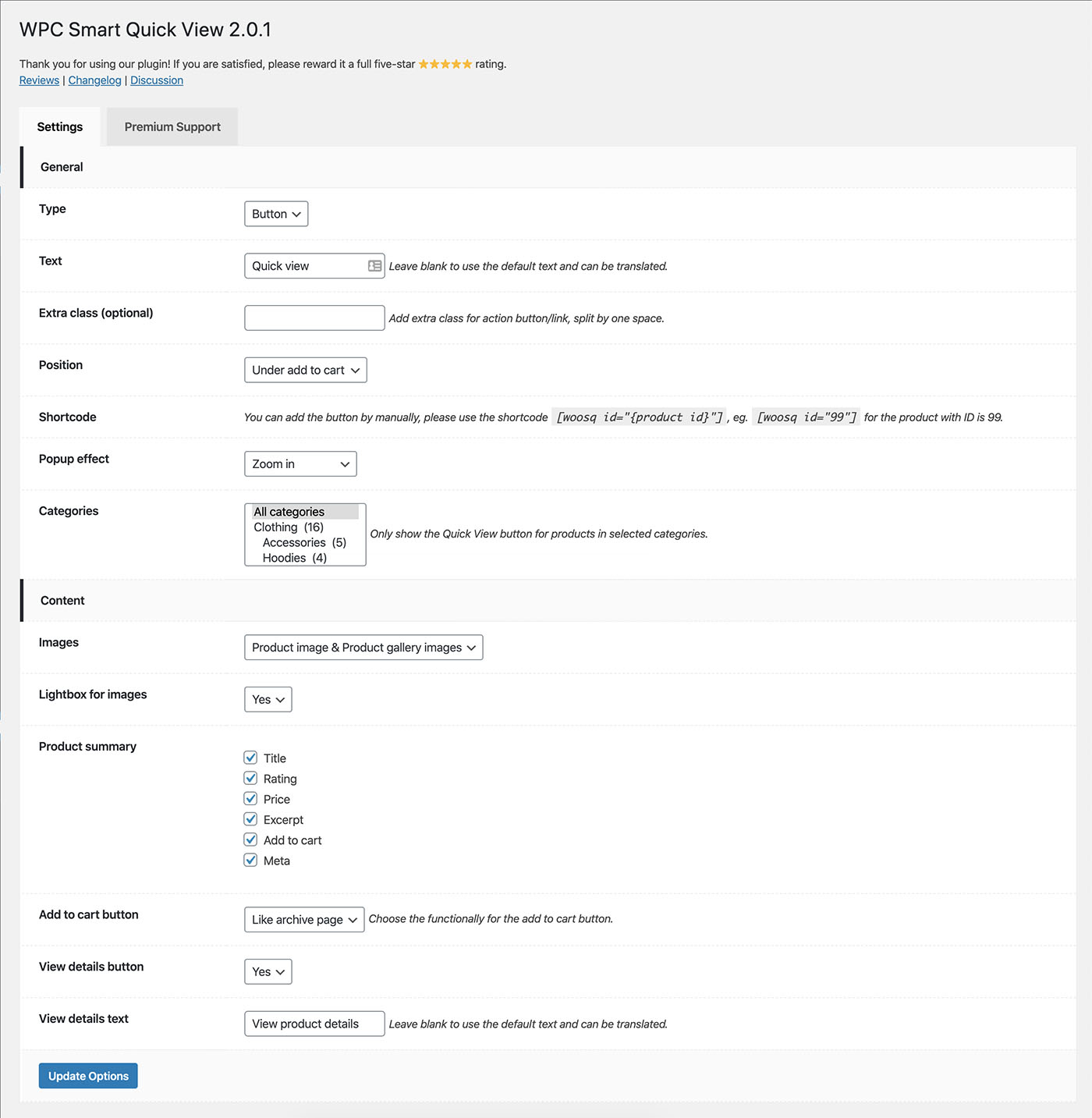
- Three types: button, link, or Quick view popup
- Diversifying button positions for choice
- Editable & translatable button text
- Navigation buttons: Next/Previous Products
- Beautiful effects: 8 different popup effects for choice
- Truly compatible with all kinds of WordPress themes
- Manually add the button on any page by using shortcodes
- Customizable visibility of Quick view button for certain selected categories
- Highly adaptable view for all screen resolutions, even small-screen devices
- A useful tool for improving your site’s search engine optimization
- WPML compatible for building multilingual sites
- RTL support for better displaying right-to-left languages
- Premium: Customizable the content on quick-view popup
- Premium: Enable fancybox/zoom effect for product images
- Premium: Enable/disable related products section
- Premium: Product summary fields: Title, Rating, Price, Excerpt, Add to Cart, Meta
- Premium: Add to Cart button can function as a single page or the archive page
- Premium: Customizable the visibility and text for View Product Details button
- Premium: Lifetime update and dedicated support
Need more features?
Please try other plugins from us:
Installation
- Please make sure that you installed WooCommerce
- Go to plugins in your dashboard and select “Add New”
- Search for “WPC Smart Quick View,” Install & Activate it
- Go to the settings page to choose the position and effect as you want
Changelog
4.4.3
- Fixed: Minor CSS/JS issues in the backend
- Updated: Compatible with WP 7.1 & Woo 11.3
4.4.2
- Fixed: Vulnerability reported by Jiemook (jiemook06@proton.me)
4.4.1
- Fixed: Vulnerability reported by Kuba
4.4.0
- Updated: New UI for the Settings page
- Added: Filter hook ‘woosq_disable_frontend_scripts’
4.3.6
- Updated: Optimized the code
- Updated: Compatible with WP 7.1 & Woo 11.1
4.3.5
- Fixed: Minor CSS/JS issues in the backend
Screenshots
For developers
Is this your plugin? Show off the numbers.
Add a live badge to your site, docs or GitHub README. It updates on its own — no account needed.
Best WPC Smart Quick View for WooC… alternatives
All quick view plugins →





FAQ
WPC Smart Quick View for WooCommerce: quick answers
Straight answers, pulled from live WordPress.org data.
Source: WordPress.org
Is WPC Smart Quick View for WooCom… free?
Yes. WPC Smart Quick View for WooCom… is free to download and use from the official WordPress.org plugin directory.
Is WPC Smart Quick View for WooCom… safe to use in 2026?
Yes — WPC Smart Quick View for WooCom… is a safe, well-maintained plugin to use in 2026. It runs on 80K+ sites, is rated 4.9/5 and was last updated 3 days ago, and scores 89/100 on our health check.
How many websites use WPC Smart Quick View for WooCom…?
WPC Smart Quick View for WooCom… is active on 80K+ WordPress websites and has been downloaded 2,450,026 times since it launched in December 2017. It was downloaded 33,462 times in the last 30 days.
Does WPC Smart Quick View for WooCom… work with WordPress 7.1?
Yes. The developer has tested WPC Smart Quick View for WooCom… up to WordPress 7.1.5, the latest release. It requires WordPress 5.9 or newer.
When was WPC Smart Quick View for WooCom… last updated?
The latest version, 4.4.3, was released on November 16, 2026 (3 days ago).
Who makes WPC Smart Quick View for WooCom…?
WPC Smart Quick View for WooCom… is developed and maintained by WPClever.
What are the best alternatives to WPC Smart Quick View for WooCom…?
The most popular alternatives to WPC Smart Quick View for WooCom… are YITH WooCommerce Quick View (80K+ installs), QODE Quick View for WooComm… (10K+ installs) and Product Labels, Quick View,… (8K+ installs).
Powered by PageForge
One template and a spreadsheet. A real page for every search.
PageForge turns each row of a CSV into a WordPress page with its own title, URL, SEO fields and schema, built on the layout you already designed. Free on WordPress.org.
- CSV and XLSX, plus Google Sheets on Professional and Enterprise
- Its own title, URL, SEO fields and schema for every page
- Works with the block editor, Elementor, Divi and Avada
- Free on WordPress.org, no credit card