


WebMCP Bridge
Make your WordPress site natively AI-agent friendly via WebMCP, REST/OpenAPI, a remote MCP server, and optional Poppy 0.4 guest carts.

Use with caution
WebMCP Bridge works, but test it on a staging site before relying on it in 2026. It runs on 700+ sites and was last updated 3 days ago, and scores 47/100 on our health check.
- Actively developed — last update 3 days ago
- Small user base (700+ active installs)
- Very few reviews so far
- Only tested up to WordPress 6.9 (latest is 7.1)
How does it stack up?
Side-by-side on installs, updates, ratings & support


Daily downloads
Download spikes usually follow a new release — each site that auto-updates counts as a download.
Rankings
Where WebMCP Bridge stands todayWordPress.org search rankings
Live position in the plugin search, top 100| Keyword | Position |
|---|---|
| AI | >100 |
| AI agent | >100 |
| mcp | >100 |
| webmcp | #4 |
| woocommerce | >100 |
Version adoption
Share of active sites per release.
About WebMCP Bridge
From the official readme · v1.10.1Description
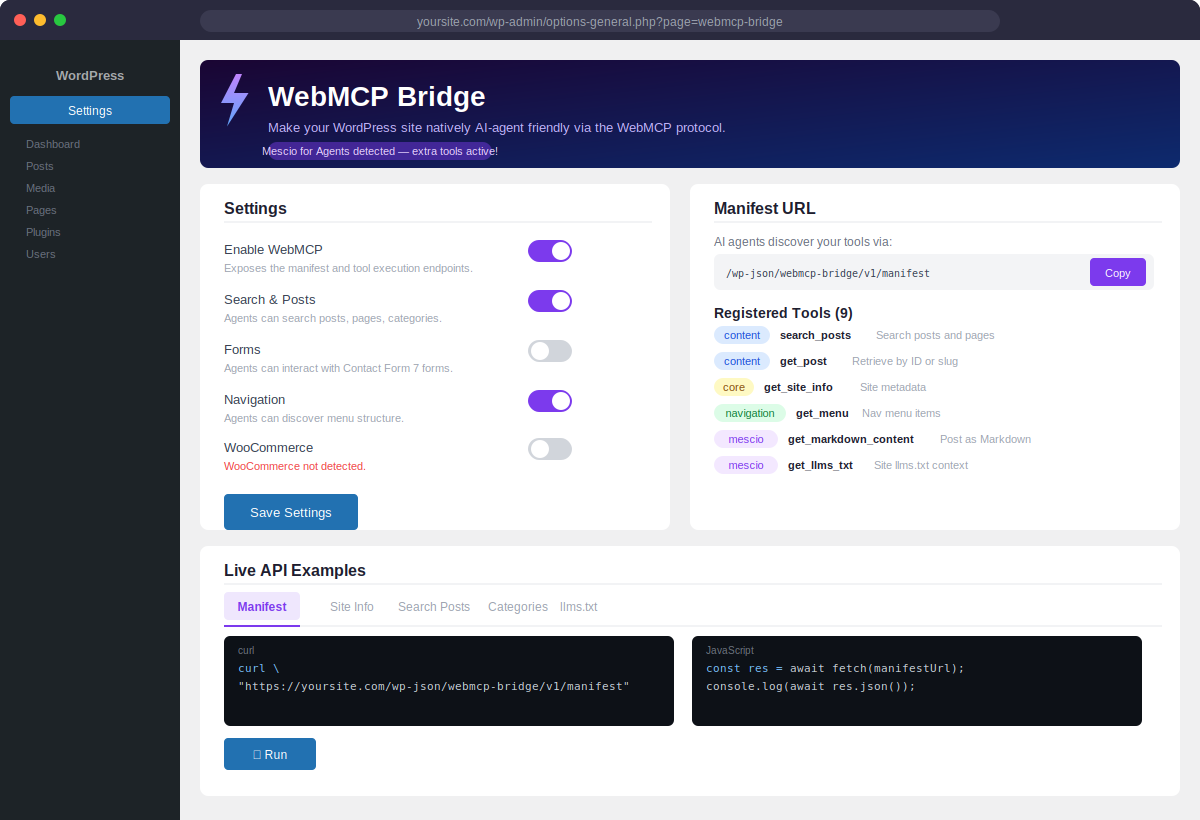
WebMCP Bridge exposes your WordPress (and WooCommerce) functionality as WebMCP tools that AI agents can discover and invoke directly in the browser.
Once installed, your site automatically becomes “agent-friendly”:
- AI agents can search posts, pages, and custom post types
- With Mescio for Agents, the site becomes a live RAG source (
retrieve→ Markdown) - AI agents can browse products, manage the cart, apply coupons (WooCommerce)
- With Personal Agent Protocol (Poppy) 0.4, a verified session can share one anonymous WooCommerce guest cart between MCP calls and the agent’s browser
- AI agents can read navigation menus and site metadata
- Developers can register custom tools in minutes via a simple PHP API
What is WebMCP?
WebMCP is a new browser-native protocol (currently in Chrome Early Preview) that lets web apps expose their functionality as structured “tools” that AI agents can invoke — without needing to screenshot or parse HTML. Think of your website as an MCP server running entirely client-side.
How it works
- Install and activate the plugin
- Enable the features you want from Settings → WebMCP Bridge
- Your tool manifest is immediately available at
/wp-json/webmcp-bridge/v1/manifest - Custom GPT Actions can import
/wp-json/webmcp-bridge/v1/openapi - Claude (and other MCP clients) can use
/wp-json/webmcp-bridge/v1/mcpas a remote Streamable HTTP MCP server (protocol 2025-06-18, still compatible with 2025-03-26) - Optional: enable Poppy 0.4 guest cart so Personal Agents can search, fill a guest cart, and send the shopper to normal WooCommerce guest checkout
- AI agents (or any JavaScript code) can call your tools via REST API or the native browser WebMCP API
Included tools
Core:
search_posts— Search posts, pages, or custom post typesget_post— Retrieve a single post by ID or slugget_menu— Return navigation menu itemsget_categories— List taxonomy termsget_site_info— Site name, description, URL, languagesubmit_contact_form— Contact Form 7 integration
WooCommerce (requires WooCommerce plugin):
woo_search_products— Search by keyword, category, price rangewoo_get_product— Full product details including attributeswoo_add_to_cart— Add a product to the cartwoo_get_cart— Current cart contents and totalswoo_remove_from_cart— Remove an item by cart keywoo_apply_coupon— Apply a coupon codewoo_get_checkout_fields— Return checkout field schemawoo_get_product_categories— List all product categories
Even more powerful with Mescio for Agents
WebMCP Bridge integrates automatically with the Mescio for Agents plugin. When both plugins are active, three additional tools are unlocked:
retrieve— RAG retrieve: ranked hits with snippets, Markdown URLs and token estimates. This is the search step of a live RAG loop over the site, without a separate vector database.get_markdown_content— Returns any post or page as clean Markdown, the format AI models consume most efficiently. Instead of raw HTML, agents receive structured, token-optimized content ready for reasoning and summarization.get_llms_txt— Exposes the site-widellms.txtcontext document (index or full variant), giving agents an instant, structured overview of what the site is about, who it is for, and what content is available — before they even start searching.
Together, the two plugins turn your WordPress site into a live knowledge base: Mescio for Agents is the content layer (Markdown, llms.txt), WebMCP Bridge is the tool layer (retrieve, act, checkout). From Mescio 1.8 / WebMCP 1.10.1, Agent activity in Mescio settings also logs MCP and REST tool calls — the observability slice: what this site served, not a ChatGPT citation score. The RAG loop is get_llms_txt → retrieve → get_markdown_content.
Privacy
This plugin does not collect, store, or transmit cart or customer data to third-party analytics. Tool execution happens in your WordPress install. No telemetry. If Poppy 0.4 guest cart is enabled, the plugin fetches the Personal Agent’s agent.json and JWKS over HTTPS only to verify Poppy-Session signatures.
Installation
- Upload the
webmcp-bridgefolder to/wp-content/plugins/ - Activate the plugin via Plugins → Installed Plugins
- Go to Settings → WebMCP Bridge and enable the features you want
Minimum Requirements
- WordPress 6.0 or higher
- PHP 8.0 or higher
- WooCommerce 7.0+ (optional, only required for WooCommerce tools)
- Contact Form 7 (optional, only required for form tools)
- Mescio for Agents (optional, unlocks
retrieve,get_markdown_contentandget_llms_txt)
Changelog
MCP now advertises protocol 2025-06-18. Optional Poppy 0.4 guest cart for WooCommerce (verified Poppy-Session only; existing nonce checks stay on).
1.10.1
- When Mescio for Agents 1.8+ is active, MCP and REST tool calls are counted in Mescio’s Agent activity log (tool name + user-agent, no IP)
- Docs: the stack is content (Mescio) + tools (WebMCP) + local request log — not a GEO ranking service
1.10.0
- MCP Streamable HTTP now defaults to protocol 2025-06-18 (required by Poppy 0.4). GET /mcp advertises that version;
initializestill accepts 2025-03-26 - Optional Personal Agent Protocol (Poppy) 0.4 guest cart for WooCommerce shops
- Verifies
Poppy-SessionandPoppy-Version(ES256 +poppy_dlg+ agent JWKS). Cart tools are listed and executed only after that check — nonce/cookie security for storefront visitors is unchanged - Each Poppy
sidmaps to its own anonymous WooCommerce session (no customer login or registration) browser_session_endpointat/poppy/browser-sessionso the Personal Agent’s browser and MCP calls share that guest cart; payment stays on normal Woo checkout- Optional WordPress-served
/.well-known/poppy.json(off by default so an existing shop document is not overwritten)
1.9.3
- Claude.ai custom connectors require OAuth: added authorization-server metadata, dynamic client registration, PKCE authorize and token endpoints
- MCP accepts OAuth access tokens issued by that handshake (and still accepts the optional API key)
- /.well-known/oauth-authorization-server is no longer a 404 — that 404 made Claude report “authentication failed”
1.9.2
- MCP tools/list is public (same as the REST manifest) so Claude can see tools without a Bearer token
- GET /mcp no longer advertises required Bearer auth — that made Claude skip discovery and report zero tools
- API key, when enabled, is enforced only on tools/call
1.9.1
- MCP GET now returns HTTP 200 (Claude probes the URL with GET; 405 looked like a dead server)
- API key is not required on GET/OPTIONS/initialize — only on tools/list and tools/call
- Added /.well-known/oauth-protected-resource so Claude can see auth is none or Bearer API key
1.9.0
- Added a real MCP server at /wp-json/webmcp-bridge/v1/mcp (Streamable HTTP, JSON-RPC 2.0)
- Claude Desktop / Claude.ai can add that URL as a remote MCP connector
- Optional Bearer API key (mcp_require_key) for public sites
- Discovery server card advertises streamable-http transport
- Admin: copy MCP URL, generate key, live initialize example
Screenshots
For developers
Is this your plugin? Show off the numbers.
Add a live badge to your site, docs or GitHub README. It updates on its own — no account needed.
Best WebMCP Bridge alternatives
All AI plugins →





FAQ
WebMCP Bridge: quick answers
Straight answers, pulled from live WordPress.org data.
Source: WordPress.org
Is WebMCP Bridge free?
Yes. WebMCP Bridge is free to download and use from the official WordPress.org plugin directory.
Is WebMCP Bridge safe to use in 2026?
WebMCP Bridge works, but test it on a staging site before relying on it in 2026. It runs on 700+ sites and was last updated 3 days ago, and scores 47/100 on our health check.
How many websites use WebMCP Bridge?
WebMCP Bridge is active on 700+ WordPress websites and has been downloaded 5,746 times since it launched in March 2026. It was downloaded 1,578 times in the last 30 days.
Does WebMCP Bridge work with WordPress 7.1?
WebMCP Bridge is officially tested up to WordPress 6.9.12, while the latest release is 7.1.5. It may still work, but try it on a staging site first.
What PHP version does WebMCP Bridge need?
WebMCP Bridge requires PHP 8.0 or higher. Most hosts run PHP 8.x today, so it works on any modern WordPress hosting.
When was WebMCP Bridge last updated?
The latest version, 1.10.1, was released on November 17, 2026 (3 days ago).
Who makes WebMCP Bridge?
WebMCP Bridge is developed and maintained by Mescio.
What are the best alternatives to WebMCP Bridge?
The most popular alternatives to WebMCP Bridge are Elementor Agent Ready Websi… (10M+ installs), Jetpack (3M+ installs) and All in One SEO (2M+ installs).
Powered by PageForge
One template and a spreadsheet. A real page for every search.
PageForge turns each row of a CSV into a WordPress page with its own title, URL, SEO fields and schema, built on the layout you already designed. Free on WordPress.org.
- CSV and XLSX, plus Google Sheets on Professional and Enterprise
- Its own title, URL, SEO fields and schema for every page
- Works with the block editor, Elementor, Divi and Avada
- Free on WordPress.org, no credit card