



Members – Membership & User Role Editor Plugin
The best WordPress membership and user role editor plugin. User Roles & Capabilities editor helps you restrict content in just a few clicks.

Safe pick
Yes — Members is a safe, well-maintained plugin to use in 2026. It runs on 300K+ sites, is rated 4.9/5 and was last updated 1 month ago, and scores 92/100 on our health check.
- Proven at scale on 300K+ active sites
- Loved by users — 4.9/5 from 1,277 reviews
- Tested with the latest WordPress (7.1)
- Responsive support — 92% of recent threads resolved
How does it stack up?
Side-by-side on installs, updates, ratings & support



Daily downloads
Download spikes usually follow a new release — each site that auto-updates counts as a download.
Rankings
Where Members stands todayWordPress.org search rankings
Live position in the plugin search, top 100| Keyword | Position |
|---|---|
| access | #11 |
| capabilities | #2 |
| memberships | #2 |
| permissions | #4 |
| roles | #1 |
Version adoption
Share of active sites per release.
Rating breakdown
★★★★★★★★★★ 4.9 from 1,277 reviews
About Members
From the official readme · v3.2.26Description
Members is a roles and capabilities based WordPress membership plugin. It gives your users the ultimate member experience by giving you powerful tools to add roles and capabilities and assign them to your users.
Members allows you to set permissions to restrict content on your site by providing a simple user interface (UI) for WordPress’ powerful roles and capabilities system, which has traditionally only been available to developers who know how to code this by hand.
Plugin Features
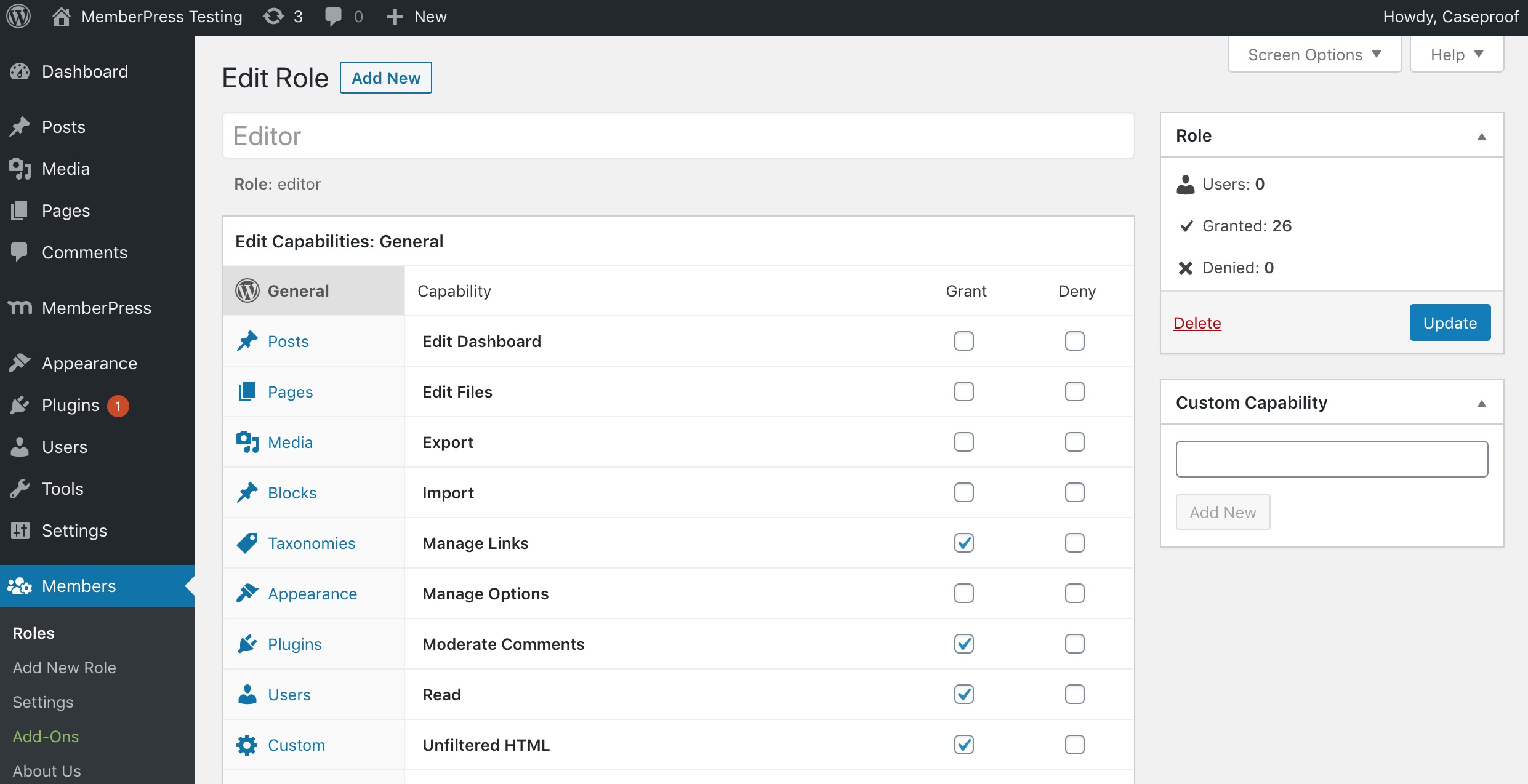
- Role Editor: Allows you to edit, create, and delete roles as well as capabilities for these roles.
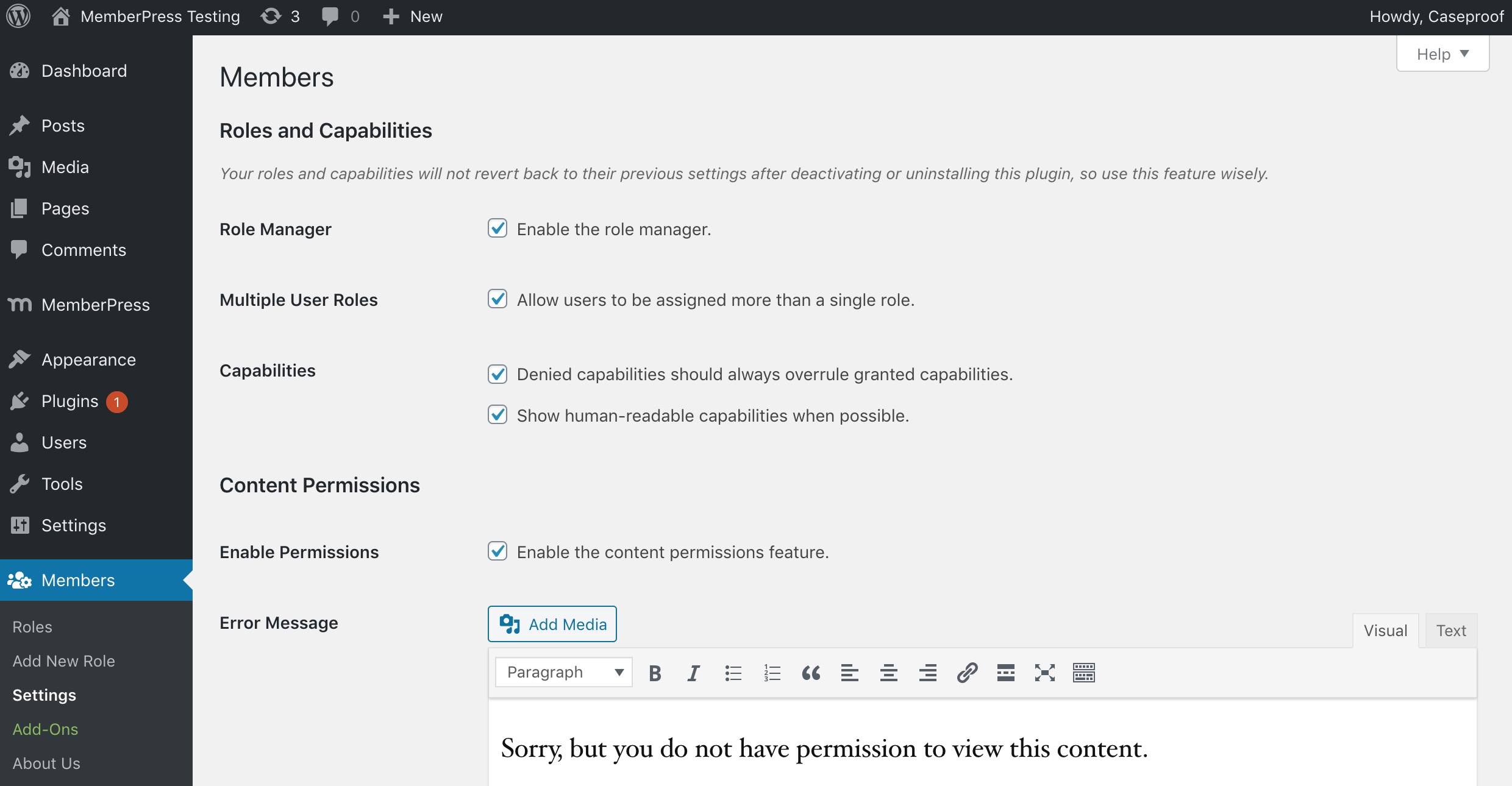
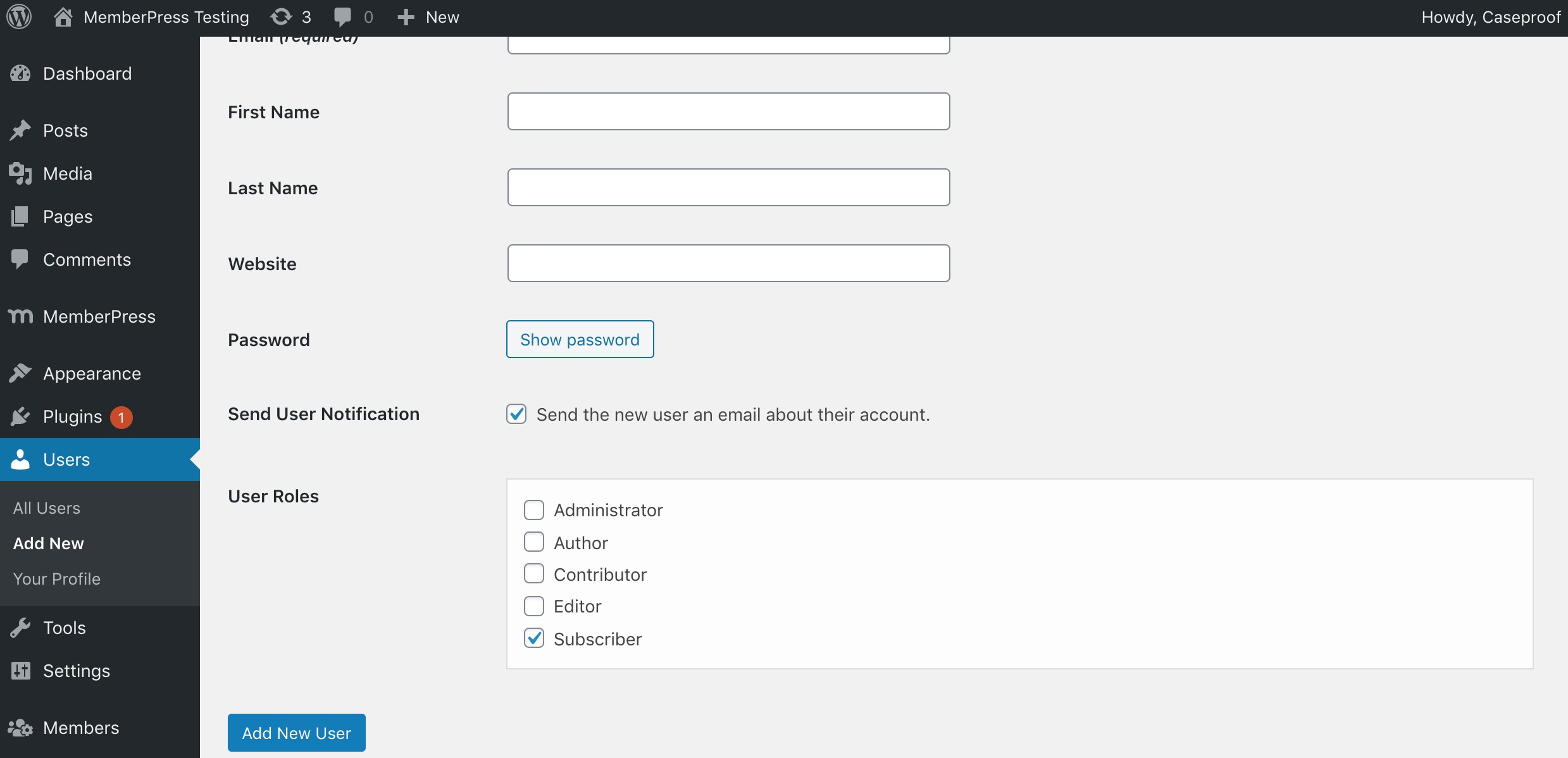
- Multiple User Roles: Give one, two, or even more roles to any user.
- Explicitly Deny Capabilities: Deny specific capabilities to specific user roles.
- Clone Roles: Build a new role by cloning an existing role.
- Role Import / Export: Export all roles and Members settings to a JSON file, export selected roles from the roles table, and preview imported roles before choosing whether to import, skip, overwrite, or rename each one.
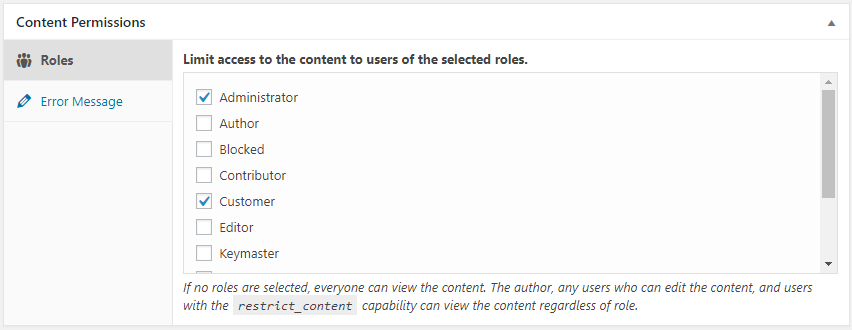
- Content Permissions / Restricted Content: Protect content to determine which users (by role) have access to post content.
- Shortcodes: Shortcodes to control who has access to content.
- Widgets: A login form widget and users widget to show in your theme’s sidebars.
- Private Site: You can make your site and its feed completely private if you want.
- Administrator Rescue (Magic Link): If you lose access to the WordPress admin (e.g. after editing roles), you can request a secure, time-limited link by email to restore your Administrator role and Members capabilities—no support ticket or database access required.
- Plugin Integration: Members is highly recommended by other WordPress developers. Many existing plugins integrate their custom roles and capabilities directly into it.
Seamless MemberPress Integration
If you’re looking to build a business out of your membership site by creating paid memberships there’s no better way than to use MemberPress. Members and MemberPress work together to provide the ultimate member experience and will help you start and profit from your amazing WordPress membership sites!
All Add-ons are now included
Members now includes ALL of it’s add-ons completely free of charge! Here are some of the awesome features they add to Members:
- Block Permissions: Allows site owners to hide or show blocks based on user logged-in status, user role, or capability.
- Privacy Caps: Creates additional capabilities for control over WordPress’ privacy and personal data features (GDPR).
- Admin Access: Allows site administrators to control which users have access to the WordPress admin via role.
- Core Create Caps: Adds the create_posts and create_pages caps to posts/pages to separate them from their edit_* counterparts, providing more flexible editing capabilities.
- Categories and Tag Caps: The Category and Tag Caps add-on creates custom capabilities for the core category and post tag taxonomies. This allows site owners to have precise control over who can manage, edit, delete, or assign categories/tags.
- Role Levels: Exposes the old user levels system, which fixes the WordPress author drop-down bug when users don’t have a role with one of the assigned levels.
- Role Hierarchy: Creates a hierarchical roles system.
- ACF Integration: Creates custom capabilities for the Advanced Custom Fields (ACF) plugin for managing with the Members plugin.
- EDD Integration: Integrates the Easy Digital Downloads plugin capabilities into the Members plugin’s role manager.
- GiveWP Integration: Integrates the GiveWP and GiveWP Recurring Donations plugin capabilities into the Members plugin’s role manager.
- Meta Box Integration: Integrates the Meta Box plugin capabilities into the Members plugin’s role manager.
- WooCommerce Integration: Integrates the WooCommerce plugin capabilities into the Members plugin’s role manager.
For more info, visit the Members plugin home page.
Like this plugin?
The Members plugin is a massive project with 1,000s of lines of code to maintain. A major update can take weeks or months of work. We don’t make any money directly from this plugin while other, similar plugins charge substantial fees to even download them or get updates. Please consider helping the cause by:
Documentation
Support
If you need plugin support from us, you can visit our support page.
Plugin Development
If you’re a theme author, plugin author, or just a code hobbyist, you can follow the development of this plugin on it’s GitHub repository.
Installation
- Upload
membersto the/wp-content/plugins/directory. - Activate the plugin through the ‘Plugins’ menu in WordPress.
- Go to “Settings > Members” to select which settings you’d like to use.
More detailed instructions are included in the plugin’s readme.html file.
Frequently asked questions
Why was this plugin created?
We weren’t satisfied with the current user, role, and permissions plugins available. Yes, some of them are good, but nothing fit what we had in mind perfectly. Some offered few features. Some worked completely outside of the WordPress APIs. Others lacked the GPL license. So, we just built something we actually enjoyed using.
What’s the difference between Members and MemberPress?
Members and MemberPress solve different problems and are designed to work together. Members is a free roles and capabilities plugin. It gives you a UI on top of WordPress’ native roles and capabilities system so you can create and edit roles, assign multiple roles to users, and restrict content by role or capability. It’s the right tool when you need to control who can do what inside your site—dashboard access, content permissions, and capability management—without charging for access. MemberPress is a premium, all-in-one WordPress membership platform built for monetization and much more. In…
How do I use it?
Most things should be fairly straightforward, but you can also view the docs online.
Can I move roles between sites?
Yes. On the Roles screen, use Export All to download a JSON file containing every role, its capabilities, and your Members plugin settings. To export only some roles, select them in the roles table and choose Export from the Bulk Actions menu. To import roles, upload a Members export JSON file from the same screen and click Upload and Preview. Members will show each role before anything is changed, so you can import new roles, skip roles, overwrite existing roles, or import conflicting roles under a new slug. Protected roles, such as the built-in Administrator role, your current role, and the…
Minimum PHP requirements.
Members now requires PHP 7.4+
I can’t access the “Role Manager” features.
When the plugin is first activated, it runs a script that sets specific capabilities to the “Administrator” role on your site that grants you access to this feature. So, you must be logged in with the administrator account to access the role manager. If, for some reason, you do have the administrator role and the role manager is still inaccessible to you, deactivate the plugin. Then, reactivate it.
On multisite, why can’t administrators manage roles?
If you have a multisite installation, only Super Admins can create, edit, and delete roles by default. This is a security measure to make sure that you absolutely trust sub-site admins to make these types of changes to roles. If you’re certain you want to allow this, add the Create Roles (create_roles), Edit Roles (edit_roles), and/or Delete Roles (delete_roles) capabilities to the role on each sub-site where you want to allow this.
How do I use Administrator Rescue (Magic Link) if I’m locked out?
If you can no longer access the WordPress admin (for example, after changing your role or capabilities), you can restore your Administrator access yourself: Go to your site’s login page: yoursite.com/wp-login.php In the address bar, add ?action=members_rescue so the URL is: yoursite.com/wp-login.php?action=members_rescue Enter the email address of an account that has (or had) the built-in Administrator role, or is a Super Admin (multisite). Click “Send Rescue Link”. If that account is eligible, a secure link will be sent to that email (you may need to check spam). Open the link from the email…
Help! I’ve locked myself out of my site!
Please read the documentation for the plugin before actually using it, especially a plugin that controls permissions for your site. We cannot stress this enough. This is a powerful plugin that allows you to make direct changes to roles and capabilities in the database. If you have the built-in Administrator role (or are a Super Admin on multisite) but lost access to the admin (e.g. after editing roles), try the Administrator Rescue (Magic Link) first: go to yoursite.com/wp-login.php?action=members_rescue, enter your admin email, and use the link we send you to restore access. If that doesn’t…
Changelog
3.2.26
- Fixed: On the user profile / edit-user screen with Multiple User Roles enabled, the role checkboxes could appear to have no checkmark — looking “unresponsive” — when another plugin’s admin CSS overrode core checkbox styles (e.g. line-height: 0). The checkboxes always toggled and saved; only the checkmark was hidden. The Members role checkboxes now defensively assert their own rendering so the checkmark shows regardless of such global overrides.
- Fixed: Hardened the Multiple User Roles save against a possible PHP 8 TypeError from malformed submitted role data (a nested array reaching members_sanitize_role()).
3.2.25
- Fixed: Saving a post via the REST API as a user without the
restrict_contentcapability (e.g. custom roles, Gutenberg + ACF Pro) failed with “Sorry, you are not allowed to edit the _members_access_role custom field,” and silently dropped other meta such as ACF fields. The request pre-processor was hooked to a non-existent action (rest_before_insert_{$post_type}) so it never ran; it now correctly strips the Content Permissions meta keys for users who cannot manage them, before the save. - Fixed: The REST protected-posts exclusion scoped its restriction lookup to the queried post type, so posts inheriting a restriction from an ancestor of a different post type were not excluded, making X-WP-Total / pagination counts inaccurate. All restriction roots are now considered regardless of post type.
- Fixed: Content Permissions role configuration and the custom error message were visible in REST API responses to any user who could read the post (registered meta is readable regardless of its write auth callback). Both meta keys are now blanked to their empty defaults in REST responses for users who cannot manage content permissions.
- Fixed: Comments on role-protected posts were fully readable — bodies, author names, dates — via the REST API comments endpoint (/wp/v2/comments), including by anonymous visitors. Comment collections now exclude protected posts and single-comment reads are denied for users who cannot view the post.
- Fixed: With “Hide protected posts from REST API” enabled, hidden posts remained enumerable by ID — a single-item GET (/wp/v2/posts/ID) returned a 200 response exposing the title, slug, date, and author. Hidden posts now return the same 404 as a nonexistent ID.
- Fixed: A crafted form submission with nested array values could cause a PHP 8 TypeError fatal in the classic Content Permissions meta box save.
- Fixed: Evaluating protected posts for the REST exclusion no longer triggers the legacy
_rolemeta conversion, which performed database writes during unauthenticated GET requests and could destructively migrate_rolepostmeta belonging to unrelated plugins. The evaluation is now read-only and also guards against posts of unregistered post types (previously a source of PHP warnings). - Fixed: The block editor “Error Message” field in the Content Permissions panel was a rich-text control used outside a block context, so it silently ignored Enter and formatting — a multi-line message could not be entered. It is now a standard multi-line text field.
- Fixed: Opening a brand-new post in the block editor marked it as having unsaved changes before the user touched anything, because default roles were written to post meta on load. Default roles are now shown pre-selected without dirtying the editor, and persist normally once the post is edited.
- Fixed: Content Permissions REST meta and its block editor save now also register on rest_api_init, so post types registered later than other plugins/themes no longer show a Content Permissions panel that fails to save.
- Fixed: Content Permissions can once again be enabled for attachments via the members_enable_attachment_content_permissions filter (a 3.2.22 change returned early for attachments before the filter ran).
- Fixed: Saving the classic Content Permissions meta box no longer drops stored roles that were hidden from the checklist by the members_wp_roles filter; those roles are now preserved like deleted-role (orphan) slugs.
- Changed: The REST protected-posts exclusion scopes its permission checks to the queried post type(s) — restriction roots of other post types are only evaluated when they can actually pass a restriction down to the queried type — computes its hidden-post list once per request per user and type combination, primes caches in bounded chunks, and no longer walks post revisions when expanding inherited restrictions.
3.2.24
- Fixed: Content Permissions could not be saved via the REST API (block editor, Elementor, and other page builders) in 3.2.23, failing with “Sorry, you are not allowed to edit the _members_access_role custom field.” The meta auth callback wrongly honored WordPress’ default deny for protected meta keys, blocking every user including administrators.
- Fixed: The 3.2.23 REST protected-posts exclusion (CVE-2026-12426 fix) generated deeply nested correlated subqueries that caused severe database load and timeouts on large sites. It is now resolved to a flat list of excluded IDs computed in PHP.
- Fixed: The same REST exclusion query could exceed MySQL’s join/subquery limits and return zero posts even when nothing was restricted. Pagination counts remain accurate and the side channel stays closed.
3.2.23
- Fixed: Unauthenticated sensitive information disclosure via a REST API pagination side channel (CVE-2026-12426). Protected posts are now excluded from REST queries at the SQL level so the result counts and pagination headers no longer reveal hidden posts.
- Fixed: REST API and block editor hangs when saving posts that use content permissions. Content permissions handling in the block editor was reworked for reliable saving.
- Fixed: Custom capability creation could break when a role’s hidden capabilities were not stored as an array.
- Fixed: Trailing space in the
members_show_roles_page_capfilter name that prevented the filter from ever firing. - Changed: Optimized role user counting on sites with large numbers of users to reduce database load.
- Changed: Refactored the login widget to use get_current_user_id() for improved security and maintainability.
3.2.22
- Added import/export feature
- Added capabilities search
- Ensure WP 7.0 Compat
3.2.21
- Fixed: Privacy Caps add-on not granting privacy capabilities to administrators on fresh activations
- Removed: Legacy standalone-plugin code from bundled add-ons (dead activation hooks, obsolete build scripts, orphaned readme/uninstall files)
Screenshots

For developers
Is this your plugin? Show off the numbers.
Add a live badge to your site, docs or GitHub README. It updates on its own — no account needed.
Best Members alternatives
All access plugins →





FAQ
Members: quick answers
Straight answers, pulled from live WordPress.org data.
Live data from WordPress.org · checked Sep 28, 2026
Is Members free?
Yes. Members is free to download and use from the official WordPress.org plugin directory.
Is Members safe to use in 2026?
Yes — Members is a safe, well-maintained plugin to use in 2026. It runs on 300K+ sites, is rated 4.9/5 and was last updated 1 month ago, and scores 92/100 on our health check.
How many websites use Members?
Members is active on 300K+ WordPress websites and has been downloaded 7,726,785 times since it launched in September 2009. It was downloaded 48,391 times in the last 30 days.
Does Members work with WordPress 7.1?
Yes. The developer has tested Members up to WordPress 7.1.2, the latest release. It requires WordPress 6.0 or newer.
What PHP version does Members need?
Members requires PHP 7.4 or higher. Most hosts run PHP 8.x today, so it works on any modern WordPress hosting.
When was Members last updated?
The latest version, 3.2.26, was released on August 25, 2026 (1 month ago).
Who makes Members?
Members is developed and maintained by Blair Williams.
What are the best alternatives to Members?
The most popular alternatives to Members are Loginizer (1M+ installs), User Role Editor (700K+ installs) and Remove Dashboard Access (30K+ installs).
Powered by PageForge
Want thousands of pages that rank like these? Build them in an afternoon.
This directory runs on the same engine as PageForge. Turn any spreadsheet, CSV or API into thousands of fast, SEO-ready WordPress pages — with schema, internal links and AI-written copy baked in.
- CSV, Google Sheets & API data sources
- AI content, schema & internal links per page
- Works with Elementor, Gutenberg, Yoast & Rank Math
- Free on WordPress.org — no credit card


