



Video Gallery for WooCommerce – Add Product Video & Featured Video
Video Gallery for WooCommerce - add product video & featured video to the WooCommerce product gallery. Customize, boost sales. WooCommerce required.

Safe pick
Yes — Video Gallery for WooCommerce is a safe, well-maintained plugin to use in 2026. It runs on 4K+ sites, is rated 5/5 and was last updated 3 weeks ago, and scores 93/100 on our health check.
- Loved by users — 5/5 from 44 reviews
- Actively developed — last update 3 weeks ago
- Tested with the latest WordPress (7.1)
How does it stack up?
Side-by-side on installs, updates, ratings & support



Daily downloads
Download spikes usually follow a new release — each site that auto-updates counts as a download.
Rankings
Where Video Gallery for WooCommer… stands todayWordPress.org search rankings
Live position in the plugin search, top 100| Keyword | Position |
|---|---|
| featured video | #3 |
| product gallery | #14 |
| product video | #2 |
| video gallery | #7 |
| woocommerce | >100 |
Version adoption
Share of active sites per release.
Rating breakdown
★★★★★★★★★★ 5 from 44 reviews
About Video Gallery for WooCommerce
From the official readme · v2.11Description
Video Gallery for WooCommerce is a simple video gallery plugin for WooCommerce stores. It lets you add a product video or featured video to any WooCommerce product gallery in seconds. No code, no shortcodes, no theme edits.
Pick any clip from the WordPress media library. The video shows up right next to your product images, inside the WooCommerce product gallery. Set autoplay, sound, and loop. Show or hide the video controls. WooCommerce must be active for the plugin to work.
Upgrade your product pages today with Video Gallery for WooCommerce!
🚀 Looking for more features? Check out our PRO version with YouTube & Vimeo integration, external video URLs, unlimited videos, custom SVG icons, SEO optimization, video analytics, sticky video on scroll, and priority support!
Product Video Gallery Features
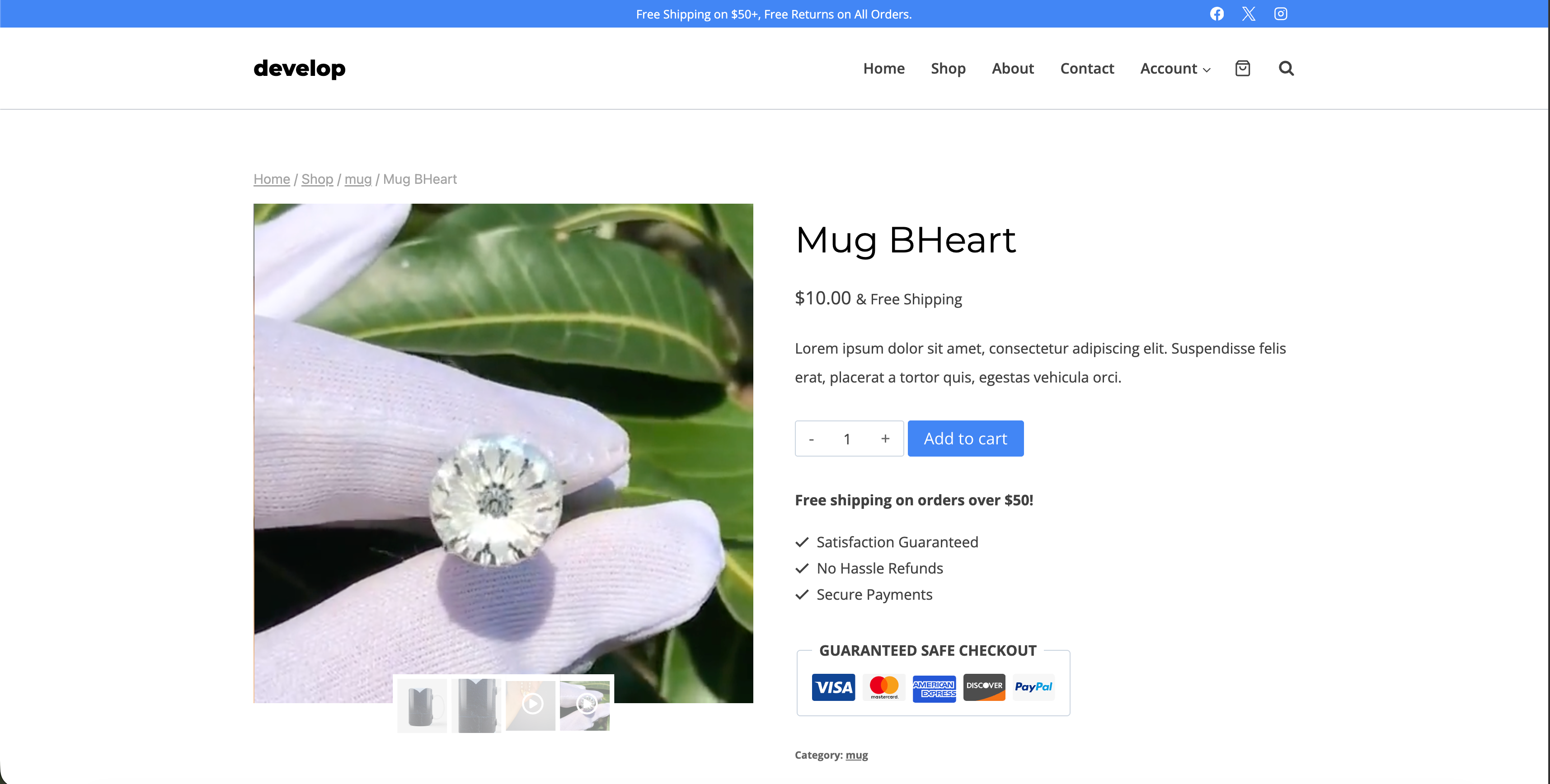
Turn every WooCommerce product gallery into a product video gallery. Add an MP4 or MOV product video from the WordPress media library. Drag and drop to reorder your clips. Shoppers see the item in motion, right next to the product images.
Featured Video for WooCommerce Products
Use any uploaded clip as a featured video for your WooCommerce products. The featured video plays inside the product gallery through the built-in VideoJS player. It works smoothly on desktop and mobile. You control autoplay, mute, and loop for each product.
WooCommerce Product Gallery Integration
Video Gallery for WooCommerce plugs into the native WooCommerce product gallery. It also supports the new WooCommerce Product Gallery Block. No gallery rebuild. No shortcodes. Install the plugin, add a product video, and you are live.
Key Features
- Add video files from the WP library to your product pages
- Pick the video thumbnail by choosing any frame, or upload your own image
- Move videos around on the product page to your desired position
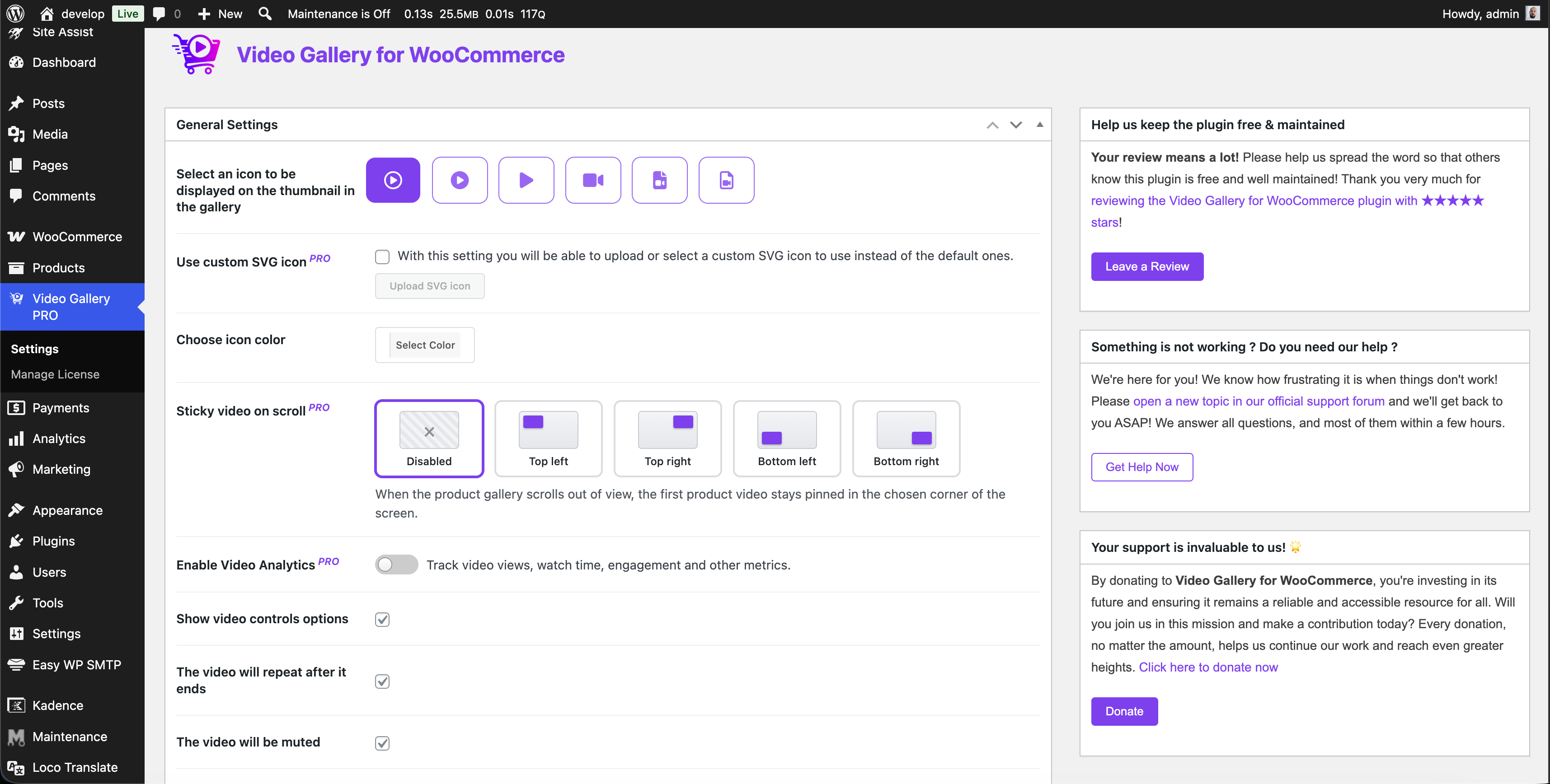
- Customize the video file icon and color
- Choose autoplay, sound, and loop options for video clips
- Show or hide video control options for a more personalized playback experience
- Enhance user engagement on your product pages with visually engaging video content
- Customize your video gallery to match your brand’s aesthetic
- Manage your media library with ease
- Increase conversions by showcasing your products with multimedia content
- Compatible with WooCommerce for seamless integration with your online store
FREE Version Limitations:
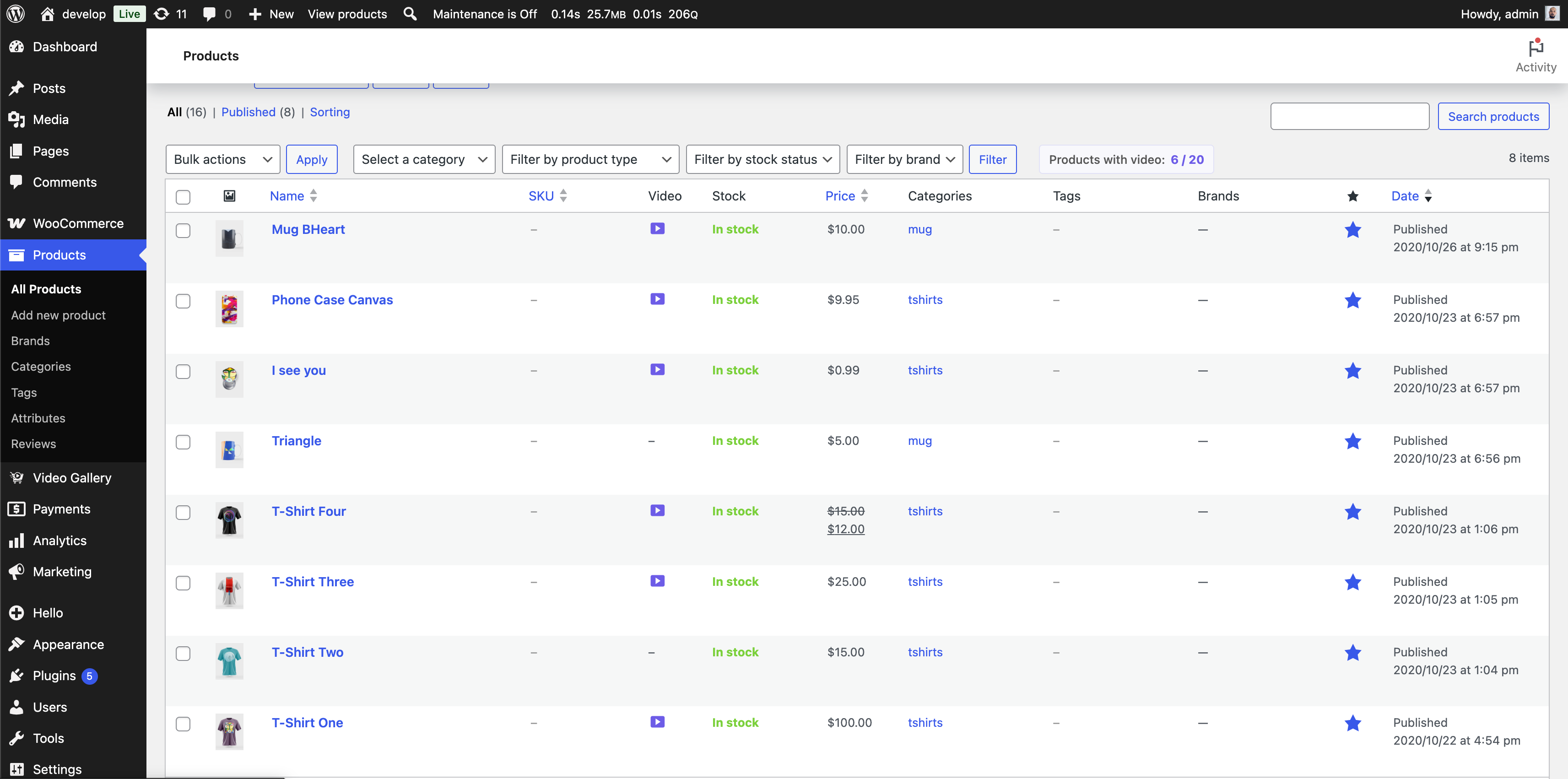
* Limited to 20 products with video
* Limited to 2 videos per product
* WordPress Media Library videos only (no YouTube, Vimeo or external video URL support)
* Basic video icons only
* Basic thumbnail generation
* Basic SEO video
* No analytics
🚀 Upgrade to PRO Version:
Get access to advanced features including up to 6 videos per product, YouTube integration, custom SVG icons, optimized thumbnails, SEO settings, video analytics, and premium support!
PRO Version Features:
* Unlimited products with video
* Up to 6 videos per product – Showcase products from multiple angles
* YouTube video integration – Embed videos directly from YouTube
* Vimeo video integration – Add Vimeo videos by URL (all plans)
* External video URLs – Add direct video-file links, .mp4/.webm/.mov (Multiple Sites plan and above)
* Custom SVG icons – Use your own brand icons
* Optimized thumbnails – Automatic thumbnail generation
* SEO settings – Custom titles and descriptions per video
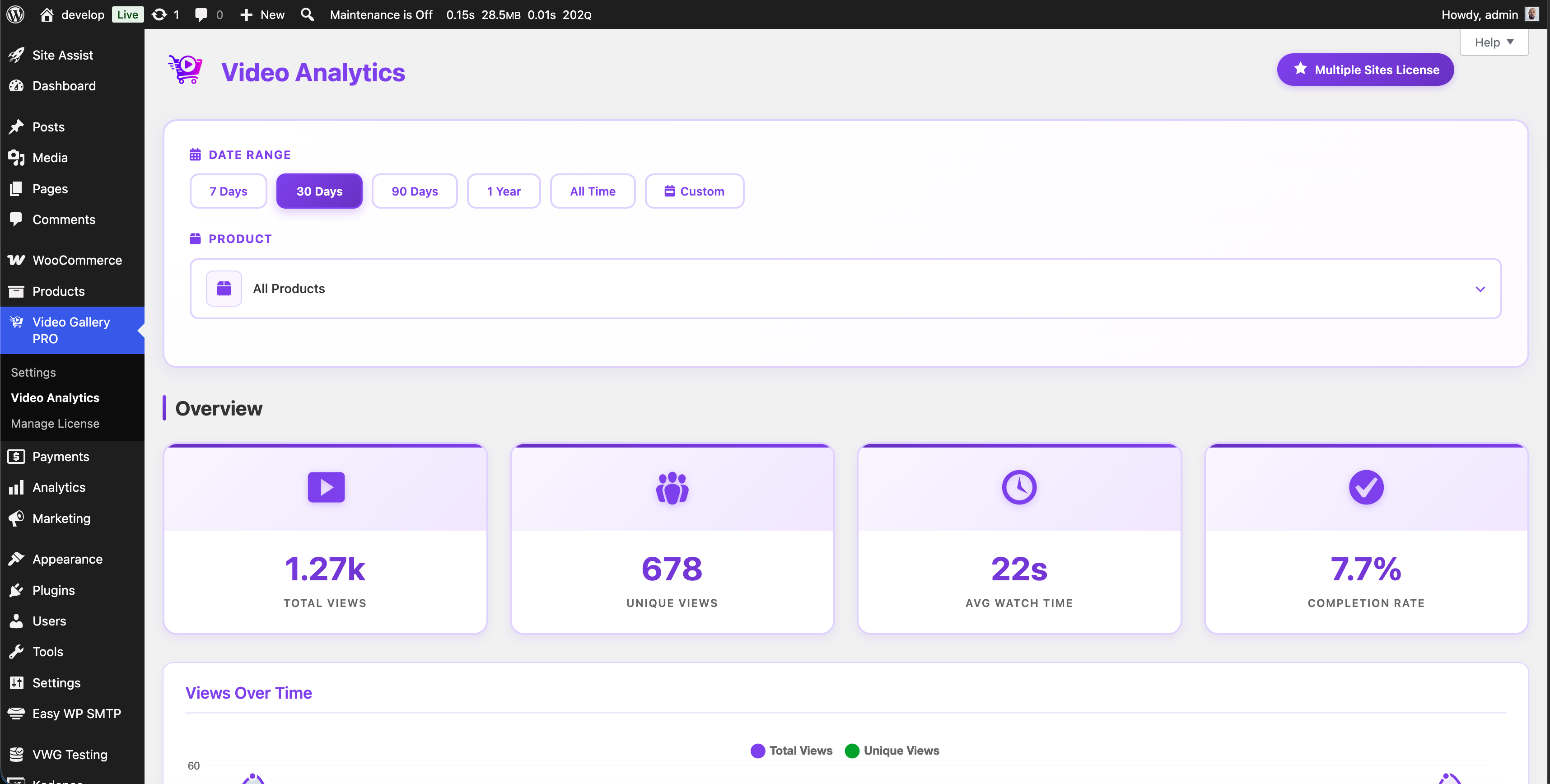
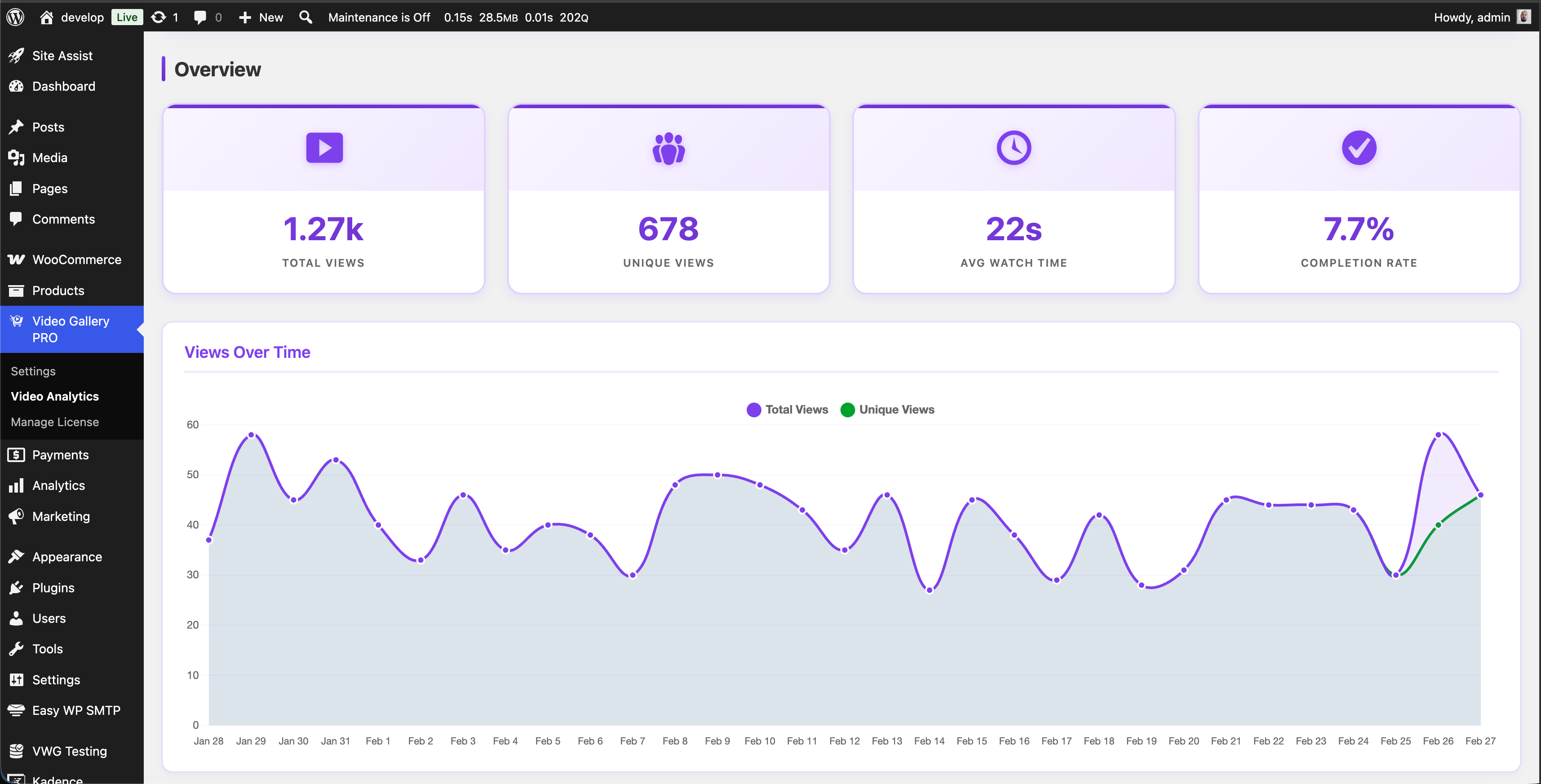
* Video Analytics (Basic) – Track video views and watch time per product (Single Site plan)
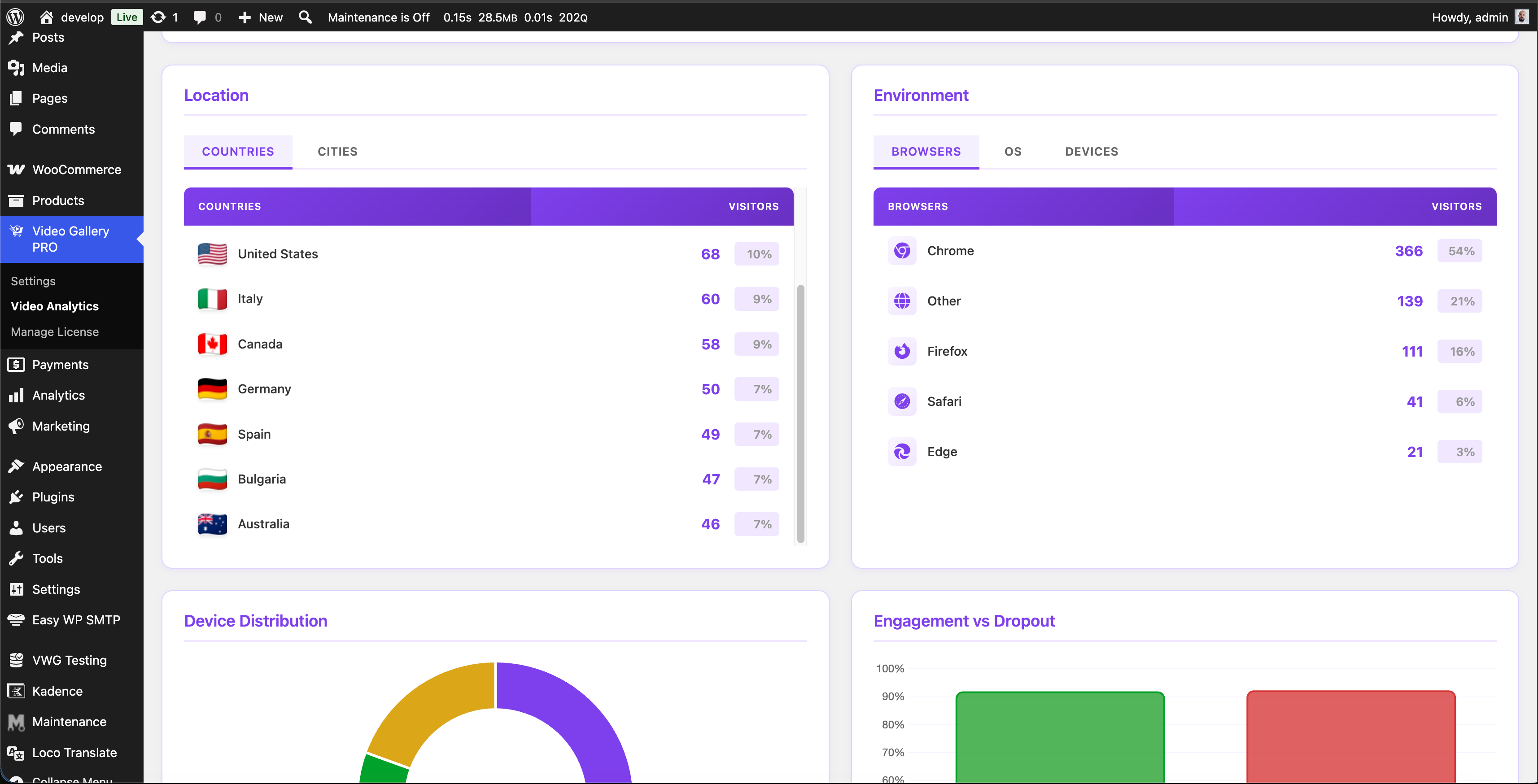
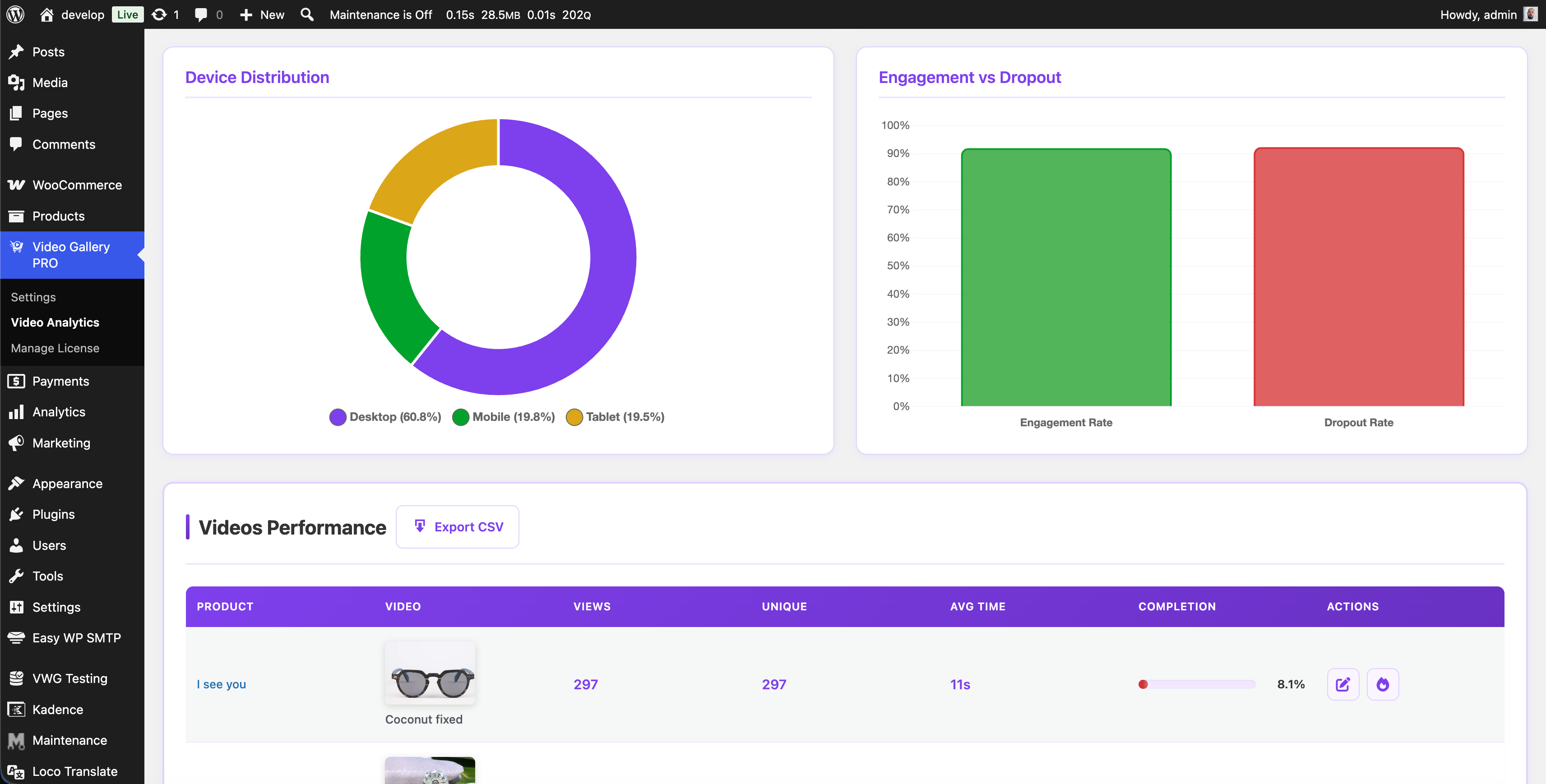
* Video Analytics (Advanced) – Device charts, engagement metrics, location analytics, browser/OS tracking, heatmap visualization, and CSV export (Multiple & Unlimited plans, or Advanced Analytics Add-on)
* Sticky video on scroll – When the active gallery slide leaves the viewport, the video stays visible in a small floating player anchored to the corner of your choice (top-left, top-right, bottom-left, bottom-right). Adapts to the source video’s aspect ratio so the whole frame is always visible.
* Premium support – Priority email support
The helper libraries plugin uses the following:
Requirements
- WooCommerce must be installed and activated. Install it first if you do not have it.
- Video files must be in a WordPress-supported format. MP4 and MOV work best.
- The plugin works with the default WooCommerce templates. We add extra support for known themes. If your theme breaks, contact support and we will check if we can make it compatible.
Videos
Watch Video Gallery for WooCommerce in action and see how to add a product video to your WooCommerce product gallery:
Installation
To install this plugin:
- Install the plugin through the WordPress admin interface, or upload the plugin folder to /wp-content/plugins/ using ftp.
- Activate the plugin through the ‘Plugins’ screen in WordPress. On a Multisite you can either network activate it or let users activate it individually.
- Go to the “Video Gallery” admin menu in your WordPress dashboard
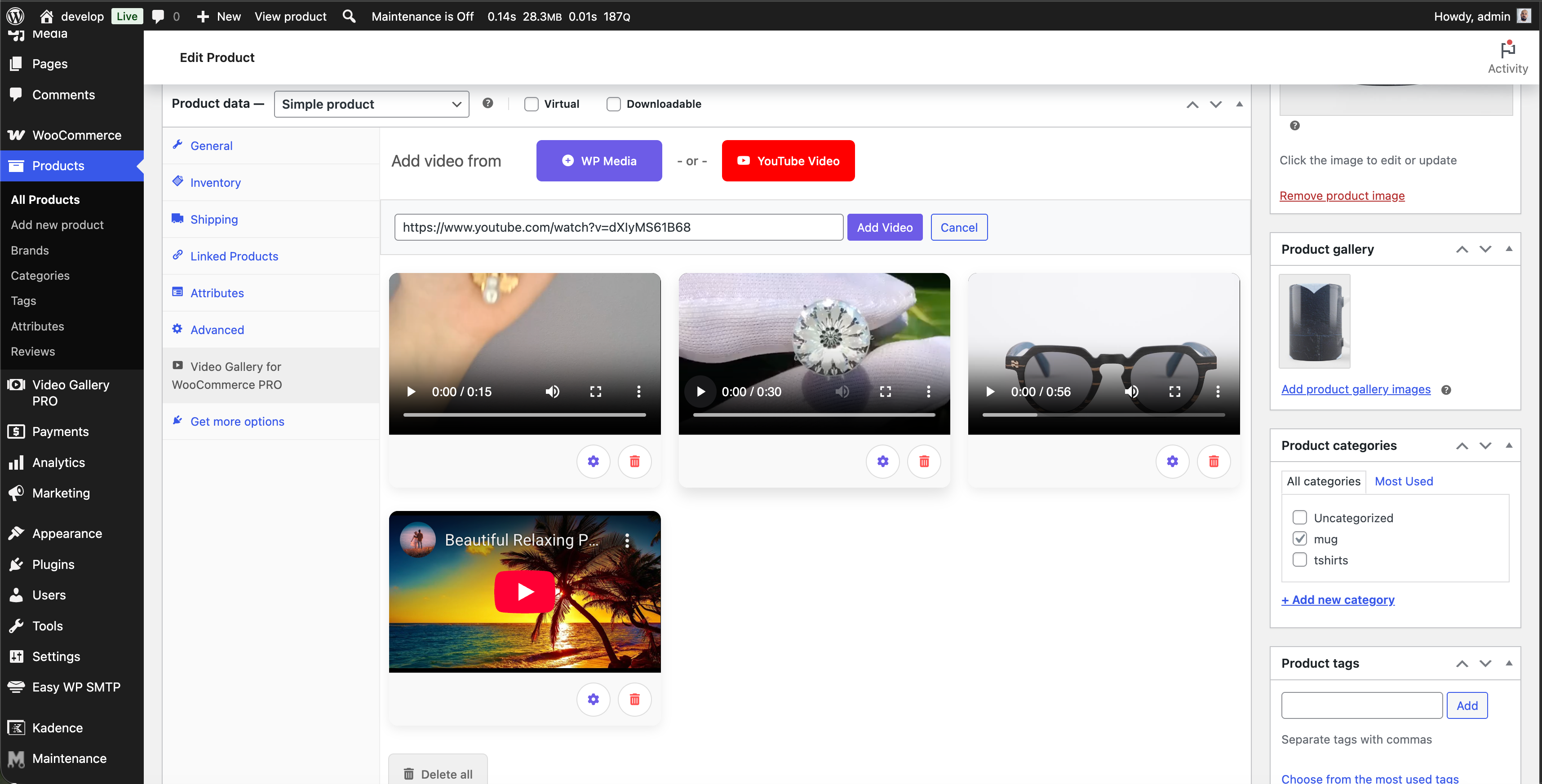
How to add a video to a product
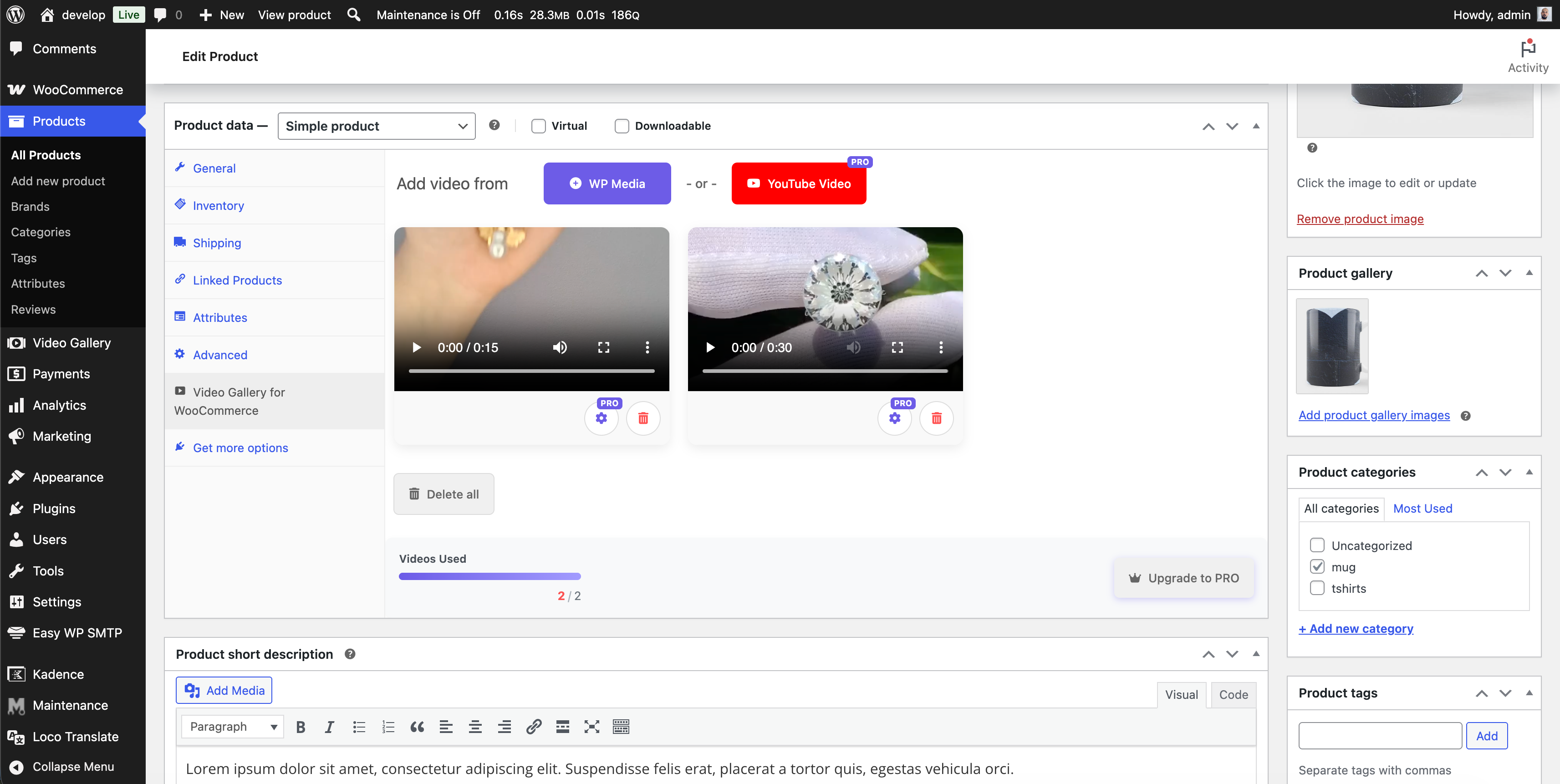
- Go to Products in WooCommerce.
- Click Edit on the product you want to add a video to.
- Scroll down to the Product Data section.
- Open the tab “Video Gallery for WooCommerce”.
- You will see the option to add a video from your media library.
- After adding a video, make sure to click Update to save the changes.
Frequently asked questions
What is Video Gallery for WooCommerce?
Video Gallery for WooCommerce is a plugin that allows you to add video files from your WordPress (WP) library to your product pages on your website. It comes with a range of customization options to enhance your video display and improve user engagement.
How do I add a product video to a WooCommerce product?
Open the product in WooCommerce. Go to the “Video Gallery for WooCommerce” tab in the Product Data box. Pick a video from the WP media library and click Update. The product video shows up inside the WooCommerce product gallery on the front end. No shortcodes, no theme edits.
Does the plugin work with the native WooCommerce product gallery?
Yes. Video Gallery for WooCommerce works with the default WooCommerce product gallery. It also supports the new WooCommerce Product Gallery Block. Your product video sits next to your product images, without breaking your theme’s layout.
What types of video files can I use with Video Gallery for WooCommerce?
You can use any video format supported by WordPress. The most common ones are MP4 and MOV. The PRO version also lets you add YouTube and Vimeo videos, and direct external video URLs (.mp4, .webm, .mov).
Can I add YouTube or Vimeo videos, or a video from an external URL?
These are PRO features. The PRO version adds a YouTube button and a Vimeo button (available on every PRO plan), plus an “External URL” button for direct video-file links such as a CDN .mp4 (available on the Multiple Sites plan and above). External videos even get an automatic thumbnail, and behave just like an uploaded video (controls, autoplay, sticky, SEO, thumbnail editor). In the free version these buttons are visible but locked.
Can I customize the display of my video files?
Yes. You can change the video icon and color. You can also move each video to any position on the product page.
Can I control how my video clips play?
Yes. Each clip has its own settings for autoplay, sound, and loop. You can also show or hide the video controls.
Is Video Gallery for WooCommerce compatible with other WordPress themes and plugins?
Yes. Video Gallery for WooCommerce works with most WordPress themes and plugins. Some themes may need small tweaks. The plugin is built to integrate smoothly with WooCommerce.
Can I set a featured video for each product?
Yes. Any uploaded clip can be used as a featured video for a WooCommerce product. The featured video loads inside the product gallery. It plays through the built-in VideoJS player, with full control over autoplay, mute, and loop.
Is there a PRO version with more features?
Yes. The PRO version unlocks unlimited products with video and up to 6 videos per product. It also adds YouTube and Vimeo integration, external video URLs, custom SVG icons, optimized thumbnails, SEO settings, and video analytics. PRO users get priority support. Visit Video Gallery for WooCommerce PRO to learn more.
What’s the difference between FREE and PRO versions?
The FREE version is limited to 20 products with video and 2 videos per product. The PRO version is unlimited. PRO also adds YouTube and Vimeo support, external video URLs, custom icons, advanced SEO, video analytics, and premium support.
What is Video Analytics and how does it work?
The PRO version includes a Video Analytics dashboard. It tracks how visitors interact with your product videos. Enable it from Video Gallery > Settings. All PRO plans include basic analytics (views and watch time). Advanced analytics (device charts, engagement, location data, heatmaps, CSV export) are part of the Multiple Sites and Unlimited Sites plans. Single Site holders can unlock them with the one-time Advanced Analytics Add-on.
Can I get advanced analytics on a Single Site license?
Yes. Buy the Advanced Analytics Add-on as a one-time payment from the Video Analytics dashboard. It unlocks device charts, engagement metrics, location analytics, heatmaps, and CSV export. No need to upgrade your full license.
What is the Sticky video on scroll feature?
Sticky video on scroll is a PRO feature. When a shopper scrolls past the active product video in the gallery, the video stays visible in a small floating player anchored to the corner of the screen you pick – Top left, Top right, Bottom left, or Bottom right. Playback continues exactly where it was: if the video was playing it keeps playing, if paused it stays paused. The floating player adapts to the source video’s aspect ratio, so 16:9, 4:3, vertical (9:16), and square clips all show without cropping. A small × button sends the video back to the gallery on demand, and scrolling back up to…
Changelog
Adds a thumbnail editor so you can pick any video frame as the thumbnail, upload your own image, or reset to the first frame.
2.11
- Fix: Blocksy theme – the gallery’s left/right navigation arrows disappeared as soon as a product had a video. They are back, using the theme’s own arrow icons and hover behaviour, so a product with video now looks and works exactly like one without.
- Fix: Blocksy theme – clicking a gallery image on a product with video opened the raw image file in the browser. Clicks are inert now, matching what the theme does when its lightbox is switched off. With the lightbox on, nothing changes – it keeps opening as before.
- Improvement: Code cleanup – the Blocksy integration decides in one place whether the default WooCommerce gallery is in use, and its styles moved into their own stylesheet.
Release date: September 6, 2026
2.10
- Improvement: Redesigned the “Add video from” button row — consistent rounded source buttons, a tidier layout and better behaviour on small screens.
- Improvement: The thumbnail editor now works with external-URL videos too (loads the clip, scrub to any frame and capture it).
- Improvement: Optimization code
- Tested with WordPress 7.0.2
Release date: July 31, 2026
2.9
- Added: Thumbnail editor for product videos. Each video in the Video Gallery tab now has an “Edit thumbnail” button that opens a popup where you can pick any frame of the video as the thumbnail by dragging a slider (no need to settle for the first frame, which is often black), upload your own image, or reset back to the first frame. Useful when the auto-generated thumbnail starts on a dark frame.
- Improvement: Code cleanup – moved the thumbnail editor into its own file for better maintainability
Release date: June 18, 2026
2.8
- Fix: Allow gallery swipe on touch devices over YouTube iframe
- Fix: Design issues
- Added: Added basic support for Porto theme
- Tested with WordPress 7.0
Release date: May 28, 2026
2.7
- Added: New “Sticky video on scroll” PRO upsell setting on the Video Gallery settings page, with a visual position picker (preview cards for Top left, Top right, Bottom left, Bottom right). The actual sticky behaviour ships with the PRO version – on the product page, when the active gallery slide leaves the viewport, the first/active video flies into the chosen corner with a smooth animation.
- Updated: Pricing modal now shows “1 year of updates” (instead of “Free updates”) with a hover tooltip that explains how updates work – free updates for 1 year from purchase, the plugin keeps working forever after expiry, optional renewal to unlock new versions.
- Tested with WordPress 6.9.4
Release date: May 8, 2026
2.6
- Fix: Video playback stopping on desktop when mouse is idle or hovering over the video in Flatsome theme
- Added: Added basic support for Astra theme
- Tested with WordPress 6.9.4
Release date: April 21, 2026
Screenshots
For developers
Is this your plugin? Show off the numbers.
Add a live badge to your site, docs or GitHub README. It updates on its own — no account needed.
Best Video Gallery for WooCommerce alternatives
All featured video plugins →





FAQ
Video Gallery for WooCommerce: quick answers
Straight answers, pulled from live WordPress.org data.
Live data from WordPress.org · checked Sep 27, 2026
Is Video Gallery for WooCommerce free?
Yes. Video Gallery for WooCommerce is free to download and use from the official WordPress.org plugin directory.
Is Video Gallery for WooCommerce safe to use in 2026?
Yes — Video Gallery for WooCommerce is a safe, well-maintained plugin to use in 2026. It runs on 4K+ sites, is rated 5/5 and was last updated 3 weeks ago, and scores 93/100 on our health check.
How many websites use Video Gallery for WooCommerce?
Video Gallery for WooCommerce is active on 4K+ WordPress websites and has been downloaded 52,745 times since it launched in March 2023. It was downloaded 3,233 times in the last 30 days.
Does Video Gallery for WooCommerce work with WordPress 7.1?
Yes. The developer has tested Video Gallery for WooCommerce up to WordPress 7.1.2, the latest release. It requires WordPress 5.3 or newer.
What PHP version does Video Gallery for WooCommerce need?
Video Gallery for WooCommerce requires PHP 7.4 or higher. Most hosts run PHP 8.x today, so it works on any modern WordPress hosting.
When was Video Gallery for WooCommerce last updated?
The latest version, 2.11, was released on September 6, 2026 (3 weeks ago).
Who makes Video Gallery for WooCommerce?
Video Gallery for WooCommerce is developed and maintained by Nitramix.
What are the best alternatives to Video Gallery for WooCommerce?
The most popular alternatives to Video Gallery for WooCommerce are Really Simple Featured Vide… (5K+ installs), YITH WooCommerce Featured V… (3K+ installs) and Featured Video for WordPress (1K+ installs).
Powered by PageForge
Want thousands of pages that rank like these? Build them in an afternoon.
This directory runs on the same engine as PageForge. Turn any spreadsheet, CSV or API into thousands of fast, SEO-ready WordPress pages — with schema, internal links and AI-written copy baked in.
- CSV, Google Sheets & API data sources
- AI content, schema & internal links per page
- Works with Elementor, Gutenberg, Yoast & Rank Math
- Free on WordPress.org — no credit card


