



Variation Monster – Product Variation Swatches for WooCommerce
Add amazing Product Attributes, colors, labels, images, & buttons Variation Swatches for WooCommerce stores to enhance product selection.

Solid choice
Variation Monster is a solid plugin choice in 2026, with a few things worth checking first. It runs on 10+ sites, is rated 4.8/5 and was last updated 1 day ago, and scores 77/100 on our health check.
- Actively developed — last update 1 day ago
- Tested with the latest WordPress (7.1)
- Small user base (10+ active installs)
- Needs PHP 8.1 or newer
How does it stack up?
Side-by-side on installs, updates, ratings & support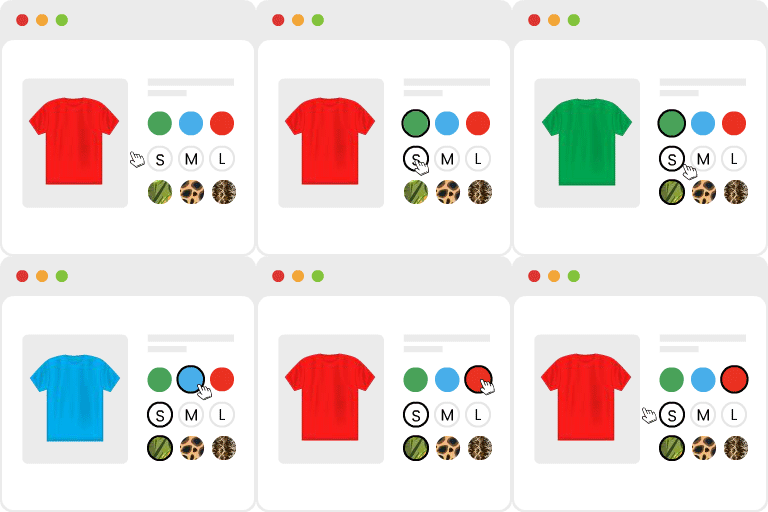



Daily downloads
Download spikes usually follow a new release — each site that auto-updates counts as a download.
Rankings
Where Variation Monster stands todayWordPress.org search rankings
Live position in the plugin search, top 100| Keyword | Position |
|---|---|
| variation swatches | #42 |
| woocommerce | >100 |
| WooCommerce attribute | >100 |
| woocommerce color swatches | #99 |
| woocommerce variation | >100 |
Version adoption
Share of active sites per release.
Rating breakdown
★★★★★★★★★★ 4.8 from 8 reviews
About Variation Monster
From the official readme · v1.1.7Description
Enhance your product attribute effectively by using variation swatches in e-commerce product listings. Use our Variation Monster, which is one of the best Variation Swatches for WooCommerce, at your disposal
Default WooCommerce dropdowns are functional, but they lack the visual appeal and intuitive flow required to convert modern shoppers.
And that’s where the Variation Monster – WooCommerce Variation Swatches plugin comes into play.
HOW TO INSTALL VARIATION MONSTER – VARIATION SWATCHES FOR WOOCOMMERCE PLUGIN
Transform how you showcase variable products on WooCommerce and say goodbye to boring product pages. By replacing outdated selection menus with high-performance swatches, interactive tables, and sleek galleries, this plugin delivers an enhanced user experience.
Whether you are selling apparel, electronics, or complex industrial equipment, Variation Monster – Product Variation Swatches for WooCommerce empowers your store to look professional and perform efficiently. It is not just an aesthetic upgrade; it is a conversion engine built to streamline the shopping journey from the archive page to the checkout.
Why You Need to Install WooCommerce Variation Swatches and Photos Plugin
The default WooCommerce interface for variable products is notoriously restrictive. It forces customers to click through multiple dropdown menus just to see a different color or size. This friction leads to high bounce rates and analysis paralysis.
To solve this, savvy store owners integrate variation swatches for WooCommerce to provide an instant, visual representation of every option available. When a customer can see every choice laid out before them, cognitive load decreases, and the path to purchase becomes clear.
The necessity of Variation Monster – Product Variation Swatches for WooCommerce
stems from three core pillars: Speed, Visual Clarity, and Bulk Accessibility.
Useful Links
- Variation Monster for WooCommerce Features
- Live Demo of Variation Monster for WooCommerce
- How to Use (video) the Variation Monster for WooCommerce
- How to Use (documentation) the Variation Monster for WooCommerce
- Get Help & Free Support 24/7
When shoppers can see a grid of colors, textures, or sizes, they make decisions significantly faster. Thus, your sales will skyrocket in no time!
Moreover, modern mobile users find dropdowns difficult to navigate. Whereas the Variation Monster’s tap-friendly swatches and responsive variation tables ensure your mobile conversion rates remain high.
By implementing WooCommerce variation swatches and photos, you eliminate guesswork and help customers feel confident in their selection. This confidence translates directly into fewer abandoned carts and a significant reduction in product returns caused by visual misunderstandings.
Your suggestions are the most important factors that will make this plugin even better. So, please let us know your valuable opinion on our plugin.
Whether the goal is to improve user experience, create stunning product attributes to increase sales, or integrate custom elements, Variation Monster acts as an effortless WooCommerce product attribute plugin.
✨ Key Features of Variation Monster – Product Variation Swatches for WooCommerce
Variation Monster is a comprehensive suite of tools that far exceeds the capabilities of a standard WooCommerce variation swatches plugin. It integrates features that would typically require five or six separate extensions into a single optimized package.
Below is a detailed exploration of the features included in this industry-leading WooCommerce variation swatches plugin:
=Basic Features=
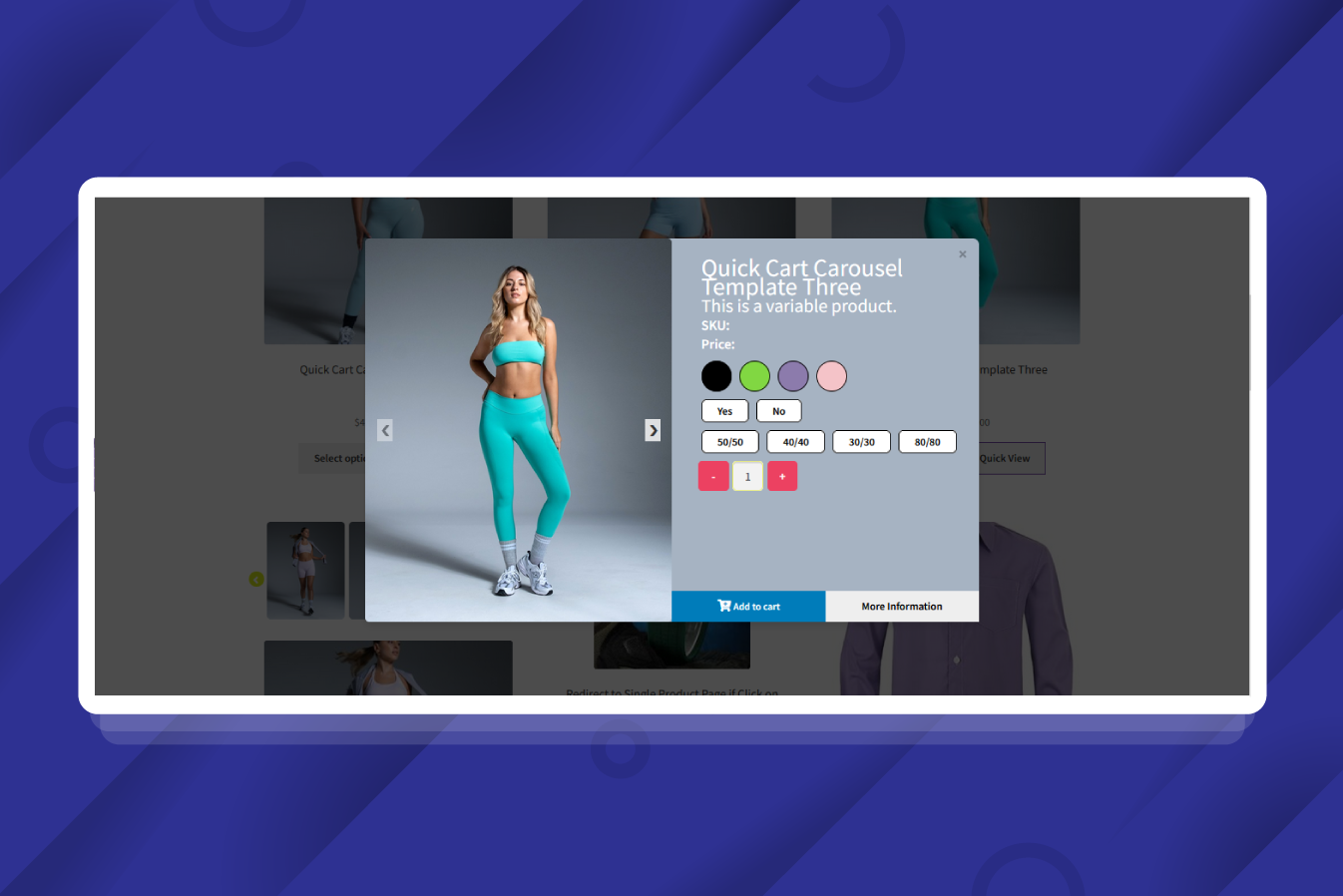
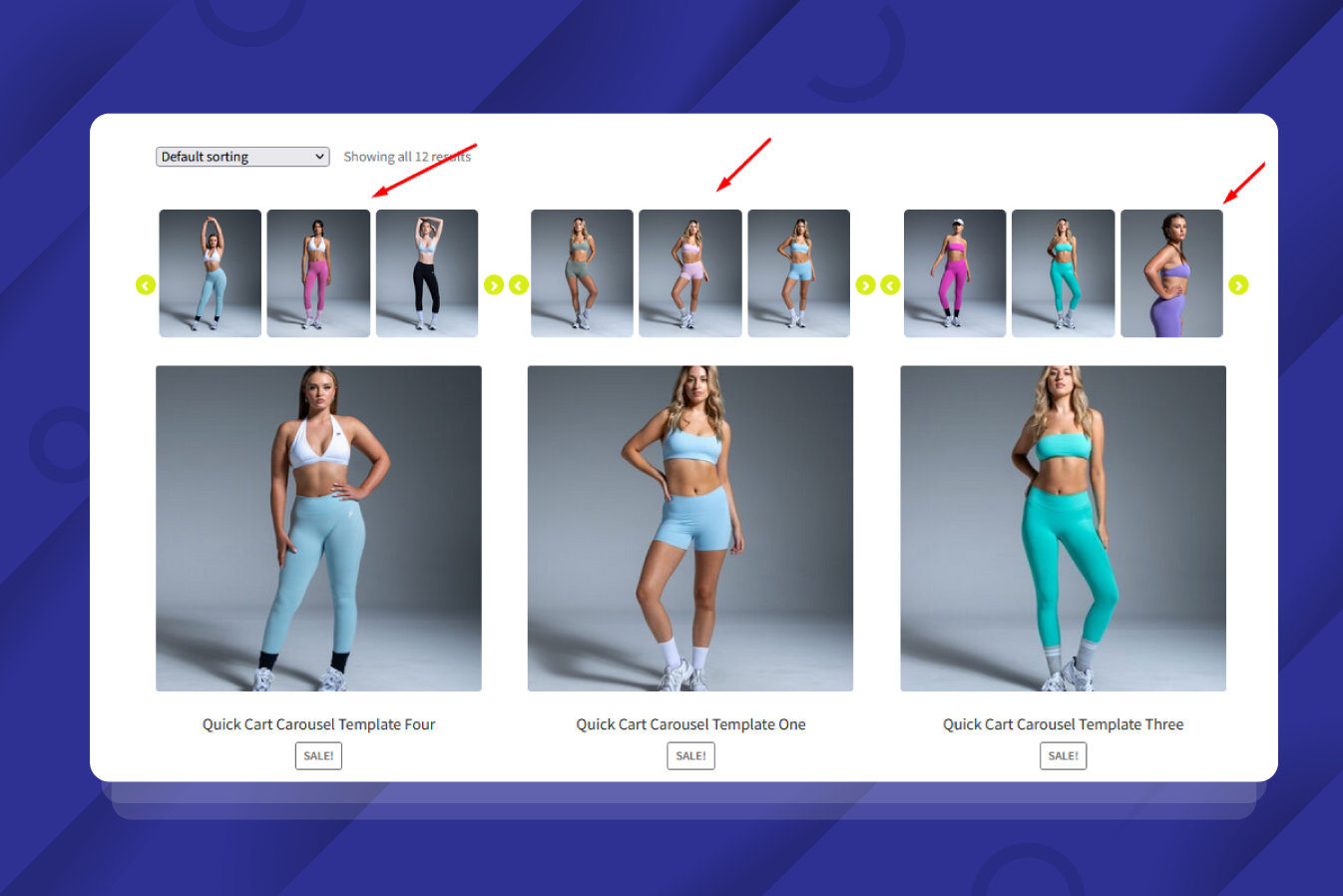
1) Quick Cart Carousel for Variable Products
Let customers choose product variations and buy straight from the shop, category, or archive pages with Variation Monster’s Quick Cart Carousel. By utilizing optimized WooCommerce variation swatches, shoppers can now browse variations and add them to the cart instantly. This makes Variation Monster the ultimate WooCommerce variation swatches plugin for speeding up the buyer’s journey and boosting conversion rates.
👉 Live Demo | Documentation
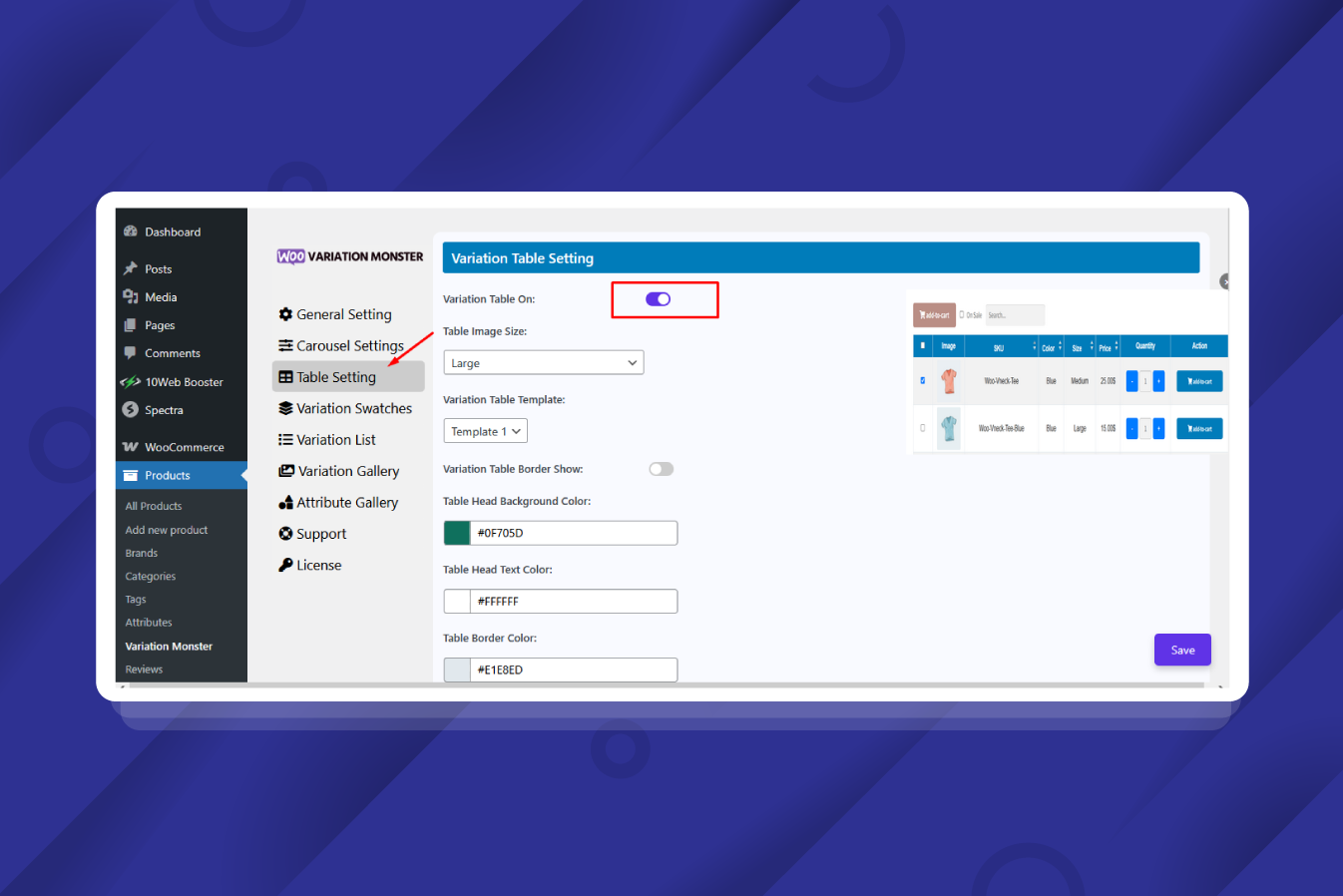
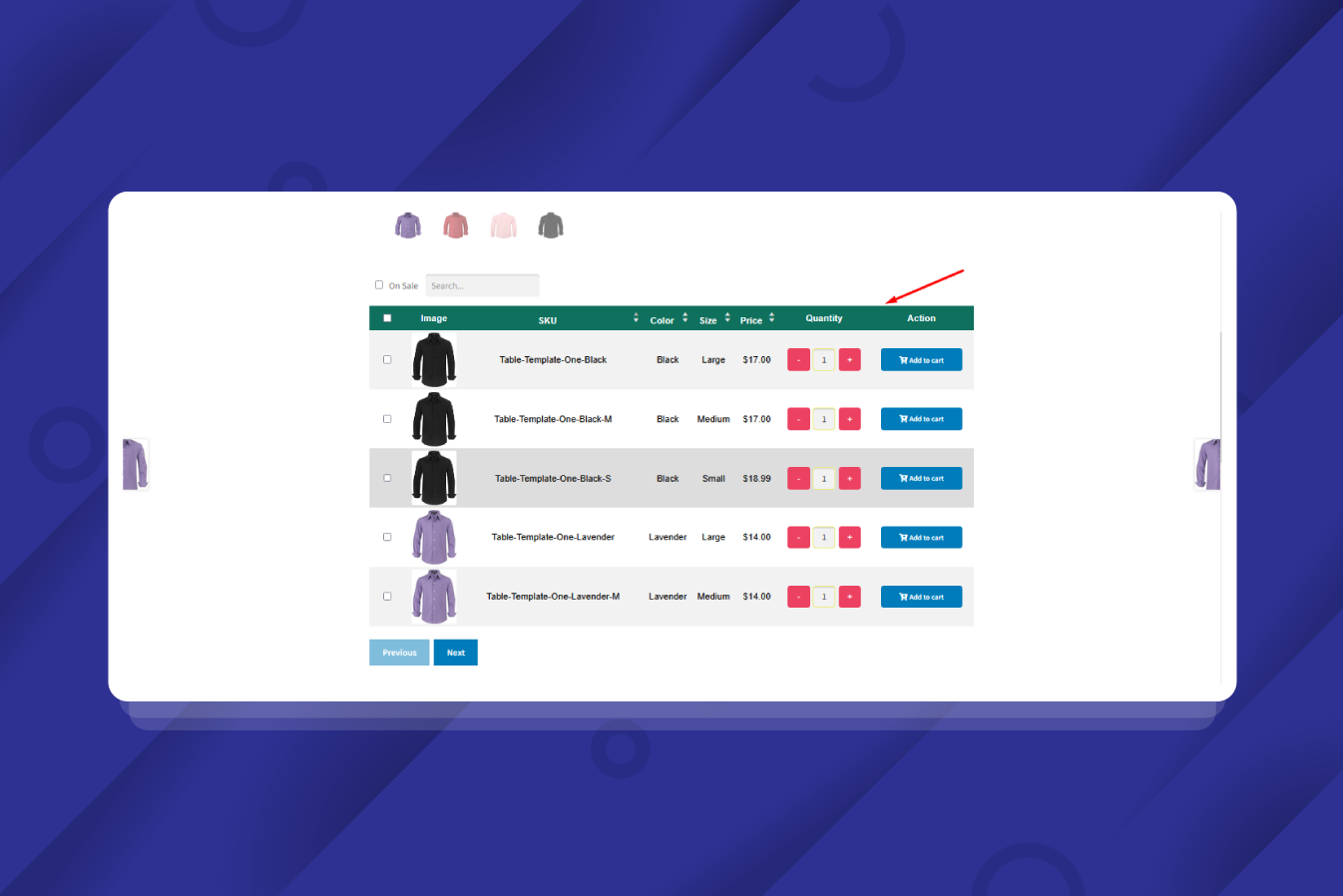
2) Variation Table
Replace confusing and outdated dropdown menus with a clear, customizable variation table, a core feature of our product variation swatches for WooCommerce. Shoppers can see every available option at once when using these structured WooCommerce product variations swatches. The layout is clean and structured, instantly enhancing your overall product listing on WooCommerce.
👉 Live Demo | Documentation
3) Customizable Table Columns
Take full control over exactly what you show in your product tables when using this powerful WooCommerce variation swatches plugin. Hide the SKU or stock status to keep the interface minimal, or display the price clearly next to your active WooCommerce product variation swatches.
👉 Live Demo | Documentation
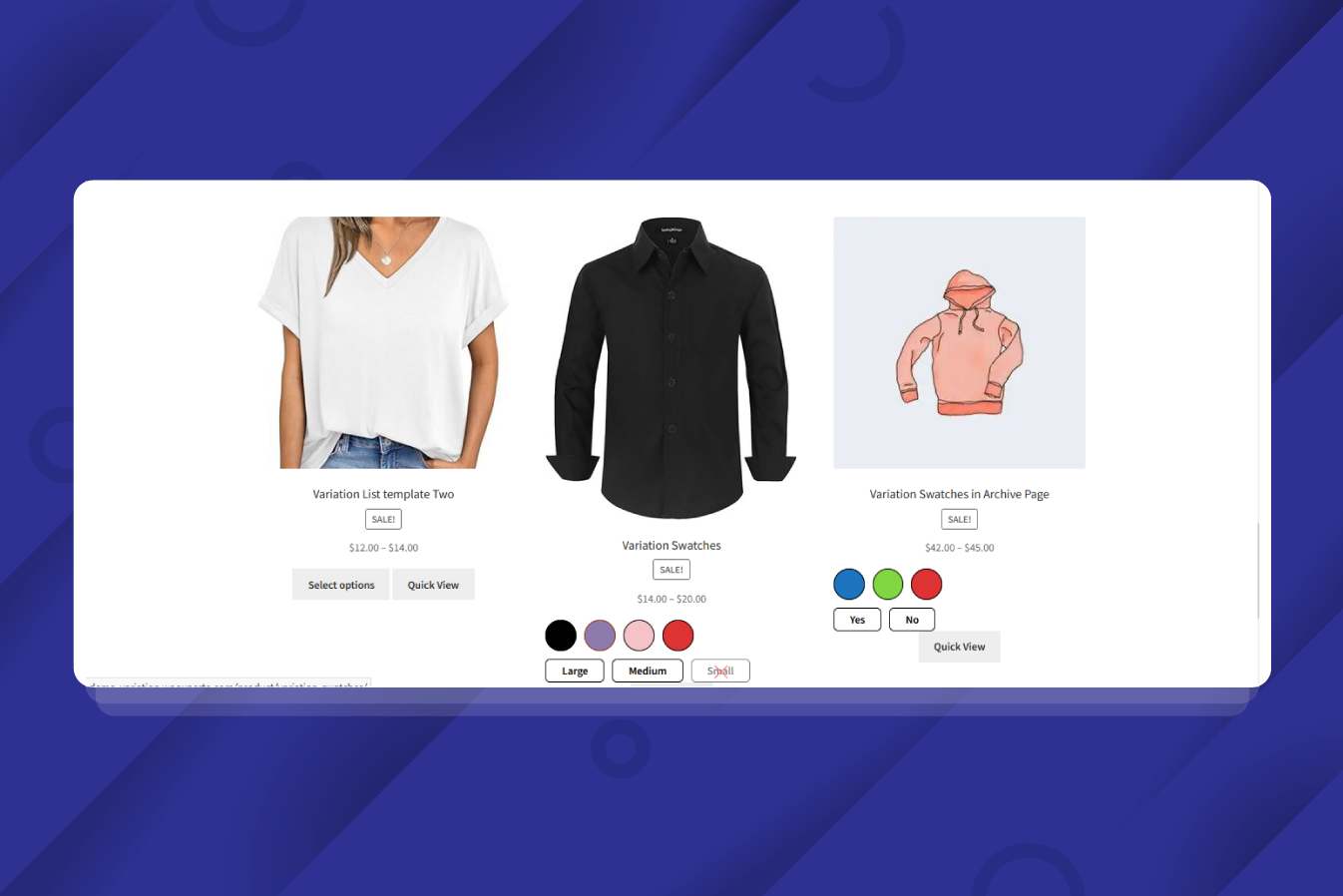
4) Variation Swatches for WooCommerce
Dropdowns are old-school, boring, and hurt your conversion rates. Use variation swatches for WooCommerce instead! Turn hidden attributes into visually engaging color, image, and label swatches. It looks incredibly professional and makes choosing options much faster, satisfying the primary needs of impulse buyers looking for a clear WooCommerce product page.
👉 Live Demo | Documentation
5) Color Swatches for Product Variations
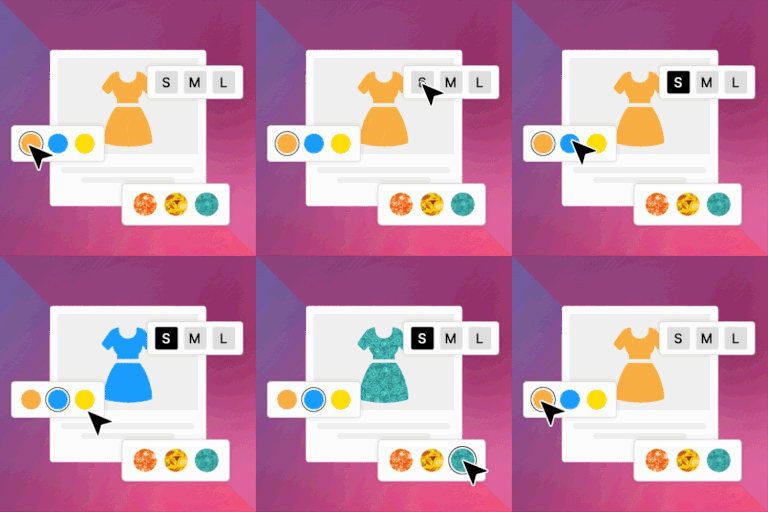
Don’t just list color names… show the actual colors with vibrant, high-converting WooCommerce variation swatches. Variation Monster effortlessly replaces the default, text-heavy WooCommerce variation dropdowns with interactive, clickable color swatches. It is instant, intuitive, and the perfect implementation of product variation swatches for WooCommerce for any apparel or design store.
👉 Live Demo | Documentation
6) Image Swatches for Product Variations
Text labels can’t effectively describe a texture or pattern. That’s where this plugin performs as premium WooCommerce product variation swatches. Instead of forcing customers to guess, upload small thumbnails to show off your patterns and fabrics using these variation swatches for WooCommerce. It gives shoppers an instant, real-world look at what they are buying, powered by our advanced WooCommerce variation swatches plugin.
👉 Live Demo | Documentation
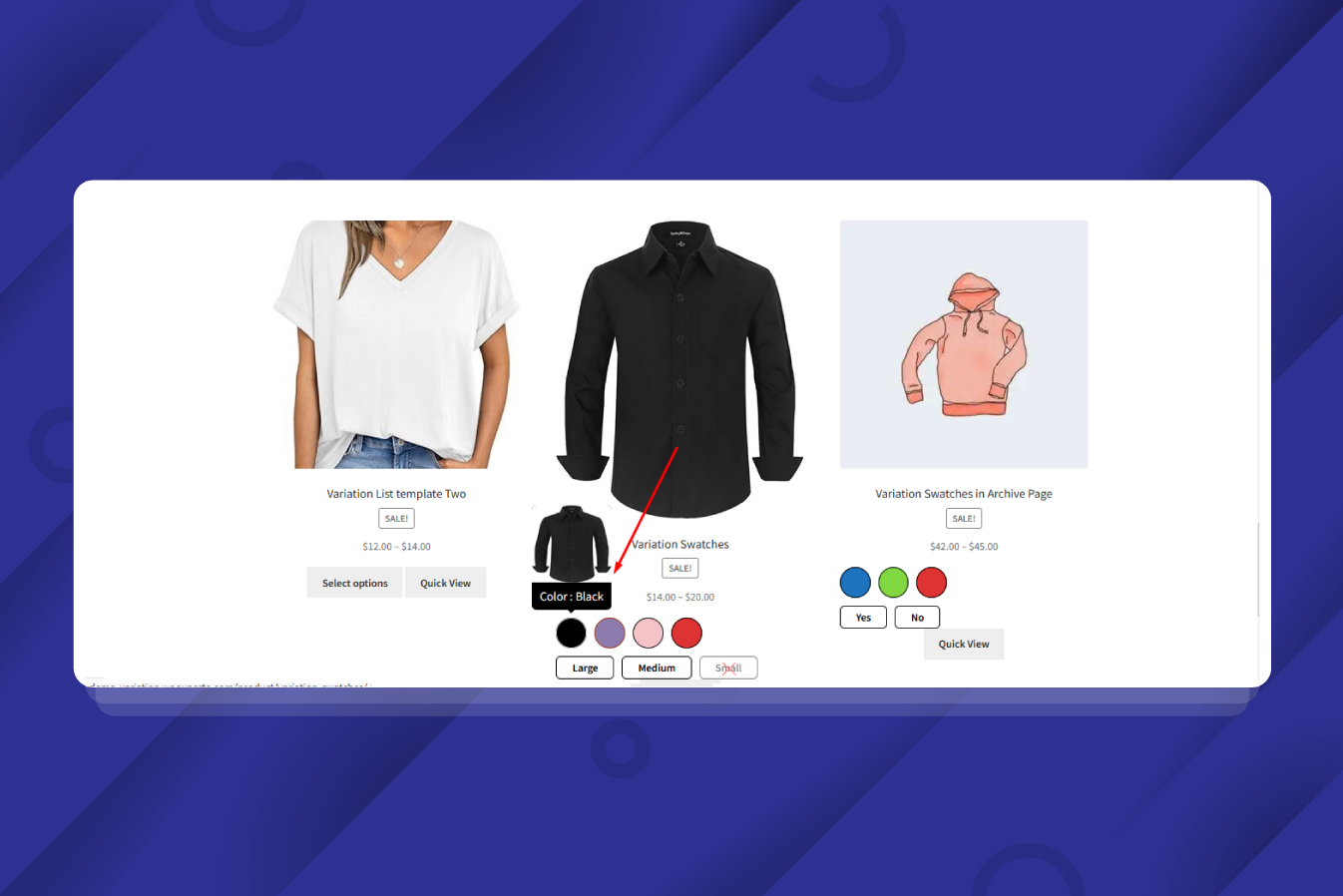
7) Enable Tooltips for Better Product Clarity
Sometimes, a tiny color circle isn’t quite enough information for your WooCommerce variation swatches. When a user hovers over your WooCommerce product variations swatches, a sleek pop-up displays the specific attribute name or a larger preview image. You can customize this to show text, images, or both, making it the most user-friendly product variation swatches for WooCommerce solution to keep your product pages clutter-free.
👉 Live Demo | Documentation
9) Variation Gallery for Each Product Option
Don’t confuse your customers with static, mismatched images. With the Variation Gallery feature, integrated flawlessly with our WooCommerce variation swatches plugin, you can assign a unique, dedicated set of photos to every single product option. If a user clicks a ‘Blue’ item in your WooCommerce product variation swatches, the whole product gallery instantly updates to show only the blue product angles.
👉 Live Demo | Documentation
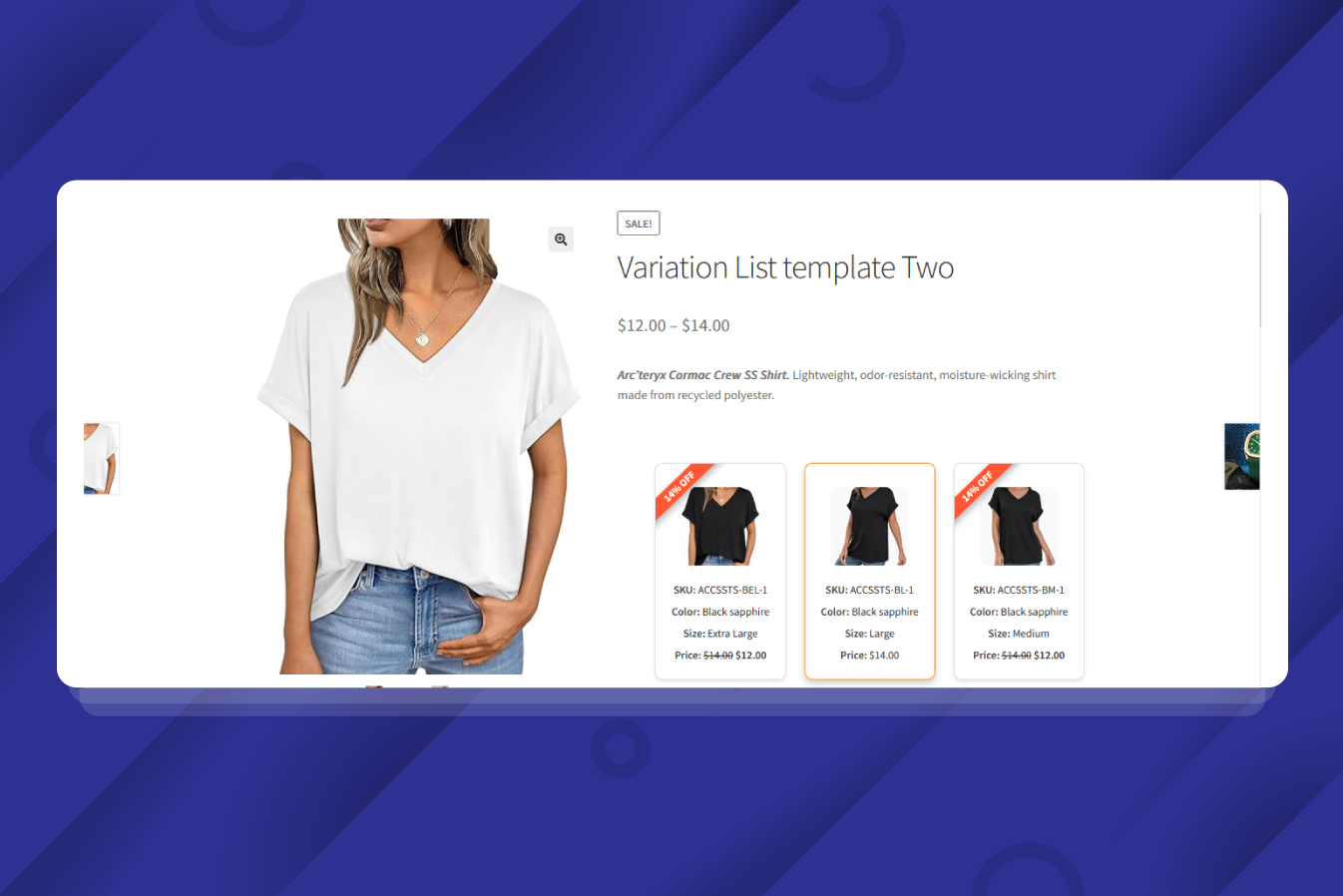
10) Enable Variation List
This feature gives you the power to replace standard WooCommerce variation swatches with a clean, highly structured list directly on your product page. Your customers can now get a clear view of everything: images, SKUs, stock status, and prices, all beautifully aligned alongside your WooCommerce product variations swatches.
👉 Live Demo | Documentation
11) Dokan Multivendor Support – Full Compatibility
Managing a multivendor marketplace entails significant security risks. You usually don’t want vendors poking around inside your main WordPress admin panel. Variation Monster solves this by integrating fully with Dokan, establishing it as the safest WooCommerce variation swatches plugin for marketplaces. Vendors can now customize their products and WooCommerce variation swatches right from their own frontend dashboard.
👉 Live Demo | Documentation
These free-to-use features are all you need for some groundwork. We keep these essential variation swatches features available to use for free to help you avoid the payment burden. If you use this WooCommerce Variation Swatches wisely, then you’ll never need to buy the pro.
However, for some advanced purposes, you can always opt for the Pro Variation Monster plugin at a reasonable rate. Let’s explore the Pro Features of the Variation Monster – Product Variation Swatches for WooCommerce.
Why Store Owners Choose Variation Monster:
👉Visual Appeal – Swap text lists for Color, Image, and Label Swatches.
👉B2B Efficiency – Enable Variation Tables for bulk ordering.
👉Speed – Let users buy from the shop page with Quick View and Quick Cart.
👉Clarity – Display specific images for every attribute using Dynamic Variation Galleries.
✨ Pro Features:
For stores looking to dominate their niche, the Pro version of Variation Monster offers advanced marketing and UX tools that turn a simple e-commerce store into a high-conversion platform.
1) Quick View for WooCommerce Products
It is frustrating to load a full product page just to check a price or see a variation. Variation Monster’s Quick View feature fixes this annoyance by integrating seamlessly with our WooCommerce variation swatches plugin. With this feature, your customers can view details, select a variation using WooCommerce product variations swatches, and add to cart without losing their place.
👉 Live Demo | Documentation
2) Quick Cart Carousel Template
You can pick the style of WooCommerce variation swatches that matches your brand perfectly. Once you choose a template, your WooCommerce product variation swatches appear directly on shop and archive pages, enabling buyers to view and select product variation swatches for WooCommerce without browsing the product detail page!
👉 Live Demo | Documentation
3) Table template on mobile view
On smaller screens, the layout displaying your WooCommerce product variations swatches automatically adjusts to column stacks or converts into card-style layouts. So your targeted customers can compare WooCommerce product attributes without frustration.
👉 Live Demo | Documentation
4) Display Flex Label And Value for WooCommerce Variations
With this feature, you can show the attribute name right next to the selected WooCommerce variation swatches value (e.g., Color: Red) in a clear and organized format. This simple yet effective feature improves the readability of your product variation swatches for WooCommerce and ensures customers know exactly what they are picking.
👉 Live Demo | Documentation
5) Disable Button Style for Variation Swatches
This feature visually marks unavailable/out-of-stock WooCommerce products. You can choose to hide them, blur them, or mark them with a Cross icon within your variation swatches for WooCommerce.
👉 Live Demo | Documentation
6) Highlight Selected Variations with a Check Mark
This feature overlays a checkmark icon on the active variation swatches for WooCommerce. You can style this in two ways: place the icon in the center or as a badge in the top-right corner of your WooCommerce variation swatches.
👉 Live Demo | Documentation
7) Image Tooltips on Variation Swatches
Instead of just reading ‘Blue,’ let customers see a real product preview the moment they hover over the WooCommerce variation swatches. This immediate visual context eliminates guesswork. It helps shoppers visualize the product variation swatches for WooCommerce instantly before they even click.
👉 Live Demo | Documentation
8) Quick Add-to-Cart with Swatches on WooCommerce Archive Pages
This option lets shoppers select WooCommerce product attributes directly from the shop or archive page. They click the variation swatches for WooCommerce, choose their option, and add it to the cart instantly.
👉 Live Demo | Documentation
9) Flexible Variation Gallery Template
Switch between multiple layout styles to find the perfect match for your WooCommerce variation swatches. It keeps your product pages looking professional while ensuring your images linked to product variation swatches for WooCommerce really pop.
👉 Live Demo | Documentation
10) Flexible Variation List Templates
Present your WooCommerce product variations swatches list in a format that suits your specific industry. It turns messy product data into a clean, organized list, helping customers find the exact product variation swatches for WooCommerce they need without confusion.
👉 Live Demo | Documentation
11) Variation List Optimized Item View for Mobile Devices
This feature maintains the clean layout of your WooCommerce variation swatches plugin on mobile devices, ensuring a smooth scrolling experience for your customers.
👉 Live Demo | Documentation
12) Items Per Page for Variation List
You decide exactly how many rows of WooCommerce variation swatches users see at once. It keeps the design tidy and prevents customers from getting lost in a wall of text while browsing your WooCommerce variable product.
👉 Live Demo | Documentation
13) Customizable Variation Product Discounts
Highlight special pricing on specific WooCommerce product variation lists to boost conversions. Showcase discounts as flat prices or percentage-based badges directly on your variation list for WooCommerce.
👉 Live Demo | Documentation
14) Attribute Gallery
This feature loads a dedicated set of images for that specific attribute term linked to your WooCommerce product variations swatches. You can fully customize the image sizes and navigation style of your variation swatches for WooCommerce to match your theme.
👉 Live Demo | Documentation
From the intuitive WooCommerce product variation swatches to the powerful bulk-add features, Variation Monster stands as the most comprehensive solution for variable product management.
By utilizing variation swatches for WooCommerce, you aren’t just changing a menu… you are upgrading your brand’s digital storefront. The combination of WooCommerce variation swatches, detailed variation tables, and dynamic galleries ensures that your customers have all the necessary information to make a purchase.
Privacy Policy
Variation Monster — Variation Tables, Swatches & Quick View for WooCommerce uses Appsero SDK to collect some telemetry data upon user’s confirmation. This helps us to troubleshoot problems faster & make product improvements.
Appsero SDK does not gather any data by default. The SDK only starts gathering basic telemetry data when a user allows it via the admin notice. We collect the data to ensure a great user experience for all our users.
Integrating Appsero SDK DOES NOT IMMEDIATELY start gathering data, without confirmation from users in any case.
Learn more about how Appsero collects and uses this data.
Installation
HOW TO INSTALL VARIATION MONSTER – VARIATION SWATCHES FOR WOOCOMMERCE PLUGIN
Installing the Variation Monster plugin is a straightforward process that takes less than five minutes.
Follow these steps to get started:
Step 1 – Search: If you are using the free version, go to the WordPress Plugin Repository and search for “Variation Monster”. If you have purchased the Pro version, download the ZIP file from your WebCartisan account or WooCommerce dashboard.
Step 2 – Upload: In your WordPress admin sidebar, go to Plugins > Add New. Click the “Upload Plugin” button at the top, select your file, and click “Install Now”.
Step 3 – Activate: Once the installation is complete, click the “Activate” button.
Step 4 – Check WooCommerce: Ensure WooCommerce is installed and active (the plugin relies on it to function).
Step 5 – Configure: Navigate to WooCommerce > Settings > Variation Monster to start configuring the plugin. Here, you can enable the global settings and choose your preferred default swatch shape.
Step 6: Go to Products > Attributes. For each attribute (like Color or Size), you can now select the “Type” (Color, Image, Button, or Radio).
Step 7: Click on “Configure Terms” for your attribute and assign the specific color hex codes or upload the images for each swatch. This is where the magic of WooCommerce product variations swatches begins.
Note: If you use variation monster pro that time you need to deactivate free version
Done! Now, open a variable product on your storefront to see your new WooCommerce product variation swatches in action.
Frequently asked questions
What is Variation Monster for WooCommerce?
Variation Monster is an all-in-one WooCommerce plugin that turns a standard WooCommerce product page into a faster, more engaging shopping experience. Think of it as a complete upgrade for your variable products. It replaces the boring default dropdowns with visual Swatches, Tables, Galleries, quick cart carousels, etc.
Can I Use Both Variation Swatches and Variation Table Together?
Yes! You aren’t limited to just one. You can display swatches for visual appeal and a table for bulk ordering simultaneously. You have full control to set the globally or tweak it for specific products.
Is the plugin compatible with all WooCommerce themes?
We built Variation Monster to play nicely with all standard WooCommerce themes. If you are using a heavily customized or non-standard theme, you might need a tiny bit of CSS styling to get things perfect, but for most users, it works right out of the box.
Does This Plugin Support Color, Image, and Label Swatches?
Absolutely. You can ditch the text lists and use Color hex codes, upload custom Images, or use clean Text Labels. It works on both your single product pages and your archive/shop pages to make browsing visual and intuitive.
Can I Show Different Image Galleries for Each Variation?
Yes! The Variation Gallery feature allows you to assign multiple images to each product variation and display them using different gallery templates.
Does this Plugin Work with Variable Products Only?
Yes. Variation Monster is designed specifically for variable products in WooCommerce and adds advanced display options for attributes and variations.
Is This Plugin Mobile Responsive?
Absolutely. All components, including swatches, variation tables, lists, and galleries, are fully responsive and optimized for mobile and tablet devices.
Does Variation Monster Require Coding Knowledge to Use?
No coding required! The plugin comes with a user-friendly admin panel where you can control every feature with simple toggles, dropdowns, and input fields.
Changelog
1.1.7 (October 22, 2026 )
- Update: Updated variation table template one pagination.
- Update: Variation list quantity updated.
- New: Variation swatches bulk selections.
- Update: Table template one updated with theme compatibility.
1.1.6 (October 07, 2026 )
- New: Bulk variation features.
- New: 2D Variations Matrix Grid.
- New: Matrix Display Placement.
- New: Shortcode [varimo_bulk_variations id=”123″].
- New: Wholesale Price Matrix Mode (Disable Purchasing)
- New: Dynamic Attribute Filters Bar Above Matrix
- New: Single-Attribute Product Layout
1.1.5 (September 25, 2026 )
- Update: Variation list template one updated for variation gallery.
- Update: default settings updated for carousel.
- New: Variation Swathes new features attached.
- Update: Variation Table for not used in variation.
- New: Free and pro plugin compatible.
1.1.4 (September 14, 2026 )
- Update: Admin dashboard design updated.
- Update: Variation Swathes setup guideline.
- Update: Variation Swathes 8+ major theme compatibility check also Elementor compatibility.
1.1.3 (August 28, 2026 )
- Fix: Bug fixing.
1.1.2 (August 13, 2026 )
- Fix: Nonce and sanitization for individual variation description.
1.1.1 (August 11, 2026 )
- New: Admin notice free support.
1.0.10 (August 07, 2026 )
- New: Free setup service card.
- Update: Free setup service attached on welcome page.
- New: Campaign notice.
1.0.9 (August 04, 2026 )
- New: Variation gallery theme compatibility for Astra, Kadence, OceanWP, Twenty Twenty-Five.
- Update: Variation swatches all free.
1.0.8 (July 31, 2026 )
- New: Welcome page show after plugin install.
1.0.7 (July 28, 2026 )
- New: Table style updated.
1.0.6 (June 02, 2026 )
- New: Updated settings field.
1.0.5 (April 02, 2026 )
- New: Single product page reload every attribute button click (pro).
- New: Every variation show individual description into product main description (pro).
- New: SEO friendly url when each attribute button click (pro).
- Update: Security update.
1.0.4 (March 11, 2026 )
- Update: Table pagination condition.
- Update: Carousel popup show hover, click replaced by just click.
- Update: Admin dashboard hide show -> Table Title, Description, Weight & Dimensions.
1.0.3 (February 04, 2026 )
- New: Variation product as simple product.
- Update: Security updated.
1.0.2 (January 22, 2026 )
- Fix: Input field text formate to number formate.
- Fix: kadence theme compatibility.
- Update: Security updated.
- Update: Table show logical condition updated.
1.0.1 (January 12, 2026 )
- Fix: Block theme compatibility.
- Fix: Ajax load shop page compatibility.
- Update: Security updated.
- Update: Dashboard change from woocommerce product menu to woocommerce settings.
- Update: UX change from dashboard.
- Update: UX change from quick view modal.
1.0.0 (March 09, 2025 )
- Initial release with core features
- New: Attribute gallery integration.
- New: Variation gallery integration.
- New: Variation quick cart integration in archive page.
- New: Variation list integration.
- New: Variation table integration.
- New: Quick view integration.
- New: Archive page variation swatches integration.
- New: Variation swatches integration.
Screenshots
For developers
Is this your plugin? Show off the numbers.
Add a live badge to your site, docs or GitHub README. It updates on its own — no account needed.
Best Variation Monster alternatives
All variation swatches plugins →



FAQ
Variation Monster: quick answers
Straight answers, pulled from live WordPress.org data.
Live data from WordPress.org · checked Oct 23, 2026
Is Variation Monster free?
Yes. Variation Monster is free to download and use from the official WordPress.org plugin directory.
Is Variation Monster safe to use in 2026?
Variation Monster is a solid plugin choice in 2026, with a few things worth checking first. It runs on 10+ sites, is rated 4.8/5 and was last updated 1 day ago, and scores 77/100 on our health check.
How many websites use Variation Monster?
Variation Monster is active on 10+ WordPress websites and has been downloaded 2,704 times since it launched in April 2025. It was downloaded 400 times in the last 30 days.
Does Variation Monster work with WordPress 7.1?
Yes. The developer has tested Variation Monster up to WordPress 7.1.3, the latest release. It requires WordPress 6.5 or newer.
What PHP version does Variation Monster need?
Variation Monster requires PHP 8.1 or higher. Most hosts run PHP 8.x today, so it works on any modern WordPress hosting.
When was Variation Monster last updated?
The latest version, 1.1.7, was released on October 22, 2026 (1 day ago).
Who makes Variation Monster?
Variation Monster is developed and maintained by WebCartisan.
What are the best alternatives to Variation Monster?
The most popular alternatives to Variation Monster are Variation Swatches for WooC… (300K+ installs), Variation Swatches for WooC… (200K+ installs) and ShopEngine (100K+ installs).
Powered by PageForge
Want thousands of pages that rank like these? Build them in an afternoon.
This directory runs on the same engine as PageForge. Turn any spreadsheet, CSV or API into thousands of fast, SEO-ready WordPress pages — with schema, internal links and AI-written copy baked in.
- CSV, Google Sheets & API data sources
- AI content, schema & internal links per page
- Works with Elementor, Gutenberg, Yoast & Rank Math
- Free on WordPress.org — no credit card


