


Valserv Analytics for SentinelPro
Connect your site to SentinelPro Analytics with real-time tracking, post-level metrics, and a privacy-focused dashboard.

Consider an alternative
Valserv Analytics for SentinelP… shows warning signs in 2026 — compare the alternatives below before installing. Was last updated 9 months ago, and scores 36/100 on our health check.
- Small user base (<10 active installs)
- Very few reviews so far
- Only tested up to WordPress 6.9 (latest is 7.1)
How does it stack up?
Side-by-side on installs, updates, ratings & support



Daily downloads
Download spikes usually follow a new release — each site that auto-updates counts as a download.
Rankings
Where Valserv Analytics for Senti… stands todayWordPress.org search rankings
Live position in the plugin search, top 100| Keyword | Position |
|---|---|
| analytics | >100 |
| privacy-first | >100 |
| sentinelpro | #1 |
| statistics | >100 |
| tracking | >100 |
About Valserv Analytics for SentinelPro
From the official readme · v1.1.0Description
📊 Connect your site to SentinelPro Analytics
🚀 Real-time tracking and post-level insights
🔒 Privacy-focused and lightweight
Valserv Analytics for SentinelPro brings high-performance analytics to your site with a simple setup and zero bloat.
🎯 Key Features
- Instant Integration – Add your SentinelPro tracking code using a Property ID and API Key.
- Post-Level Metrics – View views, sessions, and event data directly in the admin.
- Custom Tracking Options – Disable tracking for logged-in users or customize with filters.
- Performance Focused – Clean code, fast loading, and compatible with all major caching plugins.
- Privacy-First – No personal data is stored or transmitted by the plugin itself.
🧩 Feature Support
- Real-time analytics dashboard (built-in)
- Per-post views, sessions, and event data
- Works with all major themes and editors
- Developer-friendly filters for extending tracking logic
⚙️ General Plugin Features
- Lightweight and fast
- Simple, intuitive settings page
- Works with or without Gutenberg
- Compatible with multisite
- Regular updates and active development
Usage
- Log in to your SentinelPro Analytics account.
- Copy your Account Name, Property ID, and API Key.
- Paste them into the plugin settings.
- (Optional) Adjust tracking behavior, such as enabling logged-in user tracking.
- View analytics directly from your admin dashboard or on individual post listings.
Privacy
Tracking Behavior:
This plugin loads a tracking script from analytics.sentinelpro.com when tracking is enabled and properly configured. The plugin itself does not collect, store, or transmit any personal user data on your WordPress server.
What Data is Sent:
When tracking is active, the SentinelPro tracking script (loaded from analytics.sentinelpro.com/track.js) may collect standard web analytics data such as:
* Page views and navigation paths
* Session information
* Browser and device information
* Referrer information
* IP addresses (which may be anonymized based on your SentinelPro account settings)
Tracking Control:
- Tracking is disabled by default and will not load until you:
- Enable tracking in the plugin settings
- Configure your Property ID and Account Name
- By default, logged-in users are excluded from tracking (configurable in settings)
- All tracking is handled by SentinelPro servers, not by this plugin
Privacy Compliance:
To comply with GDPR, CCPA, or other data regulations:
* Refer to your SentinelPro Analytics account settings for privacy controls such as IP anonymization
* Ensure your site’s privacy policy discloses the use of analytics tracking
* Consider implementing a cookie consent mechanism if required by your jurisdiction
Data Storage:
This plugin stores only configuration data (Property ID, Account Name, API Key) in your WordPress database. No visitor tracking data is stored locally by this plugin.
Support and Development
This plugin is actively developed and maintained by Valserv Inc.
For documentation, feature requests, or support, visit: https://valserv.com/contact
Enjoy using SentinelPro Analytics?
Please consider leaving a 5-star review
Installation
- Upload the
valserv-analytics-for-sentinelprofolder to the/wp-content/plugins/directory. - Activate the plugin from the Plugins menu.
- Go to Dashboard > SentinelPro and enter your Property ID and API Key.
That’s it! Tracking starts immediately.
Frequently asked questions
Do I need a SentinelPro Analytics account?
Yes. You’ll need a SentinelPro account with a valid Property ID and API Key.
Where can I find my Property ID and API Key?
Log in to your SentinelPro Analytics dashboard and go to Property Management and Account API to retrieve them.
Does it track logged-in users?
By default, logged-in users are excluded from tracking. You can enable this in the plugin settings.
Is user data collected?
No. The plugin itself collects no user data. Analytics is handled securely by SentinelPro servers.
Can I customize the tracking code?
Yes. Developers can use filters to extend or alter the output of the tracking script.
Is it compatible with caching plugins?
Yes. SentinelPro Analytics is fully compatible with all major caching and optimization plugins.
Changelog
Initial release. No upgrade steps required.
1.0.12
- Fixed 403 Forbidden error – added missing nonce to API requests
- Both daily and hourly fetch methods now include security nonce
1.0.11
- Fixed empty cache arrays being treated as valid cache hits
- Now properly fetches fresh data when cache contains empty results
1.0.10
- Fixed CacheManager initialization – now uses proper storage key
- Added debug logging to trace data fetching flow
- Improved cache cleanup for legacy data
1.0.9
- Added checkDatabaseStatus() stub method to DataFetcher for API compatibility
1.0.8
- Fixed JavaScript cache-busting – version number now uses plugin version constant
1.0.0
- Initial release
- Tracking code injection via Property ID
- Settings page for API Key and tracking options
- Post-level analytics integration
- Real-time dashboard support
Screenshots

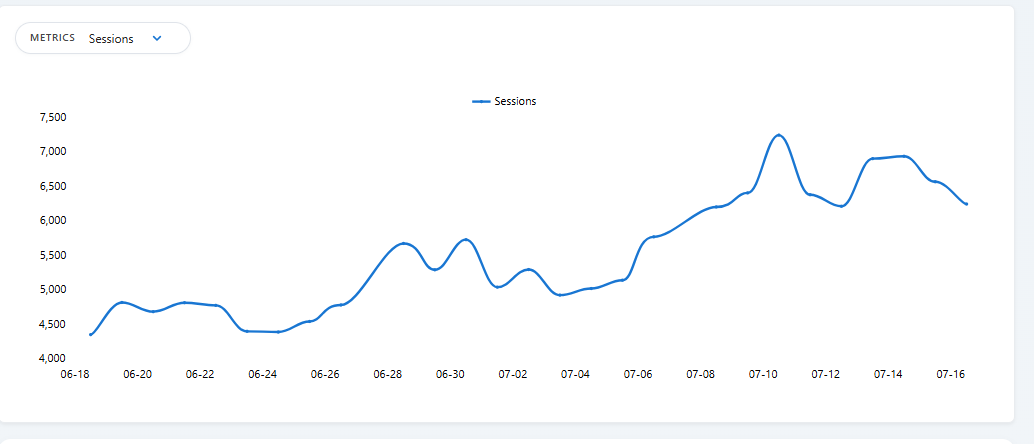
For developers
Is this your plugin? Show off the numbers.
Add a live badge to your site, docs or GitHub README. It updates on its own — no account needed.
Best Valserv Analytics for Sentine… alternatives
All analytics plugins →





FAQ
Valserv Analytics for SentinelPro: quick answers
Straight answers, pulled from live WordPress.org data.
Live data from WordPress.org · checked Oct 18, 2026
Is Valserv Analytics for SentinelP… free?
Yes. Valserv Analytics for SentinelP… is free to download and use from the official WordPress.org plugin directory.
Is Valserv Analytics for SentinelP… safe to use in 2026?
Valserv Analytics for SentinelP… shows warning signs in 2026 — compare the alternatives below before installing. Was last updated 9 months ago, and scores 36/100 on our health check.
How many websites use Valserv Analytics for SentinelP…?
Valserv Analytics for SentinelP… is active on <10 WordPress websites and has been downloaded 668 times since it launched in December 2025. It was downloaded 66 times in the last 30 days.
Does Valserv Analytics for SentinelP… work with WordPress 7.1?
Valserv Analytics for SentinelP… is officially tested up to WordPress 6.9.10, while the latest release is 7.1.3. It may still work, but try it on a staging site first.
What PHP version does Valserv Analytics for SentinelP… need?
Valserv Analytics for SentinelP… requires PHP 7.4 or higher. Most hosts run PHP 8.x today, so it works on any modern WordPress hosting.
When was Valserv Analytics for SentinelP… last updated?
The latest version, 1.1.0, was released on January 29, 2026 (9 months ago).
Who makes Valserv Analytics for SentinelP…?
Valserv Analytics for SentinelP… is developed and maintained by sentinelpro.
What are the best alternatives to Valserv Analytics for SentinelP…?
The most popular alternatives to Valserv Analytics for SentinelP… are Site Kit by Google (5M+ installs), MonsterInsights (2M+ installs) and WP Statistics (500K+ installs).
Powered by PageForge
Want thousands of pages that rank like these? Build them in an afternoon.
This directory runs on the same engine as PageForge. Turn any spreadsheet, CSV or API into thousands of fast, SEO-ready WordPress pages — with schema, internal links and AI-written copy baked in.
- CSV, Google Sheets & API data sources
- AI content, schema & internal links per page
- Works with Elementor, Gutenberg, Yoast & Rank Math
- Free on WordPress.org — no credit card


