


Tukify — AI Shopping Assistant for WooCommerce
Your AI sales assistant for WooCommerce - greets shoppers, answers questions, finds the right products, and guides them to checkout, day and night.

Solid choice
Tukify is a solid plugin choice in 2026, with a few things worth checking first. It runs on 10+ sites, is rated 5/5 and was last updated 4 weeks ago, and scores 68/100 on our health check.
- Actively developed — last update 4 weeks ago
- Momentum — downloads up 173.2% vs the previous 30 days
- Small user base (10+ active installs)
- Very few reviews so far
How does it stack up?
Side-by-side on installs, updates, ratings & support



Daily downloads
Download spikes usually follow a new release — each site that auto-updates counts as a download.
Rankings
Where Tukify stands todayWordPress.org search rankings
Live position in the plugin search, top 100| Keyword | Position |
|---|---|
| AI Chatbot | >100 |
| chatbot | >100 |
| live chat | >100 |
| product recommendations | >100 |
| woocommerce | >100 |
Version adoption
Share of active sites per release.
Rating breakdown
★★★★★★★★★★ 5 from 1 reviews
About Tukify
From the official readme · v1.6.0Description
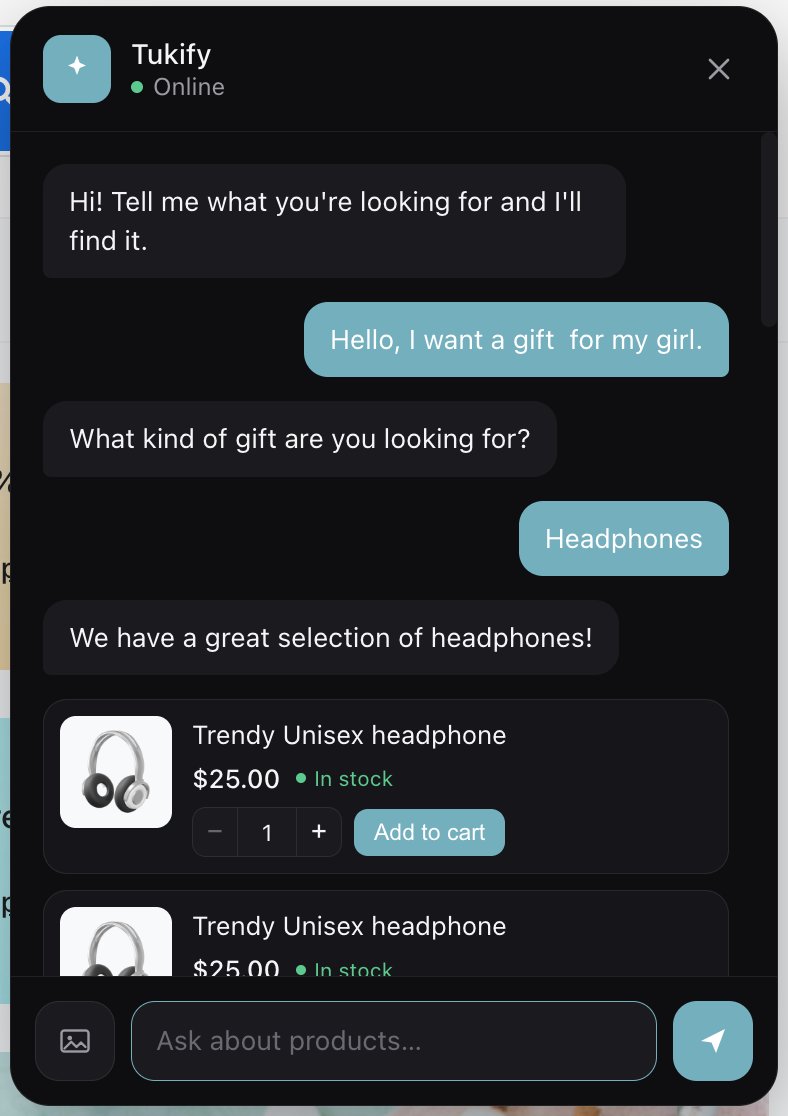
Tukify is an AI chatbot and shopping assistant for WooCommerce that works like a knowledgeable sales assistant who never sleeps. A shopper types a question in plain language – or uploads a photo – and Tukify finds the right products, answers honestly from your store’s real data, recommends complementary items, and guides them to checkout, all inside the chat without leaving the page.
It is a real AI shopping assistant, not a scripted FAQ bot. It understands intent with conversational search, replies with product cards (image, price, stock, add to cart), and only ever recommends real, in-stock products from your own catalog – so it never invents items or prices. It also steps in on its own: when a shopper stalls on the cart or checkout page, Tukify offers help with the things that usually hold a sale up.
Tukify is bring-your-own-key: connect your own AI provider – Google Gemini, OpenAI (ChatGPT), Anthropic (Claude), xAI (Grok), or Groq (fast inference) – and Tukify never pays for inference. Every AI request runs server-side in PHP, so your API keys are never exposed to the browser, and your product embeddings stay in your own site database, keeping your catalog data on your server.
What Tukify does for shoppers
- AI chatbot for WooCommerce – a natural, conversational way to shop, available around the clock.
- Conversational search – matches by meaning, not just keywords (“warm clothes for winter” surfaces jackets and sweaters).
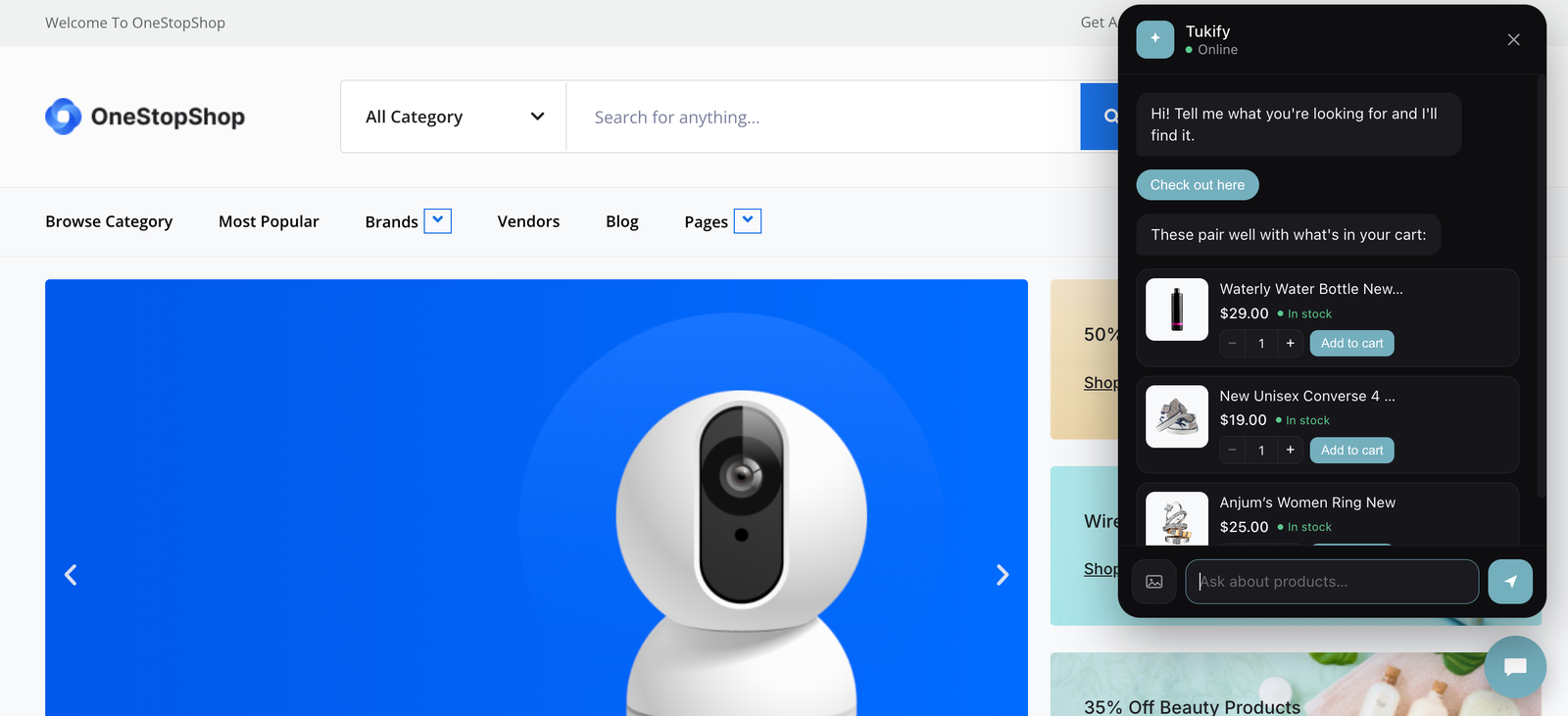
- Product recommendations – cart-aware upsell suggests genuinely complementary items based on what is already in the cart.
- Visual / image search – a shopper uploads a photo and Tukify finds similar products in your catalog, great for “find me something like this”. A photo of a room or an outfit is broken into its individual items and each one is searched separately.
- In-chat product detail popup – tap a product to see full details, an image gallery, variations (size, colour) and add to cart, all without leaving the chat.
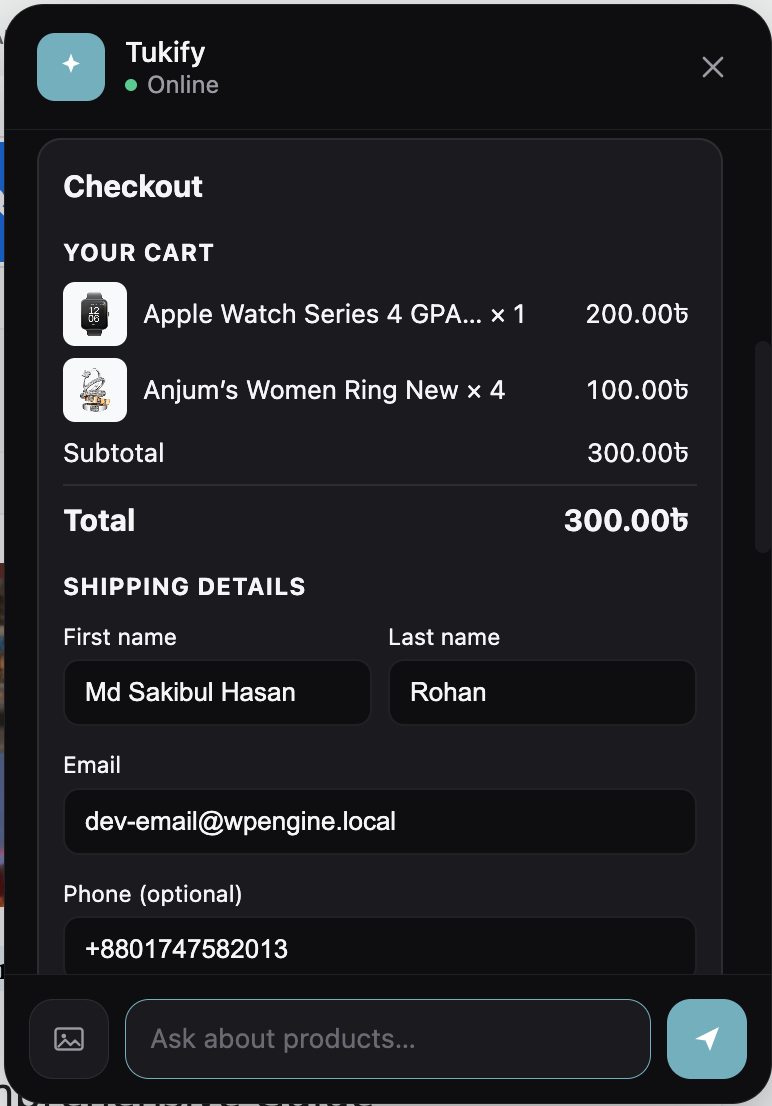
- Add to cart in chat – a quantity stepper and add-to-cart on every product card and in the detail popup, plus an optional guided in-chat checkout.
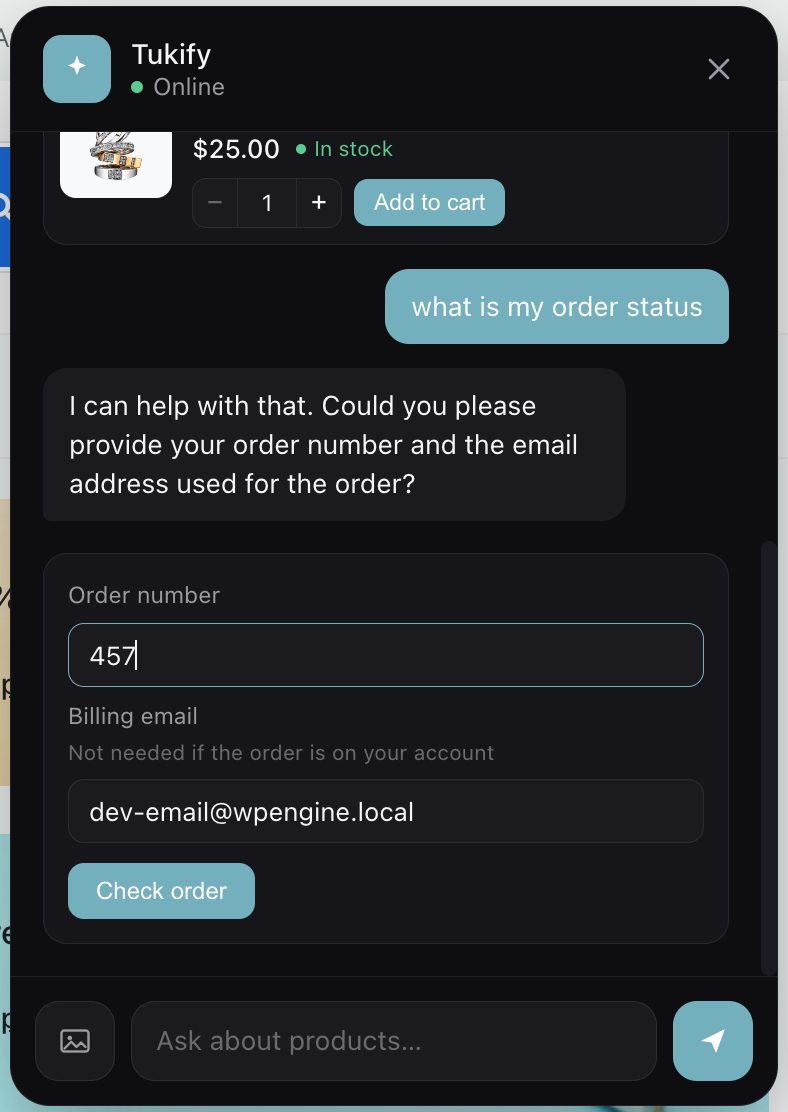
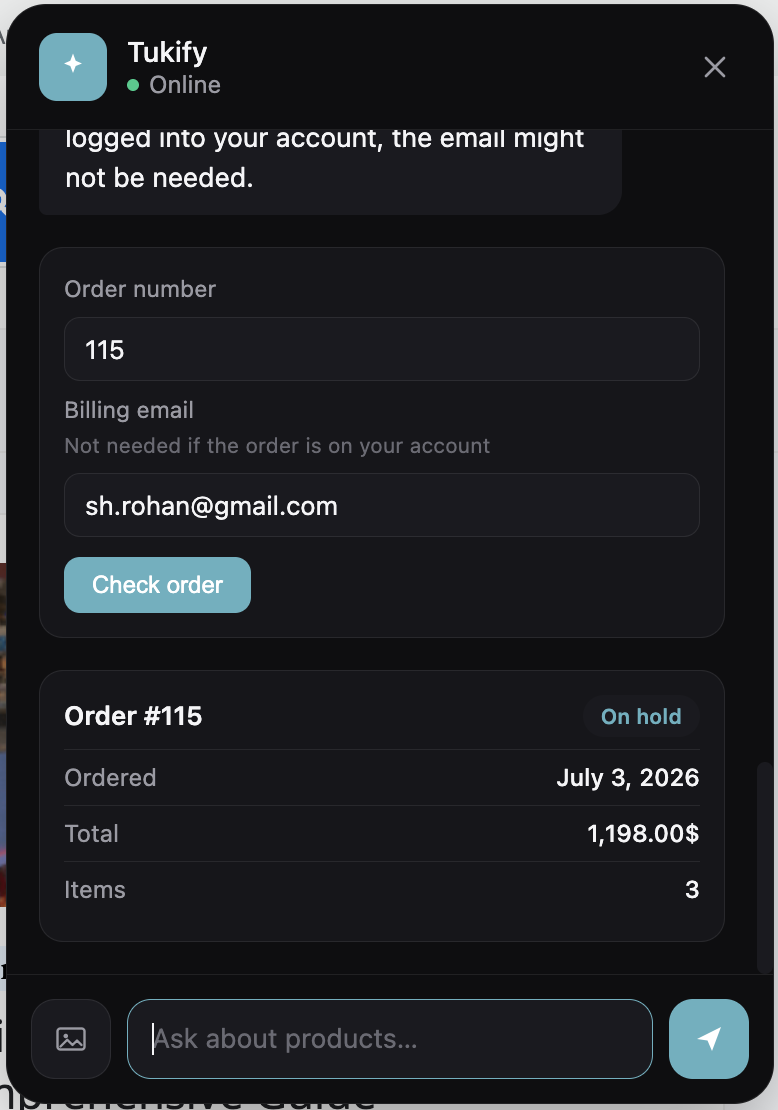
- Order status – a secure order-status lookup, verified by order number and billing email, right in the conversation.
- Clarifying questions – asks one short follow-up (with tappable quick replies) when a request is too vague, instead of dumping mediocre results.
- Natural-language filters – understands price, colour, size, brand, stock, category and sorting (“cheapest wireless headphones under $200”) and applies them as real WooCommerce queries.
- Comparison mode – a side-by-side comparison of 2-3 products with a one-line trade-off summary.
- Policy and FAQ answers – answers shipping, returns and warranty questions from your own pages and a custom Q&A knowledge base.
- Abandonment help – if a shopper stalls on the cart or checkout page, or looks about to leave, Tukify offers a hand with the things that usually hold people up: shipping cost, sizing, and payment. Dismissible, and never more than once per visit.
What Tukify gives store owners
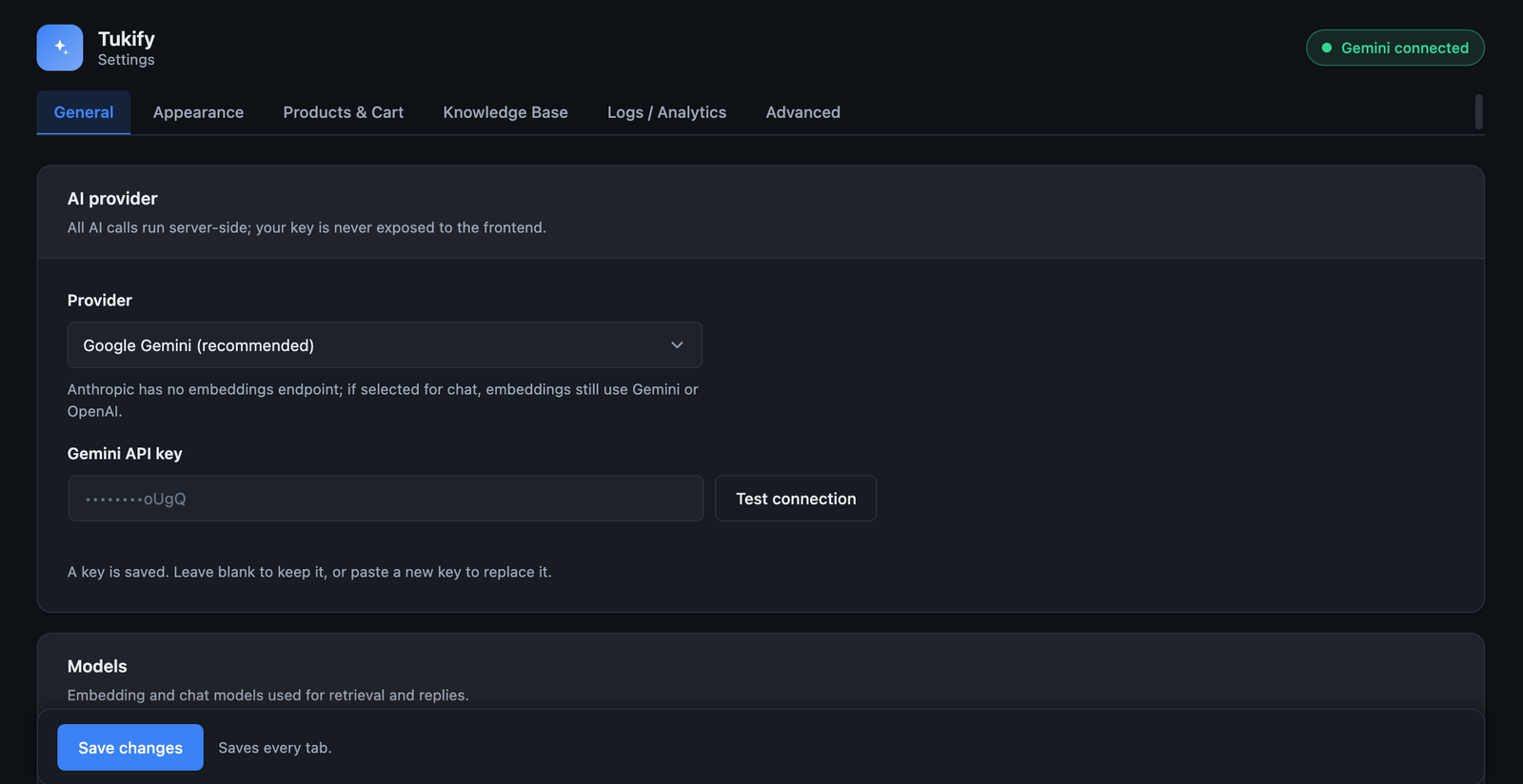
- Bring your own API key – use Google Gemini, OpenAI / ChatGPT, Anthropic Claude, xAI Grok, or Groq. You pay your provider directly; Tukify never bills for inference.
- Choice of models – pick a chat provider and an embedding provider independently, and choose the model for each.
- Background indexing – embeds your catalog in the background via Action Scheduler, and only re-embeds products that changed.
- Presentation surfaces – a global floating chat widget plus three Elementor widgets (Chat, Search, Recommendations), each rendered in a Shadow DOM so your theme’s CSS cannot break them.
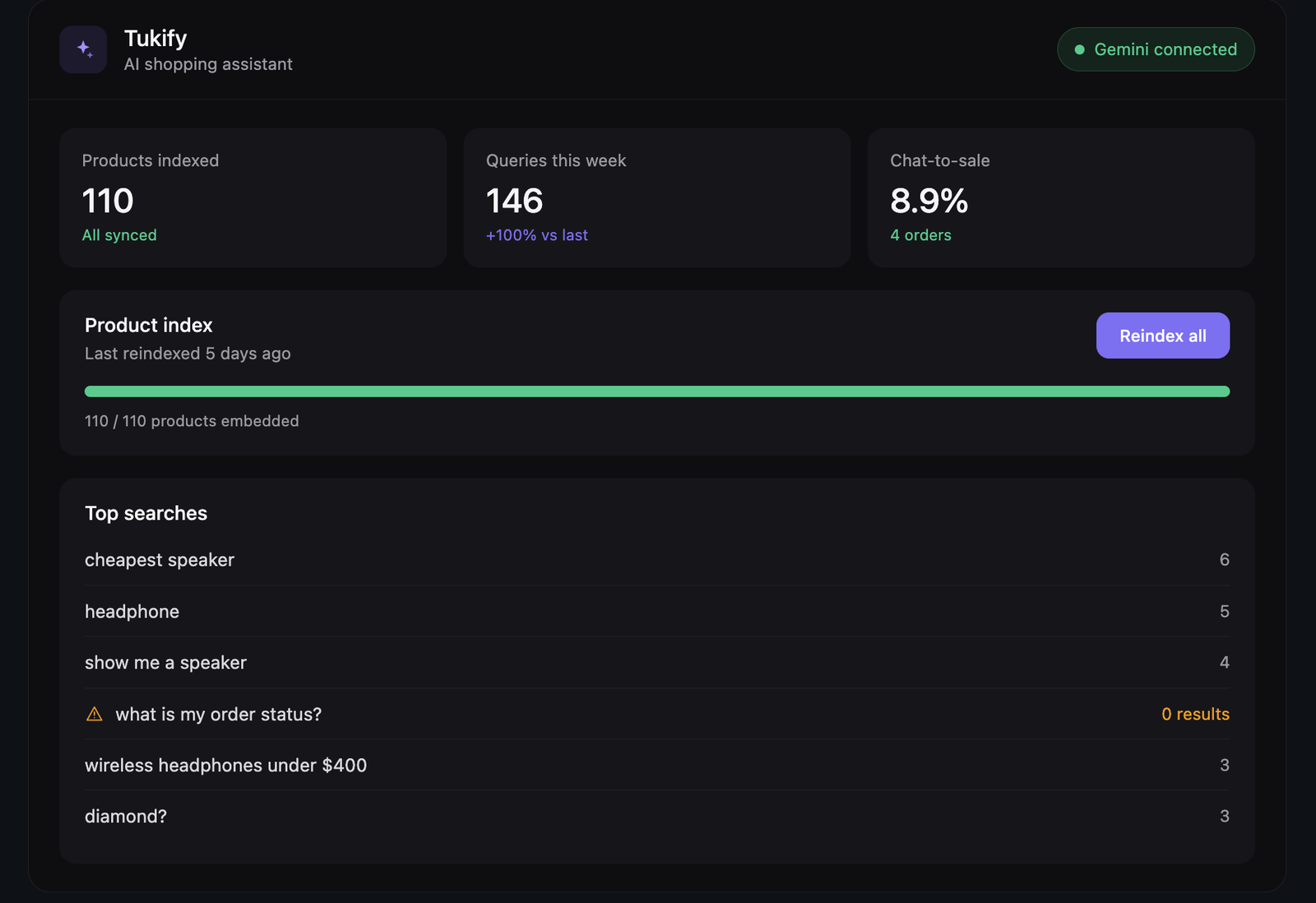
- Conversion analytics – cart recovery rate, resolution rate, chat-assisted average order value against your store-wide average, and attributed revenue, over any date range. Plus top queries, zero-result queries, and unmet-demand insights.
- Knows a problem from a purchase – when a shopper sends a photo of a damaged or wrong item, Tukify stops selling and offers the order lookup and your returns policy instead.
- Privacy-first – all AI calls are server-side, keys are masked in the admin, and your catalog data stays in your own database. Analytics are aggregate counts only.
Coming soon: a WhatsApp channel, so the same AI shopping assistant can answer shoppers on WhatsApp through Meta’s WhatsApp Business Cloud API. It is previewed in Settings but is not active in this release – nothing is sent or received yet.
Groq (fast inference)
Tukify now supports Groq as a chat provider – the fast-inference platform at groq.com (this is not xAI’s Grok). Groq returns replies very quickly and has a generous free tier, which makes the chat feel close to instant. Groq is chat only, so embeddings keep using Gemini or OpenAI, and image search falls back to a vision-capable provider.
Which provider does what
- Google Gemini – chat, embeddings and image (vision) search. Recommended default; has a free tier.
- OpenAI (ChatGPT) – chat, embeddings and image (vision) search.
- Anthropic (Claude) – chat and image (vision) search. No embeddings – use Gemini or OpenAI as the embedding provider.
- xAI (Grok) – chat and image (vision) search. No embeddings – use Gemini or OpenAI as the embedding provider.
- Groq (fast inference) – chat only, very fast, with a free tier. No embeddings or vision – use Gemini or OpenAI as the embedding provider, and image search falls back to a vision-capable provider.
You choose a chat provider and an embedding provider independently in Settings. Retrieval (RAG) always uses the embedding provider. If you change the embedding provider or model, Tukify prompts you to reindex, because embeddings from different models are not compatible and are never mixed in the same index.
Requirements
- WooCommerce (active).
- An API key for at least one supported AI provider: Google Gemini, OpenAI, Anthropic (Claude), xAI (Grok), or Groq (fast inference). Gemini and Groq offer free tiers that are enough for development and small stores.
- If you pick Claude, Grok, or Groq for chat, you also need a Gemini or OpenAI key for embeddings (those providers have no embeddings endpoint).
- PHP 7.4+.
- Elementor is optional (only needed for the Elementor widgets).
External services
Tukify connects to the AI provider(s) you configure to power conversational search, answers, natural-language understanding, and image-based (visual) search. A provider is only contacted when you have entered its API key and selected it, and only for the feature that needs it. All requests are made from your server (PHP); your API keys are never exposed to the browser, and Tukify does not send data to any other third party.
What data is sent, and when:
- Catalog indexing – when you index or re-index your products, the text of each product (title, short description, categories and key attributes) is sent to your embedding provider to generate numeric embeddings. This runs in the background and only for products that have changed.
- Knowledge base indexing – if you enable the policy/FAQ knowledge base, the content of the pages you select and any custom Q&A you enter is sent to your embedding provider.
- Search and chat – when a shopper searches or chats, their message, a short recent conversation history, and the retrieved product context are sent to your embedding provider (to embed the query) and your chat provider (to generate a grounded reply).
- Visual search – if a shopper uploads an image, that image is sent to a vision-capable provider to identify the product type before matching your catalog.
Provider terms and privacy policies (review the ones you use):
- Google Gemini – https://ai.google.dev/terms and https://policies.google.com/privacy
- OpenAI – https://openai.com/policies/terms-of-use and https://openai.com/policies/privacy-policy
- Anthropic (Claude) – https://www.anthropic.com/legal/consumer-terms and https://www.anthropic.com/legal/privacy
- xAI (Grok) – https://x.ai/legal/terms-of-service and https://x.ai/legal/privacy-policy
- Groq (fast inference) – https://groq.com/terms-of-use/ and https://groq.com/privacy-policy/
Note: some providers may use free-tier inputs to improve their models. If you handle real customer data, use a paid plan/key (typically excluded from training) and review that provider’s terms.
Installation
- Upload the plugin to
/wp-content/plugins/tukifyor install it from the Plugins screen. - Activate the plugin. WooCommerce must be installed and active.
- Get an API key from a supported provider – Google Gemini (recommended; free tier at aistudio.google.com), OpenAI, Anthropic (Claude), xAI (Grok), or Groq (fast inference, free tier at console.groq.com).
- Go to Tukify > Settings, choose your provider, paste your key, and click Test connection.
- On the Tukify dashboard, click Reindex all products to embed your catalog (runs in the background).
- Enable the floating widget in Settings, and/or drop the Tukify Elementor widgets onto a page.
Frequently asked questions
Which AI providers does Tukify support?
Five, and you bring your own API key for whichever you choose: Google Gemini, OpenAI (ChatGPT), Anthropic (Claude), xAI (Grok), and Groq (fast inference). You pick a chat provider and an embedding provider independently in Settings. Gemini and OpenAI handle chat, embeddings and image search; Claude and Grok handle chat and image search; Groq handles chat. Embeddings are always generated by Gemini or OpenAI.
Can shoppers search by image?
Yes. With visual (image) search, a shopper uploads a photo in the chat and Tukify identifies the product type and finds similar items in your catalog – ideal for “find me something like this”. Image search uses a vision-capable provider (Gemini, OpenAI, Claude, or Grok).
Does it work without a paid AI subscription?
Yes. Tukify is bring-your-own-key, and both Google Gemini and Groq offer free tiers that are enough for development and many small stores. You connect your own key and pay your provider directly (often nothing on a free tier); Tukify never charges for inference.
Is my API key safe?
Yes. Every provider key is stored in your site’s options, shown masked in the admin, and used only server-side. Keys are never sent to the browser or embedded in any front-end code, and all AI requests are made from your server.
Where is my catalog data stored?
Product embeddings are stored in a custom table in your own WordPress database. Tukify only sends product text to your configured embedding provider (Google Gemini or OpenAI) to generate those embeddings (see External services).
Does it work without Elementor?
Yes. The global floating chat widget works on any theme. Elementor is only required for the three optional Elementor widgets.
Will it invent products that aren’t in my store?
No. Every answer is grounded in real retrieval – the assistant can only recommend products that exist in your catalog, and policy answers come only from your own content.
What happens to my data if I delete the plugin?
By default, deleting Tukify removes all of its data: its settings, its custom tables (product embeddings, knowledge base, analytics, back-in-stock subscribers, usage counters) and any cached data. If you would rather keep everything for a later reinstall, enable “Keep Tukify’s data when the plugin is deleted” under Settings > Advanced before deleting. Deactivating the plugin never removes any data.
Changelog
Adds proactive cart and checkout abandonment nudges, conversion KPIs on the dashboard, and image search that tells a shopping photo from a support one. Reindex is not required.
1.6.0
Three new features in this release: a proactive abandonment intervention, conversion analytics, and smarter image search.
Abandonment intervention
- The chat now opens itself with a helpful nudge when a shopper stalls on the cart or checkout page, or looks about to leave.
- Three triggers – checkout idle, cart idle, and exit intent – each switchable, with editable idle thresholds and message templates.
- The nudge offers quick-reply chips for the most common blockers: shipping cost, sizing, and payment. Each is answered from your live cart, shipping zones, and payment gateways plus your knowledge base, with no AI call.
- One frequency cap covers every trigger, so a shopper is nudged at most once per session and at most once per N hours.
- Never fires for logged-in administrators or shop managers, so it stays out of your way while you work on your own store.
- Replaces the separate “Exit intent” and “Proactive re-engagement” settings with a single Engagement tab. Your existing settings are migrated automatically.
Conversion analytics
- New KPIs on the dashboard: cart recovery rate, resolution rate, chat-assisted average order value against your store-wide average, and attributed revenue.
- New date-range filter – 7, 30, or 90 days, 1 year, or all time – and a trend line of attributed orders per day.
- Chat-to-sale is now range-aware and counts distinct sessions on both sides of the ratio. It previously compared every attributed order against chat sessions only, which could report over 100%.
- Order totals are recorded at attribution time, so revenue metrics need no per-order lookups when the dashboard loads.
- Aggregate counts only. No customer, order contents, or personal data is stored or displayed.
Smarter image search
- Uploaded images are now understood before they are searched. A quick classification decides whether the photo shows a single product, a scene, a problem with an item, or something unclear.
- A photo of a damaged, faulty, or wrong item no longer returns products to buy. Tukify offers the secure order lookup and your own returns policy instead.
- Scene photos – a room, an outfit, a flatlay – detect the main items and search for each one, now covering furniture, lighting, decor, textiles, appliances, kitchenware, and plants as well as clothing.
- An image Tukify cannot read now asks one short question instead of guessing.
- Simple product photos take exactly the same path as before, and any classification failure falls back to it, so image search keeps working even if the extra step is unavailable.
1.5.0
- New: in-chat product detail popup (gallery, variations, add to cart).
- New: Groq (fast inference) chat provider.
- Coming soon: WhatsApp channel (preview in settings).
- Improved plugin listing and documentation.
1.4.6
- Checkout button now always appears at the bottom of the chat whenever the cart has items, in both new and existing chats (was inconsistent before).
- Added a subtle, dismissible review request on the plugin’s own screens.
1.4.5
- Improved the readme and plugin listing (search keywords, clearer descriptions, multi-provider wording).
1.4.4
- New Tukify logo (transparent SVG) shown in the chat launcher, avatar, and admin header – it renders cleanly inside the round chat bubble, with no square corners.
- Added an Appearance setting to customize the chat bubble background colour, with a live preview and a low-contrast hint.
1.4.3
- Fixed prices showing as raw HTML entities (e.g. “$76.00” instead of “$76.00”) in the chat checkout and order-status cards. Currency output is now decoded to plain text everywhere prices appear in the chat.
Screenshots
For developers
Is this your plugin? Show off the numbers.
Add a live badge to your site, docs or GitHub README. It updates on its own — no account needed.
Best Tukify alternatives
All AI Chatbot plugins →





FAQ
Tukify: quick answers
Straight answers, pulled from live WordPress.org data.
Live data from WordPress.org · checked Oct 5, 2026
Is Tukify free?
Yes. Tukify is free to download and use from the official WordPress.org plugin directory.
Is Tukify safe to use in 2026?
Tukify is a solid plugin choice in 2026, with a few things worth checking first. It runs on 10+ sites, is rated 5/5 and was last updated 4 weeks ago, and scores 68/100 on our health check.
How many websites use Tukify?
Tukify is active on 10+ WordPress websites and has been downloaded 1,493 times since it launched in July 2026. It was downloaded 888 times in the last 30 days.
Does Tukify work with WordPress 7.1?
Tukify is officially tested up to WordPress 7.0.6, while the latest release is 7.1.2. It may still work, but try it on a staging site first.
What PHP version does Tukify need?
Tukify requires PHP 7.4 or higher. Most hosts run PHP 8.x today, so it works on any modern WordPress hosting.
When was Tukify last updated?
The latest version, 1.6.0, was released on September 7, 2026 (4 weeks ago).
Who makes Tukify?
Tukify is developed and maintained by Sakibul Hasan Rohan.
What are the best alternatives to Tukify?
The most popular alternatives to Tukify are WPZOOM Connect: AI Chat, Cl… (90K+ installs), Lead Generation Contact Wid… (10K+ installs) and Hyve Lite (7K+ installs).
Powered by PageForge
Want thousands of pages that rank like these? Build them in an afternoon.
This directory runs on the same engine as PageForge. Turn any spreadsheet, CSV or API into thousands of fast, SEO-ready WordPress pages — with schema, internal links and AI-written copy baked in.
- CSV, Google Sheets & API data sources
- AI content, schema & internal links per page
- Works with Elementor, Gutenberg, Yoast & Rank Math
- Free on WordPress.org — no credit card


