



MxChat – AI Chatbot & Content Generation for WordPress
Free AI chatbot and content generation for WordPress. Train ChatGPT, Claude, Gemini or Grok on your content. WooCommerce ready with RAG.

Safe pick
Yes — MxChat is a safe, well-maintained plugin to use in 2026. It runs on 2K+ sites, is rated 5/5 and was last updated 6 days ago, and scores 88/100 on our health check.
- Loved by users — 5/5 from 30 reviews
- Actively developed — last update 6 days ago
- Tested with the latest WordPress (7.1)
- Responsive support — 76% of recent threads resolved
How does it stack up?
Side-by-side on installs, updates, ratings & support



Daily downloads
Download spikes usually follow a new release — each site that auto-updates counts as a download.
Rankings
Where MxChat stands todayWordPress.org search rankings
Live position in the plugin search, top 100| Keyword | Position |
|---|---|
| AI Chatbot | #3 |
| ChatGPT | #19 |
| content generation | #1 |
| customer support | #11 |
| woocommerce | >100 |
Version adoption
Share of active sites per release.
Rating breakdown
★★★★★★★★★★ 5 from 30 reviews
About MxChat
From the official readme · v3.2.22Description
MxChat is the most powerful free AI chatbot and content generation plugin for WordPress — connecting your website to ChatGPT, Claude, Gemini, Grok, DeepSeek, and 100+ AI models through a single, easy-to-use interface. Train your AI chatbot on your website content, WooCommerce products, PDFs, YouTube videos, and more using advanced RAG (Retrieval-Augmented Generation) technology. Now with a built-in AI Content Generator to create full blog posts and landing pages complete with images, SEO metadata, and inline AI editing.
Why Choose MxChat as Your WordPress AI Chatbot?
✅ 6 Major AI Providers in One Plugin: OpenRouter, OpenAI GPT, Claude, Gemini, xAI Grok, and DeepSeek – switch between 100+ models instantly
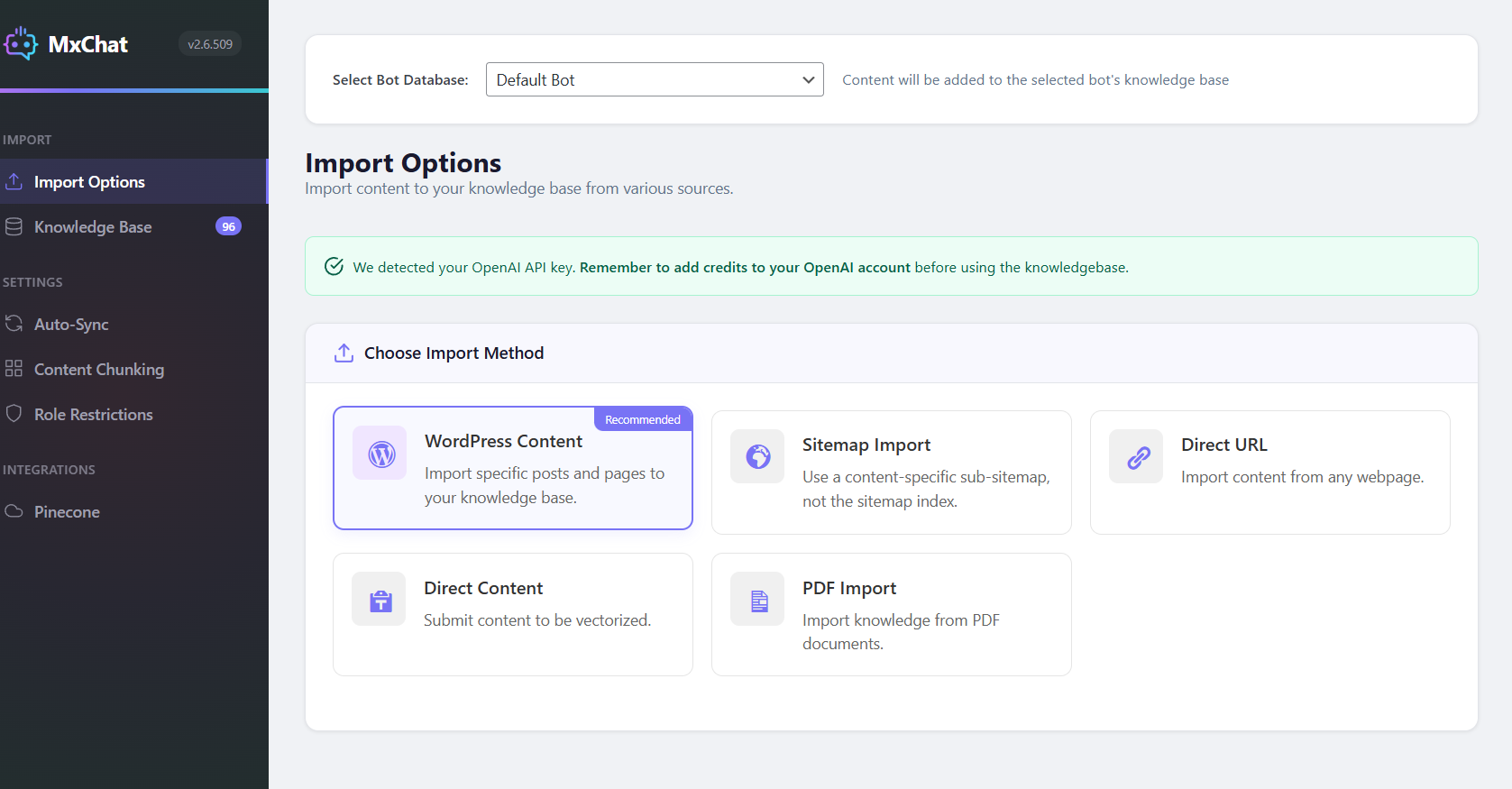
✅ Train on Your Website Data: Advanced RAG technology learns from sitemaps, PDFs, URLs, YouTube videos, or manual input for ultra-relevant responses
✅ Live Agent Handoff via Slack: Seamlessly escalate from AI to human support when customers need personal assistance
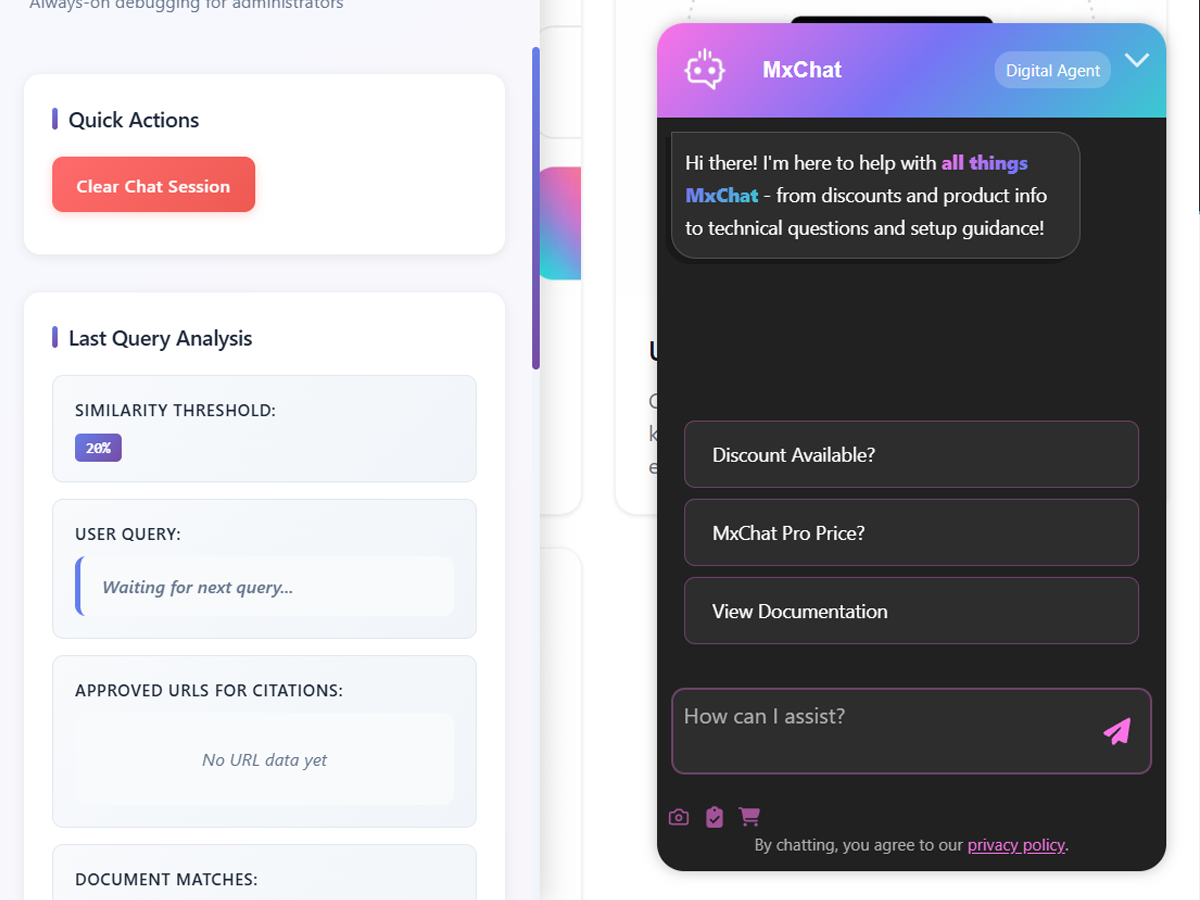
✅ Real-Time Debug Panel: See exactly what your chatbot retrieves and triggers with our admin testing interface
✅ Boost Sales with WooCommerce: Product cards, cart management, and AI-powered shopping assistance
✅ AI Content Generator: Create full blog posts and landing pages with AI-generated images, SEO metadata, and real-time preview editing
✅ Extensive Add-On Ecosystem: Forms, moderation, recommendations, theme customization, and more
🎬 Quick Setup with MxChat – Learn how to quickly setup and understand how your chatbot works
📦 Optional Premium Add-Ons
Extend the free plugin with these optional premium features:
- MCP Server Add-On – Turn your MxChat install into a Model Context Protocol server so Claude, ChatGPT, and Claude Code list transcripts, push knowledge, and inspect bots natively — JSON-RPC 2.0 + OAuth + bearer auth, no per-message fees
- Advanced Content Editor Add-On – Smart internal linking, AI image management, readability analysis, Google Search Console integration, advanced SEO optimization, and 30-day AI Content Calendar for automated blog scheduling
- WooCommerce Add-On – AI-powered shopping assistance with product-aware conversations, native product cards with images and pricing, upselling and recommendations, order inquiry handling, cart management, and real-time inventory awareness
- Forms Add-On – Capture leads and data with custom in-chat forms
- MxChat Anywhere Add-On – Deploy your chatbot on any website with one script tag — Shopify, Squarespace, Wix, static HTML, and more
- AI Chatbot Theme Customizer Add-On – Instantly design chatbot themes with natural language using AI
- Multi-Bot Add-On – Run unlimited AI chatbots with custom knowledge and personalities
- Image Analysis Add-On – Enable AI-powered image analysis and OCR inside chats
👉 Visit our website to view all add-ons
Core Features That Set MxChat Apart
🟢 100+ AI Models – Access ChatGPT, Claude, Gemini, Grok, DeepSeek, and 100+ models from OpenRouter with a single plugin
🟢 Lead Management Dashboard – Dedicated Leads tab inside Transcripts shows every captured email and name deduplicated by lead, with filters, bulk delete, CSV export, and one-click jump to each lead’s latest conversation
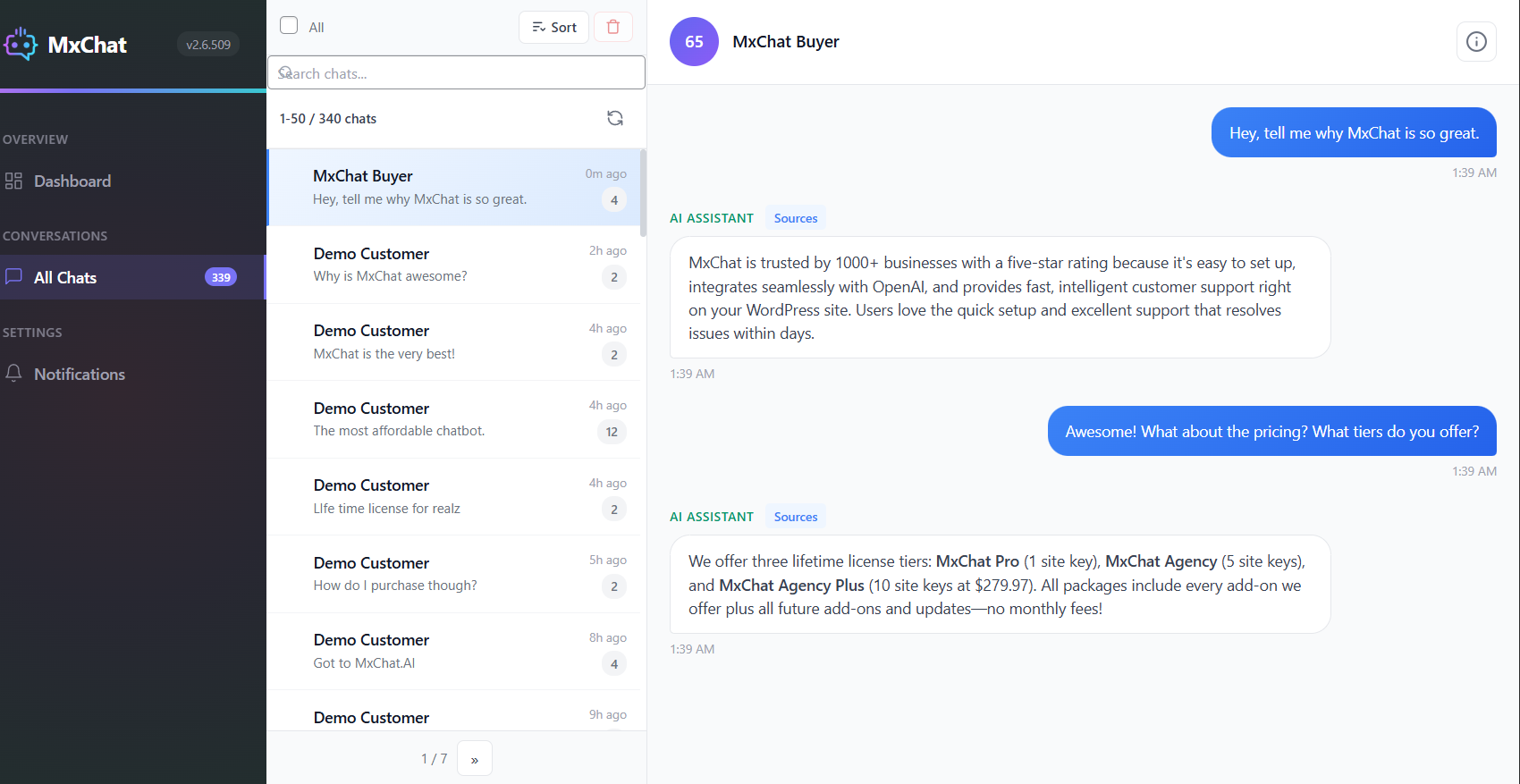
🟢 Chat Transcripts Dashboard – Review all conversations, analyze chat history, track user engagement, and see exactly which knowledge sources the AI used for each response
🟢 WooCommerce Product Training – Train your AI chatbot on your entire product catalog including descriptions, pricing, SKUs, and categories for intelligent shopping assistance
🟢 Live Agent Handoff – Seamlessly escalate conversations from AI to human support via Slack when customers need personal assistance
🟢 ACF Field Control – Choose exactly which Advanced Custom Fields are included in your knowledge base—perfect for excluding private notes or internal data
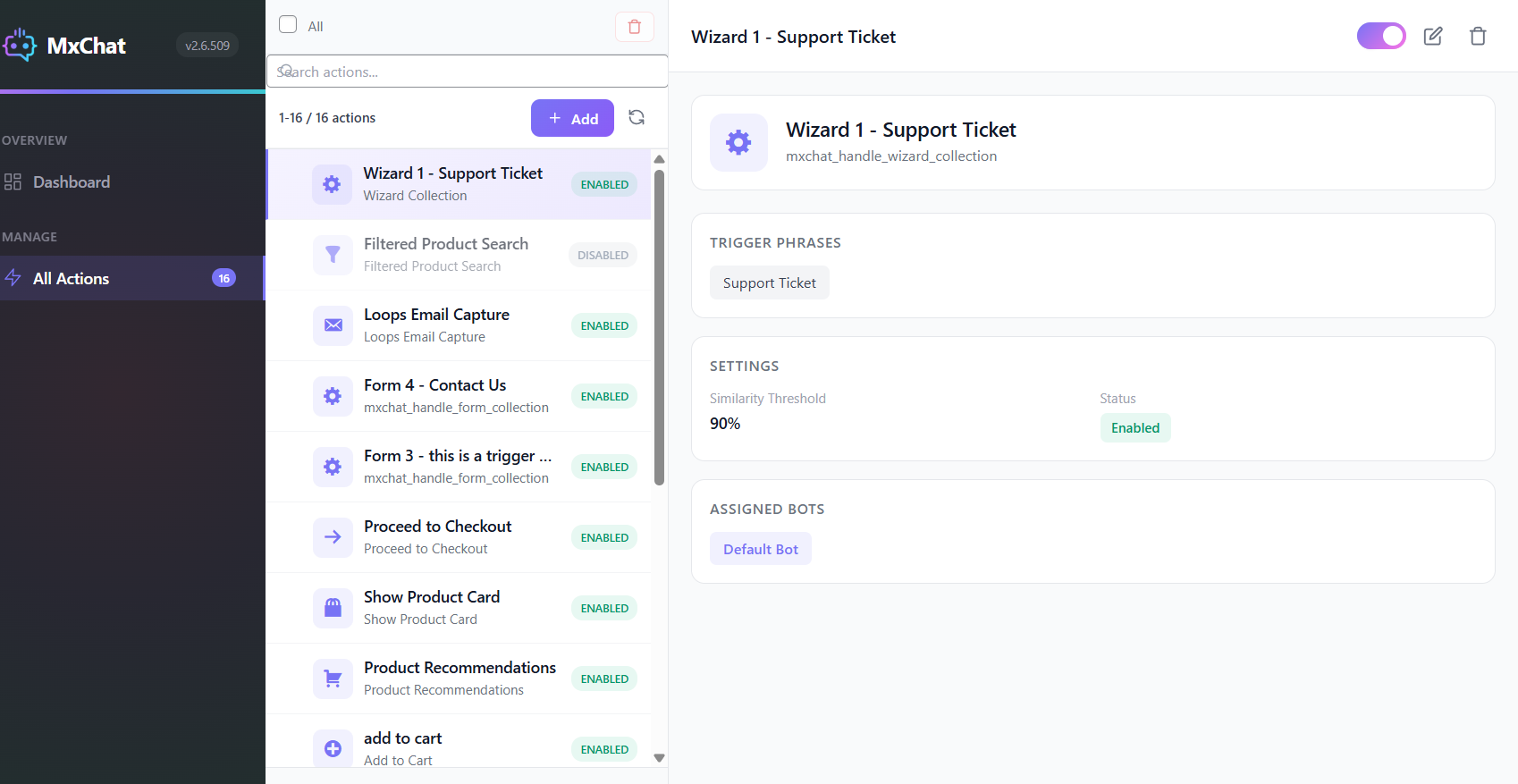
🟢 Advanced Action Recognition – Trigger Phrases use a smart vector embedding system to understand user intent and fire lead capture, appointments, redirects, and custom actions automatically — precise, deterministic control over when each action runs
🟢 AI Tools (Function Calling) – Let the chatbot decide on its own when to run an enabled action straight from natural language, with no phrases to set up. Use Trigger Phrases, AI Tools, or both together (function calling needs a tool-capable AI model)
🟢 Document Processing – Let visitors upload and chat with PDFs and Word documents directly on your frontend
🟢 Pinecone Vector Storage – Optional lightning-fast knowledge retrieval for large datasets and enterprise-scale deployments
🟢 Web Search Integration – Brave search provides real-time information beyond your knowledge base
🟢 AI Content Generator – Create full blog posts and landing pages from a prompt with AI images, SEO metadata, real-time preview, and inline AI editing via chat
🟢 Image Generation – OpenAI GPT Image and Google Imagen for visual content creation within chat conversations
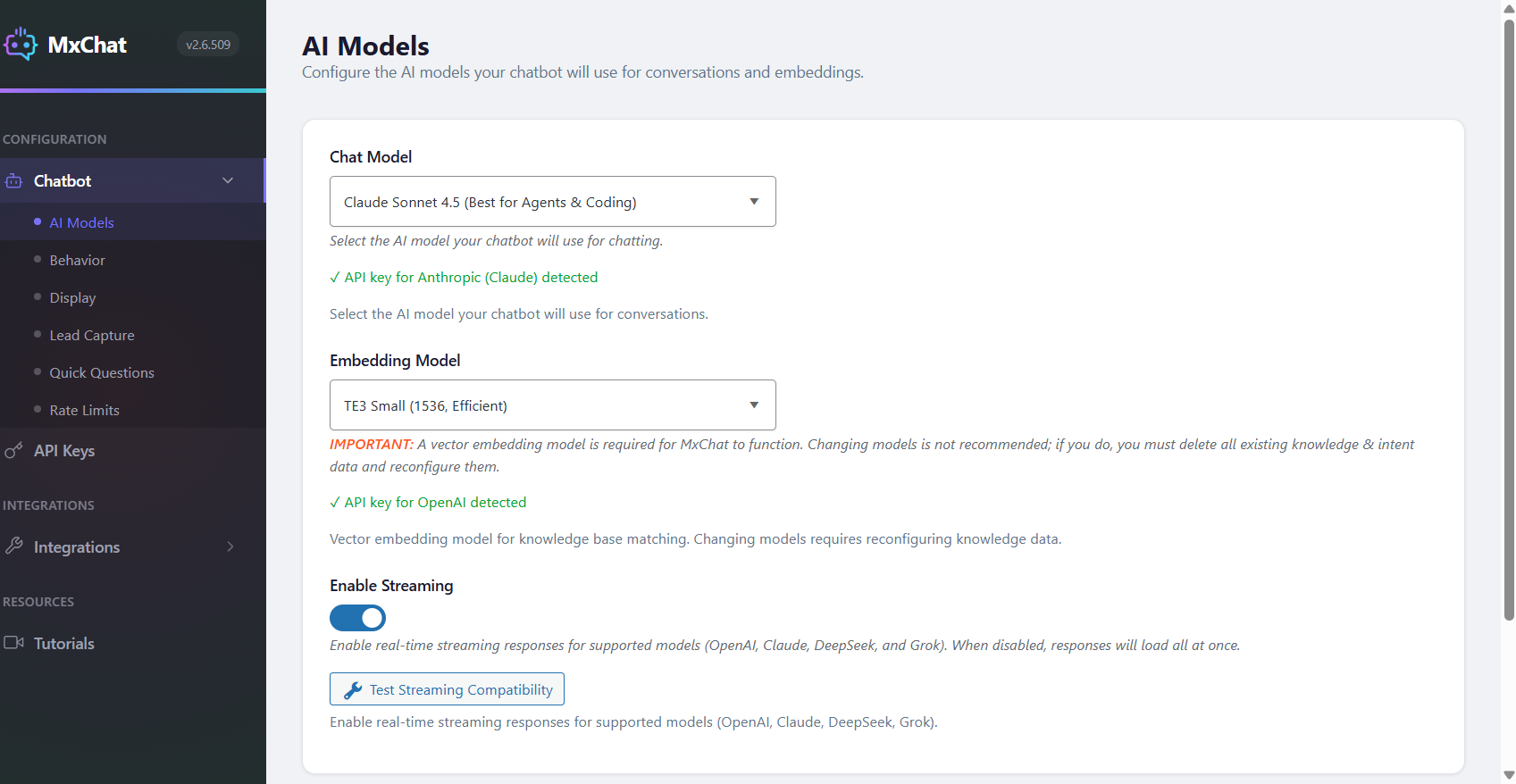
🟢 Streaming Responses – Real-time response streaming for OpenAI, Claude, Grok, and DeepSeek models for the fastest possible chat experience
🟢 REST API – Bearer-token endpoints to read transcripts, push knowledge, and bulk-delete sessions — wire MxChat into n8n, Zapier, analytics dashboards, GDPR workflows, or your own agents
Choose from 100+ Premium AI Models
Access the world’s most advanced AI models based on your specific needs:
OpenRouter: 100+ models from multiple providers with a single API key – including OpenAI, Anthropic, Google, Meta, Mistral, and more!
OpenAI:
GPT-5.5, GPT-5.4, GPT-5.4 Mini, GPT-5.4 Nano, GPT-5.3 Chat, GPT-5.2, GPT-5.1 Chat Latest, GPT-5.1, GPT-5, GPT-5 Mini, GPT-5 Nano
Anthropic Claude:
Claude Opus 4.8, Claude Opus 4.7, Claude Opus 4.6, Claude Sonnet 4.6, Claude Opus 4.5, Claude Sonnet 4.5, Claude Opus 4.1, Claude Haiku 4.5, Claude 4 Opus, Claude 4 Sonnet
X.AI:
Grok 4.1 Fast (Reasoning), Grok 4.1 Fast (Non-Reasoning), Grok 4, Grok-3, Grok-3 Fast, Grok-3 Mini, Grok-3 Mini Fast
Google Gemini:
Gemini 3.8 Flash, Gemini 3.7 Flash, Gemini 3.6 Flash, Gemini 3.5 Flash, Gemini 3.1 Pro, Gemini 3 Flash, Gemini 3.5 Flash-Lite, Gemini 3.1 Flash-Lite, Gemini 2.5 Pro, Gemini 2.5 Flash, Gemini 2.5 Flash-Lite
DeepSeek:
DeepSeek V3
Lead Management Dashboard — Turn Chat Traffic Into a Real Lead List
Every email and name your chatbot captures now lands in one clean, sortable dashboard — so you can finally see your leads as a list instead of hunting through individual transcripts.
What You Get:
- One Row Per Lead — emails captured across multiple sessions are automatically deduplicated, so each lead appears once with a conversation count and a “last seen” timestamp
- Top Pages Capturing Leads — instantly see which pages on your site are driving the most lead captures; click any page to filter the list to leads from that page only
- Powerful Filtering — search by email or name, filter by date range (24h / 7d / 30d / 90d / all-time), or filter by status (leads with a conversation vs. orphan leads who submitted the form but never chatted)
- Orphan Lead Tracking — visitors who drop their email in the pre-chat form but never send a message are surfaced separately so you never lose a captured contact
- One-Click View Conversation — jump from any lead straight into their latest full conversation in the transcripts viewer
- Bulk Delete + CSV Export — select multiple leads to delete or export in one action; CSV export supports email-only or email + name + conversation count + last-seen + top page
- Clean, Responsive, Native — works beautifully on desktop, tablet, and phone with the same polished dashboard feel as the rest of MxChat
- Zero Setup, Zero Migration — uses your existing chat data, no new database tables, no configuration — turn on lead capture and the dashboard just works
Perfect for sales teams managing inbound leads, agencies reporting to clients, and anyone who wants to see the actual ROI of their chatbot at a glance without digging through individual conversations.
AI Content Generator — Create Blog Posts & Landing Pages with AI
MxChat includes a built-in AI Content Generator that lets you create full blog posts and landing pages directly from your WordPress dashboard — no external tools or copy-pasting required.
How It Works:
- Describe Your Content — Enter a topic, title, or detailed prompt and choose between a blog post or landing page layout
- AI Generates Everything — The AI produces fully styled HTML with responsive CSS, ready-to-publish content, and optional AI-generated images using OpenAI GPT Image, Gemini, or Grok
- Real-Time Preview — See your content exactly as it will appear on your site with a live scaled preview, including desktop and mobile viewport switching
- Edit with AI Chat — Use the built-in AI chat panel to request changes like “make the heading bigger” or “change the background to blue” — the AI updates your content in real time
- Publish Instantly — Content is saved as a native WordPress post or page with clean HTML, SEO metadata, and responsive design that works with any theme
Key Content Generator Features:
- Choose from multiple AI models for content generation (GPT-5, Claude, Gemini, Grok, and more)
- AI-generated images placed directly into your content with automatic media library uploads
- SEO title and meta description generation for search engine optimization
- Built-in SEO analysis with real-time scoring and one-click AI auto-optimization
- Fullwidth and standard layout options with automatic theme compatibility
- Content history to revisit and manage previously generated posts
- Works with popular page builders and themes including Elementor, Bricks, Divi, Astra, Kadence, and more
- Optional Advanced Content Editor Add-On for Google Search Console analytics, smart internal linking, readability analysis, and advanced SEO optimization
MxChat Anywhere — Deploy Your Chatbot on Any Website
Your WordPress site powers the AI, but your chatbot doesn’t have to live there. The MxChat Anywhere Add-On lets you deploy your fully configured chatbot on any website with a single script tag — Shopify, Squarespace, Wix, static HTML, SaaS apps, documentation sites, or anything with an HTML page.
Key Features:
- One script tag to add your chatbot to any site — no coding or framework required
- Full style isolation via Shadow DOM so host page CSS never breaks your chatbot
- All your MxChat settings carry over automatically — colors, themes, quick questions, email collection, streaming, and more
- Multi-bot support lets you deploy different chatbot configurations on different sites
- Secure domain whitelisting and API key authentication prevent unauthorized usage
- Lightweight vanilla JS widget with zero dependencies — no jQuery needed on the target site
Ideal for SaaS products with a WordPress blog but a separate web app, e-commerce brands on Shopify, documentation sites, or any business that needs their chatbot beyond WordPress.
📱 Mobile-Friendly & Fully Customizable
MxChat’s chatbot widget adapts seamlessly to all devices — desktop, tablet, or mobile. Customize colors, greetings, and placement to match your brand and provide a smooth experience across your entire website.
🔐 Reliable, Fast, Secure
MxChat is optimized for performance and security. Your AI chatbot runs smoothly, loads fast, and protects your customer data with enterprise-grade security measures.
🌟 What Makes MxChat the Best AI Chatbot for WordPress?
- Used by hundreds of WordPress websites worldwide
- 5-star average rating from satisfied customers
- Native WordPress integration – no external dependencies
- Setup in under 2 minutes with simple API key configuration
🆓 Start with MxChat’s Powerful Free Plan
MxChat offers a fully functional free plan that includes everything you need to get started with AI chatbot and customer support. With no credit card required, you can:
- Access all AI models from 6 major providers
- AI Content Generator for blog posts and landing pages with SEO scoring and AI auto-optimization
- Train chatbot on unlimited website content
- Loops email capture for lead generation
- Web search and image generation capabilities
- Real-time admin debug panel
- Chat transcript review and export
- RAG support & contextual awareness
Whether you’re running a small business or launching a new online store, MxChat’s free plan gives you the tools to offer intelligent customer support and grow your business — without paying a cent.
Developer Hooks & Filters
MxChat provides WordPress filter hooks so developers can extend and customize chatbot behavior without modifying core plugin files. View full documentation with code examples.
mxchat_before_process_post
Runs during knowledge base indexing and lets you modify a post’s data before MxChat processes it. Use this to include custom field data (e.g. product specifications or ACF fields), strip internal content you don’t want the chatbot to learn, or transform posts based on bot ID. Receives the WP_Post object and the bot ID.
mxchat_system_instructions
Dynamically modify the system prompt before every AI response. Use this to inject live data such as business hours, inventory status, or user-specific context into the prompt at runtime. Receives the instructions text, bot ID, and session ID. MxChat also supports WordPress shortcodes directly in the system prompt field — any registered shortcodes are automatically expanded before being sent to the AI.
Added in 3.2.22
mxchat_client_ip (the visitor address behind a trusted proxy), mxchat_current_datetime_line (the date and time line sent with each message), mxchat_transcript_user_message and mxchat_ai_conversation_history (what humans and the model each see of a transcript), mxchat_chat_toolbar_items with the mxchat:toolbar-ready and mxchat:opened browser events (toolbar buttons from an add-on), mxchat_handoff_card_sections (extra sections on the Telegram and Slack handoff card), and the MxChat_Utils::save_session_message helper for writing to a transcript. Each is documented with examples on the page linked above.
✅ Get Started with MxChat AI Chatbot Today
Installing MxChat for WordPress takes just a few clicks. Get started with our free plan and upgrade anytime to access our complete add-on ecosystem and premium features.
💰 Pricing
Most powerful features are included in the free plan. Upgrade to Pro for the complete add-on ecosystem and advanced capabilities.
View all pricing options
Use of Third-Party Services
This plugin connects to AI service providers to generate responses:
Service Providers:
– OpenRouter – Terms | Privacy
– OpenAI – Terms | Privacy
– Anthropic – Terms | Privacy
– Google – Terms | Privacy
– X.AI – Terms | Privacy
– DeepSeek – Terms | Privacy
Please ensure compliance with applicable terms and data privacy laws.
Credits
This plugin incorporates the following third-party library:
- Smalot PDF Parser: Used for parsing and extracting text from PDF files. This library is developed by Smalot and distributed under the MIT License. For more details, visit the Smalot PDF Parser GitHub repository.
This plugin was developed by MxChat.
Installation
- Upload the
mxchat-basicfolder to the/wp-content/plugins/directory. - Activate the plugin through the ‘Plugins’ menu in WordPress.
- Navigate to the ‘MxChat’ settings page to configure your OpenAI API key and other settings.
Frequently asked questions
What AI models does MxChat support?
MxChat supports 100+ AI models including OpenAI GPT-5.5, GPT-5.1 Chat Latest, GPT-5, Anthropic Claude Opus 4.8, Claude Sonnet 4.6, Claude Haiku 4.5, Google Gemini 3.8 Flash, Gemini 3.1 Pro, xAI Grok 4, Grok 3, DeepSeek V3, and many more. With OpenRouter integration, you get access to models from OpenAI, Anthropic, Google, Meta, Mistral, and other providers with a single API key.
How do I get API keys for the AI chatbot?
For OpenAI, visit platform.openai.com and create an account. For Anthropic Claude, visit console.anthropic.com. For Google Gemini, visit ai.google.dev. For xAI Grok, visit x.ai. For DeepSeek, visit platform.deepseek.com. For OpenRouter (100+ models), visit openrouter.ai. Each provider offers different pricing tiers and free credits for new users.
Can I train the AI chatbot on my website content?
Yes. MxChat supports unlimited knowledge base training using RAG (Retrieval-Augmented Generation) technology. Import content from WordPress pages, posts, WooCommerce products, custom post types, PDFs, Word documents, text files, sitemaps, and manual Q&A entries. The AI chatbot will use your content to provide accurate, contextually relevant responses.
What is RAG technology and how does it work?
RAG (Retrieval-Augmented Generation) is an AI technique that retrieves relevant information from your knowledge base before generating responses. When a visitor asks a question, MxChat searches your trained content using vector embeddings, finds the most relevant matches, and provides that context to the AI model. This ensures accurate, factual answers based on your actual website content rather than generic AI responses.
Does MxChat work with WooCommerce?
Yes. MxChat includes full WooCommerce integration. The AI chatbot can be trained on your product catalog including titles, descriptions, pricing, SKUs, categories, and custom fields. Enable auto-sync to automatically update the knowledge base when products change. Your chatbot can answer questions about products, pricing, availability, and help customers find what they need.
Can I customize the AI chatbot appearance?
Yes. The free plugin lets you set the widget position (left or right), the greeting and placeholder text, and add your own custom CSS. The MxChat Theme Customizer add-on (Pro) handles the rest of the look: custom colors for around 20 widget elements, your own chatbot icon and avatar image, chat bubble size, light, dark and system themes, widget layouts, and a built-in CSS editor. Its AI Theme Generator lets you describe the design you want and generates the theme for you.
How do I add the chatbot to my WordPress site?
You can add the chatbot using the shortcode [mxchat_chatbot floating="yes"] for a floating widget or [mxchat_chatbot floating="no"] for an embedded chat. Alternatively, enable “Append to Body” in settings to automatically display the chatbot on all pages without shortcodes.
Does MxChat support streaming responses?
Yes. MxChat supports real-time streaming responses for OpenAI, Anthropic Claude, xAI Grok, and DeepSeek models. Streaming displays AI responses word-by-word as they’re generated, providing a faster, more engaging chat experience for your visitors.
What is the Chat Transcripts feature?
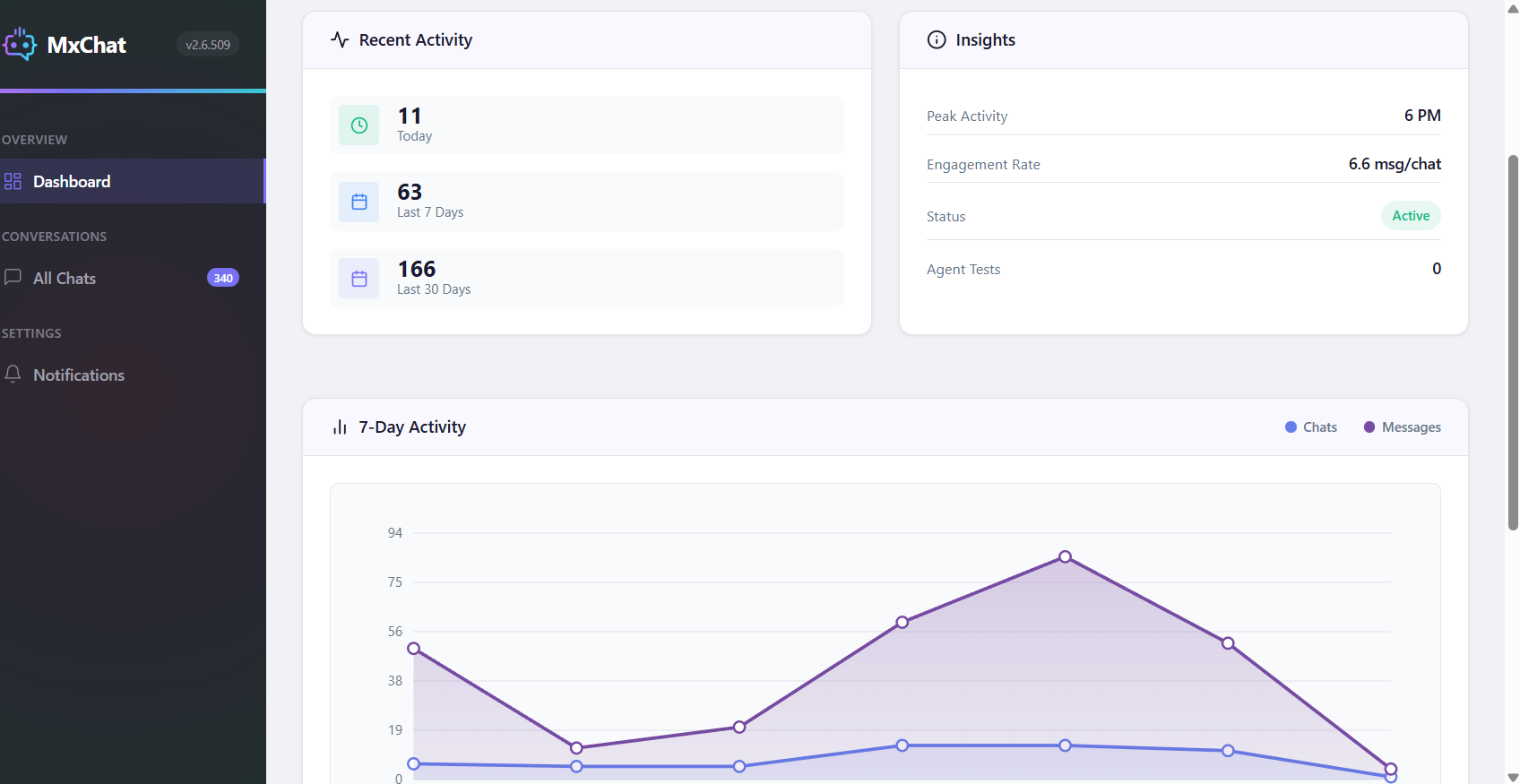
The Chat Transcripts dashboard provides comprehensive conversation management. View all chat histories, see detailed conversation flows, track which knowledge sources the AI used for each response, monitor user engagement, and analyze chat analytics including daily activity, peak hours, and user distribution.
Can I see which content the AI chatbot used to answer questions?
Yes. MxChat includes full knowledge source transparency. In the Chat Transcripts and the optional debug panel, you can see exactly which pages, posts, products, or Q&A entries the AI retrieved and used to generate each response, along with relevance scores.
Is Pinecone vector database required?
No. MxChat includes free, unlimited local vector storage in your WordPress database. Pinecone integration is optional and recommended only for enterprise-scale knowledge bases with thousands of entries requiring faster search performance.
Does MxChat support multiple languages?
Yes. The AI chatbot supports multi-language conversations and automatically responds in the language your visitors use. MxChat also supports right-to-left (RTL) languages like Arabic and Hebrew.
How much do AI API calls cost?
API costs depend on your chosen provider and model. OpenAI, Anthropic, Google, and others charge based on token usage. DeepSeek and Google Gemini offer generous free tiers. MxChat includes intelligent token optimization to minimize API costs. You can also set rate limits for guests and logged-in users to control usage.
Is MxChat GDPR compliant?
Yes. All conversation data is stored locally on your WordPress site, giving you complete control. Configure automatic data retention policies, export chat transcripts, or delete conversations as needed for compliance.
Can I restrict chatbot access to certain users?
Yes. MxChat includes role-based access controls. Restrict the chatbot to logged-in users only, specific user roles, or keep it public. You can also restrict specific knowledge base content to certain user roles.
Does MxChat support live chat handoff?
Yes. MxChat integrates with Slack for live agent handoff. When the AI cannot help or a visitor requests human support, conversations can be seamlessly transferred to your team via Slack.
What are Actions and how do they work?
Actions are capabilities your chatbot can perform — lead capture, appointment booking, support tickets, page redirects, image generation, web search, or custom JavaScript. MxChat gives you two ways to fire them, and you can use either one or both together: Trigger Phrases – the original system. A smart vector embedding match fires an action when a visitor’s message matches a phrase you’ve set up. Precise, deterministic control over exactly when each action runs. AI Tools (function calling) – the chatbot decides on its own when to run an enabled action, straight from natural language, with no…
Can visitors upload documents to chat?
Yes. Enable document uploads to let visitors chat with PDFs and Word documents. The AI extracts and processes document content in real-time, allowing contextual Q&A about uploaded files.
Does MxChat support image generation?
Yes. With OpenAI GPT Image and Google Imagen integration, the AI chatbot can generate images based on user descriptions directly within the chat conversation.
How does the knowledge base auto-sync work?
Enable auto-sync for posts, pages, WooCommerce products, or custom post types. When you publish or update content, MxChat automatically updates the knowledge base with the new information. No manual re-importing required.
Changelog
Adds the current date and time to every chat, knowledge restrictions for custom roles and single pages, media library imports with auto-sync, and an optional Pinecone full-text document index. Also hardens chat links and rate limiting, fixes function calling and underscore rendering, and adds Gemini 3.8 Flash. Now requires WordPress 5.3 and PHP 7.4.
3.2.22 – September 20, 2026
- New: An opt-in Pinecone Document index with full-text search, so a question carrying a part number, SKU or code finds the record that holds it. Create index for me, Check index and Migrate move an existing index across with no re-embedding, and classic vector indexes are untouched.
- New: The chatbot knows the current date and time in your site’s timezone, so it can tell past events from upcoming ones. The line travels with each message and does not affect prompt caching; {current_date} and {current_datetime} also work as placeholders in the instructions.
- New: Knowledge base content can be restricted to any role on your site, including custom ones from User Role Editor, Members or a membership plugin. The built-in Subscribers and Above through Administrators Only choices behave exactly as before.
- New: Every post and page has a Knowledge base access setting in the MxChat box on its edit screen, so content without tags is no longer stuck as public. Where both apply, the stricter of the tag rule and the page setting wins.
- New: PDF, Word, text and Markdown files already in your media library can be imported into the knowledge base, with the text read from the file itself. The Media source now lists only those four types.
- New: Switch on Media under Advanced Custom Post Sync Settings and a supported file adds itself to the knowledge base on upload, updates its entry when replaced and is removed when deleted.
- New: The pre-chat lead form can be shown to signed-in visitors too, pre-filled from their profile, and the email address can be made optional so you can collect a name and consent alone. Leads captured either way appear in the Leads tab and the CSV export.
- New: The API can remove knowledge base entries by source URL, singly or up to 50 at a time, so a document deleted in SharePoint, Drive or your CMS can be taken out of the chatbot by your sync job. Deleting a URL that is not stored is reported as nothing removed, not an error.
- New: Lead capture submissions can be read over the API, with paging and a since filter, so leads can be synced into a CRM or spreadsheet automatically.
- New: Gemini 3.8 Flash, 3.7 Flash and 3.6 Flash join the model picker, with 3.8 Flash as the recommended Gemini default and 3.5 Flash-Lite as the lowest-cost choice. Sites already on 3.5 Flash keep it until they pick something else.
- New for developers: Add-ons can put a button in the chat toolbar with the mxchat_chat_toolbar_items filter, and the mxchat:toolbar-ready and mxchat:opened page events mean no more watching the page or running requests on every view. The WooCommerce cart button is the first to use it.
- New for developers: Add-ons can append to a chat transcript with save_session_message, shape what humans read with mxchat_transcript_user_message and mxchat_ai_conversation_history, and add sections to the Telegram and Slack handoff card with mxchat_handoff_card_sections.
- Security: Hardened how links are written into the chat window and how a visitor’s own earlier messages are restored after a page reload. Ordinary links, encoded addresses and file names with brackets look and behave exactly as before.
- Security: Hardened per-visitor rate limiting and its hourly reset. A visitor’s allowance is now counted against the address the request really came from, with Cloudflare handled automatically, and daily, weekly and monthly limits hold for the full period; other proxies can use the new mxchat_client_ip filter.
- Fixed: Restricting a knowledge entry to a custom role no longer leaves it readable by every signed-in visitor.
- Fixed: Choosing Media in the WordPress Content importer now lists your files instead of coming back empty on every site.
- Fixed: With Pinecone, the Knowledge Entries heading shows the vector count Pinecone reports instead of 50 for any index over 500 vectors, paging uses Previous and Next and continues where the last page ended, and a bot with its own empty namespace shows 0.
- Fixed: With Contextual Awareness on, sending a message on a page with a video or audio player no longer starts an invisible copy playing or downloads the media again. The page text is read from an inert copy, gathered once per page.
- Fixed: The function-calling loop no longer sends an invalid request when the per-turn tool budget is reached. Every tool call gets a result, the model answers from what it has, and a provider failure after a tool has run is logged even with developer mode off.
- Fixed: Words joined with underscores, such as file names, SKUs and placeholders, no longer lose their underscores and turn italic. A backslash writes an underscore, asterisk, tilde or backtick literally, and anything inside backticks is shown exactly as written.
- Improved: The Hybrid keyword boost now applies to Pinecone document indexes as well as the WordPress database, and the Transcripts and Testing panels label each match Vector, Keyword or Both.
- Improved: With AI Tools active, questions that need no tool are generated once instead of twice, so replies arrive sooner and ordinary turns use roughly half the output tokens. Those replies arrive as one message; the mxchat_fc_keep_first_hop_text filter restores the old behaviour.
- Improved: Gemini 3 series models are asked for a low thinking level on every chat reply, natively and through the OpenAI-compatible provider, so you stop paying for hidden reasoning tokens. A developer can change it with the mxchat_gemini_thinking_level filter.
- Improved: The API Access screen documents every endpoint in one place, with ready-to-run examples for removing a deleted document and syncing new leads.
- Improved: The plugin listing’s appearance FAQ now says which customization options are in the free plugin and which come with the Theme Customizer add-on.
- Changed: The plugin now declares WordPress 5.3 and PHP 7.4 as its minimum versions, matching what the code has required for some time. Every MxChat add-on already required PHP 7.4.
3.2.21 – September 6, 2026
- Fixed: Ending a Telegram live agent conversation, from MxChat or from Telegram itself, now retires its topic and returns the visitor to the AI. The visitor’s next request used to post into the closed topic, where agents could not reply.
- Fixed: The conversation history shared with Telegram agents now always arrives, sent in parts within Telegram’s message limit as readable text. A long conversation could previously drop the entire handoff card without a trace.
- Fixed: Slack agents who reply in a thread on a handoff message now reach the visitor. Those threaded replies were silently discarded in the default per-conversation mode.
- Fixed: With Chat Persistence on, Start new chat now leaves only your greeting, and a restored conversation keeps the greeting above it. A returning visitor was previously left with one old reply and no greeting.
- Fixed: The Open Telegram settings button on the webhook security notice now opens the Telegram settings tab instead of the onboarding screen.
- Improved: Telegram handoffs share the last 10 messages, labeled with the count, and any Telegram delivery failure is shown on the Telegram settings screen with Telegram’s own explanation. Failures used to leave no trace anywhere.
- Improved: When your site rejects Telegram’s incoming requests, the Telegram settings screen and a dashboard notice now say how many, when, why, and how to fix it. Sites behind Cloudflare with no webhook secret previously dropped every reply in silence.
- Improved: When a Slack message cannot be relayed to the visitor, such as an edit or a file upload, the agent now sees a short note in the channel explaining how to get it through. Dropped replies are logged when debug mode is on.
- Improved: If your shared Slack handoff channel is private, the Slack settings screen now warns that your Slack app needs the message.groups event subscription. Without it, handoffs post but agent replies never reach the visitor.
- Improved: On the Pro and Extensions page, the button for an add-on you have not installed is now Get the ZIP from My Account and opens your account Downloads page. It used to open the same page as the Documentation button.
3.2.20 – August 28, 2026
- New: The knowledge base can now populate and maintain your OpenAI Vector Store — every addition, edit and deletion is mirrored automatically, and an Import Existing Knowledge Base button (or the wp mxchat vectorstore-import command) uploads what you already have in resumable batches; role-restricted entries are never uploaded.
- New: Chat answers can no longer link to pages that do not exist — every finished answer, streaming included, is checked and links to your own site that would 404 are removed while the sentence stays intact.
- New: A Strip Unapproved Links setting separates link enforcement from Citation Links, so invented links are removed even with citations off; on for new installs, opt-in for existing sites.
- New: A third live-agent handoff destination, Webhook — send handoffs to your helpdesk, CRM or automation flow as a signed JSON POST, with its own availability schedule and delivery errors shown on the settings screen.
- New: The pre-chat email form can show a consent checkbox with your own label and Privacy Policy link, optionally required, enforced on the server — and each capture records whether it was ticked, when, and the exact label shown, visible in Leads, the CSV export and privacy exports.
- New: The chatbot can be placed with a Gutenberg block, or an Elementor widget on Elementor 3.5+ — inline or floating, with a bot picker when Multi-Bot is active, and a neutral placeholder in the editor instead of a live chat.
- New: A Document Upload import method takes .docx, .txt and .md files straight into the knowledge base; the file itself is never stored and re-uploading the same name replaces rather than duplicates.
- New: A Custom Retention (Days) field on Transcripts lets you delete transcripts after any number of days instead of only the weekly and monthly presets.
- New: Pinecone knowledge entries can now be edited in the admin — saving re-chunks and re-embeds in place, so fixing a typo no longer means delete and re-import.
- New: Each ACF field group gains a group-level toggle that includes or excludes every field in it at once, with a distinct half-way state when only some are included.
- New: Add-on AI tools now receive the model’s full tool-call arguments, so a tool declaring typed parameters gets them delivered instead of everything but the query being discarded.
- New: Three developer hooks for custom retrieval — mxchat_retrieval_query rewrites the lookup text without touching the transcript, mxchat_pinecone_query_body tunes Pinecone queries, and mxchat_session_ended fires on both deletion and retention expiry.
- New: The mxchat_final_response_text filter runs on the complete answer on every response path, streaming included, before it is shown and saved.
- Security: With Contextual Awareness on, page text captured from the visitor’s browser is now fenced as untrusted reference material, capped at 8,000 characters and required to belong to your own site, so instructions hidden in comments or reviews are far less likely to be followed.
- Fixed: ACF field toggles now identify each field precisely, so same-named fields in different groups no longer share one toggle or switch each other back off; existing exclusions are migrated on the safe side with a one-time notice.
- Fixed: All remaining Pinecone reads use the correct call shape and respect a configured namespace, so listings, chunked answers and already-indexed detection work on serverless indexes instead of silently returning nothing.
- Fixed: Long manually pasted entries each keep their own identity — previously a second long pasted document silently deleted the first one’s content, in Pinecone and the local database alike.
- Fixed: Shortening an entry below the chunking threshold now removes its old chunk records, so answers can no longer draw on stale text alongside the new version.
- Fixed: Knowledge entries whose address contains percent-encoded characters, such as non-English permalinks, no longer go missing or save a duplicate under a different identity.
- Fixed: Importing Persian, Hindi and other Indic-script content no longer splits words at invisible joiner characters; re-import content added earlier to repair it.
- Fixed: The pre-chat email form now scrolls when taller than the chat window, so the submit button stays reachable — especially on phones with the keyboard open.
- Fixed: Product cards from filtered WooCommerce searches display correctly after a refresh instead of showing raw markup, and history replay now recognizes every MxChat card type automatically.
- Fixed: Cards from an AI tool answer keep their position below the answer text when the chat is refreshed or reopened, matching the order the visitor originally saw.
- Fixed: A floating chatbot placed by shortcode or block on a page that also auto-displays one no longer renders two overlapping bubbles with duplicate element ids.
- Fixed: With citation links on, real published pages on your own site and web-search source links are no longer stripped from answers as unknown.
- Fixed: The Sources tab in Message Context now lists the documents behind tool-answered replies, and tells apart a search that found nothing from a reply with no recorded retrieval.
- Fixed: The “Translation loading for the mxchat domain was triggered too early” notice on WordPress 6.7 and newer is resolved.
- Fixed: A custom retention value set by hand or by code is no longer reset to zero when other transcript settings are saved.
- Fixed: Status pills on admin screens outside API Access now render with their intended styling instead of as plain text.
- Fixed: The chat message input has a real accessible name for screen readers, rather than relying on placeholder text that disappears on typing.
- Fixed: Sites that saved the AI Tools screen on earlier versions now receive the recommended usage guidance for the handoff tools; hints you wrote yourself are never changed.
- Improved: Screen reader support for the conversation is complete — a streamed answer is announced once when it finishes rather than continuously as it types, the waiting state and error notices are read out, and restored history stays silent.
- Improved: On phones and tablets the chat input no longer takes focus after each reply, so the keyboard stays closed while the visitor reads; desktop is unchanged and the mxchat_autofocus_after_reply filter forces either behavior.
- Improved: Saving a WooCommerce product no longer generates two knowledge-base embeddings for the same product, halving embedding API usage on product saves.
- Improved: The daily model health check now watches every model in use, including per-bot models from Multi-Bot, via the new mxchat_models_in_use filter.
- Improved: Replacements for retired AI models live in one shared mapping used across the plugin and its add-ons, and content generation is now rescued from any retired model.
- Improved: The Content Generation model picker derives from the central model catalog, so new models appear automatically and a saved model that is no longer offered stays selected and labeled.
- Improved: The Video Card Match Threshold is now a slider with a live value readout, matching the other threshold controls; its range and limits are unchanged.
- Improved: The admin Testing panel reports how many links the guard checked and which it removed, which was previously silent.
- Improved: On non-English sites, the chat widget’s default texts are saved in the site language on a fresh install.
- Improved: A Pinecone listing call that genuinely fails now logs that the fallback fired instead of masking it.
3.2.19 – August 15, 2026
- Fixed: Hebrew, Arabic and other right-to-left PDFs no longer import with reversed text, and a new WP-CLI repair command fixes entries imported before this update in place.
- Fixed: Sites still set to the retired Claude Opus 4.1, or to older retired Claude models, are automatically moved to the current Claude generation of the same tier and shown a notice.
- New: MxChat checks once a day that your selected AI model still exists and warns you on the AI Models screen and dashboard before a retired model can silence your chatbot.
- Improved: Claude API costs drop on most sites — Anthropic prompt caching now runs automatically, ahead of Anthropic’s September 1 Claude Sonnet 5 price change.
- Fixed: Content generation no longer fails with an Unsupported value error on GPT-5.4 Mini and GPT-5.4 Nano, and any model that rejects a reasoning setting is retried once without it.
- Improved: The xAI Grok lineup is current again — Grok 4.6 and the rest of the new generation are offered first, and existing selections keep working.
- New: Settings edits are protected — changed fields show an Unsaved marker, leaving mid-edit asks for confirmation, and edits are handed to the browser for saving if you leave anyway.
- Fixed: Imported content keeps its currency symbols, and Arabic, Hebrew, Hindi and Thai text keeps the marks its script requires; re-import content added through the bulk website, URL or PDF import tools to repair entries indexed earlier.
- Improved: Leftover HTML character codes are converted to readable text before indexing; re-import affected entries to clean up existing ones.
- Fixed: Draft posts published by import tools or scripts are no longer indexed under your homepage address.
- Fixed: WooCommerce prices are indexed in your store’s base currency with the currency code, and on multi-currency stores the chatbot no longer mixes two currencies in one reply; re-import products to update older entries.
- New: The Notification Email field accepts up to five comma-separated addresses, and an invalid address is refused with a message naming it instead of silently breaking notifications.
- Improved: Visitor names and emails from the pre-chat form move into MxChat’s sessions storage automatically — the Leads tab and live-agent greetings work exactly as before.
- Improved: Link-click records are covered by WordPress’s privacy export and erasure tools, and old records anonymize and delete themselves over time.
- Fixed: A YouTube video card now appears only when the video actually matches the question, with a new match threshold setting — and video cards can be switched off entirely.
- New: Transcripts show which AI Tools ran on each message, with timings and errors; tools handling money, customer records or handoffs log only that they ran.
- Improved: The Slack and Telegram handoff tools arrive with their usage note prefilled, so automatic handoff works without extra setup; you can reword or clear it.
- Fixed: Inspecting a Pinecone knowledge entry works, and deletes on Pinecone setups using a namespace remove the right copy.
- Improved: Conversations are stored once instead of duplicated into the options table, and leftover duplicates clean themselves up in the background.
- Fixed: Shared admin features work again on the Transcripts and License pages, and two pieces of admin text no longer point at settings that do not exist.
3.2.18 – August 8, 2026
- Fixed: OpenAI Vector Store knowledge base search works again — an outdated request parameter caused every search to fail silently, so the chatbot answered without your knowledge base content.
- Fixed: The knowledge base status readout now correctly shows how many vector stores are configured instead of always reporting none.
- Fixed: Content updates made outside the editor are no longer skipped. When a post was published by an import tool, a scheduled post going live, or a script, the first edit after it was silently left out of the knowledge base, so the chatbot kept answering from the original version.
- Fixed: PDFs shared in chat no longer store unreadable pages when an embedding request fails part-way through. Failed pages are skipped and recorded in the Debug Mode log, and if no page can be read the chatbot now gives the real reason instead of calling the file empty or unsupported.
- Fixed: Clearing a conversation, deleting a transcript, or erasing a visitor’s data through WordPress’s privacy tools now removes every trace of that session’s stored state. Some of it was previously left behind forever.
- Fixed: Job listings imported from the content selector now include their location, job type and company name, matching listings saved in the editor. Listings imported earlier keep their old text until you import them again.
- Fixed: Post titles are now added to the knowledge base exactly as written. Curly quotes, apostrophes and long dashes were stored as raw character codes, and protected or private posts gained a Protected prefix — all of which could surface in answers. Entries indexed earlier keep their old titles until you import them again.
- Fixed: A short description made up only of page-builder shortcodes or spaces no longer adds an empty Short Description heading to the indexed text.
- Improved: Custom field names containing hyphens now read as words in the indexed text on both import routes, instead of only one of them.
- Improved: Chat sessions no longer bloat your site’s options table. Per-session details were saved as settings rows that were never cleaned up, so busy sites accumulated thousands, some loading on every page view. Sessions now live in their own table, and existing rows are moved across automatically in the background after you update.
- New: Old chat sessions are tidied up on their own. Sessions untouched for 30 days are removed automatically — the window is adjustable with a developer filter — and the cleanup runs even on sites with WordPress scheduled tasks disabled.
- Fixed: Sitemap imports now tell you why they failed instead of pointing at an empty status area — for example, an API key missing the required permission is now named as the reason.
- Improved: Knowledge base import errors from OpenAI, Gemini and Voyage now pass along the provider’s own explanation instead of a generic invalid key message.
- Improved: Chat-side embedding failures are now recorded in the Debug Mode log with the provider’s real reason, matching knowledge base imports.
- Fixed: In the content selector, a selected item’s tick mark was white on a white box and effectively invisible. Selected items now show a clearly filled checkbox.
3.2.17 – August 5, 2026
- Fixed: Japanese, Chinese and Thai content is no longer erased, split into oversized chunks, or stripped of rare characters during knowledge base imports.
- Fixed: Custom embedding providers such as Ollama, LM Studio and Azure now work end to end — the permanent mismatch banner is gone, and no cloud API key is needed for imports or automatic post syncing.
- Fixed: Scheduled posts now enter the knowledge base the moment they go live, and the developer hook for customizing indexed content also runs during automatic post syncing.
- Fixed: The WordPress content import window now fits phone screens, so its buttons are always reachable.
- Fixed: The hybrid keyword boost and smart asset loading toggles now show the saved confirmation like every other setting.
- New: Every settings tab has its own shareable link that opens directly on that tab, including nested and add-on tabs.
- Improved: Knowledge settings are centralized under Knowledge — ACF PDF extraction is now a persistent setting on the ACF Fields tab, and the hybrid keyword boost lives on the new Chunking and Retrieval tab. Saved choices carry over.
- Improved: The Editor Assistant toggle moved to the Content page’s Settings tab, next to the other content tools.
- Improved: The FAQ now documents custom and local embedding providers such as Ollama and LM Studio.
- Improved: Settings holding a Pinecone API key are no longer loaded into memory on every page view.
Screenshots
For developers
Is this your plugin? Show off the numbers.
Add a live badge to your site, docs or GitHub README. It updates on its own — no account needed.
Best MxChat alternatives
All AI Chatbot plugins →





FAQ
MxChat: quick answers
Straight answers, pulled from live WordPress.org data.
Live data from WordPress.org · checked Sep 26, 2026
Is MxChat free?
Yes. MxChat is free to download and use from the official WordPress.org plugin directory.
Is MxChat safe to use in 2026?
Yes — MxChat is a safe, well-maintained plugin to use in 2026. It runs on 2K+ sites, is rated 5/5 and was last updated 6 days ago, and scores 88/100 on our health check.
How many websites use MxChat?
MxChat is active on 2K+ WordPress websites and has been downloaded 94,309 times since it launched in August 2024. It was downloaded 6,299 times in the last 30 days.
Does MxChat work with WordPress 7.1?
Yes. The developer has tested MxChat up to WordPress 7.1.2, the latest release. It requires WordPress 5.3 or newer.
What PHP version does MxChat need?
MxChat requires PHP 7.4 or higher. Most hosts run PHP 8.x today, so it works on any modern WordPress hosting.
When was MxChat last updated?
The latest version, 3.2.22, was released on September 20, 2026 (6 days ago).
Who makes MxChat?
MxChat is developed and maintained by MxChat.
What are the best alternatives to MxChat?
The most popular alternatives to MxChat are WPZOOM Connect: AI Chat, Cl… (90K+ installs), Lead Generation Contact Wid… (10K+ installs) and Hyve Lite (7K+ installs).
Powered by PageForge
Want thousands of pages that rank like these? Build them in an afternoon.
This directory runs on the same engine as PageForge. Turn any spreadsheet, CSV or API into thousands of fast, SEO-ready WordPress pages — with schema, internal links and AI-written copy baked in.
- CSV, Google Sheets & API data sources
- AI content, schema & internal links per page
- Works with Elementor, Gutenberg, Yoast & Rank Math
- Free on WordPress.org — no credit card


