



TRS Sales Count Down
WP Sales Countdown counts the sale end time. WP Sales Countdown for WooCommerce plugin is the best thing to increase sales.

Consider an alternative
TRS Sales Count Down shows warning signs in 2026 — compare the alternatives below before installing. It runs on 10+ sites and was last updated 4 years ago, and scores 23/100 on our health check.
- Small user base (10+ active installs)
- Very few reviews so far
- No update in 3 years
- Only tested up to WordPress 6.1 (latest is 7.1)
How does it stack up?
Side-by-side on installs, updates, ratings & support



Daily downloads
Download spikes usually follow a new release — each site that auto-updates counts as a download.
Rankings
Where TRS Sales Count Down stands todayWordPress.org search rankings
Live position in the plugin search, top 100| Keyword | Position |
|---|---|
| countdown | >100 |
| Counter | >100 |
| e-commerce | >100 |
| Sales Countdown | >100 |
| WooCommerce countdown | >100 |
Version adoption
Share of active sites per release.
About TRS Sales Count Down
From the official readme · v1.0.1Description
WP Sales Countdown counts the sale end time. WP Sales Countdown for WooCommerce plugin is the best thing to increase sales.
How WP Sales Countdown Works to Increase Your Sales
These days, customers look through site pages rather checking or reading the page’s content. This customer conduct makes e-commerce even more testing. In this way, your online store must have potential highlights to change over your site guests into customers. WP Sale countdown is one potential promoting methodology to help your online income. The WP Sales count down makes sales urgency and your customers will be compelled to settle on a speedy purchasing choice.
Why You Need a WP Sales Count down?
WP Sales Count Down is necessary to increase your sales. It reminds the buyer that he must buy the items before the sale ends. Putting WP Sales Count Down beside each sale product reminds your customers that they just have a constrained measure of time to get it on a thing they have had their eye on.
Who Has Need for WP Sales Count Down?
The businesses in particular need a WP Sales Count Down. When they execute sales, they have to urge the customers to buy their products. The customers has to know that they need to buy their desired products in time. There are a few different ways to utilize urgency as a sales strategy; among them, one strategy is to show a countdown timer. WP Sales Countdown is an unmistakable viewable signal, which tells customers that, in the event that they need a product, they should make a move inside a predefined period. This could be a countdown until the finish of a sales period.
The intensity of the WP Sales countdown is that the ticking down of the clock includes additional urgency in the customer’s brain. They can really observe that time is running out and this becomes a factor in their buy choice. The key with WP Sales Countdown with the utilization of urgency overall, is that they offer valuable data to customers – which a sale will end soon or maybe that they have an hour or two remaining to arrange in the event that they need to get things the following day.
Where We Can Implement WP Sales Countdown?
WP Sales countdown can use where the sales are already executed or on any WooCommerce based store. Sometimes, the buyer thinks of buying a product but delays the process thinking that he would buy it tomorrow. However, with WP sales countdown, it would urge the customer to buy the product now because the time is running short and the sale will end soon. The conspicuous spot to utilize them is the place customers are thinking about a buy, thus they are all the more generally utilized on home and classification pages on ecommerce destinations, just as product pages. For instance, Amazon adds a countdown to delivery slice off times to make its product page progressively influential. The capacity to deliver things rapidly can be a compelling sales driver, and joining this with a delivery countdown is something that Amazon has accomplished for a considerable length of time.
Changelog
v 1.0.1
- Updated the readme file
- Tested with latest WordPress version 5.7
- Updated the plugin version
v 1.0.0
- Initial Release
Screenshots
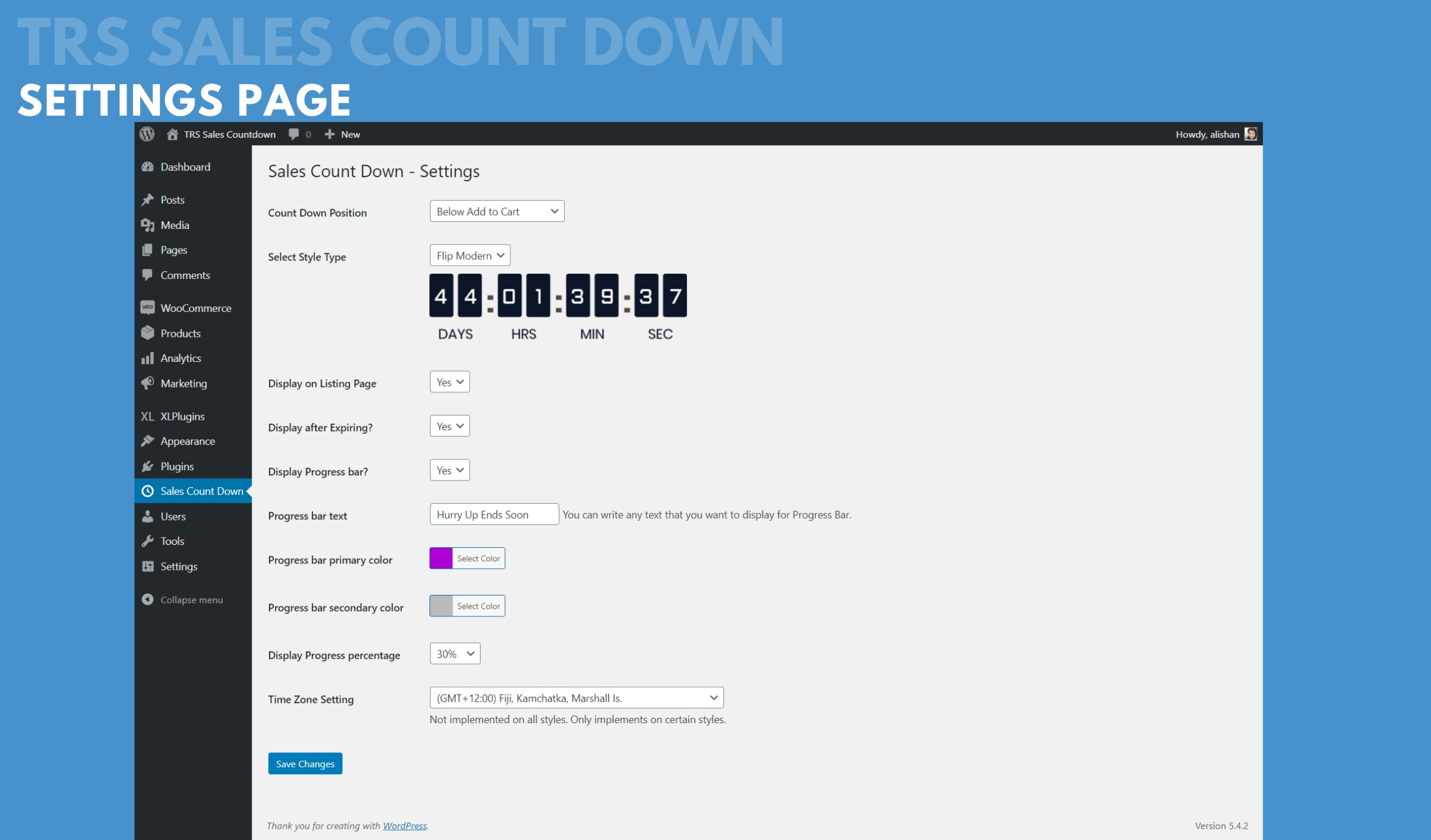


For developers
Is this your plugin? Show off the numbers.
Add a live badge to your site, docs or GitHub README. It updates on its own — no account needed.
Best TRS Sales Count Down alternatives
All countdown plugins →





FAQ
TRS Sales Count Down: quick answers
Straight answers, pulled from live WordPress.org data.
Live data from WordPress.org · checked Oct 11, 2026
Is TRS Sales Count Down free?
Yes. TRS Sales Count Down is free to download and use from the official WordPress.org plugin directory.
Is TRS Sales Count Down safe to use in 2026?
TRS Sales Count Down shows warning signs in 2026 — compare the alternatives below before installing. It runs on 10+ sites and was last updated 4 years ago, and scores 23/100 on our health check.
How many websites use TRS Sales Count Down?
TRS Sales Count Down is active on 10+ WordPress websites and has been downloaded 1,882 times since it launched in June 2020. It was downloaded 62 times in the last 30 days.
Does TRS Sales Count Down work with WordPress 7.1?
TRS Sales Count Down is officially tested up to WordPress 6.1.15, while the latest release is 7.1.3. It may still work, but try it on a staging site first.
What PHP version does TRS Sales Count Down need?
TRS Sales Count Down requires PHP 7.0 or higher. Most hosts run PHP 8.x today, so it works on any modern WordPress hosting.
When was TRS Sales Count Down last updated?
The latest version, 1.0.1, was released on October 28, 2022 (4 years ago).
Who makes TRS Sales Count Down?
TRS Sales Count Down is developed and maintained by Ali Shan.
What are the best alternatives to TRS Sales Count Down?
The most popular alternatives to TRS Sales Count Down are Countdown, Coming Soon, Mai… (10K+ installs), Countdown Block (4K+ installs) and Uji Countdown (4K+ installs).
Powered by PageForge
Want thousands of pages that rank like these? Build them in an afternoon.
This directory runs on the same engine as PageForge. Turn any spreadsheet, CSV or API into thousands of fast, SEO-ready WordPress pages — with schema, internal links and AI-written copy baked in.
- CSV, Google Sheets & API data sources
- AI content, schema & internal links per page
- Works with Elementor, Gutenberg, Yoast & Rank Math
- Free on WordPress.org — no credit card


