


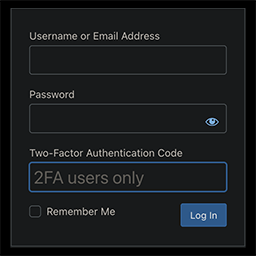
Tiny 2FA + Brute Force Protection
A simple two-factor authentication plugin that just works.

Use with caution
Tiny 2FA + Brute Force Protecti… works, but test it on a staging site before relying on it in 2026. It runs on 20+ sites and was last updated 4 months ago, and scores 52/100 on our health check.
- Small user base (20+ active installs)
- Very few reviews so far
How does it stack up?
Side-by-side on installs, updates, ratings & support



Daily downloads
Download spikes usually follow a new release — each site that auto-updates counts as a download.
Rankings
Where Tiny 2FA + Brute Force Prot… stands todayWordPress.org search rankings
Live position in the plugin search, top 100| Keyword | Position |
|---|---|
| 2FA | #57 |
| account | >100 |
| login | >100 |
| MFA | #14 |
| security | >100 |
Version adoption
Share of active sites per release.
About Tiny 2FA + Brute Force Protection
From the official readme · v0.4Description
This is probably the 2FA plugin you’re looking for.
Secure, private, and lightweight.
Integrates into WordPress like a native feature.
Proactive vs Reactive Security
Prevents attacks instead of reacting to them. The best breach is the one that never happens.
How it Works
- Install and activate the plugin
- Go to Users > Profile > Two-Factor Authentication (near the bottom)
- Check the box next to “Enable 2FA” and click “Update Profile”
- 2FA and Backup Codes are now enabled
- Scan the QR code or manually enter the secret key into your auth app of choice (and be sure to rename the generic site name “2FA” to something more useful)
- Once successful login with a 2FA code from your app has been confirmed, you should disable Backup Codes
- Brute force protection is enabled by default and can be managed site-wide by admins in profile settings
Backup Codes have been rethought from the usual method you might be used to. Read more about that in the FAQ below.
Need Support?
Ask for help here.
Installation
Automatic
- From your WordPress Admin, navigate to: Plugins > Add New
- Search for: “Tiny 2FA”
- Install it
- Activate it
Manual
- Download
- Unzip
- Upload to /plugins/ folder
- Activate
Frequently asked questions
I locked myself out of my admin!
Try not to panic; you’re not permanently locked out and nothing has been lost. You’ll simply need to disable the Tiny 2FA plugin to regain access. The simplest way to do that is to access your /wp-content/plugins folder via FTP and rename the /tiny-2fa folder to anything else. Once you’re back in your admin, you can restore the folder name and proceed to adjust your 2FA settings.
I’m positive I entered my username, password, and 2FA code correctly, but I still can’t log in!
There are a few quirks to check for that could disrupt the general 2FA process, which aren’t exclusive to Tiny 2FA: The code you’re trying to enter may have expired. Even if you get a fresh code, you may need to reload the login page again first before trying the new code. You may need to clear the browser cache and try again. If you’re using Cloudflare, you’ll need to either restore visitor IPs or disable brute force protection. If you’re using a caching plugin, make sure it doesn’t cache login pages or otherwise exclude your login page in its settings. In your authenticator app, you may…
What 2FA methods are available?
Only TOTP at this time. This is the most common 2FA method, the one you’re probably most familiar with already. It’s more secure than 2FA via SMS or email, but not as secure as a hardware key (overkill for most people), which is probably the only other option I’d consider adding.
What apps are compatible?
There are many mobile, desktop, and browser apps that support TOTP, including: Google Authenticator, Microsoft Authenticator, Proton Authenticator, Ente Auth, Authy, Bitwarden, LastPass, and 1Password.
How do I generate a new secret key?
Simply regenerate (↻) in your profile settings to get a new key.
Can I store the site encryption key in wp-config.php?
Yes. For extra security, you can define your encryption key in wp-config.php: define( 'TINY_2FA_ENCRYPTION_KEY', 'your-64-character-hex-key-here' ); You can find your current key in /wp-content/tiny-2fa-backup.php. This ensures your key survives database issues if somehow it’s lost.
How’s the security?
Other than storing secret keys in an encrypted format (apparently most sites just save them in plaintext), it’s a pretty standard implementation (but having any 2FA in place is infinitely more secure than no 2FA at all).
How’s the privacy?
As it turns out, generating QR codes is not a trivial matter. I explored generating them locally, but it added a lot of bloat to the plugin. So, I’ve opted to use an external service instead. I’m using QuickChart (rather than Google, a popular choice) to generate QR codes, and for extra privacy, proxying the requests through Cloudflare. QuickChart will only ever know the secret key, but not the site name, username, or IP address it belongs to. Cloudflare will know the server IP the request is coming from, but still not the name of the website or user.
How do Backup Codes work differently with your plugin?
The way I’ve envisioned Backup Codes is simple: immediately upon enabling 2FA, Backup Codes will be on by default. This means that you’ll receive codes by email until you’re certain you’ve set up an authentication app correctly, and then you should disable them.
Why do Backup Codes work differently with your plugin?
I don’t like the current implementation of the common Backup Codes feature that comes with most 2FAs. I think it creates a burden for the user to back them up, which if they’re capable of doing, they’re also capable of backing up their secret key in the first place without adding an unnecessary chore and new vulnerability while they’re at it. I think I’ve been able to improve upon the concept of Backup Codes, at least in the WordPress environment where most users are going to be the admin of their own website anyway. The entire point of Backup Codes in the first place is to offer a second…
Changelog
0.4
- Improved handling of 0s in passcode
0.3
- Ability to set custom encryption key
- Switched to Sodium encryption (XChaCha20-Poly1305)
- Improved safety checks
0.2
- Added brute force protection
0.1
- New
For developers
Is this your plugin? Show off the numbers.
Add a live badge to your site, docs or GitHub README. It updates on its own — no account needed.
Best Tiny 2FA + Brute Force Protec… alternatives
All 2FA plugins →





FAQ
Tiny 2FA + Brute Force Protection: quick answers
Straight answers, pulled from live WordPress.org data.
Live data from WordPress.org · checked Sep 27, 2026
Is Tiny 2FA + Brute Force Protecti… free?
Yes. Tiny 2FA + Brute Force Protecti… is free to download and use from the official WordPress.org plugin directory.
Is Tiny 2FA + Brute Force Protecti… safe to use in 2026?
Tiny 2FA + Brute Force Protecti… works, but test it on a staging site before relying on it in 2026. It runs on 20+ sites and was last updated 4 months ago, and scores 52/100 on our health check.
How many websites use Tiny 2FA + Brute Force Protecti…?
Tiny 2FA + Brute Force Protecti… is active on 20+ WordPress websites and has been downloaded 958 times since it launched in September 2025. It was downloaded 103 times in the last 30 days.
Does Tiny 2FA + Brute Force Protecti… work with WordPress 7.1?
Tiny 2FA + Brute Force Protecti… is officially tested up to WordPress 7.0.6, while the latest release is 7.1.2. It may still work, but try it on a staging site first.
What PHP version does Tiny 2FA + Brute Force Protecti… need?
Tiny 2FA + Brute Force Protecti… requires PHP 8.0 or higher. Most hosts run PHP 8.x today, so it works on any modern WordPress hosting.
When was Tiny 2FA + Brute Force Protecti… last updated?
The latest version, 0.4, was released on June 4, 2026 (4 months ago).
Who makes Tiny 2FA + Brute Force Protecti…?
Tiny 2FA + Brute Force Protecti… is developed and maintained by Web Guy.
What are the best alternatives to Tiny 2FA + Brute Force Protecti…?
The most popular alternatives to Tiny 2FA + Brute Force Protecti… are Wordfence Security (5M+ installs), Really Simple Security (3M+ installs) and Limit Login Attempts Securi… (1M+ installs).
Powered by PageForge
Want thousands of pages that rank like these? Build them in an afternoon.
This directory runs on the same engine as PageForge. Turn any spreadsheet, CSV or API into thousands of fast, SEO-ready WordPress pages — with schema, internal links and AI-written copy baked in.
- CSV, Google Sheets & API data sources
- AI content, schema & internal links per page
- Works with Elementor, Gutenberg, Yoast & Rank Math
- Free on WordPress.org — no credit card


