


Theme Blvd String Swap
When using a theme with Theme Blvd framework version 2.4+, this plugin is will allow to translate strings you see on the frontend of your website.

Consider an alternative
Theme Blvd String Swap shows warning signs in 2026 — compare the alternatives below before installing. It runs on 100+ sites, is rated 5/5 and was last updated 9 years ago, and scores 40/100 on our health check.
- Small user base (100+ active installs)
- Very few reviews so far
- No update in 8 years
How does it stack up?
Side-by-side on installs, updates, ratings & support



Daily downloads
Download spikes usually follow a new release — each site that auto-updates counts as a download.
Rankings
Where Theme Blvd String Swap stands todayWordPress.org search rankings
Live position in the plugin search, top 100| Keyword | Position |
|---|---|
| localization | >100 |
| localize | >100 |
| themeblvd | #1 |
| translate | >100 |
Version adoption
Share of active sites per release.
Rating breakdown
★★★★★★★★★★ 5 from 2 reviews
About Theme Blvd String Swap
From the official readme · v1.1.0Description
When using a theme with Theme Blvd framework version 2.4+, this plugin is will provide you with a user-friendly interface to translate most of the strings you see on the frontend of your website.
Who is this plugin for?
This plugin is useful for people trying to accomplish a couple different things. Let me explain.
Localization: The most obvious use for this plugin would be to allow you to translate the theme’s frontend text strings into whatever language you want your site displayed in. But then, why not use WordPress localization? Yes, all Theme Blvd themes of course come localization-ready, but let’s face it this is daunting task for most. Let’s say you just can’t figure out how this darn WordPress localization works, this will give you a simpler option. Or say you don’t care about translating everything throughout the WordPress admin panel, and all you care about is the audience coming to your site, this is also the quick alternative to localization that’ll be perfect for you.
Simply Changing Text: And don’t forget about the other obvious use for this plugin. What if you simply do not like the way I word the things I’ve coded into the theme framework? So, in that case, even if your site is in English, you may still find this plugin useful, as you can simply swap out select text strings througout the site with your own.
How does it work?
Within the Theme Blvd framework, most strings that appear on the frontend of your site come from a single array that we’ve placed a filter on. This means that from your own child theme or plugin, you could easily change any one of these text strings.
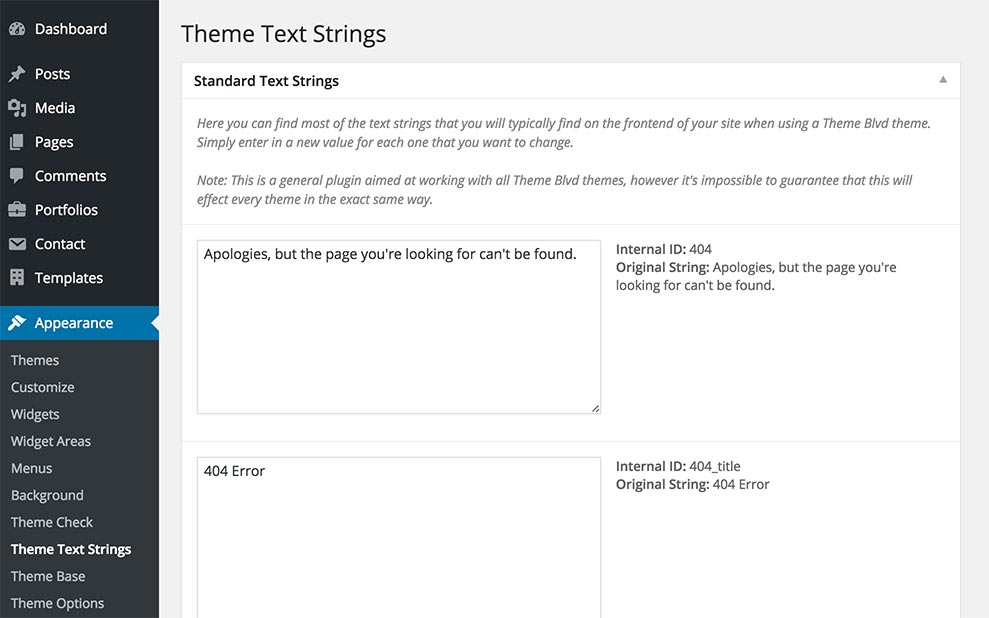
After you install this plugin, you can then go to Appearance > Theme Text Strings in your WordPress admin panel and change any of these text strings through the user-friendly interface, opposed to ever editing any code.
Installation
- Upload
theme-blvd-string-swapfolder to the/wp-content/plugins/directory - Activate the plugin through the ‘Plugins’ menu in WordPress
- Go to Appearance > Text Strings to use.
Changelog
1.1.0 – 01/16/2018
- Added compatibility for Theme Blvd Framework 2.7+.
- Code formatting improvements to pass WordPress Coding Standards.
- Removed support for much older, non-supported themes; this plugin now requires Theme Blvd Framework 2.4+.
1.0.8 – 09/07/2015
- Admin page moved to Appearance > Theme Text Strings.
1.0.7 – 12/17/2014
- Fixed issues with previously saved options not showing up after last update.
1.0.6 – 12/11/2014
- GlotPress compatibility (for 2015 wordpress.org release).
- Minor security fix.
1.0.5 – 06/05/2013
- Fixed “Dismiss” link not working for framework notice on all admin pages.
1.0.4 – 05/28/2013
- Added compatibility for Theme Blvd Framework 2.3+.
Screenshots
For developers
Is this your plugin? Show off the numbers.
Add a live badge to your site, docs or GitHub README. It updates on its own — no account needed.
Best Theme Blvd String Swap alternatives
All localization plugins →





FAQ
Theme Blvd String Swap: quick answers
Straight answers, pulled from live WordPress.org data.
Source: WordPress.org
Is Theme Blvd String Swap free?
Yes. Theme Blvd String Swap is free to download and use from the official WordPress.org plugin directory.
Is Theme Blvd String Swap safe to use in 2026?
Theme Blvd String Swap shows warning signs in 2026 — compare the alternatives below before installing. It runs on 100+ sites, is rated 5/5 and was last updated 9 years ago, and scores 40/100 on our health check.
How many websites use Theme Blvd String Swap?
Theme Blvd String Swap is active on 100+ WordPress websites and has been downloaded 9,815 times since it launched in January 2012. It was downloaded 132 times in the last 30 days.
When was Theme Blvd String Swap last updated?
The latest version, 1.1.0, was released on January 17, 2018 (9 years ago).
Who makes Theme Blvd String Swap?
Theme Blvd String Swap is developed and maintained by Jason.
What are the best alternatives to Theme Blvd String Swap?
The most popular alternatives to Theme Blvd String Swap are Polylang (900K+ installs), Performant Translations (30K+ installs) and Bogo (10K+ installs).
Powered by PageForge
One template and a spreadsheet. A real page for every search.
PageForge turns each row of a CSV into a WordPress page with its own title, URL, SEO fields and schema, built on the layout you already designed. Free on WordPress.org.
- CSV and XLSX, plus Google Sheets on Professional and Enterprise
- Its own title, URL, SEO fields and schema for every page
- Works with the block editor, Elementor, Divi and Avada
- Free on WordPress.org, no credit card