



Polylang
Go multilingual in a simple and efficient way. Keep writing posts and taxonomy terms as usual while defining their languages all at once.

Safe pick
Yes — Polylang is a safe, well-maintained plugin to use in 2026. It runs on 800K+ sites, is rated 4.7/5 and was last updated 3 weeks ago, and scores 85/100 on our health check.
- Proven at scale on 800K+ active sites
- Loved by users — 4.7/5 from 2,992 reviews
- Actively developed — last update 3 weeks ago
- Tested with the latest WordPress (7.1)
- Momentum — downloads up 41% vs the previous 30 days
- Slow support — only 20% of recent threads resolved
How does it stack up?
Side-by-side on installs, updates, ratings & support



Daily downloads
Download spikes usually follow a new release — each site that auto-updates counts as a download.
Rankings
Where Polylang stands todayWordPress.org search rankings
Live position in the plugin search, top 100| Keyword | Position |
|---|---|
| language | #8 |
| localization | #1 |
| multilingual | #13 |
| translate | #12 |
| translation | #11 |
Version adoption
Share of active sites per release.
Rating breakdown
★★★★★★★★★★ 4.7 from 2,992 reviews
About Polylang
From the official readme · v3.8.9Description
With Polylang fully integrated to WordPress and using only its built-in core features (taxonomies), keep steady performances on your site and create a multilingual site featuring from just one extra language to 10 or more depending on your needs. There is no limit in the number of languages added and WordPress’ language packs are automatically downloaded when ready.
Features
Depending on the type of site you have built or are planning to build, a combination of plugins from the list below might be of interest.
All plugins include a wizard allowing to setup them in just a few clicks.
Polylang
Polylang and Polylang Pro share the same core providing features such as:
- Translating posts, pages, media, categories, post tags, custom post types and taxonomies, RSS feeds; RTL scripts are supported.
- The language is either set by the language code in URL, or you can use a different sub-domain or domain per language.
- Automatic copy of categories, post tags and other metas when creating a new post or page translation.
- Translating classic menus and classic widgets. Also accessible with Site Editor Classic Features in block themes.
- Customizable language switchers available as blocks, classic widget or classic navigation menu item.
- Compatibility with Yoast SEO.
Polylang Pro
Helps optimizing the time spent translating your site with some very useful extra features such as:
- Better integration in the new Block Editor.
- Language options available in the widget block editor.
- Template parts translatable in the site editor (FSE).
- Duplicate and/or synchronize content across post translations.
- Improved compatibility with other plugins such as ACF Pro.
- Share the same URL slug for posts or terms across languages.
- Translate URL slugs for categories, author bases, custom post types and more…
- Machine translation with DeepL.
- Export and import of content in XLIFF format for outsourced professional translation.
- Access to a Premium Support for personalized assistance.
Polylang for WooCommerce
Add-on for the compatibility with WooCommerce which provides features such as:
- Translating WooCommerce pages (shop, check-out, cart, my account), product categories and global attribute terms directly in the WooCommerce interface.
- Translating WooCommerce e-mails and sending them to customers in their language.
- Products metadata synchronization.
- Compatibility with the native WooCommerce CSV import & export tool.
- Compatibility with popular plugins such as WooCommerce Subscriptions, Product Bundles, WooCommerce Bookings, Shipment Tracking and more.
- Ability to use the WooCommerce REST API (available with Polylang Pro).
- Access to a Premium Support for personalized assistance.
Switching from WPML?
- WPML to Polylang allows migrating from WPML to Polylang in a few clicks.
Credits
Thanks a lot to all translators who help translating Polylang.
Thanks a lot to Alex Lopez for the design of the logo.
Most of the flags included with Polylang are coming from famfamfam and are public domain.
Wherever third party code has been used, credit has been given in the code’s comments.
Installation
- Make sure you are using WordPress 6.5 or later and that your server is running PHP 7.4 or later (same requirement as WordPress itself).
- If you tried other multilingual plugins, deactivate them before activating Polylang, otherwise, you may get unexpected results!
- Install and activate the plugin as usual from the ‘Plugins’ menu in WordPress.
- The setup wizard is automatically launched to help you get started more easily with Polylang by configuring the main features.
Frequently asked questions
Where to find help ?
First time users should read Polylang – Getting started, which explains the basics and includes a lot of screenshots. Read the documentation. It includes a FAQ and the documentation for developers. Search the community support forum. You will probably find your answers here. Read the sticky posts in the community support forum. If you still have a problem, open a new thread in the community support forum. Polylang Pro and Polylang for WooCommerce users have access to our premium support through helpdesk.
Is Polylang compatible with WooCommerce?
You need Polylang for WooCommerce, premium addon described above, which will make both plugins work together.
Where do I report security bugs found in this plugin?
Please report security bugs found in the source code of the Polylang plugin through the Patchstack Vulnerability Disclosure Program. The Patchstack team will assist you with verification, CVE assignment, and notify the developers of this plugin.
Changelog
3.8.9 (2026-09-08)
- Fix wrong redirect on home when the URL includes a query var #1998
3.8.8 (2026-09-07)
- Security: Fix exposure of some draft posts metadata to non-authorized users. Reported by Patchstack.
- Pro: Allow plugins requiring Polylang to be installed when Polylang Pro is active #3051 #3116
- Pro: Fix warning
WP_Post conversion to intwith WooCommerce #3101 - Pro: Fix creation of translation in block editor for WP < 6.7 #3105
- Fix duplicated posts page #1992
3.8.7 (2026-08-17)
- Pro: Add the translation of new blocks introduced by WP 7.1 #3048
- Fix quick edit parent page dropdown for hierarchical custom post types #1947
- Fix wp-editor script enqueued together with the new widgets editor #1968
3.8.6 (2026-07-20)
- Pro: Security: Ensure the user has the required capability for ACF fields when switching language in the editor #3029
- Security: Fix exposure of some private posts metadata to non-authorized users. Reported by Patchstack.
- Security: Fix server side default language encoding for the block editor
- Fix 404 for post type or taxonomy sitemap when its name ends with a language code #1909
3.8.5 (2026-06-16)
- Pro: Fix language switcher block error in Widget screen #1905
- Pro: Fix “edit” button wrongly disabled in the languages sidebar in the block editor #3011
- Fix edited images files deleted when deleting the first media translation #1887
- Fix error in AJAX context when the parameter
langis passed a locale instead of a language code #1896
3.8.4 (2026-05-18)
- Security: Fix an XSS in the multilingual biography
- Pro: Fix draft post translations not shown in the languages sidebar in the block editor #3006
- Pro: Fix compatibility with libxml 2.15.1 #2920
- Pro: Fix Allowed memory size exhausted with Divi 5 #3008
- Improve accessibility of the multilingual biography on user profile page #1869
- Prevent using unsupported block fields in wpml-config.xml #1868
Screenshots

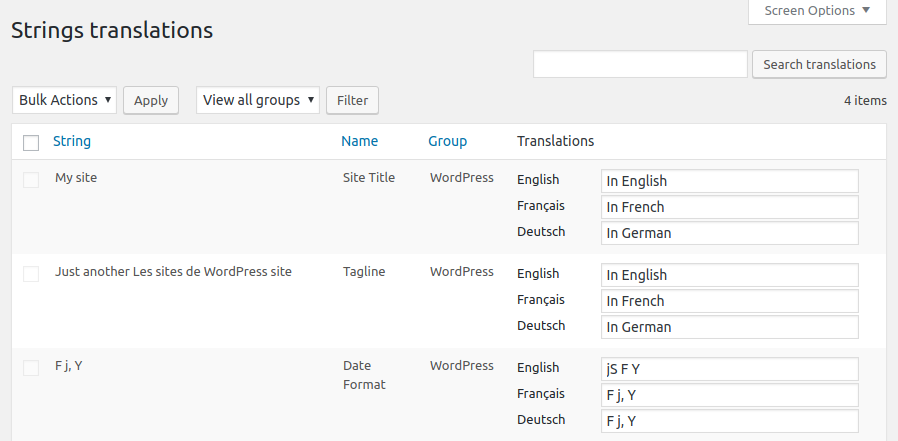
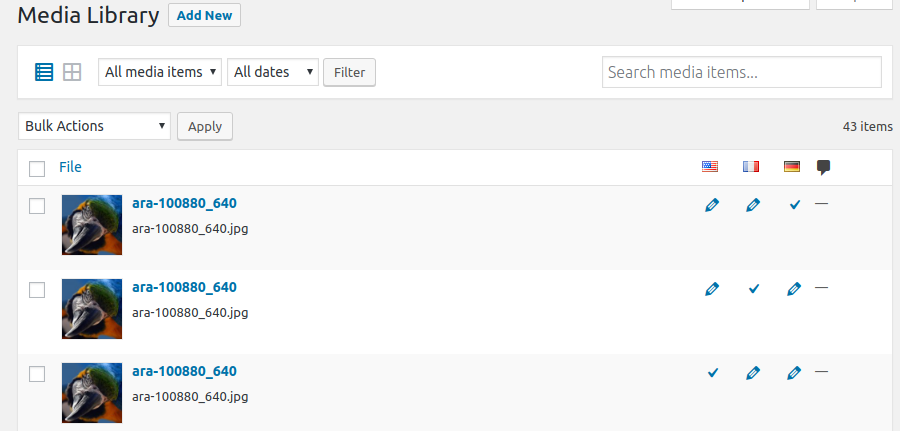
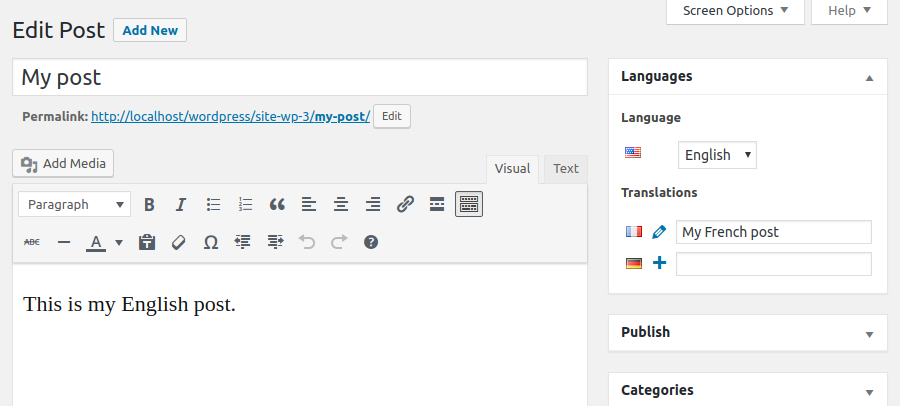
For developers
Is this your plugin? Show off the numbers.
Add a live badge to your site, docs or GitHub README. It updates on its own — no account needed.
Best Polylang alternatives
All language plugins →





FAQ
Polylang: quick answers
Straight answers, pulled from live WordPress.org data.
Live data from WordPress.org · checked Sep 26, 2026
Is Polylang free?
Yes. Polylang is free to download and use from the official WordPress.org plugin directory.
Is Polylang safe to use in 2026?
Yes — Polylang is a safe, well-maintained plugin to use in 2026. It runs on 800K+ sites, is rated 4.7/5 and was last updated 3 weeks ago, and scores 85/100 on our health check.
How many websites use Polylang?
Polylang is active on 800K+ WordPress websites and has been downloaded 29,150,300 times since it launched in September 2011. It was downloaded 644,338 times in the last 30 days.
Does Polylang work with WordPress 7.1?
Yes. The developer has tested Polylang up to WordPress 7.1.2, the latest release. It requires WordPress 6.5 or newer.
What PHP version does Polylang need?
Polylang requires PHP 7.4 or higher. Most hosts run PHP 8.x today, so it works on any modern WordPress hosting.
When was Polylang last updated?
The latest version, 3.8.9, was released on September 8, 2026 (3 weeks ago).
Who makes Polylang?
Polylang is developed and maintained by Chouby.
What are the best alternatives to Polylang?
The most popular alternatives to Polylang are Loco Translate (1M+ installs), Translate WordPress with GT… (900K+ installs) and Translate WordPress (100K+ installs).
Powered by PageForge
Want thousands of pages that rank like these? Build them in an afternoon.
This directory runs on the same engine as PageForge. Turn any spreadsheet, CSV or API into thousands of fast, SEO-ready WordPress pages — with schema, internal links and AI-written copy baked in.
- CSV, Google Sheets & API data sources
- AI content, schema & internal links per page
- Works with Elementor, Gutenberg, Yoast & Rank Math
- Free on WordPress.org — no credit card


