



Performant Translations
Making internationalization/localization in WordPress faster than ever before.

Safe pick
Yes — Performant Translations is a safe, well-maintained plugin to use in 2026. It runs on 40K+ sites, is rated 4.9/5 and was last updated 1 month ago, and scores 86/100 on our health check.
- Proven at scale on 40K+ active sites
- Tested with the latest WordPress (7.1)
- Momentum — downloads up 20% vs the previous 30 days
How does it stack up?
Side-by-side on installs, updates, ratings & support


Daily downloads
Download spikes usually follow a new release — each site that auto-updates counts as a download.
Rankings
Where Performant Translations stands todayWordPress.org search rankings
Live position in the plugin search, top 100| Keyword | Position |
|---|---|
| i18n | #3 |
| internationalization | #1 |
| localization | #5 |
| performance | #86 |
| translation | #3 |
Version adoption
Share of active sites per release.
Rating breakdown
★★★★★★★★★★ 4.9 from 16 reviews
About Performant Translations
From the official readme · v1.2.0Description
Making internationalization/localization in WordPress faster than ever before.
Disclaimer about WordPress 6.5
Attention: most functionality of this plugin has been merged into WordPress 6.5! You might not need it anymore.
However, this plugin is still relevant for cases where language packs are not downloaded from WordPress.org but somewhere else, for example if you are developing your own plugins or using commercial plugins.
The Performant Translations plugin converts the translation files of those plugins to the new file format introduced in WordPress 6.5, to really optimize them for speed.
What this plugin does
This project uses a new approach to handle translation files in WordPress, making localization blazing fast.
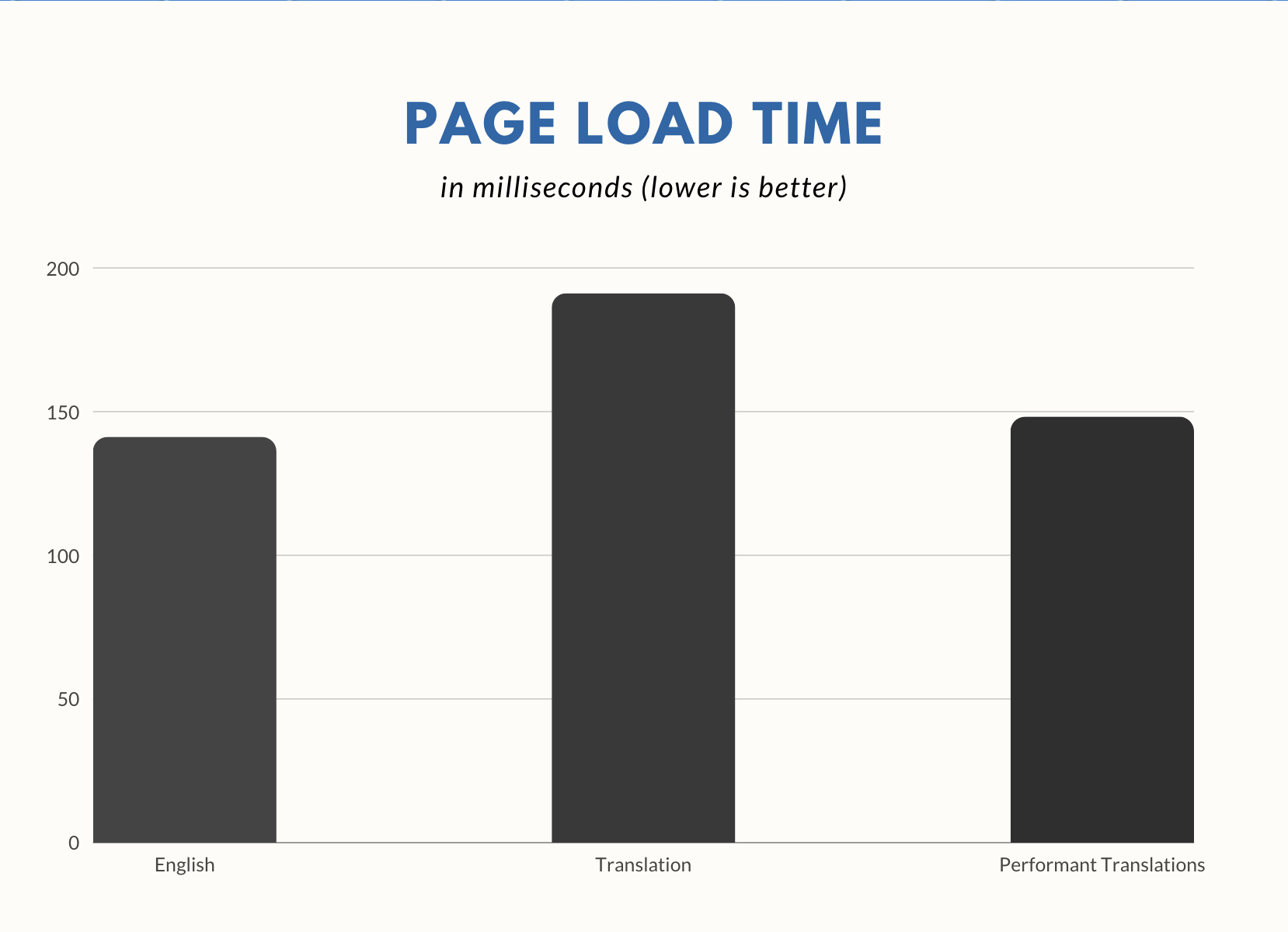
An in-depth i18n performance analysis showed that localized WordPress sites load significantly slower than a site without translations.
With this plugin’s new approach to localization, this overhead is massively reduced, making your site fast again. It does so by converting .mo translation files to .php files.
If your site is using a language other than English (US), you should see immediate speed improvements simply by activating this plugin.
Installation
Installation from within WordPress
- Visit Plugins > Add New.
- Search for Performant Translations.
- Install and activate the Performant Translations plugin.
Manual installation
- Upload the entire
performant-translationsfolder to the/wp-content/plugins/directory. - Visit Plugins.
- Activate the Performant Translations plugin.
Frequently asked questions
What makes this plugin so fast?
By converting .mo files to .php files, the translations can be parsed much faster. Plus, .php files can be stored in the so-called OPcache, which provides an additional speed boost.
Can I use this plugin on my production site?
While the plugin is mostly considered to be a beta testing plugin, it has been tested and established to a degree where it should be okay to use in production. Still, as with every plugin, you are doing so at your own risk.
Has this plugin been tested with other multilingual plugins?
Yes. This plugin has been tested with common multilingual plugins, such as WPML, Weglot, TranslatePress, MultilingualPress, and Polylang. If you still encounter issues, please let us know.
Do I need to do anything special to enable this plugin?
No. Once the plugin is activated, it just works, and you should see speed improvements right away. If you run into issues, please open a new support topic.
Can I safely remove this plugin after installation?
Yes. Once you deactivate and uninstall the plugin, all .php files generated by it will be removed from the server.
How can I contribute to the plugin?
Contributions are always welcome! Learn more about how to get involved in the Core Performance Team Handbook.
Where can I submit my plugin feedback?
If you have suggestions or requests for new features, you can submit them as an issue on the GitHub repository. If you need help with troubleshooting or have a question about the plugin, please create a new topic on our support forum.
Where can I report security issues?
To report a security issue, please visit the WordPress HackerOne program.
Changelog
Bumps the minimum WordPress version to 6.5.
For the plugin’s full changelog, please see the Releases page on GitHub.
1.2.0
- This plugin now requires WordPress 6.5
1.1.2
- Fixed a minor regression when assembling file paths to look up.
1.1.1
- Fixed: Addressed a slight performance regression in 1.1.0.
- Fixed: Addressed an issue with incorrect plural forms for certain locales.
1.1.0
- Enhancement: Support for this functionality existing in WordPress 6.5.
- Enhancement: Added hardening for file paths not being strings because of a faulty plugin filter.
- Enhancement: Invalidate OPcache after writing PHP files.
- Enhancement: Improve compatibility with pluralized strings referenced as singulars.
1.0.9
- Enhancement: Improved compatibility with WPML string translation add-on.
1.0.8
- Fixed: Added workaround for potential file permission issues.
Screenshots
For developers
Is this your plugin? Show off the numbers.
Add a live badge to your site, docs or GitHub README. It updates on its own — no account needed.
Best Performant Translations alternatives
All i18n plugins →




FAQ
Performant Translations: quick answers
Straight answers, pulled from live WordPress.org data.
Live data from WordPress.org · checked Sep 26, 2026
Is Performant Translations free?
Yes. Performant Translations is free to download and use from the official WordPress.org plugin directory.
Is Performant Translations safe to use in 2026?
Yes — Performant Translations is a safe, well-maintained plugin to use in 2026. It runs on 40K+ sites, is rated 4.9/5 and was last updated 1 month ago, and scores 86/100 on our health check.
How many websites use Performant Translations?
Performant Translations is active on 40K+ WordPress websites and has been downloaded 221,771 times since it launched in August 2023. It was downloaded 6,440 times in the last 30 days.
Does Performant Translations work with WordPress 7.1?
Yes. The developer has tested Performant Translations up to WordPress 7.1.2, the latest release. It requires WordPress 6.5 or newer.
What PHP version does Performant Translations need?
Performant Translations requires PHP 7.0 or higher. Most hosts run PHP 8.x today, so it works on any modern WordPress hosting.
When was Performant Translations last updated?
The latest version, 1.2.0, was released on August 18, 2026 (1 month ago).
Who makes Performant Translations?
Performant Translations is developed and maintained by Pascal Birchler.
What are the best alternatives to Performant Translations?
The most popular alternatives to Performant Translations are Loco Translate (1M+ installs), WP Multibyte Patch (1M+ installs) and WPBakery Visual Composer &… (7K+ installs).
Powered by PageForge
Want thousands of pages that rank like these? Build them in an afternoon.
This directory runs on the same engine as PageForge. Turn any spreadsheet, CSV or API into thousands of fast, SEO-ready WordPress pages — with schema, internal links and AI-written copy baked in.
- CSV, Google Sheets & API data sources
- AI content, schema & internal links per page
- Works with Elementor, Gutenberg, Yoast & Rank Math
- Free on WordPress.org — no credit card


