


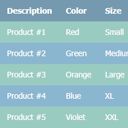
Tabular – Create Stunning HTML Tables
Tabular creates semantic HTML tables automatically. No coding required. Simply edit table cells, choose a template, and display!

Consider an alternative
Tabular shows warning signs in 2026 — compare the alternatives below before installing. It runs on 10+ sites and was last updated 9 years ago, and scores 23/100 on our health check.
- Small user base (10+ active installs)
- Very few reviews so far
- No update in 8 years
- Only tested up to WordPress 4.9 (latest is 7.1)
How does it stack up?
Side-by-side on installs, updates, ratings & support



Daily downloads
Download spikes usually follow a new release — each site that auto-updates counts as a download.
Rankings
Where Tabular stands todayWordPress.org search rankings
Live position in the plugin search, top 100| Keyword | Position |
|---|---|
| html | >100 |
| semantic | >100 |
| styles | >100 |
| table | >100 |
| templates | >100 |
Version adoption
Share of active sites per release.
About Tabular – Create Stunning HTML Tables
From the official readme · v0.1.0Description
Tabular is a brand new way to create HTML tables for your WordPress website. Each table is created automatically so no manual coding is required. Simply enter table data, or paste in directly from a spreadsheet, choose your table template, and that’s it. You’re good to go!
A full demo will be coming soon but click here to see a live demo of a table generated by Tabular, plus the outputted HTML code.
The generated table code is highly semantic in accordance with recommended web standards and best practices. Tabular does all this for you automatically, leaving you to focus on what data you want your table to display, and how it looks.
Create unlimited tables with Tabular. There is no restriction on the number of tables you can create, or the amount of data added to each table.
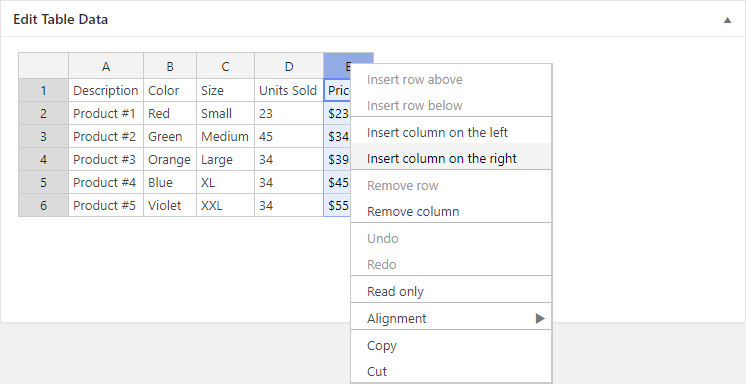
Super fast table editor! Edit the data for each table just as you would in any spreadsheet software such as Excel. You can even paste in data directly too for convenience, making editing even faster still. Also, the spreadsheet editor supports an undo function to reduce errors and recover deleted data.
If you have a moment, consider leaving feedback in the comments section. This is really important and helps us continuously improve upon the plugin. Help us to make it even better!
Please also rate Tabular if you find it useful.
Thanks to all our free plugin users for your continued support! 🙂
David – wpgoplugins.com
Installation
- Via the WordPress admin go to Plugins => Add New.
- Enter ‘Tabular’ (without quotes) in the text box and click the ‘Search Plugins’ button.
- In the list of relevant Plugins click the ‘Install’ link for Tabular on the right hand side of the page.
- Click the ‘Install Now’ button on the popup page.
- Click ‘Activate Plugin’ to finish installation.
- Under the main Tabular menu click ‘Add New Table’.
- Select your desired table type and click ‘Create Table’.
- Edit the table data and choose a style template.
- Use the [tabular id=”123″] shortcode in a page, post, or text widget to display a table. Replace ‘123’ with the specific ID of the table you want to display.
Screenshots


For developers
Is this your plugin? Show off the numbers.
Add a live badge to your site, docs or GitHub README. It updates on its own — no account needed.
Best Tabular alternatives
All html plugins →




FAQ
Tabular: quick answers
Straight answers, pulled from live WordPress.org data.
Live data from WordPress.org · checked Oct 13, 2026
Is Tabular free?
Yes. Tabular is free to download and use from the official WordPress.org plugin directory.
Is Tabular safe to use in 2026?
Tabular shows warning signs in 2026 — compare the alternatives below before installing. It runs on 10+ sites and was last updated 9 years ago, and scores 23/100 on our health check.
How many websites use Tabular?
Tabular is active on 10+ WordPress websites and has been downloaded 1,756 times since it launched in November 2017. It was downloaded 41 times in the last 30 days.
Does Tabular work with WordPress 7.1?
Tabular is officially tested up to WordPress 4.9.34, while the latest release is 7.1.3. It may still work, but try it on a staging site first.
When was Tabular last updated?
The latest version, 0.1.0, was released on November 1, 2017 (9 years ago).
Who makes Tabular?
Tabular is developed and maintained by David Gwyer.
What are the best alternatives to Tabular?
The most popular alternatives to Tabular are Shortcoder (100K+ installs), Mammoth .docx converter (20K+ installs) and Code Embed (10K+ installs).
Powered by PageForge
Want thousands of pages that rank like these? Build them in an afternoon.
This directory runs on the same engine as PageForge. Turn any spreadsheet, CSV or API into thousands of fast, SEO-ready WordPress pages — with schema, internal links and AI-written copy baked in.
- CSV, Google Sheets & API data sources
- AI content, schema & internal links per page
- Works with Elementor, Gutenberg, Yoast & Rank Math
- Free on WordPress.org — no credit card


