


SweepPress: Website Cleanup and Optimization
Remove unused, orphaned, duplicated data in your WordPress website using 55+ sweepers, manage and clean Options table, optimize database.

Solid choice
SweepPress: Website Cleanup and… is a solid plugin choice in 2026, with a few things worth checking first. It runs on 500+ sites, is rated 5/5 and was last updated 4 hours ago, and scores 71/100 on our health check.
- Actively developed — last update 4 hours ago
- Tested with the latest WordPress (7.1)
- Small user base (500+ active installs)
- Needs PHP 8.1 or newer
How does it stack up?
Side-by-side on installs, updates, ratings & support



Daily downloads
Download spikes usually follow a new release — each site that auto-updates counts as a download.
Rankings
Where SweepPress: Website Cleanup… stands todayWordPress.org search rankings
Live position in the plugin search, top 100| Keyword | Position |
|---|---|
| clean | #43 |
| cleanup | #12 |
| database | >100 |
| dev4press | #4 |
| Optimize | >100 |
Version adoption
Share of active sites per release.
Rating breakdown
★★★★★★★★★★ 5 from 5 reviews
About SweepPress: Website Cleanup and Optimiz…
From the official readme · v7.1Description
SweepPress is an easy-to-use WordPress plugin built around 52 different Sweepers for database cleanup (the Pro version has 57), support for WP-CLI, and WP REST API to perform the cleanup operations. The plugin also features a powerful WordPress Options database table management panel.
Quick Video Overview
Options Management
The WordPress Options database table holds settings for WordPress Core, all the plugins, and themes. This table can grow significantly, especially since records are not auto-deleted when removing a plugin or theme. SweepPress has Sweepers that deal with transient cache records (stored in this table), and now, since version 3.0, it has a full Management panel where you can see all the records in the Options table, detect source for the record and status to help you decide if you should delete the record or not.
SweepPress has two methods to detect the source of the record, and it will mark all the recognized records. This panel doesn’t show transient records (used for cache) or WordPress options (deleting these options is a terrible idea). There is also a Quick Tasks subpanel, which can help you quickly remove options fitting into few standard predefined criteria.
Options deletion process is not automatic! No matter how precise options usage detection is, you need to verify and confirm that you want to delete one or more records.
SweepPress Pro also has advanced management panels for all the WordPress metadata and multisite Sitemeta database tables, including options to track the usage of meta-records, and remove all the entries from the database associated with specific meta.
Modes of Sweeping
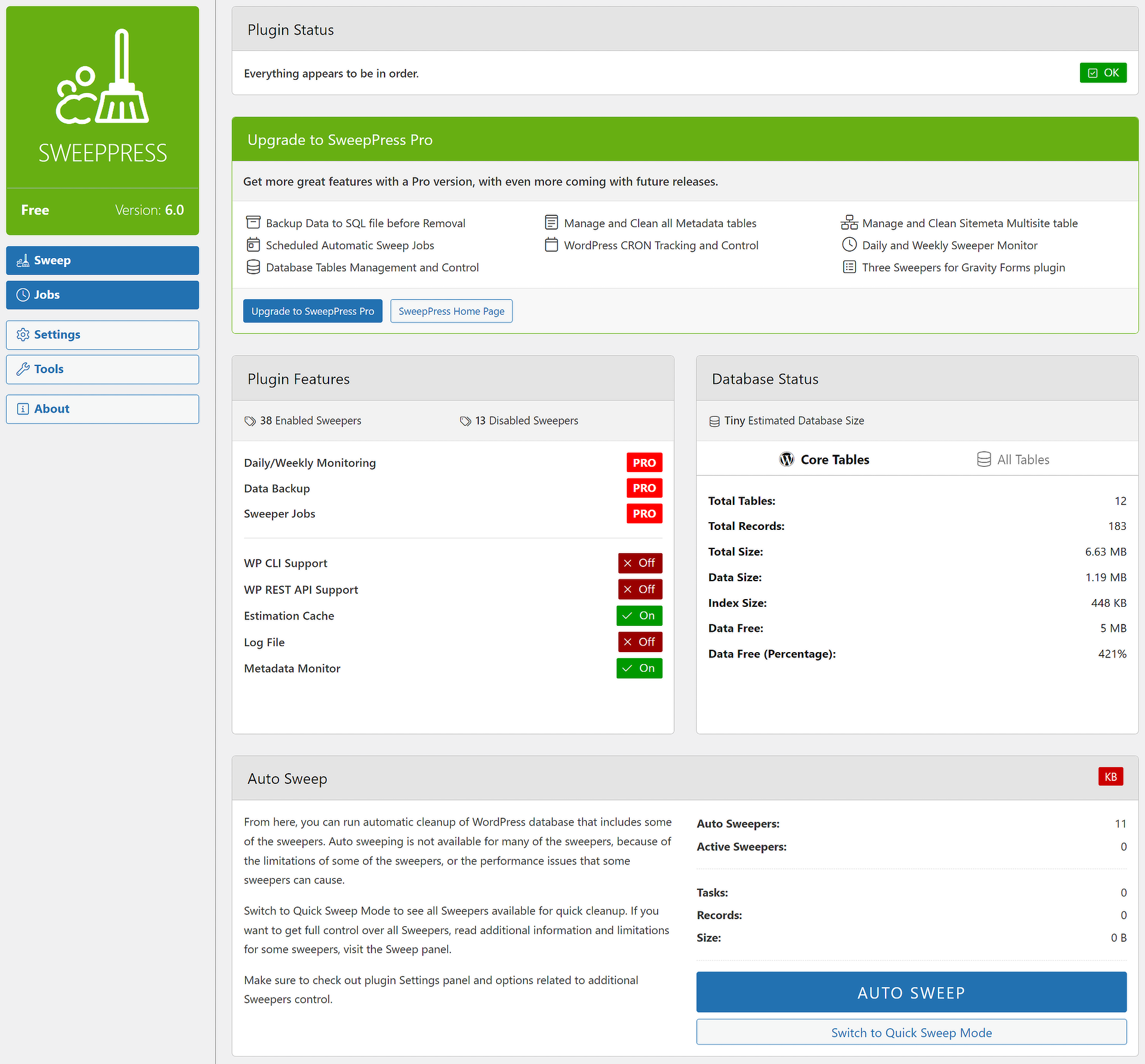
- Auto Sweep: available on the dashboard, running many (not all) sweepers without user input.
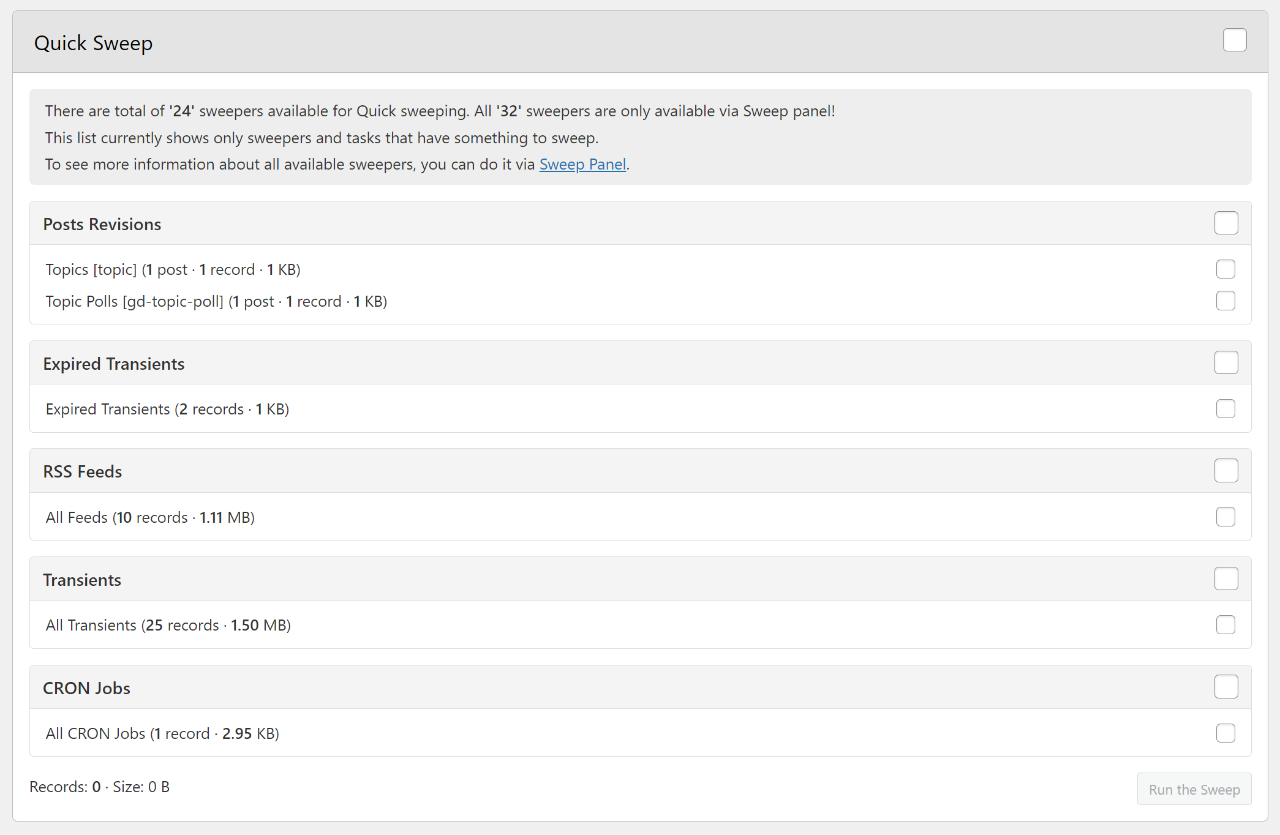
- Quick Sweep: available on the dashboard, allowing the sweepers to be selected.
- Full Sweep: available on its panel, with detailed information about sweepers and no limit run.
- CLI Sweep: the plugin supports WP-CLI and adds commands to run all the sweepers with the command line.
- REST API Sweep: the plugin supports WP REST API and allows sweeping via the new REST endpoints.
All sweepers use optimized SQL queries to find the data for removal, which is also done using SQL queries. This is the fastest and most efficient way to remove a large amount of data quickly.
List of Sweepers
- Posts: Auto Drafts
- Posts: Spam Content
- Posts: Trashed Content
- Posts: Posts Revisions
- Posts: Posts Orphaned Revisions
- Posts: Draft Posts Revisions
- Posts: Postmeta Locks
- Posts: Postmeta Last Edits
- Posts: Postmeta Oembeds
- Posts: Postmeta Old Data
- Posts: Postmeta Orphans
- Posts: Postmeta Duplicates
- Comments: Spam Comments
- Comments: Trashed Comments
- Comments: Unapproved Comments
- Comments: Orphaned Comments
- Comments: Comments User Agents
- Comments: Commentmeta Orphans
- Comments: Commentmeta Duplicates
- Comments: Pingbacks Cleanup
- Comments: Trackbacks Cleanup
- Comments: Akismet Meta Records
- Terms: Terms Orphans
- Terms: Termmeta Orphans
- Terms: Termmeta Duplicates
- Terms: Term Relationships Taxonomy Orphans
- Terms: Term Relationships Objects Orphans
- Terms: AMP Validation Errors
- Terms: Unused Terms
- Users: Usermeta Orphans
- Users: Usermeta Duplicates
- Options: Expired Transients
- Options: RSS Feeds
- Options: All Transients
- Options: CRON Jobs
- Options: Unhooked CRON Jobs
- Network: Expired Transients
- Network: All Transients
- Network: Inactive Signups
- Database: Optimize Database Tables
- Database: Repair Database Tables
- ActionScheduler: Log Entries
- ActionScheduler: Orphaned Log Entries
- ActionScheduler: Failed Actions
- ActionScheduler: Completed Actions
- ActionScheduler: Canceled Actions
- bbPress: Replies Orphans
- BuddyPress: Activity Meta Orphans
- BuddyPress: Groups Meta Orphans
- BuddyPress: Messages Meta Orphans
- BuddyPress: Notifications Meta Orphans
- Elementor: Trashed Submissions
WP-CLI and WP REST API Support
The plugin registers new CLI commands for running sweep operations from the command line (WP-CLI is required). It also registers the REST API endpoint for the same purpose: running remote sweep operations (only for the administrator role!). CLI and REST API support can be enabled through plugin settings.
Action Scheduler Support
The plugin can clean up the ActionScheduler tables. These tables are used by the Action Schedule plugin and components developed for WooCommerce but also in many other WordPress plugins, including WP Rocket and Rank Math. For these sweepers to be visible, at least one plugin using those tables needs to be active.
Additional Features
- Sweeper File Log: log every sweeper execution into a log file with all sweeper/removal SQL queries executed by each used sweeper.
Special Notice
The plugin will show the backup reminder notice by default (and it can be disabled) on every page. It is essential to understand that once the plugin deletes data, it can’t be restored. So, if you change your mind later, it is important to make the backup before the data removal. The SweepPress plugin is not responsible for any data loss — ensure backups! In SweepPress Pro, there is a Backup Data feature that will create partial backups from data before it is removed and store it into SQL export files.
Plugin Home Page
- Learn more about the plugin: SweepPress Home Page
- Plugin knowledge base: SweepPress on Dev4Press
- Support for the Lite version: Support Forum on Dev4Press
SweepPress Pro
SweepPress Lite edition is a fully functional plugin with no limits to its operations. But SweepPress Pro contains a lot of additional features not available in the Lite version:
- Backup the data before it is deleted into SQL export files. Includes a management panel for Backup files.
- Management for Media Library: scan attachments in the database and detect (and remove) invalid, missing, and unused attachments and files.
- Management for ALL the WordPress Metadata tables:
postmeta,termmeta,commentmeta,usermeta, andblogmeta. - Management for the WordPress Multisite Sitemeta table: this table is equivalent of the Options table, but for all the blogs in the multisite.
- Track and Detect use of metadata and allow removal of any meta-records for all supported metadata tables.
- Preview duplicated metadata records for all supported metadata tables. Preview data for some sweepers.
- Create and manage Sweeper Jobs: create custom background sweeper jobs to run at a specific date or as a recurring job.
- Control and track WordPress CRON jobs: list all the WordPress CRON jobs, track and display the source, and more.
- Sweeper Monitor: monitor the website for cleanup daily or weekly, and send notifications when the sweeping limit is reached.
- Database Tables: an overview of all tables in the database with source information and various actions for better control.
- GravityForms Support: three additional sweepers to remove all trashed forms, spammed, and trash entries by form.
- CLI Command to list CRON jobs: list all registered WP CRON jobs via the command line.
Future updates will include more exclusive Pro features.
Installation
General Requirements
- PHP: 8.1 or newer
- WordPress: 6.4 or newer
PHP Notice
- The plugin doesn’t work with PHP 7.4 or older versions.
Basic Installation
- Plugin folder in the WordPress plugins should be
sweeppress. - Upload the
sweeppressfolder to the/wp-content/plugins/directory. - Activate the plugin through the ‘Plugins’ menu in WordPress.
- Plugin adds a new top-level menu called ‘SweepPress.’
- Check all the plugin settings before using the plugin.
Changelog
Requires WordPress 6.4+ and PHP 8.1+. Includes admin security fixes.
Version: 7.1 (2026.11.29)
- New: require
PHP8.1 andWordPress6.4 or newer. - New: build
TypeScriptandSCSSwithVite - New: enhanced transients sweepers for better performance
- Edit: remove
jQueryfrom the loading requirements - Edit: Dev4Press Library 5.6.5
- Fix: transients sweepers can get stuck or crash for big sets during removal
- Fix: escape output in admin tables, action links, and sweep reports
- Fix: require an explicit Apply submission so Search and Filter cannot trigger bulk actions
- Fix: several small issues with the wildcard queries usage
Version: 7.0.1 (2026.10.23)
- Edit: Freemius SDK 2.13.5
Version: 7.0 (2026.07.19)
- New: plugin tested with
WordPressup to 7.0 - New: plugin tested with
PHPup to 8.5 - New: updated plugin system requirements
- New: dashboard panel with quick access buttons
- New: eslint and stylelint support
- New: security audit for various security issues
- Edit: reorganized SASS code to modernize loading
- Edit: many improvements to the SASS code and styling
- Edit: many improvements to the JS code
- Edit: remove all the old licensing code
- Edit: Freemius SDK 2.13.4
- Edit: Dev4Press Library 5.5.2
- Fix: styles for
Optionspanel not included with a free version - Fix: a few smaller
echonot escaped issues
Version: 6.5 (2026.01.02)
- New: plugin tested with WordPress up to 6.9
- New: plugin tested with PHP up to 8.5
- New: updated plugin system requirements
- Edit: Dev4Press Library 5.5
Version: 6.4.4 (2025.11.12)
- Edit: Freemius SDK 2.13
Version: 6.4.3 (2025.09.04)
- Edit: Freemius SDK 2.12.1
Screenshots


For developers
Is this your plugin? Show off the numbers.
Add a live badge to your site, docs or GitHub README. It updates on its own — no account needed.
Best SweepPress: Website Cleanup a… alternatives
All clean plugins →





FAQ
SweepPress: Website Cleanup and Opt…: quick answers
Straight answers, pulled from live WordPress.org data.
Source: WordPress.org
Is SweepPress: Website Cleanup and… free?
Yes. SweepPress: Website Cleanup and… is free to download and use from the official WordPress.org plugin directory. The developer also sells premium add-ons or a Pro version with extra features.
Is SweepPress: Website Cleanup and… safe to use in 2026?
SweepPress: Website Cleanup and… is a solid plugin choice in 2026, with a few things worth checking first. It runs on 500+ sites, is rated 5/5 and was last updated 4 hours ago, and scores 71/100 on our health check.
How many websites use SweepPress: Website Cleanup and…?
SweepPress: Website Cleanup and… is active on 500+ WordPress websites and has been downloaded 39,401 times since it launched in March 2022. It was downloaded 847 times in the last 30 days.
Does SweepPress: Website Cleanup and… work with WordPress 7.1?
Yes. The developer has tested SweepPress: Website Cleanup and… up to WordPress 7.2, the latest release. It requires WordPress 6.4 or newer.
What PHP version does SweepPress: Website Cleanup and… need?
SweepPress: Website Cleanup and… requires PHP 8.1 or higher. Most hosts run PHP 8.x today, so it works on any modern WordPress hosting.
When was SweepPress: Website Cleanup and… last updated?
The latest version, 7.1, was released on November 29, 2026 (4 hours ago).
Who makes SweepPress: Website Cleanup and…?
SweepPress: Website Cleanup and… is developed and maintained by Milan Petrovic.
What are the best alternatives to SweepPress: Website Cleanup and…?
The most popular alternatives to SweepPress: Website Cleanup and… are Advanced Database Cleaner (100K+ installs), Media Cleaner: Delete Unuse… (90K+ installs) and Advanced WordPress Reset (10K+ installs).
Powered by PageForge
One template and a spreadsheet. A real page for every search.
PageForge turns each row of a CSV into a WordPress page with its own title, URL, SEO fields and schema, built on the layout you already designed. Free on WordPress.org.
- CSV and XLSX, plus Google Sheets on Professional and Enterprise
- Its own title, URL, SEO fields and schema for every page
- Works with the block editor, Elementor, Divi and Avada
- Free on WordPress.org, no credit card