


Transient Cleaner
Clean expired transients from your options table. The original and best!

Safe pick
Yes — Transient Cleaner is a safe, well-maintained plugin to use in 2026. It runs on 1K+ sites, is rated 5/5 and was last updated 3 months ago, and scores 83/100 on our health check.
- Loved by users — 5/5 from 23 reviews
- Tested with the latest WordPress (7.1)
- Momentum — downloads up 21.6% vs the previous 30 days
How does it stack up?
Side-by-side on installs, updates, ratings & support



Daily downloads
Download spikes usually follow a new release — each site that auto-updates counts as a download.
Rankings
Where Transient Cleaner stands todayWordPress.org search rankings
Live position in the plugin search, top 100| Keyword | Position |
|---|---|
| cache | >100 |
| clean | #30 |
| database | >100 |
| options | >100 |
| transient | #1 |
Version adoption
Share of active sites per release.
Rating breakdown
★★★★★★★★★★ 5 from 23 reviews
About Transient Cleaner
From the official readme · v1.7Description
Clean expired transients from your options table. The original and best!
Transient housekeeping was added to the core of WordPress after version 5.8. However, I have decided to open up this plugin to all versions to allow for manual transient cleaning. Longer term I am working on a new version of the plugin, designed specifically for all WordPress releases.
- Tested up to PHP 8.2
- Fully complies with WordPress coding standards
- Compliant with the stronger WordPress VIP coding standards, as well as compatibility with their platform
- Community plugin – visit the Github page to get involved with the latest code development, request enhancements and report issues
“Transients are a simple and standardized way of storing cached data in the WordPress database temporarily by giving it a custom name and a timeframe after which it will expire and be deleted.”
Unfortunately, expired transients only get deleted when you attempt to access them. If you don’t access the transient then, even though it’s expired, WordPress will not remove it. This is a known “issue” but due to reasons, which are explained in the FAQ, this has not been adequately resolved.
Why is this a problem? Transients are often used by plugins to “cache” data (my own plugins included). Because of this it means that expired data can be left and build up, resulting in a bloated database table.
Meantime, this plugin is the hero that you’ve been waiting for. Simply activate the plugin, sit back and enjoy a much cleaner, smaller options table. It also adds the additional recommendation that after a database upgrade all transients will be cleared down.
The Settings Screen
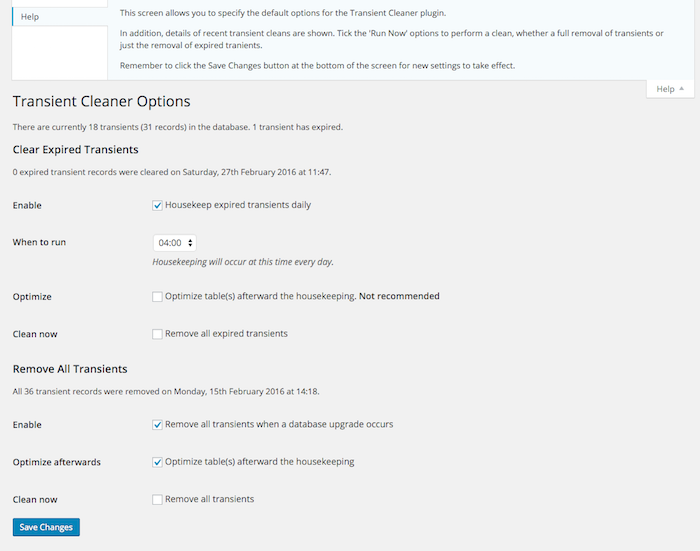
Within Administration -> Tools -> Transients an options screen exists allowing you to tweak when you’d like cleaning to happen, including the ability to perform an ad-hoc run, and when you’d like the to be automatically scheduled.
You can even request an optimization of the options table to give your system a real “pep”!
Running in Lite mode
A “lite” mode is available. By activating this the options screen will no longer appear and default settings will be used. The advantage? Improved performance to Admin and, especially if you’re running multi-site, no chance of anybody “tinkering” with the settings.
To activate, use the following…
define( 'TC_LITE', true );
This should be added to your wp-config.php file.
Using hooks
If you’re the type of odd person who likes to code for WordPress (really?) then I’ve added a couple of hooks so you can call our rather neat cleaning functions…
housekeep_transients– this will clear down any expired transientsclear_all_transients– this will remove any and all transients, expired or otherwise
Acknowledgements
I’d like to thank WordPress Developer Andrew Nacin for his early discussion on this. Also, I’d like to acknowledge the useful article at Everybody Staze for ensuring the proposed solution made sense, and W-Shadow.com for the cleaning code.
Iconography is courtesy of the very talented Janki Rathod.
Installation
This plugin can be found and installed via the Plugin menu within WP Admin (Plugins -> Add New). Alternatively, it can be downloaded from WordPress.org and installed manually…
- Upload the entire unzipped plugin folder to your
wp-content/plugins/directory, either from WP Admin (Plugins -> Add New), your favorite FTP client or any other file manager - Activate the plugin through the ‘Plugins’ menu in WP Admin (Plugins -> Installed Plugins)
Changelog
Code quality improvements
I use semantic versioning, with the first release being 1.0.
1.7
- Enhancement: Code quality improvements – major code changes to make sure all code guidelines are met
- Enhancement: Using new cross-plugin shared functions
- Enhancement: Tidy up of this README
1.6.2
- Bug: Fixed a bug in the settings screen. Remember kids – listen to your teachers when they tell you that spelling is important! Especially function names
1.6.1
- Maintenance: Removed the WordPress version check so that the plugin will remain active on all versions
1.6
- Enhancement: Added new error screens to prevent activation after WordPress 5.8
- Enhancement: Code quality improved
- Maintenance: Removed links to Github repo, as this will be retired
1.5.8
- Enhancement: Changed some of the language used by the plugin to be more inclusive
- Enhancement: New header meta added to the plugin
- Bug: The scheduled event was not being removed during the uninstall routine – that’s now been added
1.5.7
- Maintenance: Transient cleaning now takes place as part of WordPress 4.9 and above. Therefore, on all installations >= 4.9, an admin message will be shown to indicate as such
- Maintenance: Some further tidying up of code
- Bug: Fixed a multisite counting issue
Screenshots
For developers
Is this your plugin? Show off the numbers.
Add a live badge to your site, docs or GitHub README. It updates on its own — no account needed.
Best Transient Cleaner alternatives
All cache plugins →



FAQ
Transient Cleaner: quick answers
Straight answers, pulled from live WordPress.org data.
Source: WordPress.org
Is Transient Cleaner free?
Yes. Transient Cleaner is free to download and use from the official WordPress.org plugin directory.
Is Transient Cleaner safe to use in 2026?
Yes — Transient Cleaner is a safe, well-maintained plugin to use in 2026. It runs on 1K+ sites, is rated 5/5 and was last updated 3 months ago, and scores 83/100 on our health check.
How many websites use Transient Cleaner?
Transient Cleaner is active on 1K+ WordPress websites and has been downloaded 131,774 times since it launched in November 2012. It was downloaded 846 times in the last 30 days.
Does Transient Cleaner work with WordPress 7.1?
Yes. The developer has tested Transient Cleaner up to WordPress 7.1.5, the latest release. It requires WordPress 4.4 or newer.
What PHP version does Transient Cleaner need?
Transient Cleaner requires PHP 7.4 or higher. Most hosts run PHP 8.x today, so it works on any modern WordPress hosting.
When was Transient Cleaner last updated?
The latest version, 1.7, was released on August 20, 2026 (3 months ago).
Who makes Transient Cleaner?
Transient Cleaner is developed and maintained by David Artiss.
What are the best alternatives to Transient Cleaner?
The most popular alternatives to Transient Cleaner are WP Super Cache (1M+ installs), WP Fastest Cache (1M+ installs) and WP-Optimize (1M+ installs).
Powered by PageForge
One template and a spreadsheet. A real page for every search.
PageForge turns each row of a CSV into a WordPress page with its own title, URL, SEO fields and schema, built on the layout you already designed. Free on WordPress.org.
- CSV and XLSX, plus Google Sheets on Professional and Enterprise
- Its own title, URL, SEO fields and schema for every page
- Works with the block editor, Elementor, Divi and Avada
- Free on WordPress.org, no credit card