


Storebird AI Chat for WooCommerce
WooCommerce AI chatbot that answers product and order questions with live store data—so shoppers keep moving and you get time back.

Solid choice
Storebird AI Chat for WooCommer… is a solid plugin choice in 2026, with a few things worth checking first. It runs on 20+ sites, is rated 5/5 and was last updated 4 days ago, and scores 73/100 on our health check.
- Actively developed — last update 4 days ago
- Momentum — downloads up 104.2% vs the previous 30 days
- Small user base (20+ active installs)
- Very few reviews so far
How does it stack up?
Side-by-side on installs, updates, ratings & support



Daily downloads
Download spikes usually follow a new release — each site that auto-updates counts as a download.
Rankings
Where Storebird AI Chat for WooCo… stands todayWordPress.org search rankings
Live position in the plugin search, top 100| Keyword | Position |
|---|---|
| AI Chatbot | >100 |
| customer support | >100 |
| order tracking | >100 |
| product recommendations | >100 |
| woocommerce | >100 |
Version adoption
Share of active sites per release.
Rating breakdown
★★★★★★★★★★ 5 from 3 reviews
About Storebird AI Chat for WooCommerce
From the official readme · v1.7.2Description
Questions cost sales before checkout—and time after it. Storebird answers both.
A shopper is ready to buy, but has one last question. Is it the right size? Is it in stock? Will it arrive in time?
Another customer just wants to know where their order is.
If nobody answers, the first shopper may leave. The second question lands in your inbox.
Storebird is the AI chatbot that knows your WooCommerce store. It turns live products, stock, variations, orders and store information into useful answers. Before the sale, it helps shoppers find the right product and move forward. After the sale, it answers order, delivery and policy questions—without making you type the same reply again.
Less chasing. Less hesitation. More customers who know what to do next.
Real Questions. Real Store. Real Results.
On one real WooCommerce store, Storebird handled 534 customer chats and captured 72 leads. 82% of those conversations were freely typed product questions—not preset buttons.
That is the job Storebird is built for: being there at the exact moment a customer needs an answer.
Not Another Chatbot That Guesses
Generic chatbots read a few pages and hope for the best. Storebird connects directly to WooCommerce, so it can work with the data your store already runs on:
- Products and variations — help shoppers compare options, sizes, colours and specifications
- Live prices and stock — show what is available now
- Product recommendations — turn natural-language questions into matching products with direct links
- Orders and tracking — let customers securely check order status and delivery information
- Coupons and policies — explain discounts, shipping, returns and the store information you add
When you update a product in WooCommerce, Storebird syncs the change automatically. No scripts to maintain. No chatbot flowcharts to rebuild. No OpenAI API key required.
Train Storebird on What Makes Your Store Different
Your store is more than product titles and prices. The best answers often live in your shipping rules, return policy, sizing advice, buying guides and the details your team knows by heart.
Storebird gives your AI its own knowledge base. You can:
- Import pages from your website and turn existing store content into answers
- Add and edit knowledge manually for FAQs, policies, product advice or anything unique to your business
- Teach product-specific details with notes and corrections attached to individual products
- Control what the AI uses by activating, updating or removing knowledge whenever you want
- See which knowledge gets used in customer answers
Storebird automatically enriches and reprocesses the knowledge you add. Update a page, correct a product or change your WooCommerce data, and future answers can use the latest version.
The more useful knowledge you give Storebird, the more useful Storebird becomes—without rebuilding scripts or chatbot flows.
Your own knowledge base is included on every plan: up to 100 pages on Essential and unlimited pages on Pro and Scale.
One WooCommerce Brain, Before and After the Sale
Storebird does more than answer FAQs. It understands where the customer is in the buying journey.
Before checkout, Storebird can answer questions such as:
- “Which of these products fits what I need?”
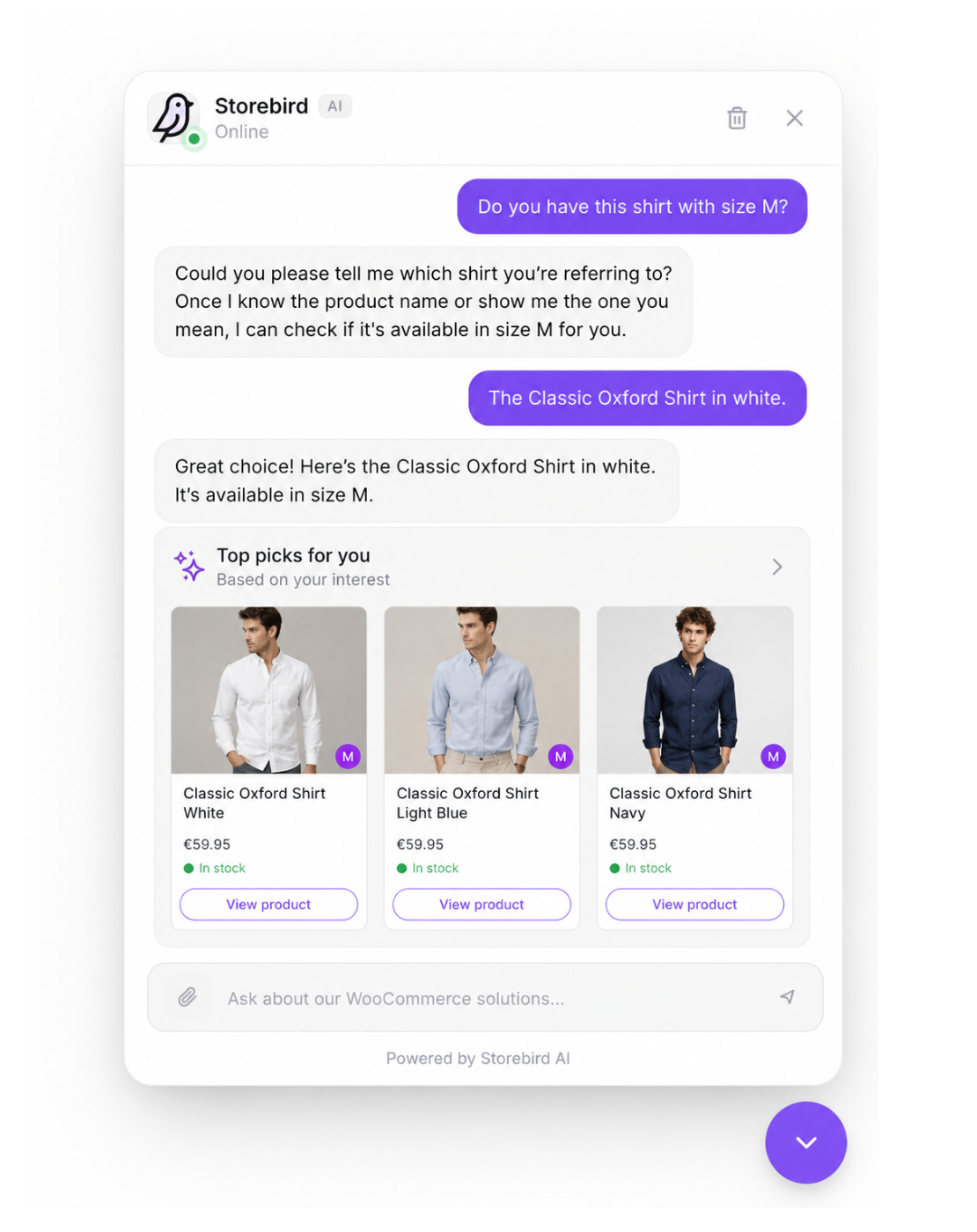
- “Do you have this in my size?”
- “What is the difference between these two?”
- “Can this arrive before Saturday?”
After checkout, the same assistant can help with:
- “Where is my order?”
- “Has my package shipped?”
- “Can I return this?”
- “How do I use the product I bought?”
Your customer gets a clear next step. You get fewer repetitive questions competing for your attention.
AI When It Can. You When It Should.
Some conversations need a person. Storebird can hand over the full conversation history and notify you, so the customer does not have to start again.
When you are ready to bring more customer communication together, Storebird also supports AI email drafts using live WooCommerce data, two-way WhatsApp conversations, lead capture and one inbox across connected stores and channels.
You stay in control of the assistant’s tone, instructions, welcome message and knowledge. Match the widget to your brand, review conversations in the dashboard and let Storebird respond in your customer’s language, with WPML support for multilingual catalogs.
Your Store in Your Pocket. Free iOS and Android App.
A handoff only helps if you notice it. The Storebird app for iOS and Android sends you a push notification the moment a shopper asks for a human, so you can read the whole conversation, take over from the AI and answer from wherever you are — then resolve the chat or hand it back to the assistant.
The app is included with your Storebird account: same login, no extra subscription, no per-seat fee.
Get it for iPhone and iPad or Android.
See It Answer Before Your Customers Do
Do not take our word for it. Install Storebird, connect your store and ask it the hardest product question you received this week.
Private test mode keeps the widget visible only to logged-in store administrators until you decide it is ready for shoppers:
- Install and connect Storebird
- Let your WooCommerce products sync
- Ask real customer questions
- Check the answers yourself
- Go live when you are ready
The plugin is free to install. A Storebird account and paid plan are required to make the assistant available to shoppers. The Pro plan includes a 14-day trial.
Your customers already have questions. Give them a reason to keep shopping.
Install Storebird and see what it knows
External Services
This plugin connects to the Storebird API service to provide AI-powered chat functionality.
Storebird API
This plugin sends data to and receives data from the Storebird API (https://storebird.ai/api) for the following purposes:
Data sent:
* Product information (names, prices, descriptions, images) – when syncing products
* Chat messages from customers – when customers use the chat widget
* Visitor information (page URL, session ID) – for chat context
* WordPress and WooCommerce version info – during connection setup
When data is sent:
* On initial plugin connection (automatic or manual)
* On product sync (manual trigger in admin)
* When products are created/updated in WooCommerce
* When customers send messages through the chat widget
Service links:
* Service website: https://storebird.ai
* Terms of Service: https://storebird.ai/terms
* Privacy Policy: https://storebird.ai/privacy
Installation
- Go to Plugins > Add New in your WordPress admin
- Search for “Storebird”
- Click Install Now and then Activate
- If you created your website on storebird.ai first, the plugin connects automatically — no extra steps needed!
- Otherwise, click “Connect to Storebird” in the plugin settings to link your store
- Your store is connected — sync your products and you’re live!
Alternative: Connect from the Storebird dashboard
Already have a Storebird account? Go to your dashboard, click “Connect Plugin”, and the plugin will connect automatically.
Frequently asked questions
Do I need a Storebird account?
Yes. The plugin is free to install, but you need a Storebird account to power the WooCommerce AI chatbot. The Pro plan includes a 14-day free trial so you can test it on your store.
How much does Storebird cost?
Plans start at $39/month (Essential), including up to 100 knowledge pages and human handoff. The Pro plan at $89/month includes a 14-day free trial and unlocks AI email replies, unlimited knowledge pages, custom branding, and lead capture. The Scale plan at $199/month supports up to 3 websites. See all plans at storebird.ai.
Can Storebird answer questions about my specific products?
Yes! Storebird syncs your entire WooCommerce product catalog — including names, descriptions, prices, images, stock status, categories, and variations. It uses this data to give accurate, product-specific answers.
Does Storebird support multiple languages?
Yes. Storebird automatically detects and responds in your customer’s language. You can also set a preferred language in the dashboard.
Can customers track their orders through the chatbot?
Yes. Customers can ask about their order status using their order number or email address, and Storebird will show them real-time tracking information from WooCommerce. This is a WooCommerce order tracking chatbot that eliminates repetitive “where is my order?” support emails.
Can I hand off a conversation to a human?
Yes, on every paid plan. When the AI can’t fully resolve an issue, it can hand off to you or your team. You’ll get a push notification and can respond in real-time from the Storebird dashboard or from the free Storebird app for iOS and Android. This gives you the best of both worlds: an AI customer support plugin with woocommerce live chat when you need it.
Can Storebird chat with customers on WhatsApp?
Yes. Storebird connects your store to WhatsApp so the AI works across both your website and WhatsApp. Customers can message your assistant directly in WhatsApp, you can hand off a website conversation to WhatsApp for personal follow-up (the history comes along), and you can send order confirmations, status updates, and tracking to customers on WhatsApp. You enable and configure WhatsApp from your Storebird dashboard.
Can Storebird answer my customer emails too?
Yes (Pro plan and above). Forward your store’s support inbox to Storebird with a single forwarding rule (Gmail, Outlook, or cPanel — no DNS changes needed). When a customer emails, the AI drafts a reply using your live WooCommerce data: order status, tracking, stock, and product recommendations. You review the draft and send it with one click, and the reply is delivered in the same email thread. Conversations from chat and email — across all your stores — appear in one inbox.
Can I customize the look of the chat widget?
Yes (Pro plan and above). You can customize header colors, message colors, button colors, logos, widget position, and more from the Storebird dashboard to match your brand.
Will Storebird slow down my website?
No. The chat widget loads asynchronously and weighs under 15KB. It has zero impact on your Core Web Vitals or page load speed.
How is Storebird different from Tidio, Crisp, or other live chat plugins?
Storebird is built specifically for WooCommerce. Unlike generic live chat plugins, Storebird syncs your product catalog and understands products, prices, categories, variations, and stock levels. When a customer asks a product question, Storebird answers from your WooCommerce data instead of relying on scripted responses. It also includes WooCommerce order tracking, revenue attribution, and category-aware product recommendations out of the box. And unlike live chat tools, Storebird answers your customer email as well: the AI drafts replies with live order data in them, so your inbox gets the…
Does Storebird work with WPML or multilingual WooCommerce stores?
Yes. Storebird has full WPML compatibility. It syncs all language versions of your products and pages, detects the current language on the frontend, and responds to customers in their language. The AI automatically handles multi-language conversations without any additional configuration.
How does the AI chatbot learn about my products?
When you connect Storebird to your WooCommerce store, it automatically syncs your entire product catalog — including product names, descriptions, prices, images, stock status, categories, and variations. The sync happens automatically when you add or update products.
Can I train Storebird with my own knowledge?
Yes, on every plan. Storebird gives your store its own knowledge base: up to 100 pages on Essential and unlimited pages on Pro and Scale. Import pages from your website, add or edit knowledge manually, and attach notes or corrections to specific products. Use it for store policies, shipping, returns, sizing advice, product expertise, FAQs or any other information your customers need. When you change that content, Storebird automatically reprocesses it so future answers can use the latest version.
Can Storebird help reduce cart abandonment?
Yes. Storebird proactively engages customers who may have questions blocking their purchase. By providing instant answers about products, shipping, returns, and availability, the WooCommerce AI chatbot removes friction from the buying process. The lead capture feature also lets you collect email addresses so you can follow up with customers who don’t complete their purchase.
Which shipping and tracking plugins does Storebird support?
Storebird works with all major WooCommerce shipping and tracking plugins, including WooCommerce Shipment Tracking, Advanced Shipment Tracking (AST), YITH Order Tracking, AfterShip, SendCloud, PostNL, MyParcel, DHL for WooCommerce, and ShipStation. Customers can check their order status and tracking information directly in the chat.
Is Storebird GDPR compliant?
Yes. Storebird supports Google Consent Mode v2 for compliant analytics tracking. Customer data is processed securely through the Storebird API. You can review our privacy policy at storebird.ai/privacy and our terms of service at storebird.ai/terms.
Changelog
Security update: the secret key is no longer printed in your page source. Update recommended.
1.7.2 – October 2026
- Security: The chat widget no longer prints your Storebird secret key in the page source. The widget never needed it: chat runs on the public API key and a per-conversation token. The secret key now stays on your server and is only used for the connection between your store and Storebird. / Beveiliging: de chatwidget zet je Storebird secret key niet meer in de broncode van de pagina. De widget had hem niet nodig; de secret blijft nu op je server.
1.7.1 – September 2026
- Fix: Order lookup now finds orders on stores that use Sequential Order Numbers Pro (SkyVerge) with a prefix or suffix, such as “AB-12345”. The assistant used to answer “order not found” for those order numbers. / Fix: het opzoeken van een bestelling werkt nu ook op winkels met Sequential Order Numbers Pro (SkyVerge) en een voor- of achtervoegsel in het ordernummer. De assistent meldde bij zulke nummers “bestelling niet gevonden”.
1.7.0 – August 2026
- Security: The connect flow now sanitises the redirect and store-URL parameters it reads from the URL, and the redirect back to your Storebird dashboard goes through WordPress’s safe-redirect check with an explicit host allowlist. This closes an open-redirect risk in the connection step. / Beveiliging: de koppel-flow ontsmet nu de redirect- en winkel-URL uit de adresbalk en gebruikt WordPress’ veilige-redirectcontrole, waarmee een open-redirect-risico in de koppelstap is gedicht.
- Security: All widget attributes are now escaped through WordPress’s own script-tag helper before they reach your page markup.
- Fix: Product text is decoded identically on every supported PHP version. On PHP 8.1 and newer the decoding defaults had changed, which could make quotes and special characters in product descriptions come out differently than on older versions. / Fix: producttekst wordt nu op elke PHP-versie gelijk gedecodeerd — op PHP 8.1+ konden aanhalingstekens en speciale tekens anders uitvallen.
- Improvement: Diagnostic logging only writes to the error log when WP_DEBUG is enabled, so production installs stay quiet.
- Improvement: Declared compatibility with WooCommerce 11.
1.6.9 – August 2026
- Improvement: Storebird now declares official compatibility with WooCommerce High-Performance Order Storage (HPOS), so WooCommerce no longer flags the plugin as incompatible on the Plugins screen. / Verbetering: Storebird is nu officieel compatibel met HPOS, de moderne WooCommerce-orderopslag — WooCommerce markeert de plugin niet langer als incompatibel.
- Fix: On stores using HPOS, the estimated delivery date attached to an order was never passed to the assistant, so it could not tell customers when their parcel was expected. It is now read through the WooCommerce order API and works on both storage types. / Fix: op webshops met HPOS werd de verwachte leverdatum nooit doorgegeven, waardoor de assistent die vraag niet kon beantwoorden.
1.6.8 – July 2026
- Improvement: Revenue attribution is far more accurate. Your store now reports the WooCommerce order ID, the order key and the real order date/payment time alongside the order number, so a chat conversation is matched to the exact order the shopper completed instead of being guessed from the e-mail address. Stores with a sequential-order-number plugin (where the order number differs from the WooCommerce ID) are matched correctly for the first time. / Verbetering: omzet-attributie is veel nauwkeuriger — de bestelling wordt nu exact gekoppeld in plaats van geraden op e-mailadres, ook op webshops met een eigen bestelnummer-plugin.
- Improvement: Order lookup can verify an order with the WooCommerce order key as well as the e-mail address or postcode. This is a server-to-server check that only ever validates the one order the key belongs to; a wrong key is always rejected and the key is never shown to a visitor. / Verbetering: een bestelling kan nu ook geverifieerd worden met de WooCommerce order-key, naast e-mailadres of postcode.
1.6.7 – July 2026
- Fix (important): On stores that still use the classic WooCommerce order storage (not HPOS), order lookup returned the store’s most recent order for every order number instead of the one the customer asked about. The assistant then compared that stranger’s order against the customer’s e-mail/postcode and told genuine customers their details “don’t match” — so order tracking failed for all of them. The order number is now always verified against the order before it is used. Stores on HPOS were not affected. / Fix: op webshops met de klassieke orderopslag gaf het opzoeken van een bestelling altijd de nieuwste bestelling terug in plaats van de gevraagde, waardoor echte klanten onterecht “komt niet overeen” te zien kregen. Het bestelnummer wordt nu altijd gecontroleerd.
Screenshots


For developers
Is this your plugin? Show off the numbers.
Add a live badge to your site, docs or GitHub README. It updates on its own — no account needed.
Best Storebird AI Chat for WooComm… alternatives
All AI Chatbot plugins →





FAQ
Storebird AI Chat for WooCommerce: quick answers
Straight answers, pulled from live WordPress.org data.
Live data from WordPress.org · checked Oct 5, 2026
Is Storebird AI Chat for WooCommer… free?
Yes. Storebird AI Chat for WooCommer… is free to download and use from the official WordPress.org plugin directory.
Is Storebird AI Chat for WooCommer… safe to use in 2026?
Storebird AI Chat for WooCommer… is a solid plugin choice in 2026, with a few things worth checking first. It runs on 20+ sites, is rated 5/5 and was last updated 4 days ago, and scores 73/100 on our health check.
How many websites use Storebird AI Chat for WooCommer…?
Storebird AI Chat for WooCommer… is active on 20+ WordPress websites and has been downloaded 2,765 times since it launched in February 2026. It was downloaded 827 times in the last 30 days.
Does Storebird AI Chat for WooCommer… work with WordPress 7.1?
Storebird AI Chat for WooCommer… is officially tested up to WordPress 7.0.6, while the latest release is 7.1.2. It may still work, but try it on a staging site first.
What PHP version does Storebird AI Chat for WooCommer… need?
Storebird AI Chat for WooCommer… requires PHP 7.4 or higher. Most hosts run PHP 8.x today, so it works on any modern WordPress hosting.
When was Storebird AI Chat for WooCommer… last updated?
The latest version, 1.7.2, was released on October 1, 2026 (4 days ago).
Who makes Storebird AI Chat for WooCommer…?
Storebird AI Chat for WooCommer… is developed and maintained by velocityplugins.
What are the best alternatives to Storebird AI Chat for WooCommer…?
The most popular alternatives to Storebird AI Chat for WooCommer… are WPZOOM Connect: AI Chat, Cl… (90K+ installs), Lead Generation Contact Wid… (10K+ installs) and Hyve Lite (7K+ installs).
Powered by PageForge
Want thousands of pages that rank like these? Build them in an afternoon.
This directory runs on the same engine as PageForge. Turn any spreadsheet, CSV or API into thousands of fast, SEO-ready WordPress pages — with schema, internal links and AI-written copy baked in.
- CSV, Google Sheets & API data sources
- AI content, schema & internal links per page
- Works with Elementor, Gutenberg, Yoast & Rank Math
- Free on WordPress.org — no credit card


