


Statify
Visitor statistics for WordPress with focus on data protection, transparency and clarity. Perfect as a widget in your WordPress Dashboard.

Safe pick
Yes — Statify is a safe, well-maintained plugin to use in 2026. It runs on 100K+ sites, is rated 4.8/5 and was last updated 6 days ago, and scores 93/100 on our health check.
- Proven at scale on 100K+ active sites
- Loved by users — 4.8/5 from 51 reviews
- Actively developed — last update 6 days ago
- Tested with the latest WordPress (7.1)
- Responsive support — 86% of recent threads resolved
How does it stack up?
Side-by-side on installs, updates, ratings & support



Daily downloads
Download spikes usually follow a new release — each site that auto-updates counts as a download.
Rankings
Where Statify stands todayWordPress.org search rankings
Live position in the plugin search, top 100| Keyword | Position |
|---|---|
| analytics | #57 |
| pageviews | #2 |
| privacy | #20 |
| statistics | #13 |
| stats | #13 |
Version adoption
Share of active sites per release.
Rating breakdown
★★★★★★★★★★ 4.8 from 51 reviews
About Statify
From the official readme · v2.0.3Description
Statify provides a straightforward and compact access to the number of site views. It is privacy-friendly as it uses neither cookies nor a third party.
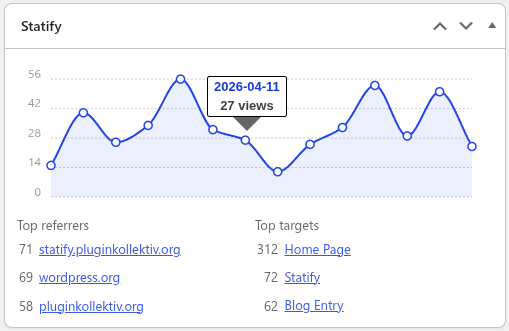
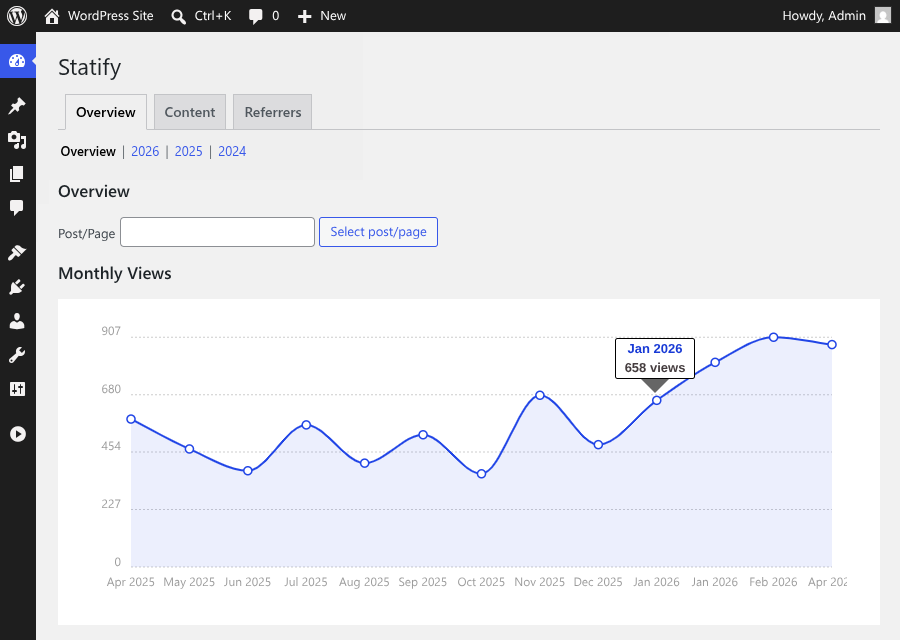
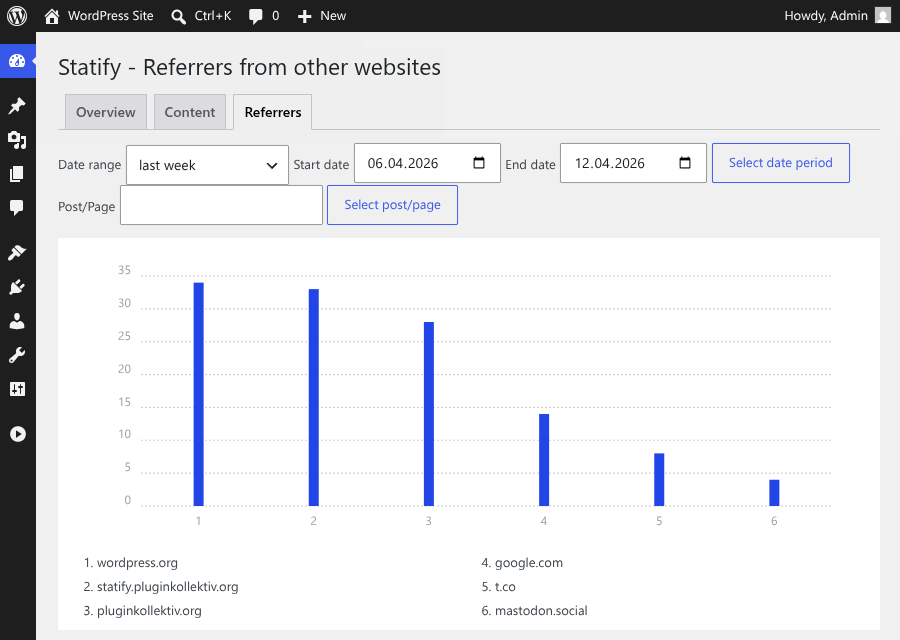
An interactive chart is followed by lists of the most common reference sources and target pages. The period of statistics and length of lists can be set directly in the dashboard widget.
Data Privacy
In direct comparison to statistics services such as Google Analytics, WordPress.com Stats and Matomo (Piwik) Statify doesn’t process and store personal data as e.g. IP addresses – Statify counts site views, not visitors.
Absolute privacy compliance coupled with transparent procedures: A locally in WordPress created database table consists of only four fields (ID, date, source, target) and can be viewed at any time, cleaned up and cleared by the administrator.
Due to this tracking approach, Statify is 100% compliant with GDPR and serves as an lightweight alternative to other tracking services.
Display of the widget
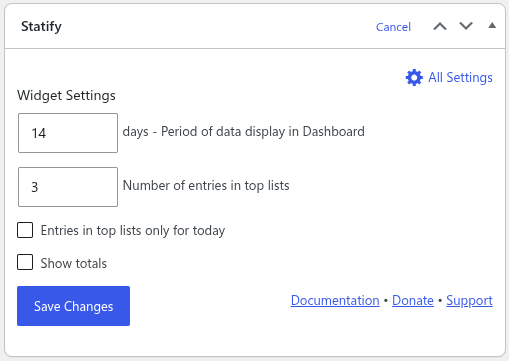
The plugin configuration can be changed directly in the Statify Widget on the dashboard by clicking the Configure link.
The amount of links shown in the Statify Widget can be set as well as the option to only count views from today. Of course, older entries are not deleted when changing this setting.
The statistics for the dashboard widget are cached for four minutes.
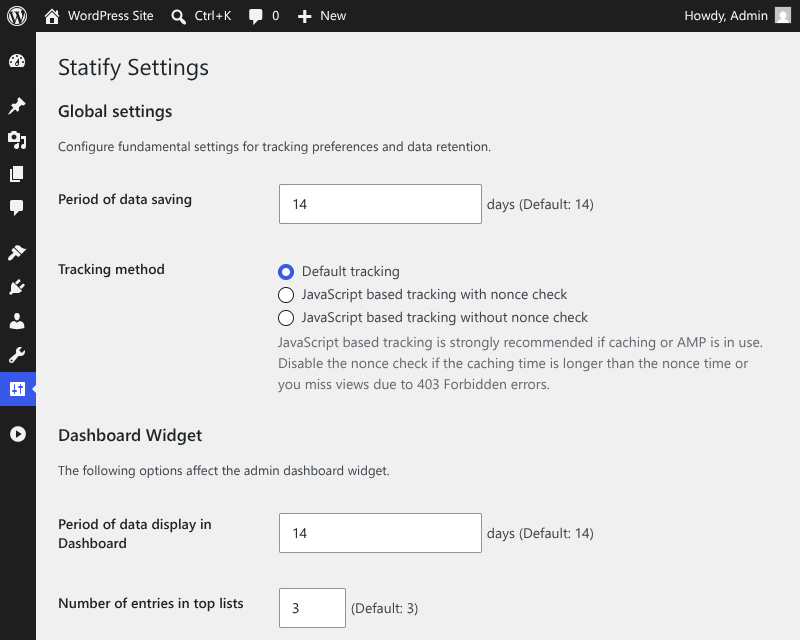
Period of data saving
Statify stores the data only for a limited period (default: two weeks), longer intervals can be selected as option in the widget. Data which is older than the selected period is deleted by a daily cron job.
An increase in the database volume can be expected because all statistic values are collected and managed in the local WordPress database (especially if you increase the period of data saving).
JavaScript tracking for caching compatibility
For compatibility with caching plugins like Cachify Statify offers an optional switchable tracking via JavaScript. This function allows reliable count of cached blog pages.
For this to work correctly, the active theme has to call wp_footer(), typically in a file named footer.php.
Skip tracking for spam referrers
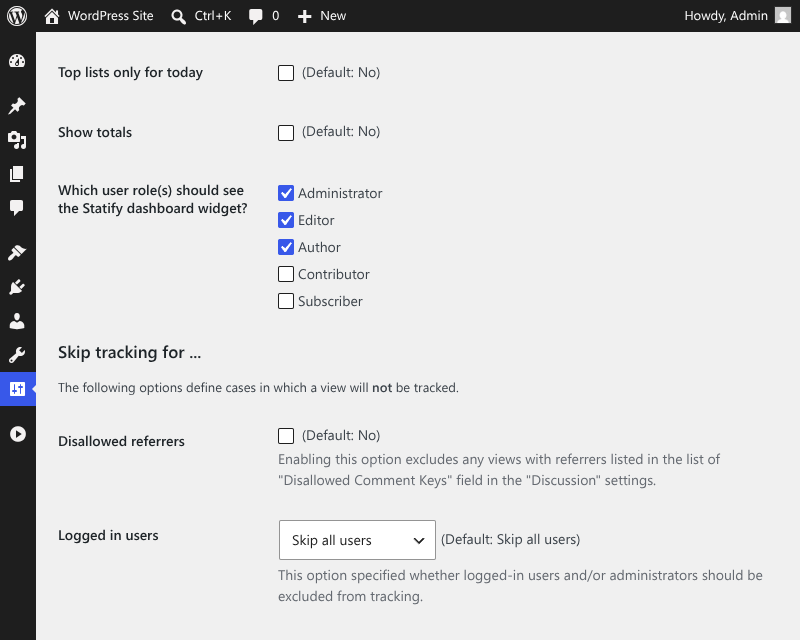
The comment blacklist can be enabled to skip tracking for views with a referrer URL listed in comment blacklist, i. e. which considered as spam.
Support
If you’ve problems or think you’ve found a bug (e.g. you’re experiencing unexpected behavior), please post at the support forums.
Contribute
- Active development of this plugin is handled on GitHub.
- Pull requests for documented bugs are highly appreciated.
- If you want to help us translate this plugin you can do so on WordPress Translate.
Frequently asked questions
Which areas are excluded from counting?
Statify does not count the following views: feeds trackbacks searches previews views by logged in users (unless tracking is activated via the settings page) error pages favicon (as of WP 5.4) sitemap (as of WP 5.5) This behavior can be modified with the statify__skip_tracking hook.
Why are some sources missing in the dashboard widget?
Statify determines the source of a visit from the Referer request header (or, with JavaScript tracking enabled, from document.referrer). The browser only sends this information when the originating site allows it via the Referrer-Policy header, so the originating site controls whether Statify receives a source at all. A few common reasons why a Referer is missing: the originating site sends Referrer-Policy: no-referrer or same-origin (the latter is the default on many Fediverse instances, including Mastodon) the link uses rel="noreferrer" or rel="noopener noreferrer" the link goes from an…
Can further visitor data be recorded?
Some plugin users want to capture additional visitor data, e.g. name of the device and resolution. Statify counts exclusively page views and no visitors, the desired data acquisition is not a question.
How to change who can see the Dashboard widget?
Per default only administrators can see the widget. This can be changed with the statify__user_can_see_stats hook. Example: add_filter( 'statify__user_can_see_stats', '__return_true' ); has to be added to the theme’s functions.php and adapted to your needs. This example would allow all users to see the widget. Editing the configuration is still limited to users with edit_dashboard capability.
How to skip tracking for defined users or pages
The conditions for tracking views can be customized according to page type and user capabilities by using the hook statify__skip_tracking. Example: add_filter( 'statify__skip_tracking', function() { if ( condition ) { return true; } return false; } ); has to be added to the theme’s functions.php. The condition has modified such that the method returns true if and only if the view should be ignored.
How to extend this plugin?
Statify Widget to display most popular content Statify Blacklist to define a customized blacklist for referrer spam
How can I report security bugs?
You can report security bugs through the Patchstack Vulnerability Disclosure Program. The Patchstack team help validate, triage and handle any security vulnerabilities. Report a security vulnerability.
Changelog
Bugfix release which resolves issues with translations and table contents.
You can find the full changelog in our GitHub repository.
2.0.3
- Make REST API endpoints visible to control and security plugins
- Properly encode CSV data for download
- Localize built-in user role names on settings page
- Right-align numbers in tables
- Minor dashboard JavaScript improvements
- Tested up to WordPress 7.1
2.0.2
- Translatable texts in JS-generated content now work as expected
- Special characters in post titles are now displayed correctly
- Break long URLs to prevent scrollbar in content table
- Y-axis labels in charts are no longer truncated on higher numbers
2.0.1
- Fixed an issue that prevented loading dashboard widgets on region-specific locales
- Restored automatic scrolling to the latest data point in the dashboard widget
2.0.0
- JavaScript tracking now uses WP REST API instead of AJAX
- Integrated additional dashboards from Extended Evaluation for Statify
- Show post titles instead of URLs in widget
- Visibility of statistics can now be configured for different roles
- Improvements for bot detection
- It is now possible to exclude administrators from tracking
- Added feature to reset all statistics
- Use WordPress admin theme colors in the dashboard widgets
- Improved the field explanation for “Disallowed Comment Keys”
- Updated deprecated WordPress hooks
- Use wp-i18n for frontend translation
- Order of top targets/referrers is now consistent if the number of visits is equal
- Prevent layout shift when showing tooltips in the dashboard widget
- Added localized number format to charts and tables
- Fixed user role error on saving settings
- Fixed RTL layout in the dashboard widget
- Fix dashboard widget for days without visitors
- Removed XML-RPC integration
- Removed deprecated
statify_skip_trackingfilter - Requires PHP 7.4 or higher
- Requires WordPress 5.1 or higher
- Tests up to WordPress 7.0
1.8.5
- Updated build environment
- Minor code style corrections
- Tested up to WordPress 6.7
1.8.4
- Use same date retrieval for tracking and analysis (#227) (#232)
- Replace input filtering for PHP 8.1 compatibility (#237)
- Minor markup corrections in dashboard widget (#235)
- Tested up to WordPress 6.1
1.8.3
- Update documentation links (#204)
- Minor markup fix on settings page (#206)
- Dashboard widget is closeable again (#208) (#209)
- Fix static initialization on multisite with PHP 8 (#210, props @walterebert)
- Tested up to WordPress 5.8
1.8.2
- Minor adjustments for the dashboard widget (#197) (#199)
- Tested up to WordPress 5.7
1.8.1
- Fix AMP compatibility for Standard and Transitional mode (#181) (#182)
- JavaScript is no longer embedded if request is served by AMP (#181) (#182)
- Always register the action for the cleanup (#184)
- Exclude sitemap calls (WP 5.5+) from tracking (#185) (#186)
- Tested up to WordPress 5.6
1.8.0
- Fix date offset in dashboard widget in WP 5.3+ environments with mixed timezones (#167)
- Allow to deactivate the nonce check during JavaScript tracking (#168)
- Add support for “disallowed_keys” option instead of “blacklist_keys” in WordPress 5.5 (#174)
- Add refresh button in the dashboard, increase caching time (#157)
1.7.2
- Prevent JavaScript tracking from raising 400 for logged-in users, if tracking is disabled (#159)
- Use
wp_die()instead of header and exit for AJAX requests (#160) - Fix 1 day offset between display range and number of days evaluated in top lists (#162)
1.7.1
- Fix refresh of the dashboard widget when settings have been changed through the settings page (#147)
- Fix Cachify cache not being flushed after changing JavaScript settings (#152)
- Fix date inconsistency for number of total visits (#150)
- Extend user agent filter for bot detection (#149) (#151)
- Update tooltip library (containing a bugfix in IE 11) (#156)
1.7.0
- Fix JavaScript embedding when bots visit before caching (#84) (#86)
- Fix offset in visitor reporting due to different timezones between PHP and database (#117, props @sophiehuiberts)
- Fix untranslatable support link (#122) (#126, props @arkonisus)
- Add separate settings page and reduced widget backview to widget settings only (#111)
- Add options to track logged in users (#103) (#111)
- Add option to show total visits (#134, props @yurihs)
- Refactored JavaScript tracking to use WP AJAX (#109) (#142)
- Introduced new option to separate display from storage range (#72)
- Automatically add AMP analytics trigger if official AMP PlugIn is installed (#110) (#116, props @tthemann)
- Dashboard widget is now scrollable with dynamic point radius to keep long-term statistics readable (#71) (#101, props @manumeter)
- Improved bot detection (#112) (#125, props @mahype)
- Updated Chartist JS library for dashboard widget (#132)
- Skip tracking for favicon.ico redirects (since WP 5.4) (#144)
- Tested up to WordPress 5.4
For the complete changelog, check out our GitHub repository.
Screenshots
For developers
Is this your plugin? Show off the numbers.
Add a live badge to your site, docs or GitHub README. It updates on its own — no account needed.
Best Statify alternatives
All analytics plugins →





FAQ
Statify: quick answers
Straight answers, pulled from live WordPress.org data.
Live data from WordPress.org · checked Sep 26, 2026
Is Statify free?
Yes. Statify is free to download and use from the official WordPress.org plugin directory.
Is Statify safe to use in 2026?
Yes — Statify is a safe, well-maintained plugin to use in 2026. It runs on 100K+ sites, is rated 4.8/5 and was last updated 6 days ago, and scores 93/100 on our health check.
How many websites use Statify?
Statify is active on 100K+ WordPress websites and has been downloaded 2,782,916 times since it launched in March 2011. It was downloaded 111,468 times in the last 30 days.
Does Statify work with WordPress 7.1?
Yes. The developer has tested Statify up to WordPress 7.1.2, the latest release. It requires WordPress 5.1 or newer.
What PHP version does Statify need?
Statify requires PHP 7.4 or higher. Most hosts run PHP 8.x today, so it works on any modern WordPress hosting.
When was Statify last updated?
The latest version, 2.0.3, was released on September 20, 2026 (6 days ago).
Who makes Statify?
Statify is developed and maintained by pluginkollektiv.
What are the best alternatives to Statify?
The most popular alternatives to Statify are Site Kit by Google (5M+ installs), MonsterInsights (2M+ installs) and WP Statistics (600K+ installs).
Powered by PageForge
Want thousands of pages that rank like these? Build them in an afternoon.
This directory runs on the same engine as PageForge. Turn any spreadsheet, CSV or API into thousands of fast, SEO-ready WordPress pages — with schema, internal links and AI-written copy baked in.
- CSV, Google Sheets & API data sources
- AI content, schema & internal links per page
- Works with Elementor, Gutenberg, Yoast & Rank Math
- Free on WordPress.org — no credit card


