


Specific Content For Mobile – Customize the mobile version without redirections
Specific Content For Mobile allows you to create pages and posts content designed for mobile devices.

Solid choice
Specific Content For Mobile is a solid plugin choice in 2026, with a few things worth checking first. It runs on 4K+ sites, is rated 4.8/5 and was last updated 3 weeks ago, and scores 77/100 on our health check.
- Loved by users — 4.8/5 from 31 reviews
- Actively developed — last update 3 weeks ago
- Tested with the latest WordPress (7.1)
- Momentum — downloads up 52.2% vs the previous 30 days
How does it stack up?
Side-by-side on installs, updates, ratings & support


Daily downloads
Download spikes usually follow a new release — each site that auto-updates counts as a download.
Rankings
Where Specific Content For Mobile stands todayWordPress.org search rankings
Live position in the plugin search, top 100| Keyword | Position |
|---|---|
| amp | #31 |
| cleanup | #45 |
| device | #28 |
| mobile | #9 |
| optimization | >100 |
Version adoption
Share of active sites per release.
Rating breakdown
★★★★★★★★★★ 4.8 from 31 reviews
About Specific Content For Mobile
From the official readme · v0.5.6Description
Specific Content For Mobile allows you to create pages and posts content designed for mobile devices.
This plugin DOES NOT redirect content from the desktop website: it creates brand new mobile-specific content.
It’s perfect if in some pages you need different content for the mobile version.
The best way to have a mobile version is always a fully responsive design, but in some cases you may need specific content for the mobile version.
How to add or remove specific content for the mobile version:
- Click on Pages in the main admin menu
- Go with your mouse on the page you want to modify for the mobile version and click on the action link “Create mobile version”, or click on the icon “+” you see in the devices column
- Modify your page as you want to see it on mobile
- Save your page mobile version
If you want to create a mobile version for your blog posts, do as explained above, but going to the list of Posts.
On mobile devices, the plugin will load the mobile version you have created for that page or post.
If you create the mobile version for a page reachable at https://your-domain.com/page-example/, and you are logged-in, you will see also https://your-domain.com/page-example-mobile/.
But logged-out users will not see it, and the only URL that exists for the public is https://your-domain.com/page-example/.
The page reachable at https://your-domain.com/page-example/ will show the desktop content on desktop devices, and the mobile content on mobile devices The URL is always the same.
You have no redirections, and the plugin just replaces the desktop content with the related mobile version.
For more details read the Documentation.
Requirements
If you have a server cache plugin, be sure to set a different server cache handling for mobile devices, in another case the mobile version of your pages could also be served on desktop devices.
E.g. W3 Total Cache, WP Fastest Cache, and Powered Cache are caching plugins that can handle the mobile cache.
Be careful if you are using W3 Total Cache or whatever other caching plugin that gives you the possibility to manage the mobile version, DO NOT set up any redirection for mobile devices.
If you have issues with the mobile and desktop versions with W3 Total Cache, read Mobile version showing in desktop view – W3 Total Cache Plugin
Specific Content For Mobile DOES NOT redirect the mobile users. The URL of a page visited on mobile is exactly the same as the desktop URL.
Differences with AMP plugins
Specific Content For Mobile has nothing to do with AMP pages. It gives you the possibility to show specific content for mobile, but without any redirection, and without generating any AMP markup.
If you want to serve AMP pages, Specific Content For Mobile is not for you. In that case, you may be interested in a plugin like AMP, or AMP For WP.
You consider Specific Content For Mobile like an alternative to AMP plugins.
Limitations of the free version
The free version supports only the mobile version of pages and posts, no custom post types, no archives, no terms.
I need advanced functionality to be integrated with this plugin.
If you need custom functionality, I offer a development service for WordPress plugin integrations and advanced feature extensions.
Learn more about advanced functionality for WordPress.
Additional information
As a default, WordPress doesn’t output the blog page content before the posts loop.
Some themes do it. In this case, the blog page content output before the loop is handled by the theme templates.
The plugin will check if the theme declares support for the blog page mobile version, if not so the blog page mobile version may take the original desktop content.
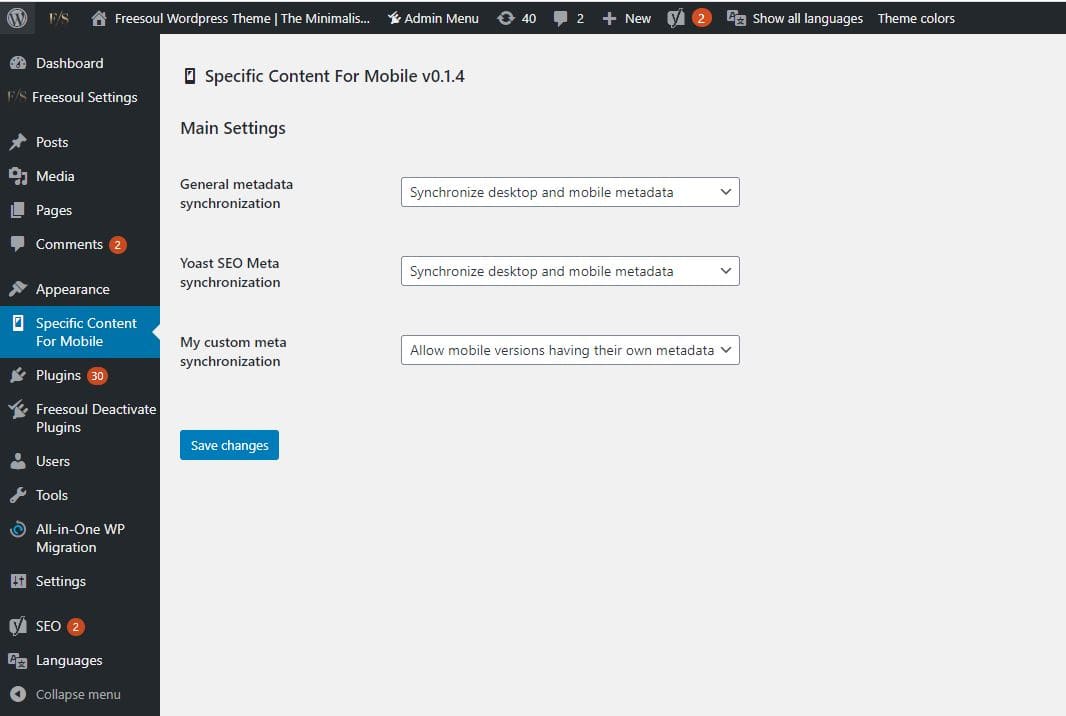
As a default Specific Content For Mobile synchronizes the post metadata. This means that when you save a post or page, if they have a mobile version, the same metadata will be saved in the mobile version.
When you save a mobile version, the mobile version metadata will be saved also in the desktop version.
If you want to change this behavior, go to Specific Content For Mobile settings and choose “Allow mobile versions having their own metadata”.
For the most popular SEO plugins, you can choose the metadata synchronization specifically for that plugin.
PRO Version
The PRO version also allows you to:
- Have a mobile version of all the queriable post types are supported
- Load a different theme specifically on mobile devices
- Unload specific plugins only on mobile devices
- Decide if tablets should be considered as mobile devices or not so
- Have a different navigation on mobile
- Write specific content depending on the device
- Have access to the premium support
For developers
Template for mobile
If you need to use a different template file on mobile, copy the template file of your theme and put it in one of these folders:
wp-content/scfm/
wp-content/themes/theme-name/scfm
For example, if your theme is “theme-name” and you want to load a different page.php on mobile, it will be something that looks like:
wp-content/scfm/page.PHP
or
wp-content/themes/theme-name/page.php
In the case of mobile devices, Specific Content For Mobile will look for the custom template file first in wp-content/themes/theme-name/scfm and if it doesn’t find it in wp-content/scfm.
Integration with other plugins
If you add an option for the metadata synchronization of an external plugin, you can use the filter “eos_scfm_meta_integration_array”.
Here an example:
add_filter( 'eos_scfm_meta_integration_array','my_custom_scfm_meta_integration',20,2 );
//It adds an option to synchronize your plugin meta data.
function my_custom_scfm_meta_integration( $arr,$options ){
    $slug = 'my_custom_meta';
    $arr[$slug] = array(
        'is_active' => defined( 'WPSEO_FILE' ),
        'args' => array(
            'title' => __( 'My custom meta synchronization','my-textdomain' ),
            'type' => 'select',
            'value' => isset( $options[$slug] ) ? esc_attr( $options[$slug] ) : 'synchronized',
            'options' => array(
                'synchronized' => __( 'Synchronize desktop and mobile metadata','my-textdomain' ),
                'separated' => __( 'Allow mobile versions having their own metadata','my-textdomain' )
            ),
        ),
        'prefix' => array( '_my_plugin' ),
        'default' => 'synchronized'
    );
    return $arr;
}
Then you will see your custom option “My custom meta synchronization” in the main settings page.
Helper functions
In your theme, you can use the following functions to give full support to the mobile version content:
eos_scfm_related_desktop_id( $post_id );
given the post ID, it will get the post ID of the related desktop version.
eos_scfm_related_mobile_id( $post_id );
given the post ID, it will get the post ID of the related mobile version.
Theme support
To add the theme support to the blog content, you can add this line in your theme support action hook:
add_theme_support('specific_content_form_mobile',array( 'posts_page' => true ) );
Help
If something doesn’t work on the free version, open a thread on the support forum
If you are a PRO user, and you have issues, don’t hesitate to open a ticket on the premium support
Custom Plugin Development
Need to customize this plugin or build a custom WordPress plugin from scratch? I offer professional custom plugin development services, from adapting existing plugins to meet your specific requirements to developing fully custom solutions tailored to your needs.
Learn more about my custom WordPress plugin development services or book a free discovery call to discuss your project and explore the best solution for your requirements.
Installation
- Upload the entire
specific-content-for-mobilefolder to the/wp-content/plugins/directory or install it using the usual installation button in the Plugins administration page. - Activate the plugin through the ‘Plugins’ menu in WordPress.
- After successful activation you will be automatically redirected to the plugin global settings page.
- All done. Good job!
Changelog
0.5.6
- Fix: Vulnerability to SQL Injection via the eos_scfm_duplicate_post_as_draft() function (CVE-2025-11454)
0.5.5
- Fix: Rewrite rules moved after the WordPress rewrite rules in .htaccess
0.5.4
- Fix: Vulnerability when duplicating post for mobile version
0.5.3
- Added: Hidden ?scfm-mobile=1 on mobile devices
0.5.2
- Added: Minor updates
0.5.1
- Fix: Conflict with the Elementor editing page
Screenshots


For developers
Is this your plugin? Show off the numbers.
Add a live badge to your site, docs or GitHub README. It updates on its own — no account needed.
Best Specific Content For Mobile alternatives
All amp plugins →





FAQ
Specific Content For Mobile: quick answers
Straight answers, pulled from live WordPress.org data.
Live data from WordPress.org · checked Nov 17, 2026
Is Specific Content For Mobile free?
Yes. Specific Content For Mobile is free to download and use from the official WordPress.org plugin directory.
Is Specific Content For Mobile safe to use in 2026?
Specific Content For Mobile is a solid plugin choice in 2026, with a few things worth checking first. It runs on 4K+ sites, is rated 4.8/5 and was last updated 3 weeks ago, and scores 77/100 on our health check.
How many websites use Specific Content For Mobile?
Specific Content For Mobile is active on 4K+ WordPress websites and has been downloaded 156,468 times since it launched in August 2019. It was downloaded 811 times in the last 30 days.
Does Specific Content For Mobile work with WordPress 7.1?
Yes. The developer has tested Specific Content For Mobile up to WordPress 7.1.4, the latest release. It requires WordPress 4.6 or newer.
What PHP version does Specific Content For Mobile need?
Specific Content For Mobile requires PHP 5.6 or higher. Most hosts run PHP 8.x today, so it works on any modern WordPress hosting.
When was Specific Content For Mobile last updated?
The latest version, 0.5.6, was released on October 28, 2026 (3 weeks ago).
Who makes Specific Content For Mobile?
Specific Content For Mobile is developed and maintained by Jose Mortellaro.
What are the best alternatives to Specific Content For Mobile?
The most popular alternatives to Specific Content For Mobile are AMP (300K+ installs), Ad Inserter (300K+ installs) and Head, Footer and Post Injec… (200K+ installs).
Powered by PageForge
Want thousands of pages that rank like these? Build them in an afternoon.
This directory runs on the same engine as PageForge. Turn any spreadsheet, CSV or API into thousands of fast, SEO-ready WordPress pages — with schema, internal links and AI-written copy baked in.
- CSV, Google Sheets & API data sources
- AI content, schema & internal links per page
- Works with Elementor, Gutenberg, Yoast & Rank Math
- Free on WordPress.org — no credit card


