


AMP
An easier path to great Page Experience for everyone. Powered by AMP.

Use with caution
AMP works, but test it on a staging site before relying on it in 2026. It runs on 400K+ sites, is rated 3.8/5 and was last updated 1 year ago, and scores 57/100 on our health check.
- Proven at scale on 400K+ active sites
- No update in over a year
- Only tested up to WordPress 6.8 (latest is 7.1)
How does it stack up?
Side-by-side on installs, updates, ratings & support



Daily downloads
Download spikes usually follow a new release — each site that auto-updates counts as a download.
Rankings
Where AMP stands todayWordPress.org search rankings
Live position in the plugin search, top 100| Keyword | Position |
|---|---|
| amp | #4 |
| mobile | >100 |
| optimization | >100 |
| page experience | #47 |
| performance | >100 |
Version adoption
Share of active sites per release.
Rating breakdown
★★★★★★★★★★ 3.8 from 367 reviews
About AMP
From the official readme · v2.5.5Description
Page Experience (PX) is a set of ranking signals—including Core Web Vitals (CWV)—measuring the user experience of interacting with a web page. AMP is a powerful tool which applies many optimizations and best practices automatically on your site, making it easier for you to achieve good page experience for your visitors. The official AMP Plugin, supported by the AMP team, makes it easy to bring the power of AMP to your WordPress site, seamlessly integrating with the normal publishing flow and allowing the use of existing themes and plugins.
For more videos like this, check out the ongoing AMP for WordPress video series.
The plugin’s key features include:
- Automate the process of generating AMP-valid markup as much as possible, letting users follow the standard workflows they are used to in WordPress.
- Provide effective validation tools to help users deal with AMP incompatibilities when they happen, including mechanisms for identifying, contextualizing, and resolving issues caused by validation errors.
- Provide development support to make it easier for WordPress developers to build AMP-compatible ecosystem components and build websites and solutions with AMP-compatibility built-in.
- Support the serving of AMP pages to make it easier for site owners to take advantage of mobile redirection, AMP-to-AMP linking, and generation of optimized AMP by default (via PHP port of AMP Optimizer).
- Provide a turnkey solution for segments of WordPress creators to be able to go from zero to publishing AMP pages in no time, regardless of technical expertise or availability of resources.
The official AMP plugin for WordPress is a powerful tool that helps you build user-first WordPress sites, that is, sites that are fast, beautiful, secure, engaging, and accessible. A user-first site will deliver experiences that delight your users and therefore will increase user engagement and the success of your site. And, contrary to the popular belief of being only for mobile sites (it doesn’t stand for Accelerated Mobile Pages anymore!), AMP is a fully responsive web component framework, which means that you can provide AMP experiences for your users on both mobile and desktop devices.
AMP Plugin Audience: Everyone
This plugin can be used by both developers and non-developer users:
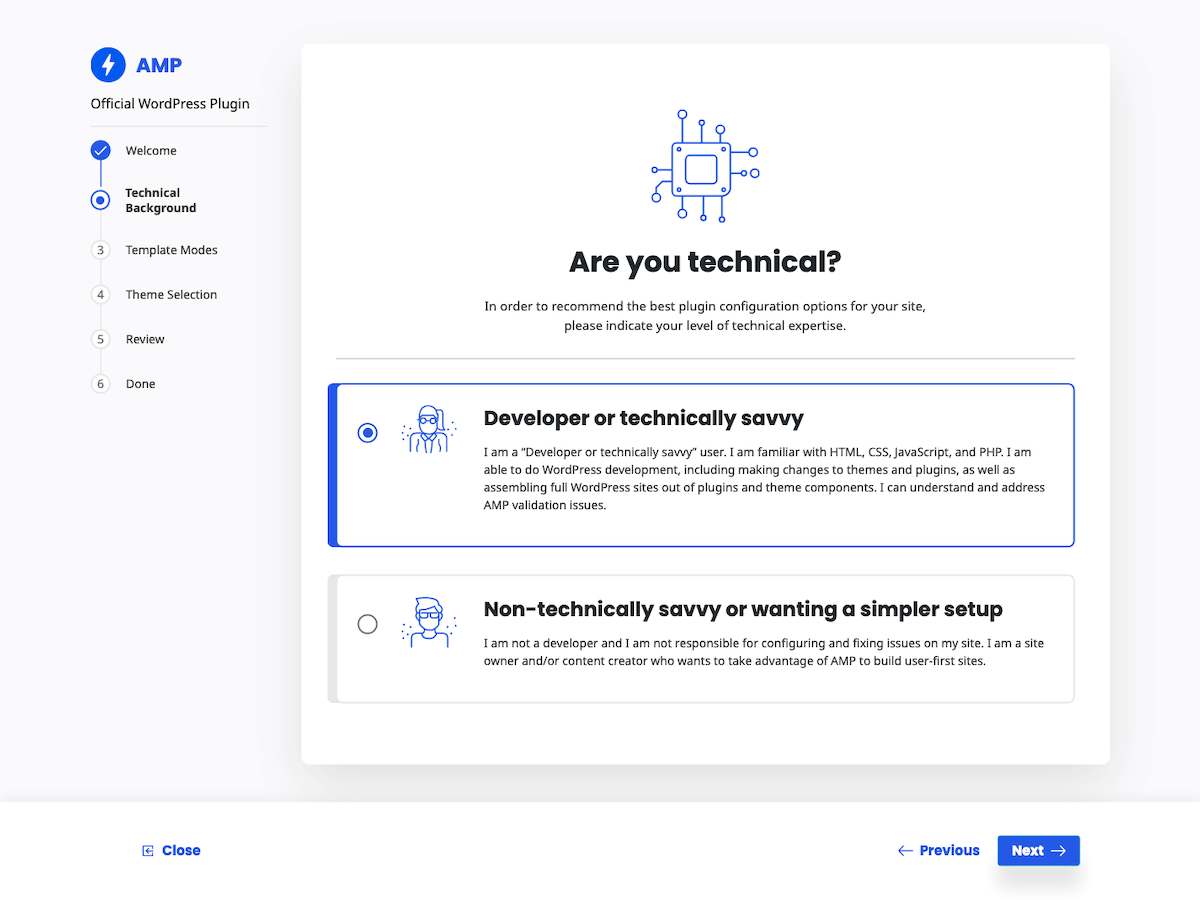
- If you are a developer or tech savvy user, you can take advantage of advanced developer tools provided by the AMP plugin to fix validation issues your site may have and reach full AMP compatibility.
- If you are not a developer or tech savvy user, or you just simply don’t want to deal with validation issues and tackling development tasks, the AMP plugin allows you to assemble fully AMP-compatible sites with different configurations taking advantage of AMP-compatible components. The plugin helps you to deal with validation issues by removing invalid AMP markup in cases where it is possible, or altogether suppressing AMP-incompatible plugins on AMP pages.
The bottom line is that regardless of your technical expertise, the AMP plugin can be useful to you.
Template Modes
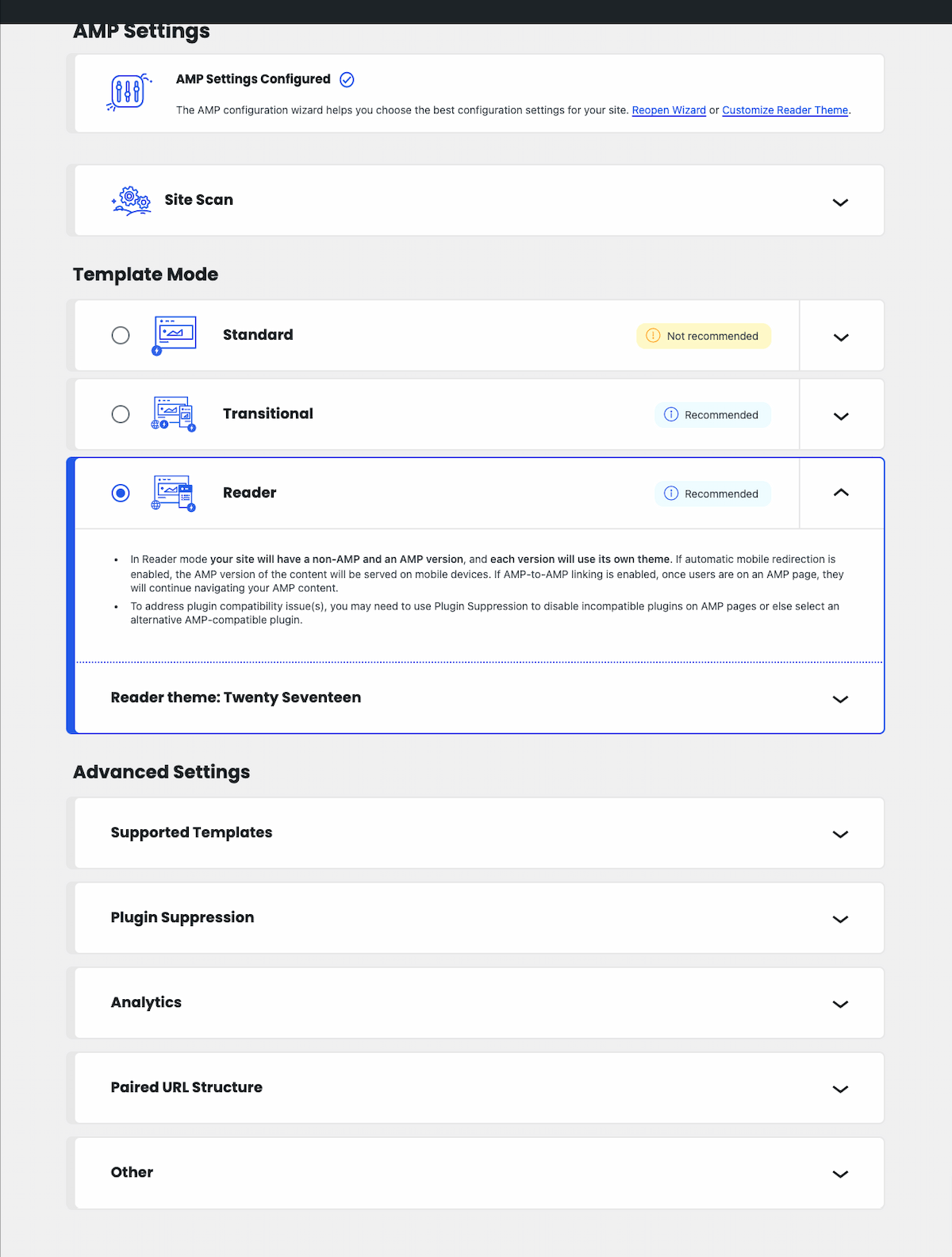
The official AMP plugin enables site owners to serve AMP to their users in different ways, which are referred to as template modes: Standard, Transitional, and Reader. The differences between them are in terms of the number of themes used (one or two), and the number of versions of the site (non-AMP, AMP). Each template mode brings its own value proposition and serves the needs of different scenarios in the large and diverse WordPress ecosystem. And in all cases, the AMP plugin provides as much support as possible in terms of automating the generation of AMP pages, as well as keeping the option chosen AMP valid. In a nutshell, the available template modes are the following:
Standard Mode: This template mode is the ideal, as there is only one theme for serving requests and a single version of your site: the AMP version. Besides enabling all of your site to be AMP-first, this has the added benefit of reducing development and maintenance costs. This mode is the best choice for sites where the theme and plugins used in the site are fully AMP-compatible. It's also a good option if some components are not AMP-compatible but the site owner has the resources or the know-how to fix them. See our showcase of sites using Standard mode.
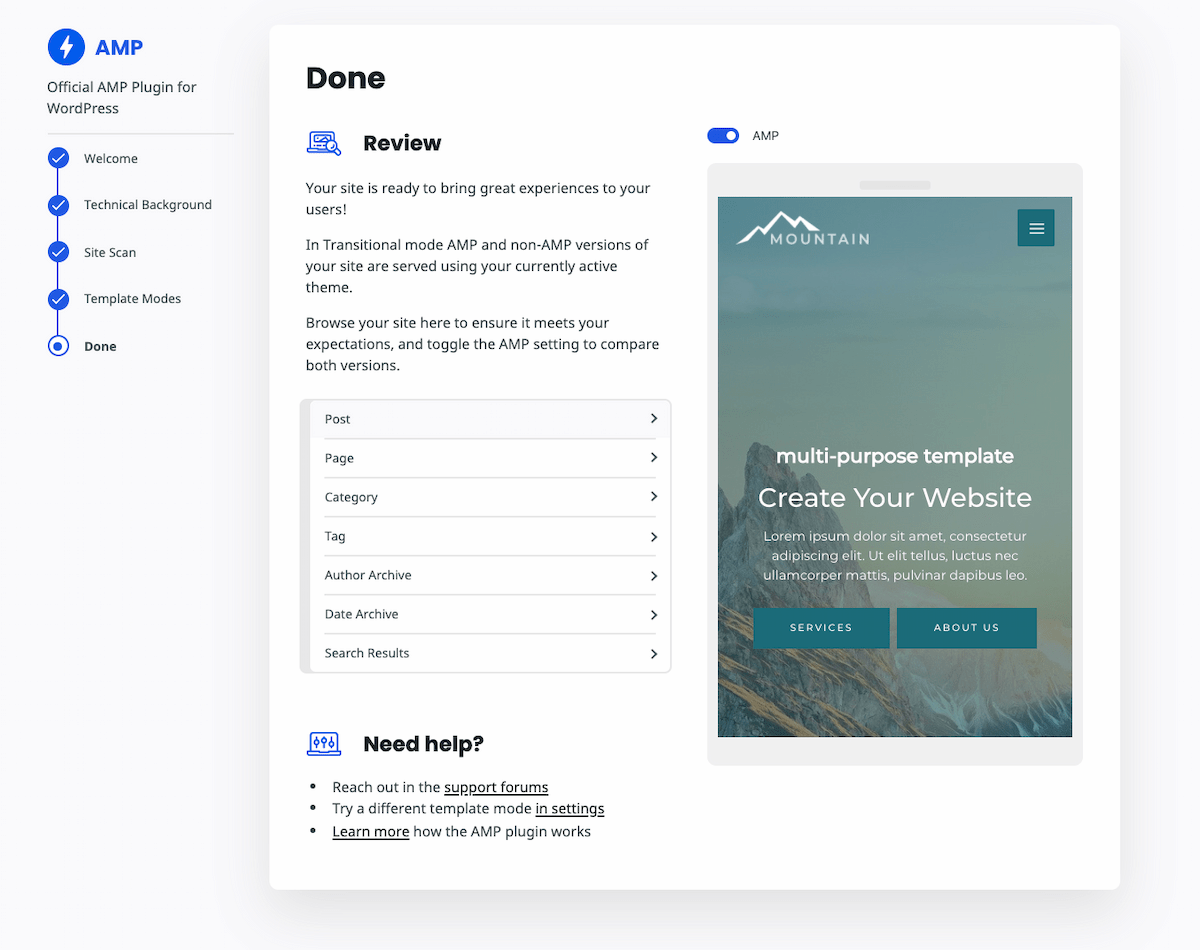
Transitional Mode: In this mode there is also a single theme used, but there can be two versions of each page: AMP and non-AMP. The active theme is used for serving the AMP and non-AMP versions of a given URL. This mode is a good choice if the site uses a theme that is not fully AMP compatible, but the functional differences between the AMP and non-AMP pages are acceptable (due to graceful degradation). In this case, users accessing the site from mobile devices can get the AMP version and get an optimized experience which also retains the look and feel of the non-AMP version. Check out our showcase of sites using Transitional mode.
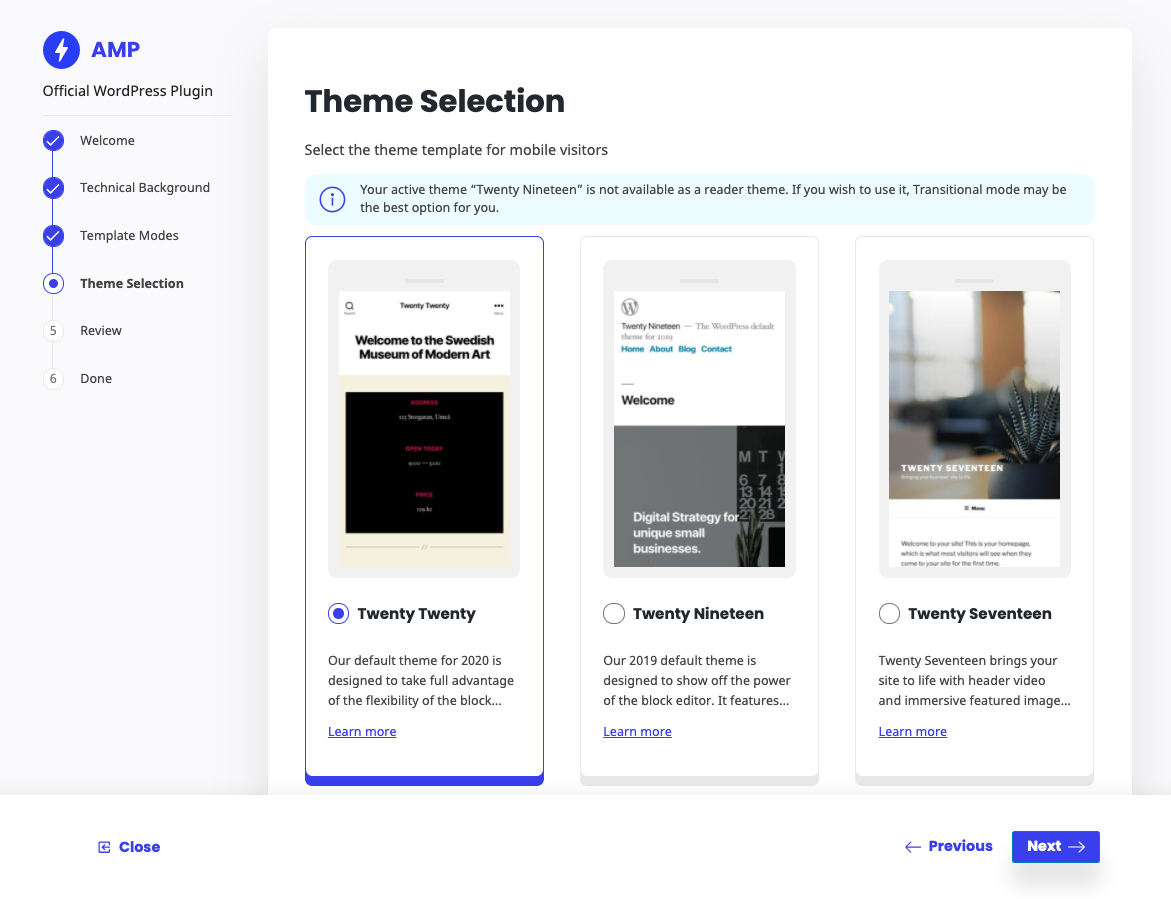
Reader Mode: In this mode there are two different themes, one for AMP pages and another for non-AMP pages, and therefore there are also two versions of the site. This mode may be selected when the site is using an AMP-incompatible theme, but the level of incompatibilities is significant without graceful degradation. It’s also a good choice if you are not technically savvy (or simply do not want to deal with the incompatibilities) and therefore want simplified and robust workflows that allow you to take advantage of AMP with minimal effort.
Different modes would be recommended in different scenarios, depending on the specifics of your site and your role. As you configure the plugin, it will suggest the mode that might be best for you based on its assessment of the theme and plugins used on your site. And, independently of the mode used, you have the option of serving all or only a portion of your site as AMP. This gives you all the flexibility you need to get started enabling AMP on your site progressively.
AMP Ecosystem
It is possible today to assemble great looking user-first sites powered by the AMP plugin by picking and choosing themes and plugins from a growing AMP-compatible ecosystem. In this context, the AMP plugin acts as an orchestrator of the overall AMP content creation and publishing process; it serves as a validator and enforcer making it easier to not only get to AMP experiences, but to maintain them with confidence.
Many popular theme and plugin developers have taken efforts to support the official AMP plugin. If you are using a theme like Astra or Newspack, or if you are using plugins like Yoast or WP Forms — they will work out of the box! You can see the growing list of tested themes and plugins.
AMP Development
Although there is a growing ecosystem of AMP-compatible WordPress components, there is still a ways to go before majority AMP compatibility in the ecosystem. If you are a developer, or you have the resources to pursue development projects, you may want in some cases to develop custom plugin or theme to serve your specific needs. The official AMP plugin can be of great help to you by providing powerful and effective developer tools that shed light into the AMP development process as it is done in WordPress. This includes mechanisms for detailing the root causes of validation issues, the contextual space to understand them properly, and methods to deal with them during the process of achieving full AMP compatibility. Read more about Developer Tools.
Getting Started
To learn more about the plugin and start leveraging its capabilities to power your AMP publishing workflow, check the official AMP plugin product site.
If you are a developer, we encourage you to follow along or contribute to the development of this plugin on GitHub.
We have put up a comprehensive FAQ page and extensive documentation to help you start as smoothly as possible.
But if you need some help, we are right here to support you in the plugin’s support forum, as well as through GitHub issues (for technical bugs and feature requests). And our thriving AMP Expert ecosystem has indie freelancers to enterprise grade agencies in case you need commercial support!
Installation
- Upload the folder to the
/wp-content/plugins/directory. - Activate the plugin through the “Plugins” menu in WordPress.
- Navigate to AMP > Settings in the WordPress admin to configure the plugin; use the onboarding wizard there for guided setup.
Changelog
If you currently use older versions of the plugin in Reader mode, it is strongly encouraged to pick a Reader theme instead of using the legacy Reader templates. You may also want to switch to Standard mode or Transitional mode if you have AMP-compatible theme and plugins.
Version 2.5.1 is a maintenance and security release which fixes a reflected XSS vulnerability when mobile redirection is enabled. For prior affected versions, the fix is backported to new patch releases: v2.0.12, v2.1.5, v2.2.5, v2.3.1, and v2.4.3. These are available in the WordPress.org Plugin Directory but not on GitHub.
For the plugin’s changelog, please see the Releases page on GitHub.
Screenshots


For developers
Is this your plugin? Show off the numbers.
Add a live badge to your site, docs or GitHub README. It updates on its own — no account needed.
Best AMP alternatives
All amp plugins →





FAQ
AMP: quick answers
Straight answers, pulled from live WordPress.org data.
Live data from WordPress.org · checked Sep 26, 2026
Is AMP free?
Yes. AMP is free to download and use from the official WordPress.org plugin directory.
Is AMP safe to use in 2026?
AMP works, but test it on a staging site before relying on it in 2026. It runs on 400K+ sites, is rated 3.8/5 and was last updated 1 year ago, and scores 57/100 on our health check.
How many websites use AMP?
AMP is active on 400K+ WordPress websites and has been downloaded 16,616,144 times since it launched in October 2015. It was downloaded 41,260 times in the last 30 days.
Does AMP work with WordPress 7.1?
AMP is officially tested up to WordPress 6.8.10, while the latest release is 7.1.2. It may still work, but try it on a staging site first.
What PHP version does AMP need?
AMP requires PHP 7.4 or higher. Most hosts run PHP 8.x today, so it works on any modern WordPress hosting.
When was AMP last updated?
The latest version, 2.5.5, was released on April 10, 2025 (1 year ago).
Who makes AMP?
AMP is developed and maintained by Weston Ruter.
What are the best alternatives to AMP?
The most popular alternatives to AMP are Ad Inserter (300K+ installs), Head, Footer and Post Injec… (200K+ installs) and Schema & Structured Data fo… (100K+ installs).
Powered by PageForge
Want thousands of pages that rank like these? Build them in an afternoon.
This directory runs on the same engine as PageForge. Turn any spreadsheet, CSV or API into thousands of fast, SEO-ready WordPress pages — with schema, internal links and AI-written copy baked in.
- CSV, Google Sheets & API data sources
- AI content, schema & internal links per page
- Works with Elementor, Gutenberg, Yoast & Rank Math
- Free on WordPress.org — no credit card


