



SMNTCS Google Webmaster Tools
Adds the Google Search Console verification meta tag to your site, so you can verify ownership in a minute.

Safe pick
Yes — SMNTCS Google Webmaster Tools is a safe, well-maintained plugin to use in 2026. It runs on 6K+ sites, is rated 5/5 and was last updated 7 hours ago, and scores 84/100 on our health check.
- Actively developed — last update 7 hours ago
- Tested with the latest WordPress (7.1)
How does it stack up?
Side-by-side on installs, updates, ratings & support



Daily downloads
Download spikes usually follow a new release — each site that auto-updates counts as a download.
Rankings
Where SMNTCS Google Webmaster Too… stands todayWordPress.org search rankings
Live position in the plugin search, top 100| Keyword | Position |
|---|---|
| #45 | |
| google search console | #12 |
| seo | >100 |
| verification | #53 |
| webmaster tools | #1 |
Version adoption
Share of active sites per release.
Rating breakdown
★★★★★★★★★★ 5 from 5 reviews
About SMNTCS Google Webmaster Tools
From the official readme · v3.8Description
SMNTCS Google Webmaster Tools adds the Google Search Console verification tag to the head of every page, so Google can confirm that you own the site.
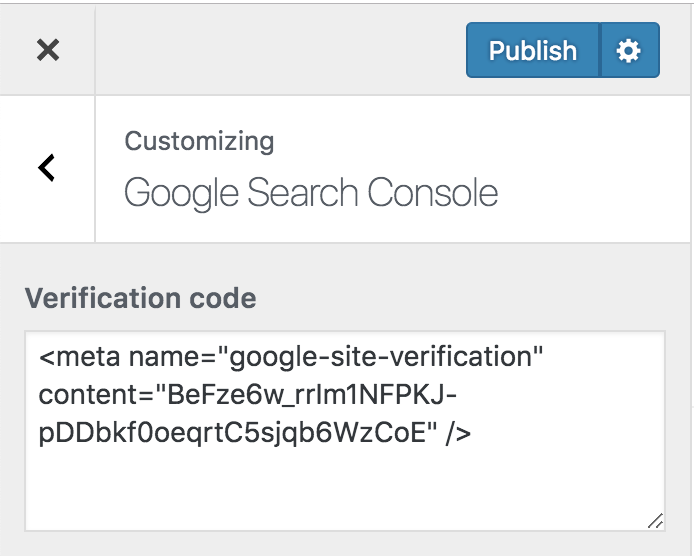
In Search Console, choose the HTML tag verification method and copy the tag. Paste the whole tag or just the code into the Customizer under Google Search Console, publish, and click Verify in Search Console.
Google Search Console was formerly called Google Webmaster Tools.
Installation
- Upload
smntcs-google-webmaster-toolsto the/wp-content/plugins/directory - Activate the plugin through the Plugins menu in WordPress
- Go to https://search.google.com/search-console/welcome
- Provide your URL in the section
URL prefix, e.g. https://example.com, and click onContinue - Now, open the section
HTML tagwithin the sectionOther verification methods - Copy the meta tag, e.g.
<meta name="google-site-verification" content="BeFze6w_rrIm1NFPKJ-pDDbkf0oeqrtC5sjqb6WzCoE" /> - Go to Google Webmaster Tools and paste your verification code
Frequently asked questions
Why do I need Google Webmaster Tools in first place?
Google Webmaster Tools enables web masters to detect indexing issues, e.g. if the Google Bot cannot access the page or if missing pages occur in the search index.
How do I add Google Webmaster Tools to my page?
Go to https://search.google.com/search-console/welcome Provide your URL in the section URL prefix, e.g. https://example.com, and click on Continue Now, open the section HTML tag within the section Other verification methods Copy the meta tag, e.g. Go to Google Webmaster Tools and paste your verification code
Why am I not able to save the verification code?
This issue might be caused by a security plugin. If you use a security plugin, e.g. Wordfence, then disable it to save your verification code and activate it once you’re done.
Changelog
3.8 (2026.09.27)
- Clarify the licence as GPL v2 or later
- Rewrite the plugin description
3.7 (2026.09.26)
- Test up to WordPress 7.1
- Update development dependencies and GitHub Actions
3.6 (2026.08.14)
- Test up to WordPress 7.0
3.5 (2025.04.02)
- Test up to WordPress 6.8
3.4 (2024.10.30)
- Test up to WordPress 6.7
3.3 (2024.10.22)
- Test up to WordPress 6.6
- Migrate Cypress to Playwright
Screenshots


For developers
Is this your plugin? Show off the numbers.
Add a live badge to your site, docs or GitHub README. It updates on its own — no account needed.
Best SMNTCS Google Webmaster Tools alternatives
All google plugins →




FAQ
SMNTCS Google Webmaster Tools: quick answers
Straight answers, pulled from live WordPress.org data.
Live data from WordPress.org · checked Sep 27, 2026
Is SMNTCS Google Webmaster Tools free?
Yes. SMNTCS Google Webmaster Tools is free to download and use from the official WordPress.org plugin directory.
Is SMNTCS Google Webmaster Tools safe to use in 2026?
Yes — SMNTCS Google Webmaster Tools is a safe, well-maintained plugin to use in 2026. It runs on 6K+ sites, is rated 5/5 and was last updated 7 hours ago, and scores 84/100 on our health check.
How many websites use SMNTCS Google Webmaster Tools?
SMNTCS Google Webmaster Tools is active on 6K+ WordPress websites and has been downloaded 165,893 times since it launched in March 2016. It was downloaded 3,019 times in the last 30 days.
Does SMNTCS Google Webmaster Tools work with WordPress 7.1?
Yes. The developer has tested SMNTCS Google Webmaster Tools up to WordPress 7.1.2, the latest release. It requires WordPress 5.5 or newer.
What PHP version does SMNTCS Google Webmaster Tools need?
SMNTCS Google Webmaster Tools requires PHP 7.4 or higher. Most hosts run PHP 8.x today, so it works on any modern WordPress hosting.
When was SMNTCS Google Webmaster Tools last updated?
The latest version, 3.8, was released on September 27, 2026 (7 hours ago).
Who makes SMNTCS Google Webmaster Tools?
SMNTCS Google Webmaster Tools is developed and maintained by Niels Lange.
What are the best alternatives to SMNTCS Google Webmaster Tools?
The most popular alternatives to SMNTCS Google Webmaster Tools are Site Kit by Google (5M+ installs), Google for WooCommerce (800K+ installs) and GA Google Analytics (400K+ installs).
Powered by PageForge
Want thousands of pages that rank like these? Build them in an afternoon.
This directory runs on the same engine as PageForge. Turn any spreadsheet, CSV or API into thousands of fast, SEO-ready WordPress pages — with schema, internal links and AI-written copy baked in.
- CSV, Google Sheets & API data sources
- AI content, schema & internal links per page
- Works with Elementor, Gutenberg, Yoast & Rank Math
- Free on WordPress.org — no credit card


