



Smart Optimizer – Instantly Boost Page Speed with One-Click Optimization
Smart Optimizer is a powerful yet lightweight WordPress optimization plugin that helps improve your website’s performance through various optimization techniques. It provides both basic and advanced optimization…

Consider an alternative
Smart Optimizer shows warning signs in 2026 — compare the alternatives below before installing. It runs on 10+ sites and was last updated 1 year ago, and scores 32/100 on our health check.
- Small user base (10+ active installs)
- Very few reviews so far
- No update in over a year
- Only tested up to WordPress 6.8 (latest is 7.1)
How does it stack up?
Side-by-side on installs, updates, ratings & support



Daily downloads
Download spikes usually follow a new release — each site that auto-updates counts as a download.
Rankings
Where Smart Optimizer stands todayWordPress.org search rankings
Live position in the plugin search, top 100| Keyword | Position |
|---|---|
| cache | >100 |
| lazy load | >100 |
| minification | >100 |
| optimization | >100 |
| performance | >100 |
Version adoption
Share of active sites per release.
About Smart Optimizer
From the official readme · v1.0.1Description
Smart Optimizer is a powerful yet lightweight WordPress optimization plugin that helps improve your website’s performance through various optimization techniques. It provides both basic and advanced optimization features that can be enabled with a single click or controlled individually.
Key Features
Currently Available Features:
-
Basic Optimization:
- HTML Minification – Reduces HTML file size by removing unnecessary whitespace and comments
-
Advanced Optimization:
- Disable WordPress Emojicons – Remove unnecessary emoji-related scripts and styles
- Enable Lazy Load for Images – Automatically add loading=”lazy” to images for better performance
Coming Soon Features:
-
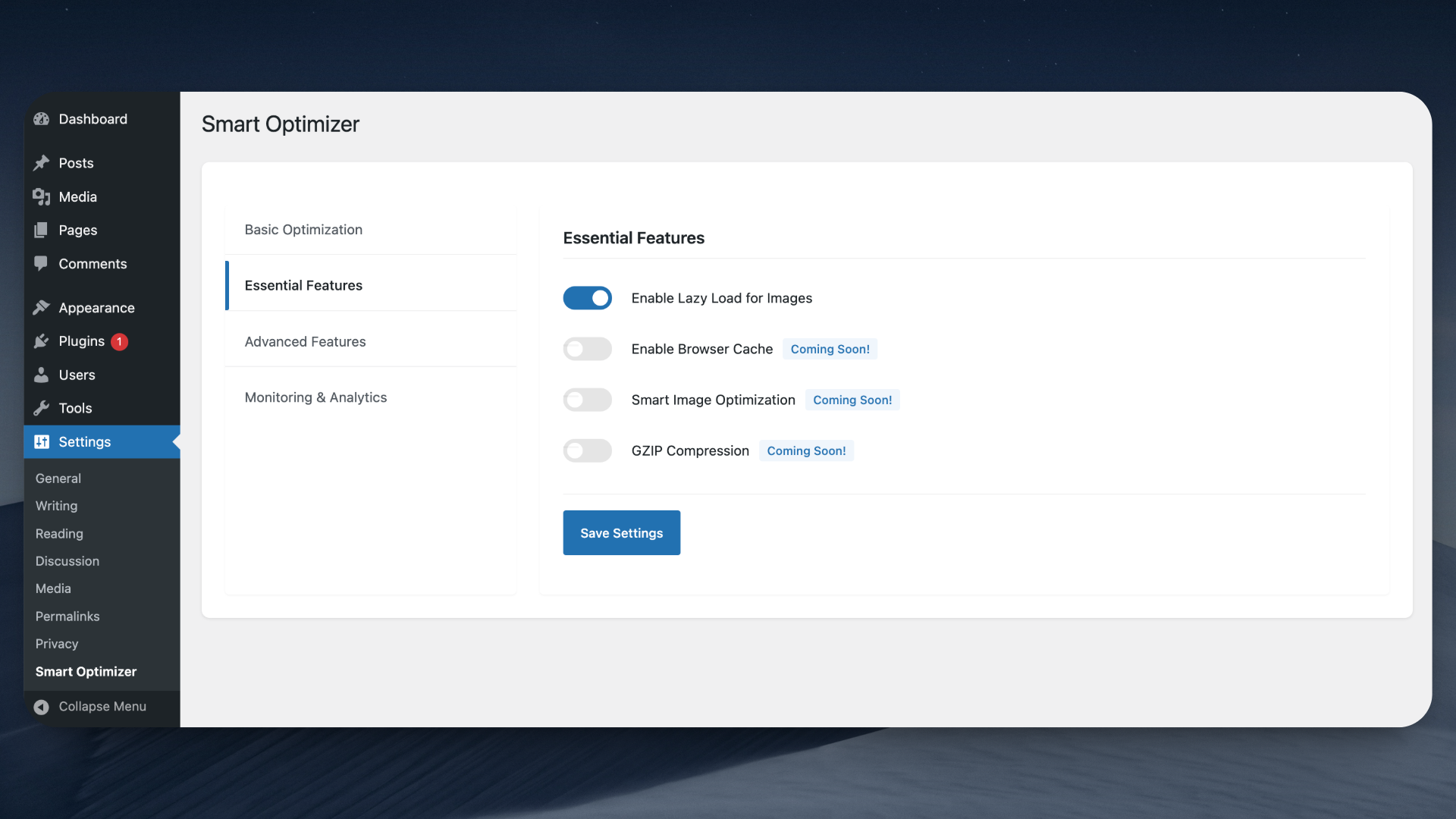
Essential Features:
- Enable Browser Cache – Add appropriate headers for browser caching of static resources
- Smart Image Optimization – Automatically optimize and compress images
- GZIP Compression – Enable GZIP compression for faster page loads
-
Advanced Features:
- CSS and JS Minification – Compress CSS and JavaScript files for better performance
- Database Optimization – Clean and optimize your WordPress database
- Preload Critical Resources – Preload important resources for faster rendering
-
Monitoring & Analytics:
- Performance Analytics Dashboard – Get insights into your site’s performance
- Speed Test Tools – Test your site’s speed directly from your dashboard
Who Should Use Smart Optimizer?
- Website owners looking to improve page load times
- Developers seeking a well-structured optimization solution
- Anyone concerned about their WordPress site’s performance
Check out our other Plugins
Enhance your WordPress site with our other powerful plugins:
- Random Quote – Display daily inspirational quotes from ZenQuotes API with Gutenberg block and shortcode support.
- Smart Password Protect – Secure your WordPress site with password protection and IP whitelisting.
- Redirect After Logout – Redirect users to a custom page after logging out for enhanced user experience.
- Access Defender – Advanced security plugin to protect your WordPress site from unauthorized access and malicious attacks.
- Contributors Gallery – Showcase your WordPress contributors in a beautiful and customizable gallery layout.
- Product Spotlight Badge – Highlight your WooCommerce products with eye-catching badges to boost sales.
Additional Information
- Follow the developer on LinkedIn
- For support, feature requests, or bug reports, please visit the plugin’s support forum
Privacy Policy
Smart Optimizer does not collect any personal data. It operates entirely within your WordPress installation.
Installation
Via WordPress Repository (Recommended):
- Log in to your WordPress Dashboard
- Navigate to Plugins > Add New
- Search for “Smart Optimizer”
- Click “Install Now” and wait for the installation to complete
- Click “Activate” to enable the plugin
- Navigate to Settings > Smart Optimizer to configure the plugin
Manual Installation
- Download the plugin zip file
- Log in to your WordPress dashboard
- Navigate to Plugins > Add New > Upload Plugin
- Choose the downloaded zip file and click “Install Now”
- After installation, click “Activate”
- Configure the plugin settings under Settings > Smart Optimizer
How to Use
Basic Optimization:
1. Go to Settings > Smart Optimizer
2. Toggle the “Enable Basic Optimization” switch
3. Save changes
4. Your site will now use minified HTML
Advanced Optimization:
1. Navigate to the Essential Features and Advanced Features sections
2. Choose which optimizations to enable:
– Enable Lazy Load for Images
– Disable WordPress Emojicons
3. Save your settings
4. Test your site to ensure everything works as expected
Note: Several advanced features are currently in development and will be available in upcoming updates.
Frequently asked questions
Will this plugin slow down my site?
No, Smart Optimizer is designed to be lightweight and efficient. All optimizations are performed with minimal server impact and are cached when possible.
Is this plugin compatible with caching plugins?
Yes, Smart Optimizer works well with most popular caching plugins. We recommend testing the optimization settings with your caching plugin enabled.
Will this plugin break my site?
No, the plugin is designed to be safe and includes fallback mechanisms. However, we recommend testing on a staging environment first and backing up your site before enabling optimization features.
How do I know if the optimizations are working?
You can use tools like Google PageSpeed Insights, GTmetrix, or WebPageTest to measure your site’s performance before and after enabling optimizations.
When will the “Coming Soon” features be available?
We’re actively working on these features and plan to release them in upcoming updates. Follow our changelog for the latest feature additions.
Can I disable specific optimizations?
Yes, all optimization features can be controlled individually through the plugin settings page.
Changelog
This update enables all optimization features by default during activation and improves code quality.
1.0.1
- Enhancement: Default settings now enable all optimization features on plugin activation
- Optimization: Centralized default settings to improve code consistency and maintainability
- Code Improvement: Reduced code duplication across the plugin
1.0.0
- Initial release
- Basic optimization features (HTML minification)
- Advanced optimization options (Disable Emojicons, Lazy Load for Images)
- Modern object-oriented architecture implementation
- Full WordPress coding standards compliance
Screenshots
For developers
Is this your plugin? Show off the numbers.
Add a live badge to your site, docs or GitHub README. It updates on its own — no account needed.
Best Smart Optimizer alternatives
All cache plugins →





FAQ
Smart Optimizer: quick answers
Straight answers, pulled from live WordPress.org data.
Live data from WordPress.org · checked Sep 30, 2026
Is Smart Optimizer free?
Yes. Smart Optimizer is free to download and use from the official WordPress.org plugin directory.
Is Smart Optimizer safe to use in 2026?
Smart Optimizer shows warning signs in 2026 — compare the alternatives below before installing. It runs on 10+ sites and was last updated 1 year ago, and scores 32/100 on our health check.
How many websites use Smart Optimizer?
Smart Optimizer is active on 10+ WordPress websites and has been downloaded 618 times since it launched in May 2025. It was downloaded 44 times in the last 30 days.
Does Smart Optimizer work with WordPress 7.1?
Smart Optimizer is officially tested up to WordPress 6.8.10, while the latest release is 7.1.2. It may still work, but try it on a staging site first.
What PHP version does Smart Optimizer need?
Smart Optimizer requires PHP 7.4 or higher. Most hosts run PHP 8.x today, so it works on any modern WordPress hosting.
When was Smart Optimizer last updated?
The latest version, 1.0.1, was released on May 17, 2025 (1 year ago).
Who makes Smart Optimizer?
Smart Optimizer is developed and maintained by Huzaifa Al Mesbah.
What are the best alternatives to Smart Optimizer?
The most popular alternatives to Smart Optimizer are WP Super Cache (1M+ installs), WP Fastest Cache (1M+ installs) and WP-Optimize (1M+ installs).
Powered by PageForge
Want thousands of pages that rank like these? Build them in an afternoon.
This directory runs on the same engine as PageForge. Turn any spreadsheet, CSV or API into thousands of fast, SEO-ready WordPress pages — with schema, internal links and AI-written copy baked in.
- CSV, Google Sheets & API data sources
- AI content, schema & internal links per page
- Works with Elementor, Gutenberg, Yoast & Rank Math
- Free on WordPress.org — no credit card


