



External Links Manager – Open new window in a new tab + nofollow, noreferrer
Manage external links: new tabs, add rel attribute nofollow, noopener, noreferrer, sponsored, show icon on/off. SEO, secure, XHTML Strict compliant.

Use with caution
External Links Manager works, but test it on a staging site before relying on it in 2026. It runs on 50+ sites, is rated 5/5 and was last updated 4 months ago, and scores 60/100 on our health check.
- Small user base (50+ active installs)
- Very few reviews so far
How does it stack up?
Side-by-side on installs, updates, ratings & support



Daily downloads
Download spikes usually follow a new release — each site that auto-updates counts as a download.
Rankings
Where External Links Manager stands todayWordPress.org search rankings
Live position in the plugin search, top 100| Keyword | Position |
|---|---|
| external links | #17 |
| new tab | #20 |
| new window | #7 |
| nofollow | #14 |
| noopener | #8 |
Version adoption
Share of active sites per release.
Rating breakdown
★★★★★★★★★★ 5 from 1 reviews
About External Links Manager
From the official readme · v1.3.4Description
Take full control of your WordPress site’s links with Smart External Links Manager!
The professional solution for managing external links on modern WordPress sites. Reliably handles dynamic content (AJAX, infinite scroll) and gives you complete control over SEO and style.
This powerful plugin ensures all external links open in a new browser window or tab, enhancing user experience and keeping visitors on your site longer. Built with SEO best practices and XHTML Strict compliance in mind, it offers a seamless integration for both users and search engines.
Its highly configurable settings panel allows you to precisely tailor link behavior to your needs. The core mechanism uses JavaScript to open links, the preferred method for XHTML 1.0 Strict compliance, avoiding target attribute modifications that could invalidate your markup. If JavaScript is disabled, links gracefully open in the current window.
Ideal for blogs, affiliate sites, magazines, and business websites that rely heavily on external links.
Who is this plugin for?
- Bloggers and Content Creators who want to improve user engagement.
- Affiliate Marketers who need to manage rel=”sponsored” and “nofollow” attributes correctly.
- Website owners using modern themes with infinite scroll or AJAX-loaded content.
- Developers who need a reliable, XHTML Strict compliant, and lightweight solution for their clients.
- Anyone who wants a simple, set-and-forget tool to manage external links professionally.
Key Features Include:
- Automatic New Tab for External Links: Improve site engagement by default.
- Optional Link Icon: Visually indicate links that open in a new tab with a customizable Dashicon or symbol (e.g., 🔗, ↗).
- Custom Styling via CSS Class: Optionally add a specific CSS class to modified links, giving you a clean hook to style them exactly as you want from your theme.
- Link Tooltip: Option to display a customizable text tooltip on mouse hover for all modified links.
- XHTML Strict Compliant: Uses JavaScript for
window.open(), preserving markup validity. - Security First: Automatically adds
rel="noopener"to all modified links. - SEO Enhancements:
- UGC Ready: Works seamlessly with WordPress’s default rel=”ugc” on comment links, ensuring best practices for user-generated content.
- Option to add
rel="noreferrer"for enhanced privacy. - Option to add
rel="nofollow"for specific link types. - Option to add
rel="sponsored"for paid or affiliate links.
- Granular Control with Lists:
- Force List: Specify URLs or patterns (e.g., internal PDFs, specific pages) that should always open in a new tab.
- Ignore List: Define URLs or patterns that should never open in a new tab, even if external (highest priority).
- User-Friendly Settings: Intuitive interface to manage all options, including dynamic lists.
- Lightweight & Efficient: Designed to be performant and not slow down your site. Dynamically processes new links added via AJAX.
- Internationalization Ready: Easily translatable into any language.
Why Choose Smart External Links Manager?
- User Experience: Keep users on your site while allowing them to explore external resources.
- SEO Friendly: Proper use of
relattributes (noopener,noreferrer,nofollow,sponsored) without alteringhreffor search engines. - Compliance: Adheres to XHTML Strict standards for modern web development.
- Flexibility: Extensive configuration options to suit any website’s needs.
- Developer Support: From the creator of NewCodeByte, with a commitment to quality and updates.
Future Enhancements Planned:
* Excluding specific links via CSS selectors.
* Advanced management for internal link behavior.
* And much more!
Support
If you need help or have a question, the best place to ask is the support forum on WordPress.org (once the plugin is listed).
You can also visit NewCodeByte for more information.
Found this plugin useful? Please consider leaving a ★★★★★ review!
Want to support future development? Buy me a coffee ☕!
Installation
- Upload the
smart-external-links-managerfolder to the/wp-content/plugins/directory. - Activate the plugin through the ‘Plugins’ menu in WordPress.
- Configure the settings under Settings > Links Manager.
Frequently asked questions
Does this affect SEO?
This plugin is designed to be SEO-friendly. By using JavaScript to open links in a new tab and correctly managing rel attributes (like noopener, noreferrer, nofollow, sponsored), it doesn’t negatively impact SEO. The href attribute itself is not modified for search engine crawlers. Opening links in a new tab is primarily a user experience choice.
Why use JavaScript instead of target=”_blank”?
Using window.open() via JavaScript is the recommended method for XHTML 1.0 Strict compliance. Directly adding target="_blank" can invalidate strict markup. This JavaScript approach also allows for dynamic addition of window features like noopener and noreferrer effectively.
How does this plugin handle WordPress external links?
It automatically identifies external links on your WordPress website and uses JavaScript to open them in a new tab or window. The plugin also manages important SEO attributes like rel=”noopener”, “nofollow”, and “noreferrer”, giving you full control.
Can I customize which links open in a new tab?
Yes, you can use the Force List and Ignore List to specify URLs or URL patterns to always or never open in a new tab.
Can I choose a different icon for external links?
Absolutely! From the settings page, you can enable the “Display External Link Icon” option. Once enabled, a new dropdown menu will appear, allowing you to choose from a wide variety of Dashicons and modern Unicode symbols (like ↗ or 🔗) to best match your site’s style.
How does the plugin handle links in comments (UGC)?
The plugin is fully compatible with WordPress’s handling of User-Generated Content (UGC). By default, WordPress adds rel=”nofollow ugc”to links in comments. Our plugin respects this and applies its own rules on top, such as opening these links in a new tab. If you enable the “Add nofollow” option in the settings, it will ensure nofollow is present, harmonizing perfectly with WordPress’s SEO best practices.
Is this plugin compatible with caching and minification plugins?
Yes, it is lightweight and works well alongside most caching and optimization plugins.
What is the priority of Force/Ignore lists?
Ignore List: Links matching patterns here will always open in the same tab. Force List: If not ignored, links matching patterns here will always open in a new tab. Default Behavior: If not in ignore or force lists, external links open in a new tab, internal links in the same tab.
Changelog
1.3.4
- New Feature: Added a “Reset to Default Settings” button on the settings page. This allows users to safely revert all options to their original configuration with a single click, improving usability and making troubleshooting easier.
- Tweak: The new reset button is styled in red to clearly distinguish it as a potentially destructive action, following WordPress UI conventions.
1.3.3
- New Feature: Added an option to display a customizable text tooltip on mouse hover for all modified links, improving user experience and accessibility.
1.3.2
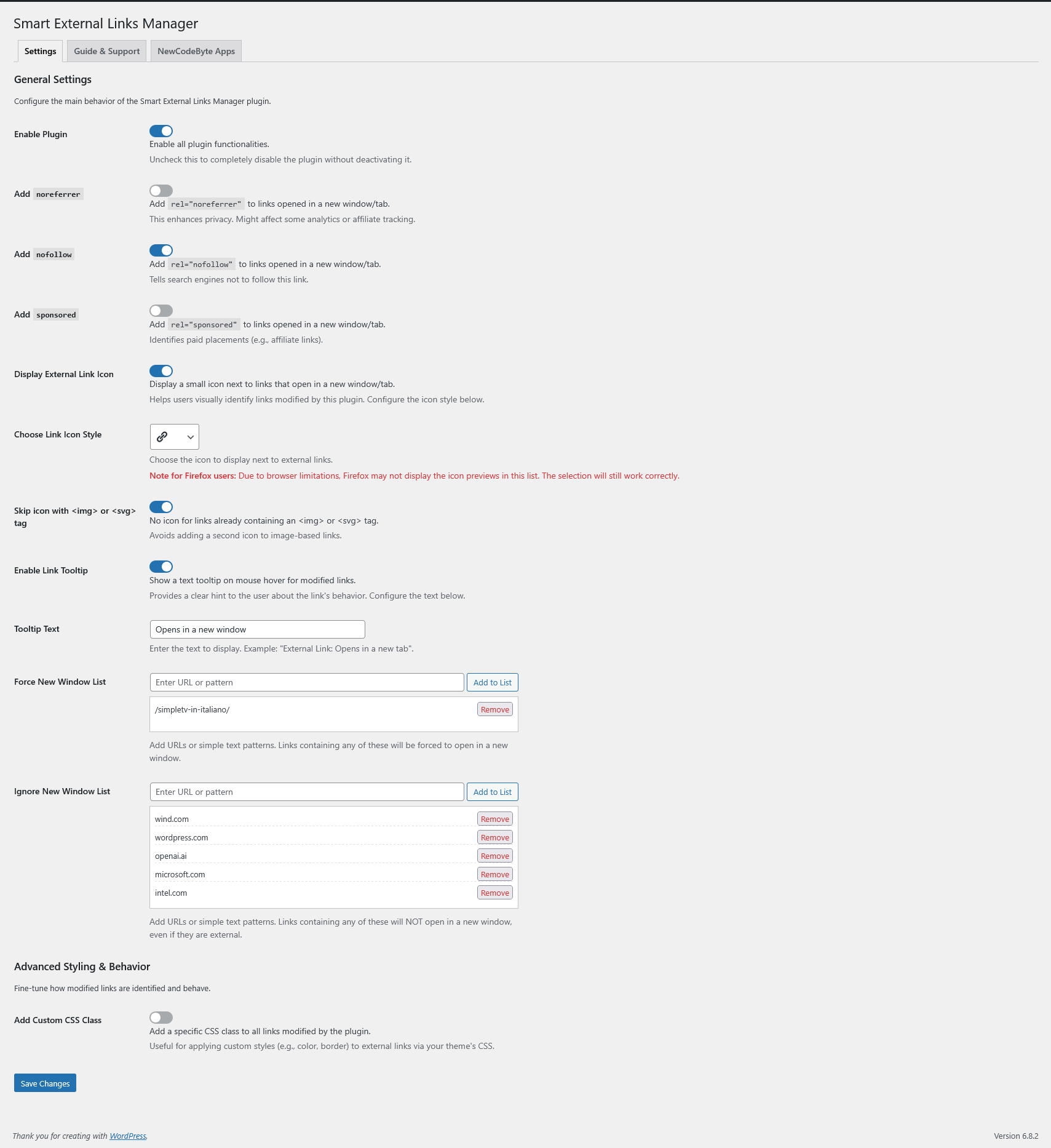
- New Feature: The admin settings page has been completely reorganized into a modern tabbed interface, separating Settings, Guide & Support, and a new “NewCodeByte Apps” section for a cleaner and more intuitive user experience.
- Enhancement: The “Guide & Support” content has been moved to its own dedicated tab, decluttering the main settings screen.
- Enhancement: Added a new “NewCodeByte Apps” tab to showcase other available plugins from the author.
- Dev: Corrected the text domain for translatable strings in the new “Apps” tab to ensure the plugin is self-contained and does not rely on other plugins for translations.
- Dev: Updated internal plugin version constant to ensure proper cache-busting for CSS and JavaScript assets on update.
1.3.1
- Enhancement: The admin settings page has been modernized. All checkboxes have been replaced with a more intuitive and compact toggle switch interface.
- Enhancement: Improved user experience for Firefox. While browser limitations prevent icon previews in the selection list, a clear notice is now displayed to inform the user.
- Dev: Minor code refinements for better stability and future compatibility.
1.3
- New: Added an option to apply a custom CSS class to all modified links. This provides a standard-compliant way for users to add their own styles (e.g., color, borders) via their theme’s CSS.
- Enhancement: The admin settings page is now more interactive. The new Custom CSS Class text field is conditionally displayed only when its parent option is enabled.
- Enhancement: The “How This Plugin Works” guide in the settings page has been updated to better explain the plugin’s advanced features, including its AJAX-ready capabilities.
- Dev: Refactored the admin JavaScript to use a reusable function for handling conditional option visibility.
- Dev: Updated the frontend JavaScript to cleanly add and remove the new custom CSS class during link processing.
1.2
- New: Customizable Link Icons! You can now choose from a wide variety of Dashicons or modern Unicode symbols (like ↗, ↪, 🔗) to perfectly match your site’s design. This feature is powered by a flexible JSON-based icon library.
- New: Interactive URL/Pattern Lists. The “Force” and “Ignore” lists in the admin settings are now fully interactive. Easily add or remove entries without reloading the page for a much faster workflow.
- Enhancement: Improved Admin Interface. The settings page has been reorganized for better clarity. The icon selection control is now dynamically shown or hidden based on the “Display Icon” setting.
- Enhancement: Better Support & Guidance. The “Help & Support” section has been completely revamped with clearer explanations, a detailed guide on UGC link handling, and a new FAQ section in the readme file.
- Dev: Code Refinements & i18n. Refactored and improved the rendering of admin option fields. All new strings are fully localizable.
Screenshots


For developers
Is this your plugin? Show off the numbers.
Add a live badge to your site, docs or GitHub README. It updates on its own — no account needed.
Best External Links Manager alternatives
All external links plugins →




FAQ
External Links Manager: quick answers
Straight answers, pulled from live WordPress.org data.
Live data from WordPress.org · checked Oct 2, 2026
Is External Links Manager free?
Yes. External Links Manager is free to download and use from the official WordPress.org plugin directory.
Is External Links Manager safe to use in 2026?
External Links Manager works, but test it on a staging site before relying on it in 2026. It runs on 50+ sites, is rated 5/5 and was last updated 4 months ago, and scores 60/100 on our health check.
How many websites use External Links Manager?
External Links Manager is active on 50+ WordPress websites and has been downloaded 1,499 times since it launched in May 2025. It was downloaded 93 times in the last 30 days.
Does External Links Manager work with WordPress 7.1?
External Links Manager is officially tested up to WordPress 7.0.6, while the latest release is 7.1.2. It may still work, but try it on a staging site first.
What PHP version does External Links Manager need?
External Links Manager requires PHP 7.0 or higher. Most hosts run PHP 8.x today, so it works on any modern WordPress hosting.
When was External Links Manager last updated?
The latest version, 1.3.4, was released on May 25, 2026 (4 months ago).
Who makes External Links Manager?
External Links Manager is developed and maintained by NewCodeByte.
What are the best alternatives to External Links Manager?
The most popular alternatives to External Links Manager are External Links (90K+ installs), External Links in New Windo… (30K+ installs) and External Links (8K+ installs).
Powered by PageForge
Want thousands of pages that rank like these? Build them in an afternoon.
This directory runs on the same engine as PageForge. Turn any spreadsheet, CSV or API into thousands of fast, SEO-ready WordPress pages — with schema, internal links and AI-written copy baked in.
- CSV, Google Sheets & API data sources
- AI content, schema & internal links per page
- Works with Elementor, Gutenberg, Yoast & Rank Math
- Free on WordPress.org — no credit card


