



External Links Overview
Analyze, manage, and monitor all external links on your WordPress site. ---

Consider an alternative
External Links Overview shows warning signs in 2026 — compare the alternatives below before installing. It runs on 1K+ sites, is rated 5/5 and was last updated 1 year ago, and scores 32/100 on our health check.
- Very few reviews so far
- No update in over a year
- Only tested up to WordPress 6.9 (latest is 7.1)
How does it stack up?
Side-by-side on installs, updates, ratings & support



Daily downloads
Download spikes usually follow a new release — each site that auto-updates counts as a download.
Rankings
Where External Links Overview stands todayWordPress.org search rankings
Live position in the plugin search, top 100| Keyword | Position |
|---|---|
| broken links | #39 |
| external links | #8 |
| link checker | #30 |
| outbound links | #7 |
| seo | >100 |
Version adoption
Share of active sites per release.
Rating breakdown
★★★★★★★★★★ 5 from 3 reviews
About External Links Overview
From the official readme · v1.3.0Description
The “External Links Overview” plugin scans your WordPress posts and pages for outgoing external links and presents them in a searchable, filterable, and sortable table. It helps you optimize your outbound link profile and identify broken or potentially harmful links.
All plugin functions, options, and database entries use the prefix seokelo_ to prevent conflicts with other plugins.
👉 External Links Overview Plugin Homepage on seo-kreativ.de
💬 Get Support on WordPress.org
Features
✅ Collects and analyzes external links from posts and pages
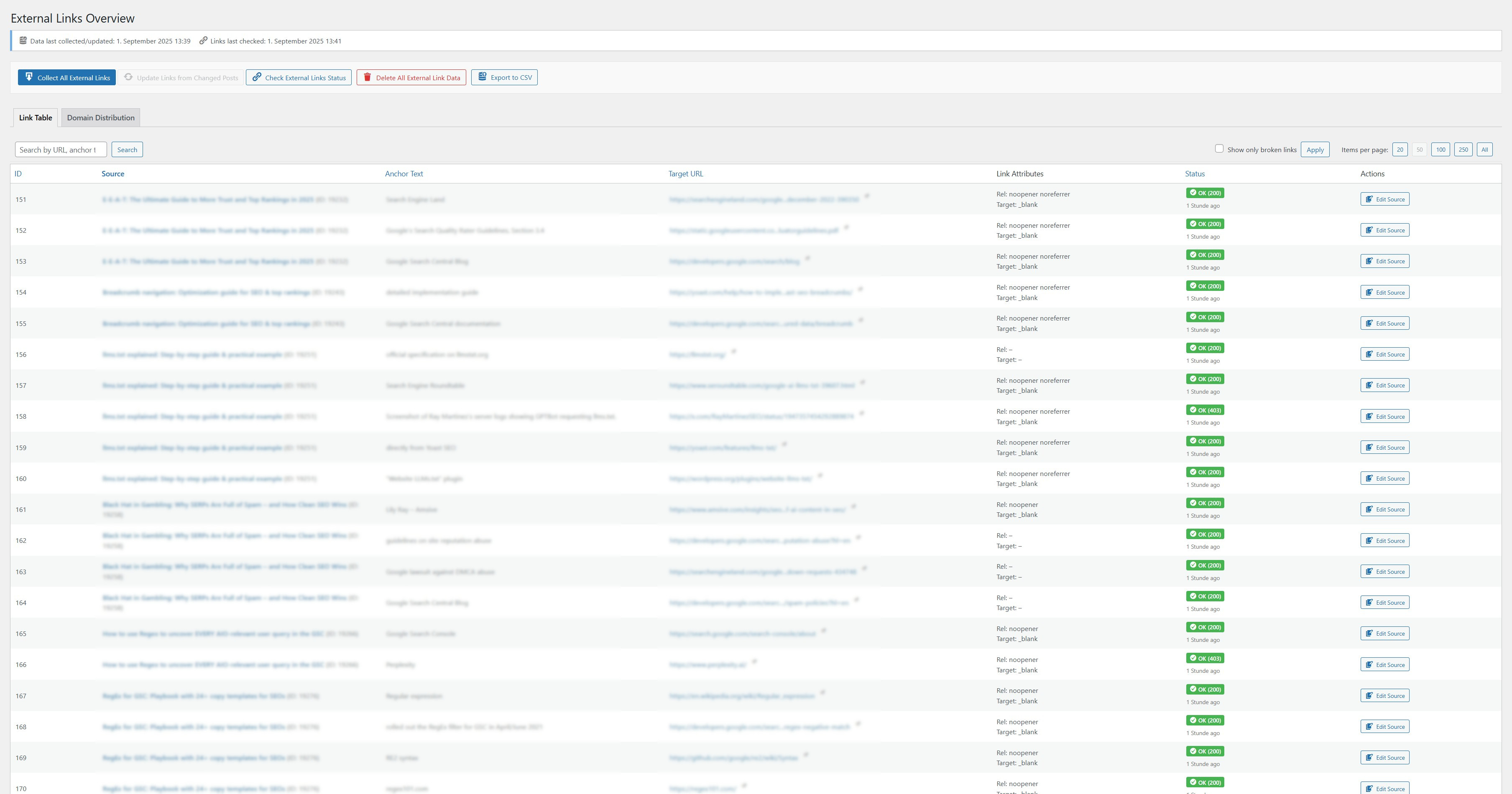
✅ Displays a detailed link table with sorting, filtering (e.g. broken links), and search
✅ Verifies the HTTP status of external links (e.g. 404, 301, timeout)
✅ Shows rel and target attributes of each link
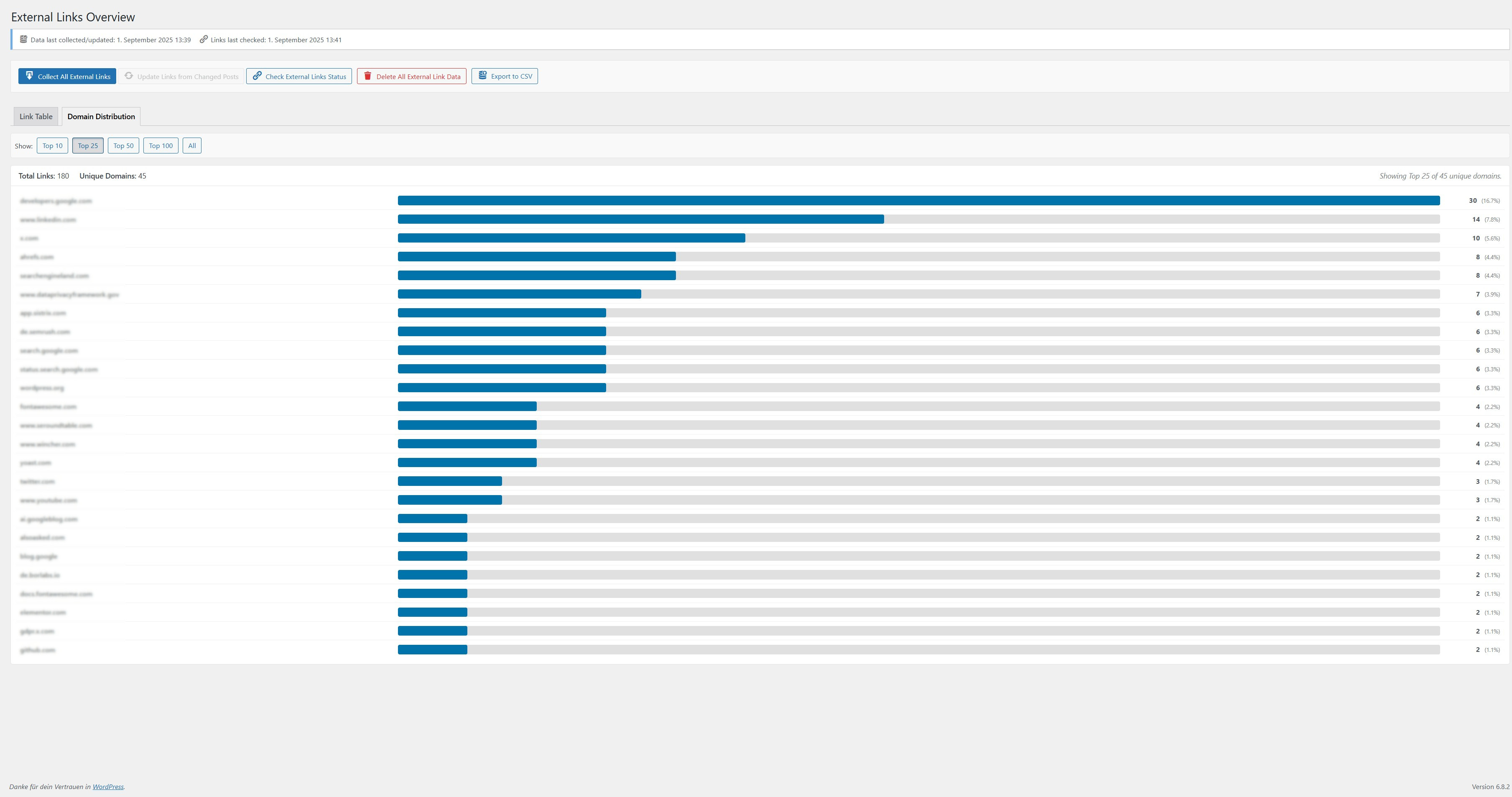
✅ Tracks domain distribution: see which domains you link to most frequently
✅ CSV export of all link data
✅ Dashboard widget showing a summary of broken links
✅ Uses prefix seokelo_ / SEOKELO_ for all functions, options, and database entries
✅ Rescans posts after updates for up-to-date link data
✅ Clean uninstall: removes plugin data when deleted via WordPress admin
Usage
- Go to External Links → Collect All External Links to start the initial scan.
- Use the Link Table tab to view, filter, and sort all collected links.
- Click Check External Links Status to validate HTTP status codes.
- Visit the Domain Distribution tab to analyze your outbound domain profile.
- Export your data using the Export CSV button.
License
This plugin is licensed under the GPLv2 or later.
See https://www.gnu.org/licenses/gpl-2.0.html
Developer Notes
Hooks and filters will be documented in future releases.
The plugin uses seokelo_ as a unique function prefix throughout.
Installation
- Upload the entire
external-links-overviewfolder to the/wp-content/plugins/directory. - Activate the plugin via the Plugins menu in WordPress.
→ This creates or updates the database tablewp_seokelo_external_links. - Access the plugin via the “External Links” menu item in your WordPress admin sidebar.
Frequently asked questions
Does this plugin modify links on my site?
No. It only analyzes and displays existing external links. Your content remains unchanged.
Will it slow down my site?
No. The plugin only runs when triggered manually via the admin panel. It does not affect front-end performance.
Is it safe to uninstall the plugin?
Yes. If you delete the plugin via the WordPress admin interface, all associated data (database tables and options) will be removed cleanly.
Changelog
1.3.0
- Improvement: The link table now displays
relandtargetattributes in a combined “Link Attributes” column for better space management. - Improvement: The Domain Distribution view and the overall UI have been enhanced for a better user experience.
- Improvement: Database queries and data handling have been optimized for better performance.
- Readme: Updated description, features, and usage instructions.
1.2.1
- Fix: Improved responsive table display in admin area to prevent column titles from overlapping content on mobile views.
1.2.0
- Feature: Added a new „Target“ column to the admin link table, displaying the target attribute of the link (e.g., _blank, _self).
- Feature: Made the new „Target“ column sortable in the admin link table.
- Feature: Ensured link_target attribute is included in the CSV export.
- Improvement: Updated CSS for table column layout to include the new „Target“ column.
- Readme: Updated stable tag, version information, and feature descriptions to reflect the new „Target“ column.
Screenshots
For developers
Is this your plugin? Show off the numbers.
Add a live badge to your site, docs or GitHub README. It updates on its own — no account needed.
Best External Links Overview alternatives
All broken links plugins →





FAQ
External Links Overview: quick answers
Straight answers, pulled from live WordPress.org data.
Live data from WordPress.org · checked Sep 30, 2026
Is External Links Overview free?
Yes. External Links Overview is free to download and use from the official WordPress.org plugin directory.
Is External Links Overview safe to use in 2026?
External Links Overview shows warning signs in 2026 — compare the alternatives below before installing. It runs on 1K+ sites, is rated 5/5 and was last updated 1 year ago, and scores 32/100 on our health check.
How many websites use External Links Overview?
External Links Overview is active on 1K+ WordPress websites and has been downloaded 5,002 times since it launched in May 2025. It was downloaded 384 times in the last 30 days.
Does External Links Overview work with WordPress 7.1?
External Links Overview is officially tested up to WordPress 6.9.9, while the latest release is 7.1.2. It may still work, but try it on a staging site first.
What PHP version does External Links Overview need?
External Links Overview requires PHP 7.0 or higher. Most hosts run PHP 8.x today, so it works on any modern WordPress hosting.
When was External Links Overview last updated?
The latest version, 1.3.0, was released on September 1, 2025 (1 year ago).
Who makes External Links Overview?
External Links Overview is developed and maintained by Christian Ott.
What are the best alternatives to External Links Overview?
The most popular alternatives to External Links Overview are Broken Link Checker (500K+ installs), Broken Link Checker by AIOS… (300K+ installs) and 404 to 301 (100K+ installs).
Powered by PageForge
Want thousands of pages that rank like these? Build them in an afternoon.
This directory runs on the same engine as PageForge. Turn any spreadsheet, CSV or API into thousands of fast, SEO-ready WordPress pages — with schema, internal links and AI-written copy baked in.
- CSV, Google Sheets & API data sources
- AI content, schema & internal links per page
- Works with Elementor, Gutenberg, Yoast & Rank Math
- Free on WordPress.org — no credit card


