



Leaving Notice Popup For External Links – nofollow, noopener & New Tab
Show an exit popup or leaving notice when visitors click external links. Add nofollow, noopener, noreferrer & more rel attributes. Add icons.

Solid choice
Leaving Notice Popup For Extern… is a solid plugin choice in 2026, with a few things worth checking first. It runs on 300+ sites, is rated 5/5 and was last updated 1 month ago, and scores 76/100 on our health check.
- Tested with the latest WordPress (7.1)
- Small user base (300+ active installs)
- Very few reviews so far
How does it stack up?
Side-by-side on installs, updates, ratings & support



Daily downloads
Download spikes usually follow a new release — each site that auto-updates counts as a download.
Rankings
Where Leaving Notice Popup For Ex… stands todayWordPress.org search rankings
Live position in the plugin search, top 100| Keyword | Position |
|---|---|
| exit popup | #20 |
| exit-intent | #25 |
| external links | #6 |
| nofollow | #7 |
| noopener | #2 |
Version adoption
Share of active sites per release.
Rating breakdown
★★★★★★★★★★ 5 from 3 reviews
About Leaving Notice Popup For External Links
From the official readme · v1.4.3Description
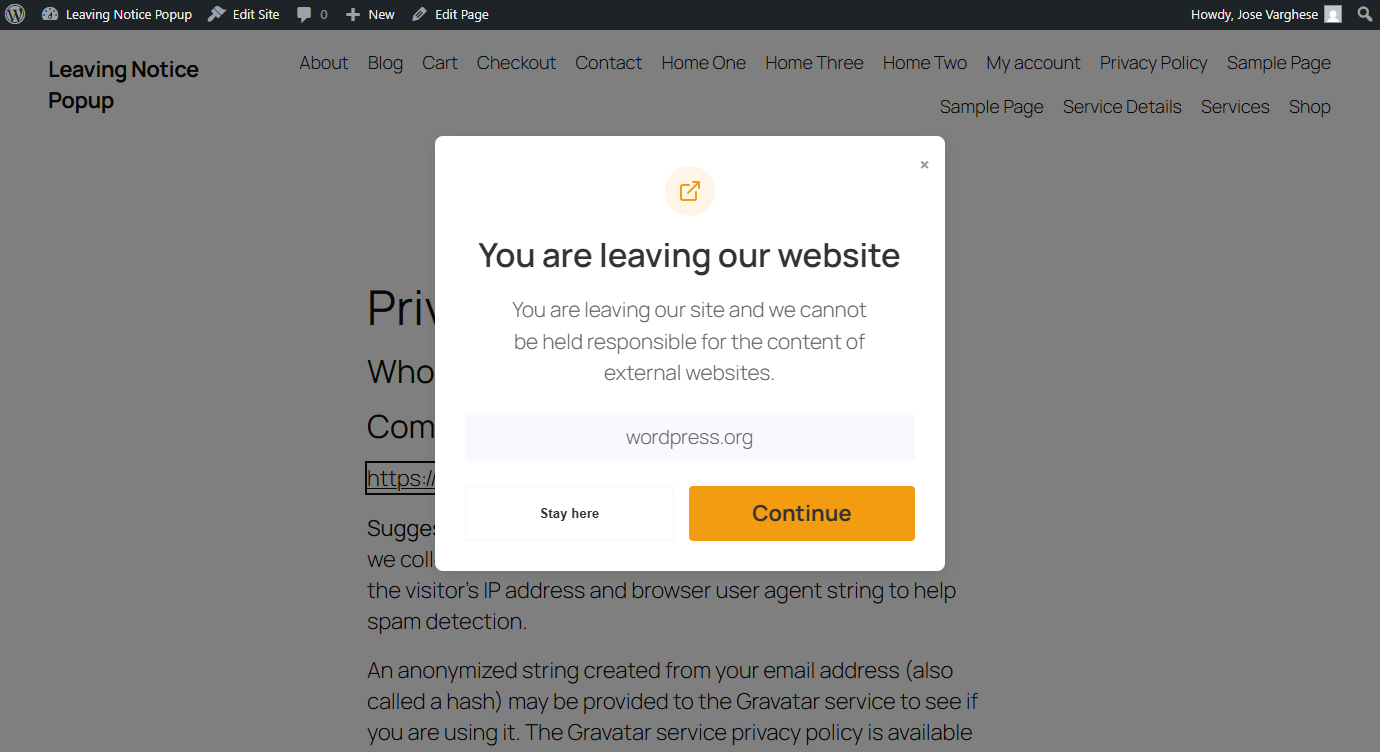
Leaving Notice Popup for External Links is a lightweight WordPress plugin that displays a customizable exit popup (also known as a leaving notice, exit confirmation dialog, or outbound link warning) whenever a visitor clicks an external link, giving them a moment to continue or stay on your site.
Beyond the leaving notice, the plugin lets you fully manage your outbound links: automatically apply rel attributes like nofollow, noopener, noreferrer, sponsored, ugc, and external; display SVG icons next to external links; choose whether the Continue button opens links in a new tab or the same tab; and whitelist trusted domains so they bypass the popup entirely.
It is an essential tool for affiliate marketers, government sites, educational portals, and any site that needs an exit popup, exit intent modal, outbound link interstitial, or legal disclaimer before visitors leave for third-party content.
Why use this plugin?
* Exit Popup / Leaving Notice: Show a fully customizable exit confirmation modal (exit popup, exit intent dialog, or outbound link warning) whenever a visitor clicks an outbound link, protecting your traffic and reducing unintended exits.
* nofollow, noopener & More: Automatically add rel="nofollow", rel="noopener", rel="noreferrer", rel="sponsored", rel="ugc", or rel="external" attributes to external links for better SEO control and security.
* Open in New Tab Control: Choose whether the Continue button opens external links in a new tab or the same tab.
* External Link Icons: Display one of 5 built-in SVG icons next to outbound links, with left/right positioning and an option to skip icons on linked images.
* Smart Domain & URL Whitelist: Exclude trusted affiliate partners or sister sites by domain, exact URL, or wildcard pattern (e.g. https://www.facebook.com/sharer/*); they will open without triggering the popup.
* CSS Class Exclusion: Skip the popup and rel attribute processing entirely for links that carry specific CSS classes.
* Advanced Page Filtering: Restrict the leaving notice to specific Page IDs, or enable it conditionally on archives, categories, and the home page using built-in filters.
Key Features
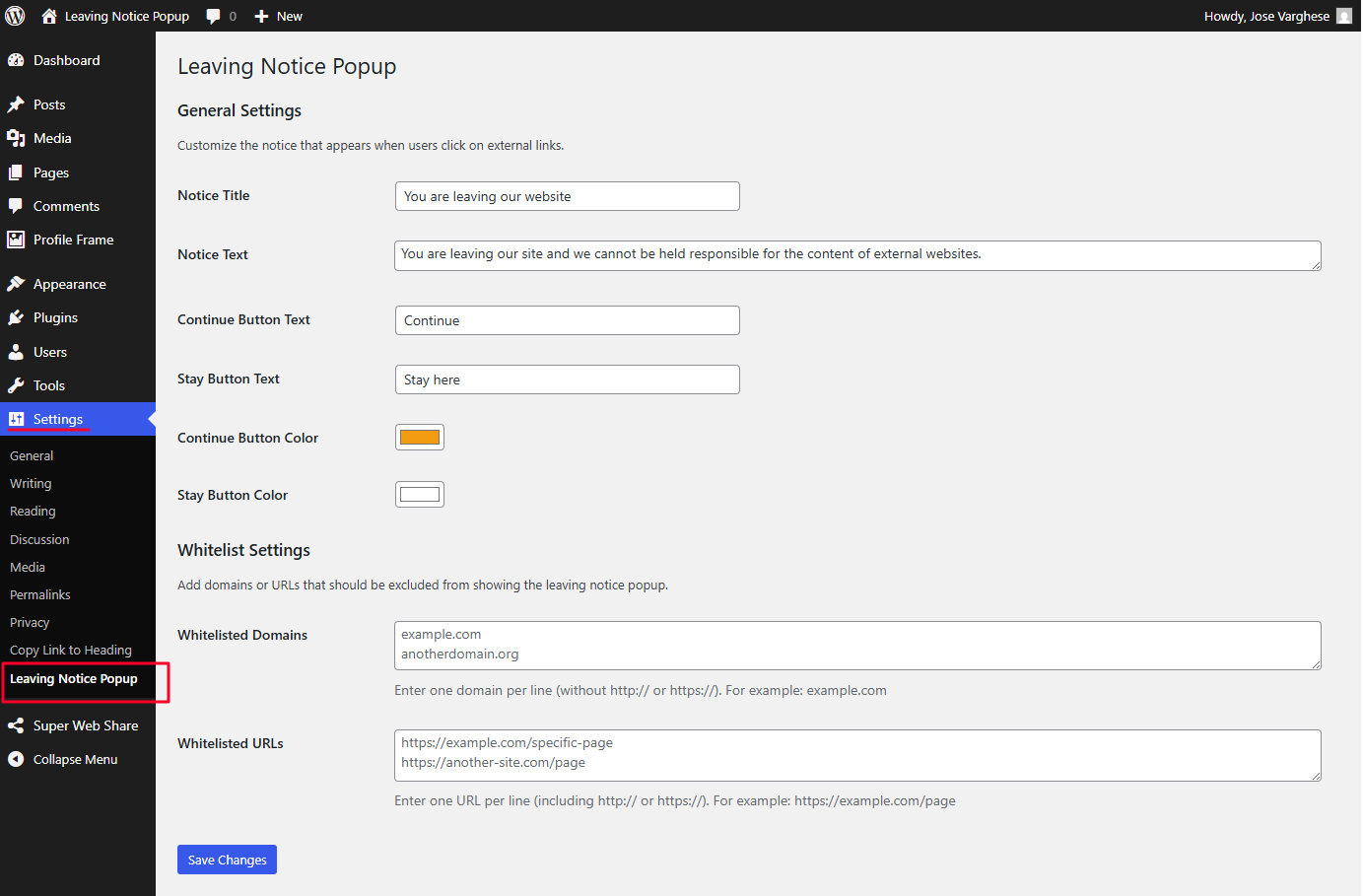
- Customizable Popup: Change the title, message, and button text to match your brand
- Button Color Control: Choose custom colors for both the “Continue” and “Stay” buttons
- rel Attributes: Add nofollow, noopener, noreferrer, sponsored, ugc, or external to outbound links
- New Tab Toggle: Control whether Continue opens the external link in a new tab or same tab
- SVG Link Icons: Show one of 5 icons beside external links, positioned left or right
- Domain Whitelist: Exclude specific domains from triggering the notice
- URL Whitelist with Wildcard Support: Exclude specific URLs or wildcard patterns (e.g.
https://example.com/share/*) from triggering the notice - CSS Class Exclusion: Skip links that carry a specified CSS class
- Page-Level Filtering: Show the popup only on chosen pages, posts, archives, or categories
- Widget Support: rel attribute processing also applies to widget text areas
- Responsive Design: Works perfectly on all devices and screen sizes
- Accessible: Built with accessibility best practices
- Lightweight: Minimal impact on page load time with deferred script loading
- Easy Setup: No coding required, just activate and configure
Use Cases
- Show an exit popup or exit confirmation dialog when visitors click outbound links
- Add nofollow to external links to protect SEO link equity
- Add noopener and noreferrer to external links for security
- Mark affiliate links with rel=”sponsored” per Google’s guidelines
- Display an external link icon to signal outbound navigation
- Provide a legal disclaimer before visitors leave for third-party sites
- Whitelist trusted domains so affiliate partners open without interruption
- Meet legal or compliance requirements for certain jurisdictions
Privacy
This plugin does not collect or store any personal data from your visitors.
My other small free plugins projects on WordPress
- Super Web Share – For Native social sharing
- Copy Link to Heading – quickly add a copy icon near to your headings
- Social Profile Frame Generator – Custom Social Media Frames Creator
Installation
- Upload the
leaving-notice-popup-for-external-linksfolder to the/wp-content/plugins/directory - Activate the plugin through the ‘Plugins’ menu in WordPress
- Go to Settings > Leaving Notice Popup to configure the plugin
Frequently asked questions
Will this work with all themes?
Yes, Leaving Notice Popup is designed to be compatible with all WordPress themes. The popup is added to the page dynamically and does not interfere with your theme’s design.
Does this work for all external links?
The plugin works for all standard links that lead to external domains. It will not trigger for special links like mailto:, tel:, javascript: or anchor (#) links.
Can I exclude certain domains from triggering the notice?
Yes, in the plugin settings you can add domains to a whitelist. Links to these domains will not trigger the leaving notice popup.
Can I exclude specific URLs from triggering the notice?
Yes, you can add specific URLs to a whitelist in the plugin settings. These URLs will not trigger the leaving notice popup. You can also use * as a wildcard to match any characters in a URL. For example, entering https://www.facebook.com/sharer/* will whitelist all Facebook share URLs (like https://www.facebook.com/sharer/sharer.php?u=...) without whitelisting the entire Facebook domain. This is useful for social sharing links, affiliate redirect paths, or any URL pattern where you need partial matching.
Can I show the notice only on specific pages?
Yes, you can use the externallinknotice_allowed_pages filter for specific pages (Pages, Posts, Custom Post Types). Example: add_filter( ‘externallinknotice_allowed_pages’, function( $pages ) { return array( 10, 25 ); // Replace with your Page IDs } ); Note: This will ONLY work for singular pages/posts. It will not work for archives or categories.
Can I show the notice on Archives, Categories, or Home page?
Yes, for more advanced control, use the externallinknotice_is_enabled filter. Example: add_filter( ‘externallinknotice_is_enabled’, function( $enabled ) { if ( is_home() || is_archive() ) { return true; } return $enabled; } );
Will the notice appear when clicking on internal links?
No, the popup only appears when users click on links that lead to domains other than your own website.
Does the plugin work with embedded content or iframes (YouTube, Google Maps, etc.)?
No, the Leaving Notice Popup does not detect or intercept links inside embedded content or iframes. This is by design and is a technical limitation that applies to all similar plugins. Here’s why: Embeds and iframes (such as YouTube videos, Google Maps, social media widgets, or any other third-party embed) are sandboxed content rendered entirely by the external provider’s server inside an isolated frame. They are not standard anchor () links on your page; they are self-contained mini-pages loaded from a third-party domain. Because of browser security policies (specifically the Same-Origin…
My website uses advertisements or ads. Should I use this plugin?
We do not recommend using this plugin on websites that rely on advertisements or ad networks for revenue. Here’s why: Ad clicks are essential for generating revenue on your website. Since ads typically link to external domains, the Leaving Notice Popup will treat those ad links like any other external link and display a warning popup when a visitor clicks on them. This can significantly disrupt the ad click flow and negatively impact your ad revenue. However, you can give a try whether it works for you or not as some ads uses embed and it will not trigger the popup as mentioned in the FAQ…
Is the plugin GDPR compliant?
Yes, the plugin does not collect, store, or process any personal data.
Can I add nofollow to all external links automatically?
Yes. In the plugin settings under the SEO & Security attributes section, enable the rel="nofollow" option. The plugin will automatically add nofollow to every external link on your site without you needing to edit any post or page manually.
What is the difference between nofollow, noopener, and noreferrer?
These are all values for the rel attribute on links, but they serve different purposes: nofollow: tells search engines not to pass SEO link equity (PageRank) to the linked page. Useful for outbound links you don’t want to endorse. noopener: a security attribute that prevents the newly opened page from accessing your site via window.opener. Recommended whenever you open external links in a new tab. noreferrer: hides your page’s URL from the destination site’s referrer logs and also implies noopener. You can enable any combination of these in the plugin settings.
Can I mark affiliate links as sponsored?
Yes. The plugin supports rel="sponsored", which is Google’s recommended attribute for paid or affiliate links. Enable it in the SEO & Security settings and it will be applied automatically to all external links, or combine it with the domain whitelist to control which links are excluded.
Can I show an icon next to external links?
Yes. The plugin includes 5 built-in SVG icons that you can display beside external links. You can choose left or right positioning and optionally skip the icon when the link wraps an image.
Can I open external links in a new tab?
Yes. There is a dedicated toggle in the settings that controls whether the Continue button inside the leaving notice popup opens the external link in a new tab or the same tab.
Can I skip the popup for links with a certain CSS class?
Yes. You can enter one or more CSS class names in the plugin settings under the exclusion options. Any link that carries one of those classes will be skipped entirely: no popup will appear and no rel attributes will be added to it.
Does the plugin affect links in widget areas?
Yes. The rel attribute processing (nofollow, noopener, noreferrer, sponsored, ugc, external) also applies to links inside widget text areas via the widget_text filter.
Will adding nofollow or noopener change my existing post content in the database?
No. The plugin processes links on the fly as WordPress renders the page. Your original post and page content in the database is never modified. If you deactivate the plugin, all links revert to exactly how they were before.
Is the plugin compatible with page builders like Elementor or Divi?
Yes, the plugin works with links output by page builders as long as they render standard HTML anchor tags () in the page’s DOM. Since processing happens at the output level rather than in the editor, it is compatible with most page builders and themes.
Changelog
1.4.3
30th June 2026
* New feature: Added an option in Icon Settings to choose a custom color for the link icon, applied on the frontend when enabled.
1.4.2
26th June 2026
* Modal icon now uses the Continue Button Color for both its icon color and background (at 10% opacity), instead of a hardcoded color.
1.4.1
29th May 2026
* Added wildcard () support in the Whitelisted URLs field — e.g. https://www.facebook.com/sharer/ whitelists share URLs without exposing the entire Facebook domain.
1.4.0
16th May 2026
* Added rel=”sponsored”, rel=”ugc”, and rel=”external” attribute options for external links.
* Added open in new tab toggle: choose whether the Continue button opens links in a new tab or the same tab.
* Added exclude by CSS class: links with specified CSS classes are skipped entirely (no popup, no rel attributes).
* Added icon support: display one of 5 original SVG icons next to external links in content, with left/right positioning and skip-on-image option.
* Extended rel attribute processing to widget text areas (widget_text filter).
* Added Copy Technical Info button in settings sidebar for easier support requests.
1.3.2
7th May 2026
* Improved script loading performance by adding defer strategy to the frontend script.
* Fixed settings page fields not showing pre-filled values when options are not yet saved to the database.
* Fixed color picker fields now use WordPress native color picker (wp-color-picker) to display the hex value alongside the color swatch. Props to @orpheus55 for reporting the issue.
1.3.1
6th May 2026
* Fixed PHPCS warnings: prefixed main plugin class
Screenshots

For developers
Is this your plugin? Show off the numbers.
Add a live badge to your site, docs or GitHub README. It updates on its own — no account needed.
Best Leaving Notice Popup For Exte… alternatives
All exit popup plugins →



FAQ
Leaving Notice Popup For External L…: quick answers
Straight answers, pulled from live WordPress.org data.
Live data from WordPress.org · checked Sep 27, 2026
Is Leaving Notice Popup For Extern… free?
Yes. Leaving Notice Popup For Extern… is free to download and use from the official WordPress.org plugin directory.
Is Leaving Notice Popup For Extern… safe to use in 2026?
Leaving Notice Popup For Extern… is a solid plugin choice in 2026, with a few things worth checking first. It runs on 300+ sites, is rated 5/5 and was last updated 1 month ago, and scores 76/100 on our health check.
How many websites use Leaving Notice Popup For Extern…?
Leaving Notice Popup For Extern… is active on 300+ WordPress websites and has been downloaded 3,289 times since it launched in June 2025. It was downloaded 204 times in the last 30 days.
Does Leaving Notice Popup For Extern… work with WordPress 7.1?
Yes. The developer has tested Leaving Notice Popup For Extern… up to WordPress 7.1.2, the latest release. It requires WordPress 5.2 or newer.
What PHP version does Leaving Notice Popup For Extern… need?
Leaving Notice Popup For Extern… requires PHP 7.2 or higher. Most hosts run PHP 8.x today, so it works on any modern WordPress hosting.
When was Leaving Notice Popup For Extern… last updated?
The latest version, 1.4.3, was released on August 24, 2026 (1 month ago).
Who makes Leaving Notice Popup For Extern…?
Leaving Notice Popup For Extern… is developed and maintained by Jose Varghese.
What are the best alternatives to Leaving Notice Popup For Extern…?
The most popular alternatives to Leaving Notice Popup For Extern… are Popup builder with Gamifica… (70K+ installs), Popup Box (50K+ installs) and CartBounty (10K+ installs).
Powered by PageForge
Want thousands of pages that rank like these? Build them in an afternoon.
This directory runs on the same engine as PageForge. Turn any spreadsheet, CSV or API into thousands of fast, SEO-ready WordPress pages — with schema, internal links and AI-written copy baked in.
- CSV, Google Sheets & API data sources
- AI content, schema & internal links per page
- Works with Elementor, Gutenberg, Yoast & Rank Math
- Free on WordPress.org — no credit card


