


SiteGuard WP Plugin
Adds WordPress login and admin protections, including CAPTCHA, login lock, login alerts, renamed login URLs, and SiteGuard WAF tuning support.

Safe pick
Yes — SiteGuard WP Plugin is a safe, well-maintained plugin to use in 2026. It runs on 600K+ sites, is rated 4.3/5 and was last updated 1 month ago, and scores 81/100 on our health check.
- Proven at scale on 600K+ active sites
- Tested with the latest WordPress (7.1)
How does it stack up?
Side-by-side on installs, updates, ratings & support



Daily downloads
Download spikes usually follow a new release — each site that auto-updates counts as a download.
Rankings
Where SiteGuard WP Plugin stands todayWordPress.org search rankings
Live position in the plugin search, top 100| Keyword | Position |
|---|---|
| captcha | #22 |
| Login Alert | #4 |
| login lock | #3 |
| pingback | #2 |
| security | #80 |
Version adoption
Share of active sites per release.
Rating breakdown
★★★★★★★★★★ 4.3 from 15 reviews
About SiteGuard WP Plugin
From the official readme · v1.8.9Description
SiteGuard WP Plugin helps protect WordPress sites by strengthening login and admin-area security. It helps reduce brute-force login attacks, password list attacks, comment spam, and unauthorized access to /wp-admin/.
Main Features
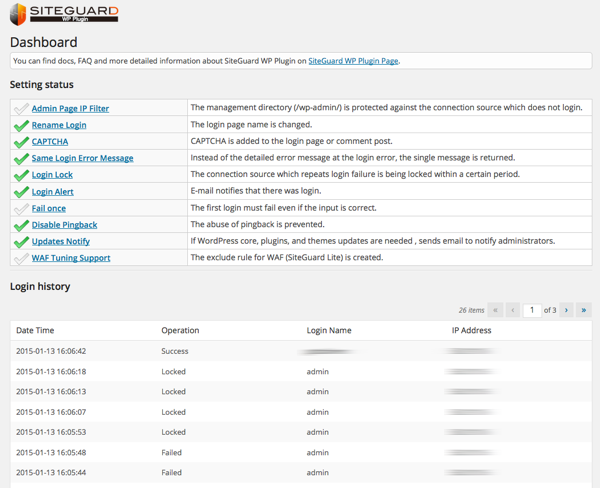
- Admin Page IP Filter: Restricts wp-admin access to IP addresses that have successfully logged in.
- Rename Login: Changes the URL of the login page from
wp-login.phpto a custom path. - CAPTCHA: Adds CAPTCHA to login, comment, password reset, and user registration forms.
- Login Lock: Temporarily locks out IP addresses after repeated failed login attempts.
- Login Alert: Sends email notifications when users log in.
- Fail Once: Intentionally rejects the first valid login attempt and requires the user to try again shortly after.
- Protect XML-RPC: Disables pingbacks or all XML-RPC access to help prevent abuse.
- Block Author Query: Helps prevent username leakage through
/?author=<number>requests. - Update Notifications: Sends email notifications when updates are available for WordPress core, plugins, or themes.
- WAF Tuning Support: Creates exclusion rules to help prevent false positives when SiteGuard Server Edition WAF is installed.
Requirements and Compatibility
- WordPress multisite is not supported.
- Apache 1.3, Apache 2.x, and Nginx are supported.
- Rename Login cannot be combined with a login page URL change feature in another plugin. Enable it in only one plugin; using both can leave two login URLs available, or stop the login page from loading.
- CAPTCHA requires the PHP extensions
mbstringandgd. - WAF Tuning Support requires SiteGuard Server Edition on Apache.
Documentation
Documentation, FAQs, and more details are available in English and Japanese.
Translations
This plugin is translated by the community. We appreciate your help with translations on the WordPress translation platform.
Installation
From the WordPress Dashboard
- In the WordPress dashboard, go to Plugins > Add New.
- Search for “SiteGuard WP Plugin”.
- Install and activate the plugin.
Manual Installation
- Search for and download “SiteGuard WP Plugin”.
- In the WordPress dashboard, go to Plugins > Add New > Upload Plugin.
- Upload the downloaded ZIP file.
- Install and activate the plugin.
Changelog
1.8.9
- Update Notifications: fixed notification emails still being sent while the feature was set to OFF.
- CAPTCHA: fixed a fatal error on the login page on servers that cannot render the CAPTCHA image. CAPTCHA is now skipped so that login remains available, and the reason is shown on the settings screen.
- CAPTCHA: fixed login becoming impossible when the CAPTCHA working directory could not be written to by the web server. This is now detected and reported instead of failing silently.
- Confirmed compatibility with WordPress 7.1.
Special thanks to miruko for the update notification report.
1.8.8
- Rename Login: shows a warning when another active plugin is also changing the login page URL.
- Rename Login: fixed an issue where a fresh install could leave the login page inaccessible (the login URL returned 404).
Special thanks to niflex for the plugin conflict report, and to kitadahi for the login URL report.
1.8.7
- Fixed a cross-site scripting (XSS) vulnerability in the logout URL that could occur when the login page URL is changed.
Special thanks to daroo (Patchstack) for the report.
1.8.6
- Rename Login: when the login URL falls back to the .php (stub) form, the settings screen now explains why .htaccess could not be used.
- Rename Login: fixed the .htaccess self-test so it works when WordPress has been given its own directory (the WordPress Address differs from the Site Address).
- Block Author Query: the “Disable REST API” exclusion list now uses REST API namespaces instead of plugin names.
Special thanks to abcdrew and miwarock777 for their contributions to this release.
1.8.5
- Fixed a security issue affecting the login URL protection on some server configurations.
Special thanks to goto5656 for the report.
1.8.4
- Fixed a security issue affecting the login URL protection on some server configurations.
Special thanks to goto5656 for the report.
Screenshots
For developers
Is this your plugin? Show off the numbers.
Add a live badge to your site, docs or GitHub README. It updates on its own — no account needed.
Best SiteGuard WP Plugin alternatives
All captcha plugins →





FAQ
SiteGuard WP Plugin: quick answers
Straight answers, pulled from live WordPress.org data.
Live data from WordPress.org · checked Sep 26, 2026
Is SiteGuard WP Plugin free?
Yes. SiteGuard WP Plugin is free to download and use from the official WordPress.org plugin directory.
Is SiteGuard WP Plugin safe to use in 2026?
Yes — SiteGuard WP Plugin is a safe, well-maintained plugin to use in 2026. It runs on 600K+ sites, is rated 4.3/5 and was last updated 1 month ago, and scores 81/100 on our health check.
How many websites use SiteGuard WP Plugin?
SiteGuard WP Plugin is active on 600K+ WordPress websites and has been downloaded 7,461,428 times since it launched in October 2014. It was downloaded 81,188 times in the last 30 days.
Does SiteGuard WP Plugin work with WordPress 7.1?
Yes. The developer has tested SiteGuard WP Plugin up to WordPress 7.1.2, the latest release. It requires WordPress 6.0 or newer.
When was SiteGuard WP Plugin last updated?
The latest version, 1.8.9, was released on August 19, 2026 (1 month ago).
Who makes SiteGuard WP Plugin?
SiteGuard WP Plugin is developed and maintained by jp-secure.
What are the best alternatives to SiteGuard WP Plugin?
The most popular alternatives to SiteGuard WP Plugin are CF7 Apps (300K+ installs), Really Simple CAPTCHA (300K+ installs) and Advanced Google reCAPTCHA (200K+ installs).
Powered by PageForge
Want thousands of pages that rank like these? Build them in an afternoon.
This directory runs on the same engine as PageForge. Turn any spreadsheet, CSV or API into thousands of fast, SEO-ready WordPress pages — with schema, internal links and AI-written copy baked in.
- CSV, Google Sheets & API data sources
- AI content, schema & internal links per page
- Works with Elementor, Gutenberg, Yoast & Rank Math
- Free on WordPress.org — no credit card


