


SimpleStamp Designer
Let customers design custom stamp text right on the product page — millimeter-precise, export-ready for laser engraving.

Solid choice
SimpleStamp Designer is a solid plugin choice in 2026, with a few things worth checking first. Was last updated 6 days ago, and scores 64/100 on our health check.
- Actively developed — last update 6 days ago
- Tested with the latest WordPress (7.1)
- Small user base (<10 active installs)
- Very few reviews so far
How does it stack up?
Side-by-side on installs, updates, ratings & support
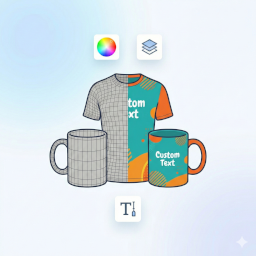


Daily downloads
Download spikes usually follow a new release — each site that auto-updates counts as a download.
Rankings
Where SimpleStamp Designer stands todayWordPress.org search rankings
Live position in the plugin search, top 100| Keyword | Position |
|---|---|
| custom products | >100 |
| laser engraving | #4 |
| Product Personalization | >100 |
| stamps | #45 |
| woocommerce | >100 |
About SimpleStamp Designer
From the official readme · v2.19.4Description
SimpleStamp Designer turns any WooCommerce product into a fully customizable stamp. Customers type their text directly on the product page, see an accurate live preview instantly, and add the finished stamp design to the cart — ready for laser engraving.
Features in the free version
- Text editor for rectangular stamps (bold, italic, underline, alignment, borders)
- Curved-text editor for round stamps (Model 1: full outer ring, Model 3: arc top + bottom)
- Upload a custom graphic (SVG, PNG, JPG, PDF)
- Unlimited stamp profiles (sizes/shapes), including JSON import/export; 5 ready-made profiles included to get started
- Automatic, millimeter-precise SVG export for laser engraving software
- Direct WooCommerce cart integration, including “Edit design” from the cart
With [SimpleStamp Pro Designer](https://simplestamp-designer.de)
- Over 80 ready-made profiles for common stamp models (free version includes 5)
- Upload your own fonts or choose from Google Fonts
- Add a logo alongside the text, freely movable and resizable
- Additional curved-text models (2 and 4)
Note: This plugin requires WooCommerce and will not work without it.
Note on oval stamps: Oval stamp shapes are not yet included in this version and are planned for an upcoming update.
Installation
- Make sure WooCommerce is already installed and active.
- Upload and activate the plugin via “Plugins” → “Add New”.
- Under “Stamp Designer” → “Import / Export”, import the bundled default profiles (or create your own).
- For each WooCommerce product that should be sold as a stamp, open it for editing and assign the matching stamp profile under “General”.
Frequently asked questions
Does the plugin work without WooCommerce?
No. SimpleStamp Designer is built entirely on top of WooCommerce (products, cart, orders) and cannot be activated without it.
How many stamp profiles can I create in the free version?
As many as you like. The free version ships with 5 ready-made profiles to get started; SimpleStamp Pro Designer, a separate product, ships with more than 80 ready-made profiles.
Are oval stamps supported?
Not yet — this is planned for an upcoming update.
How do I export the finished design for my laser engraving software?
Every order automatically includes a ready-made SVG (registration marks and cut line provided separately), downloadable from the order details in the WordPress admin area.
Changelog
Renamed to SimpleStamp Designer; security and code-quality improvements. Update recommended.
2.19.4
- Security: added nonce verification to the add-to-cart design form (custom stamp fields and the “replace existing cart item” logic were previously accepted from $_POST without a nonce check)
2.19.3
- Added a one-time cleanup tool (Stamp Designer → Import / Export) that detects duplicate profiles/categories left over from earlier installations, shows a preview, and merges them only after explicit confirmation (profiles are moved to trash, not permanently deleted)
2.19.2
- Fix: the “Import default profiles” button (and the custom JSON import) could create duplicate profiles if run more than once, since removing the 2.19.1 profile-limit code also removed a side effect that had accidentally prevented this; importing now skips any profile whose title already exists
2.19.1
- Removed the technical 5-profile limit; the free version now allows unlimited stamp profiles (5 ready-made profiles remain included, Pro’s larger library of 80+ remains a Pro feature)
- Removed remaining unreachable Pro-only code paths (logo overlay, curved-text models 2/4); the free version now only shows an informational locked badge for these, with no Pro functionality shipped
- The plugin no longer deactivates another, separately installed plugin automatically; it now shows a notice with a link the site admin has to click themselves
- Renamed all internal identifiers (post type, taxonomy, option and meta-data keys) from the 3-character prefix “ssd_” to the required 4-character “ssdx_”; existing data is migrated automatically on first load after the update
2.19.0
- Renamed to SimpleStamp Designer
- Removed the font-management and logo-overlay code entirely from this free version (previously present but always locked); these remain exclusive to the separate SimpleStamp Pro Designer product
- Removed the license-checking system from this free version (it never applied here, since this version is permanently free)
- Security: uploaded SVG files are now sanitized (scripts, event-handler attributes, and embedded foreign content are stripped) before being stored
- Moved inline admin styles/scripts into properly enqueued files
- readme.txt rewritten in English per WordPress.org policy
2.18.9
- Fix: replaced the default “Add to cart” button with a “Design now” button on the shop and category pages for stamp products, so customers can no longer add an undesigned stamp straight to the cart from a product listing
For developers
Is this your plugin? Show off the numbers.
Add a live badge to your site, docs or GitHub README. It updates on its own — no account needed.
Best SimpleStamp Designer alternatives
All custom products plugins →


FAQ
SimpleStamp Designer: quick answers
Straight answers, pulled from live WordPress.org data.
Live data from WordPress.org · checked Oct 3, 2026
Is SimpleStamp Designer free?
Yes. SimpleStamp Designer is free to download and use from the official WordPress.org plugin directory.
Is SimpleStamp Designer safe to use in 2026?
SimpleStamp Designer is a solid plugin choice in 2026, with a few things worth checking first. Was last updated 6 days ago, and scores 64/100 on our health check.
How many websites use SimpleStamp Designer?
SimpleStamp Designer is active on <10 WordPress websites and has been downloaded 75 times since it launched in September 2026. It was downloaded 80 times in the last 30 days.
Does SimpleStamp Designer work with WordPress 7.1?
Yes. The developer has tested SimpleStamp Designer up to WordPress 7.1.2, the latest release. It requires WordPress 6.4 or newer.
What PHP version does SimpleStamp Designer need?
SimpleStamp Designer requires PHP 7.4 or higher. Most hosts run PHP 8.x today, so it works on any modern WordPress hosting.
When was SimpleStamp Designer last updated?
The latest version, 2.19.4, was released on September 27, 2026 (6 days ago).
Who makes SimpleStamp Designer?
SimpleStamp Designer is developed and maintained by simplestampdesigner.
What are the best alternatives to SimpleStamp Designer?
The most popular alternatives to SimpleStamp Designer are WC Recurring Invoice (30+ installs), Precise Expressions Product… (10+ installs) and CPB (<10 installs).
Powered by PageForge
Want thousands of pages that rank like these? Build them in an afternoon.
This directory runs on the same engine as PageForge. Turn any spreadsheet, CSV or API into thousands of fast, SEO-ready WordPress pages — with schema, internal links and AI-written copy baked in.
- CSV, Google Sheets & API data sources
- AI content, schema & internal links per page
- Works with Elementor, Gutenberg, Yoast & Rank Math
- Free on WordPress.org — no credit card


