


ConfigQuote
Replace "Add to Cart" with "Request Quote" on configurable WooCommerce products, powered by your ConfigQuote account.

Use with caution
ConfigQuote works, but test it on a staging site before relying on it in 2026. Was last updated 1 month ago, and scores 59/100 on our health check.
- Actively developed — last update 1 month ago
- Small user base (<10 active installs)
- Very few reviews so far
How does it stack up?
Side-by-side on installs, updates, ratings & support


Daily downloads
Download spikes usually follow a new release — each site that auto-updates counts as a download.
Rankings
Where ConfigQuote stands todayWordPress.org search rankings
Live position in the plugin search, top 100| Keyword | Position |
|---|---|
| configurator | >100 |
| custom products | >100 |
| quote | >100 |
| request a quote | >100 |
| woocommerce | >100 |
About ConfigQuote
From the official readme · v1.0.42Description
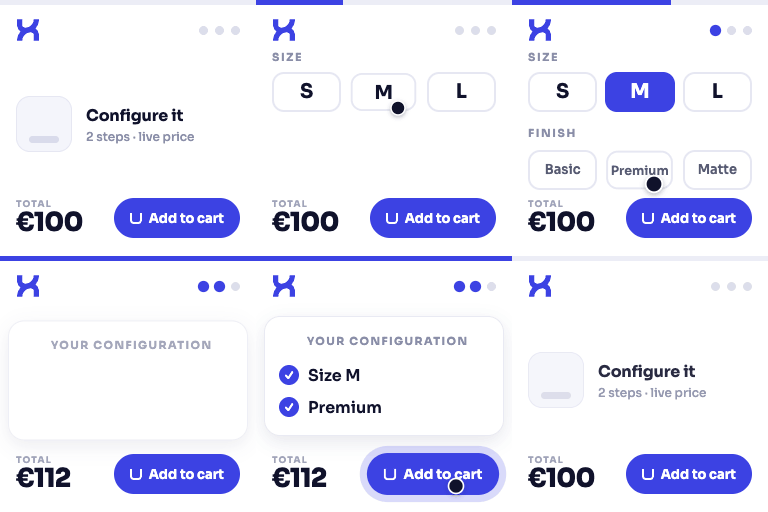
This plugin connects your WooCommerce store to a ConfigQuote account, letting customers configure complex or custom products and request a quote instead of adding a fixed-price item to the cart.
Features
- Automatically replaces “Add to Cart” with “Request Quote” for products mapped in your ConfigQuote account
- Modal popup or full-page redirect to the ConfigQuote quote builder
- No customer account required to request a quote
- Settings integrated into WooCommerce → Settings → ConfigQuote
- Built-in connection test to verify the integration is working
- Optional webhook endpoints so ConfigQuote can push quote status updates back into WooCommerce
- Multi-product quote requests
- Customer-facing quote history in the “My Account” dashboard
- Debug mode with logging via the standard WooCommerce logger
Requires a ConfigQuote account
This plugin is a connector: it requires an active ConfigQuote account to configure products, receive quote requests, and manage quotes. It does not provide a quote builder on its own.
External services
This plugin connects to third-party services to provide its functionality. Details of what is sent and to whom:
- ConfigQuote application (the URL you configure under WooCommerce → Settings → ConfigQuote, e.g.
https://app.configquote.comor your own ConfigQuote tenant URL). The plugin sends WooCommerce product IDs, product configuration lookups, and customer-submitted quote details (name, email, and any fields you enable in the quote form) to this URL so ConfigQuote can build the configurator and process quote requests. It also polls this URL for quote status and, optionally, receives webhook callbacks from it. This connection is required for the plugin to function and is authenticated with a Bearer token you generate in your ConfigQuote account.
ConfigQuote Terms of Service | ConfigQuote Privacy Policy - Google Fonts (fonts.googleapis.com). When a mapped product uses the personalized-artwork preview overlay, the customer’s browser loads the font families used in that artwork directly from Google Fonts’ CDN.
Google Fonts Privacy Policy
Installation
- Upload the plugin files to
/wp-content/plugins/configquote, or install the plugin through the WordPress admin: Plugins → Add New → Upload Plugin. - Activate the plugin through the “Plugins” screen in WordPress.
- Go to WooCommerce → Settings → ConfigQuote and enter your ConfigQuote Application URL.
- Click “Test Connection” to verify the integration.
- In your ConfigQuote admin panel, map WooCommerce products to ConfigQuote configurations.
Frequently asked questions
Do I need a ConfigQuote account to use this plugin?
Yes. The plugin connects your WooCommerce store to a ConfigQuote account where products are configured and quotes are managed. See https://configquote.com.
The “Request Quote” button isn’t appearing on my product
Check that the product has a configuration mapping in your ConfigQuote admin panel, that the plugin is activated, and that the connection test in WooCommerce → Settings → ConfigQuote succeeds.
The connection test fails
Verify the ConfigQuote Application URL is correct and reachable from your server, and that no firewall or security plugin is blocking outbound requests.
The quote modal doesn’t open
Check your browser’s developer console for JavaScript errors, confirm your theme doesn’t conflict with the modal markup, and try switching to redirect mode in the plugin settings.
How do I see debug logs?
Enable “Debug Mode” in WooCommerce → Settings → ConfigQuote, then view the logs under WooCommerce → Status → Logs (source: configquote).
Does this plugin store customer data?
Quote submissions (contact details and configuration selections) are sent to your ConfigQuote account for processing; see the External Services section above for details of what is sent and where.
Changelog
Adds an optional setting to hide Add to Cart for Quote Builder-only products; no action needed unless you want to turn it on.
1.0.42
- The multi-product quote badge now opens an in-store review popup automatically as soon as an item is added, instead of only showing an updated count and requiring the customer to click it themselves
- That popup now opens as an in-store overlay instead of navigating the customer away to the ConfigQuote domain
1.0.41
- Tested up to WordPress 7.1
- Remove the “Add to Quote Builder” per-product checkbox and its “Add to Quote” button — it duplicated the “Enable Quote Request” checkbox/button and never worked as its own flow
- Fix: “Hide Add to Cart for Quote Request products” was checking the removed checkbox’s meta key and so never had any effect; it now correctly checks “Enable Quote Request” and actually hides Add to Cart as documented
- Fix: the “Default Button Text” setting now also applies to the “Request a Quote” button (it previously only affected the Configurable-product button)
1.0.40
- Add a new setting, “Hide Add to Cart for Quote Builder products” — when enabled, hides the native Add to Cart button (on the product page and shop/category listings) for products with “Add to Quote Builder” enabled but not “Configurable”. Independent of Configurable products, which already always hide Add to Cart.
1.0.39
- Fix: “Test Connection” always failed with “Please enter a ConfigQuote base URL” after the 1.0.38 option rename — the admin JS was still reading the old field IDs (woocommerce_configquote_base_url / _api_token)
1.0.38
- Rename all options from the generic “woocommerce_configquote_” prefix to the plugin’s own unique “configquote_” prefix, per WordPress.org’s uniqueness requirement
- Rename the non-persisted settings-section field IDs the same way for consistency
1.0.37
- Silence residual meta_query slow-query scanner warnings on the two authenticated sync/search REST endpoints, with justification (no dedicated taxonomy exists for these lookups; both are bounded, low-frequency, server-to-server calls)
For developers
Is this your plugin? Show off the numbers.
Add a live badge to your site, docs or GitHub README. It updates on its own — no account needed.
Best ConfigQuote alternatives
All configurator plugins →




FAQ
ConfigQuote: quick answers
Straight answers, pulled from live WordPress.org data.
Live data from WordPress.org · checked Oct 1, 2026
Is ConfigQuote free?
Yes. ConfigQuote is free to download and use from the official WordPress.org plugin directory.
Is ConfigQuote safe to use in 2026?
ConfigQuote works, but test it on a staging site before relying on it in 2026. Was last updated 1 month ago, and scores 59/100 on our health check.
How many websites use ConfigQuote?
ConfigQuote is active on <10 WordPress websites and has been downloaded 239 times since it launched in July 2026. It was downloaded 109 times in the last 30 days.
Does ConfigQuote work with WordPress 7.1?
ConfigQuote is officially tested up to WordPress 7.0.6, while the latest release is 7.1.2. It may still work, but try it on a staging site first.
What PHP version does ConfigQuote need?
ConfigQuote requires PHP 7.4 or higher. Most hosts run PHP 8.x today, so it works on any modern WordPress hosting.
When was ConfigQuote last updated?
The latest version, 1.0.42, was released on September 1, 2026 (1 month ago).
Who makes ConfigQuote?
ConfigQuote is developed and maintained by ConfigQuote.
What are the best alternatives to ConfigQuote?
The most popular alternatives to ConfigQuote are Configurator (60+ installs), Elfsquad Product Configurat… (20+ installs) and Printess Editor (20+ installs).
Powered by PageForge
Want thousands of pages that rank like these? Build them in an afternoon.
This directory runs on the same engine as PageForge. Turn any spreadsheet, CSV or API into thousands of fast, SEO-ready WordPress pages — with schema, internal links and AI-written copy baked in.
- CSV, Google Sheets & API data sources
- AI content, schema & internal links per page
- Works with Elementor, Gutenberg, Yoast & Rank Math
- Free on WordPress.org — no credit card


